Date: Wednesday March 27, 2024, 11:00am PT – now on-demand
Level: Intermediate
Duration: 30 mins (25 mins + 5 mins Q&A)
Background
Named after its creator’s handle – “Meduza” – the Meduza Stealer malware infects Windows system files and steals sensitive information, including cookies, login credentials, and data from browser extensions such as password managers, 2FA services and cryptocurrency wallets.
Structure
In the webinar, Product Manager Jonathan Peyster will demonstrate how to use the Silent Push Web Scanner to proactively locate Meduza Stealer infrastructure, by targeting different page elements.
You’ll learn how to execute threat hunting queries in Web Scanner using two key data fields, how to pivot on the results, how to enrich the data and how to view and store Meduza infrastructure in a dedicated Early Detection Feed.
Live Scanner Preview
You’ll also get a sneak preview of our Live Scanner – a new feature set for release in 4.1 that allows you to actively scan a live URL and view data across 90+ categories.
Registration
Please use the form below to view the webinar recording.
Due to the contents of this webinar, we manually approve each individual who requests access. This means you may have to wait up to 24 hours to receive your personal login code.
Risk scoring provides a numerical framework for cyber security teams to better understand observable DNS data, and pinpoint emerging threats.
Assigning a risk score to a domain or IP allows defenders to evaluate attacker infrastructure that’s specific to their organization and supply chain, and make operational judgements based on the likelihood of an observable being involved in malicious activity.
Summary
In this blog, we’ll take you through how the Silent Push console and API outputs risk scores, and how to utilize scoring methodologies to level-up your threat intelligence operation. We’ll explain how each score is calculated, including the different factors we take into account, and how to operationalize the data.
Data independence
Many security teams use CTI platforms that pool data from disparate, third-party sources. Data is often forced through multiple aggregation layers without any concerted effort to convert it into actionable intelligence.
All of our risk scores are powered by a proprietary, first-party database. We own and control our own data, allowing us to add an infinite amount of context to each observable, and provide layers of accurate, timely and complete intelligence data.
Understanding risk scoring in Silent Push
Risk scoring is available across the board to Enterprise users, and to a limited extent for Community users. We’ll explain the difference between the two tiers later, but for now we’ll focus on the main mechanism for obtaining risk scores available to Enterprise users – the ThreatRanking screen.
Scoring categories
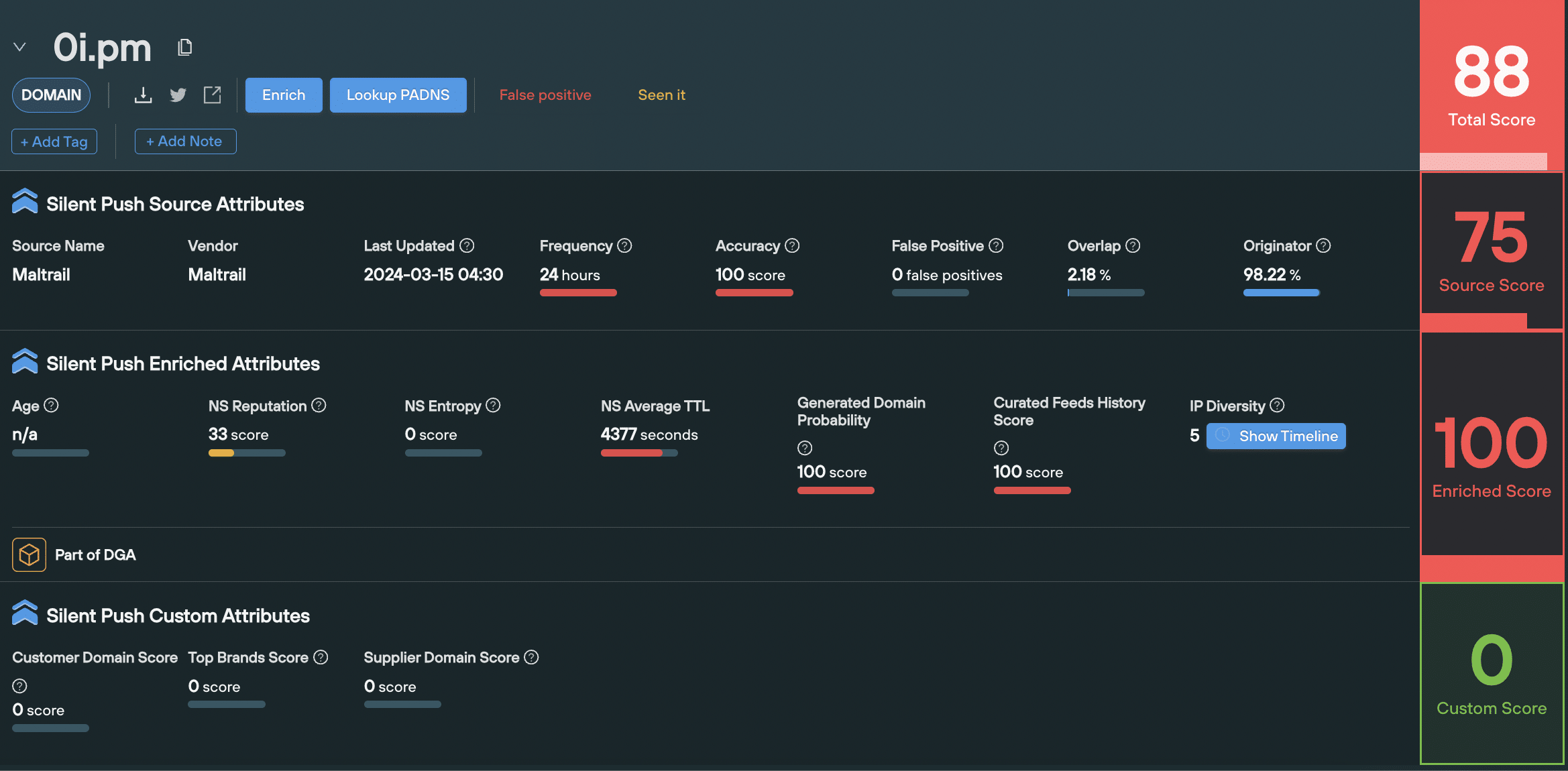
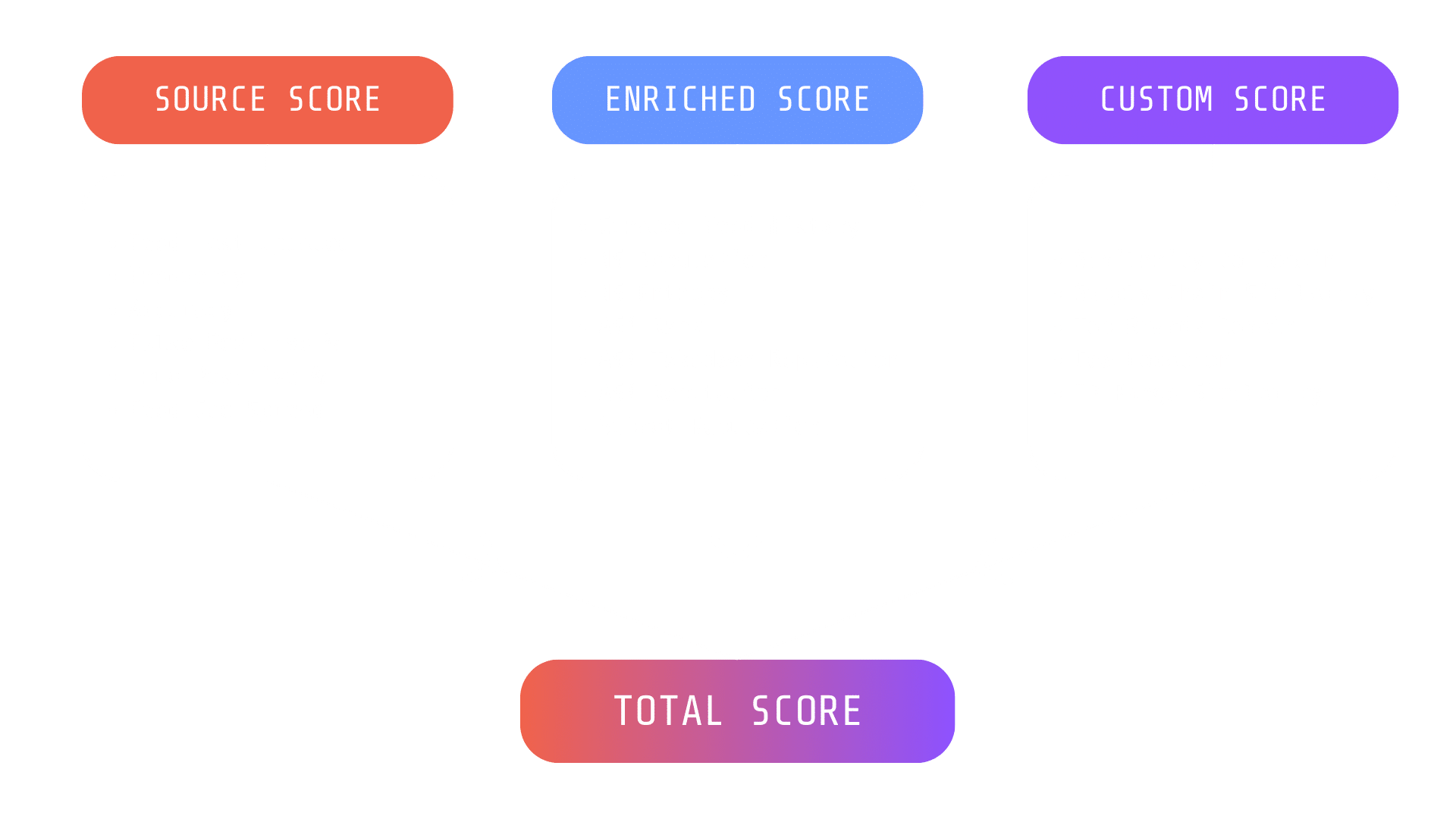
Silent Push assigns four different risk scores on the ThreatRanking screen, to every domain and IP:
Enriched score
Source score
Custom score
Total score
Source, Enriched and Custom scores each have their own unique set of factors that make up the final score for that category. Each factor has a numerical value that allows you to perform a deep-dive into an observables risk level, above and beyond a headline score. More about factors later on.
The Total score is always set at the mid-point between the Source score, and the highest value between the Enriched and Custom score.
Let’s take a look at each category in turn…
1. ‘Enriched’ risk scoring
An Enriched score takes different pieces of information we have available about an observable’s relationship with the rest of the Internet, and provides an overall risk level based on its enriched attributes.
When should I use it?
You can use the Enriched score to better understand the infrastructure used by a single observable, including how it’s being managed, how it’s moved across the IPv4 space, and the likelihood of it being involved in malicious activity.
A domain or IP’s Enriched score is useful for breaking down different elements of an observable, to understand which components raise red flags.
How is it calculated?
The Enriched Score is an algorithmically-calculated number, based on a variety of factors that take into account the underlying infrastructure, and how an observable is being managed. An Enriched score is calculated using different factors for domains and IPs. All of these factors contribute to the final Enriched score.
Domain-based Enriched scoring considers factors such as domain age, nameserver (NS) reputation, and the presence of automated domain generation algorithms.
Factor
Definition
Curated Feed History Score
The frequency and recency of an observable’s presence within trusted feeds
NS Reputation
The ratio of blacklisted domains, taken from the total number of domains using a NS
NS Entropy
The recency, frequency, and the number of NS changes
Generated domain probability
How likely it is that a domain was created by an domain generation algorithm
IP-based Enriched scoring evaluates the threat level of IP addresses based on factors such as Autonomous System Number (ASN) reputation, subnet reputation, and responsiveness to takedown requests.
Factor
Definition
Curated Feed History Score
The frequency and recency of an observable’s presence within trusted feeds
ASN Rank
A ranking of ASNs seen to host threats listed on feeds, calculated using a weighted formula based on the type of threat observed
ASN Takedown Reputation
A reputation score based on the time it takes for an ASN owner to react to takedown requests related to malicious URLs. A higher reputation score indicates the ASN owner is slow to react to takedown requests
ASN Reputation
A measure of the trustworthiness and reputation of the networks associated with a particular ASN.
Subnet Reputation
A measure of the trustworthiness and reputation of a specific subnet or range of IP addresses within a larger network.
2. ‘Source’ risk scoring
A ‘Source’ is the feed that an observable is listed in. The Source score is a number that tells you the overall value of that feed.
When should I use it?
The Source score offers a quick way of understanding the overall threat level for a group of domains or IPs contained within a feed. This allows you to compare different feeds at-a-glance, and prioritize the most dangerous threat groups relevant to your organization.
How is it calculated?
A Source score is calculated based on the attributes of the feed the observable is listed in (or custom feeds created by a user), using the following factors:
When a feed was last updated
How often the feed gets updated
The percentage of false positives
The percentage of true positives
The geographic spread of observables
3. ‘Custom’ risk scoring
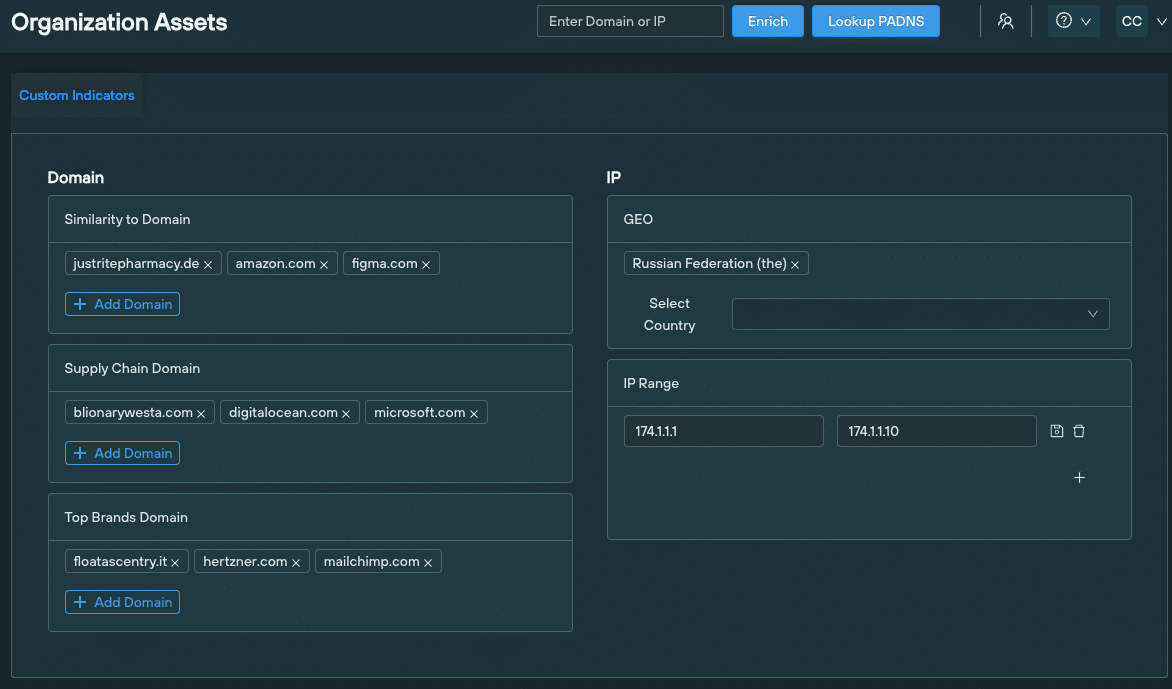
A Custom score is based on a set of user-defined parameters that locates malicious infrastructure relevant to their organization and supply chain operation.
When should I use it?
Custom scores are extremely useful when attempting to ascertain the likelihood of an IP or domain being involved in threat activity that is either specifically targeting your public DNS presence, or is involved in threat activity within a given sector.
How is it calculated?
Users are able to define a series of custom indicators within the Organizational Assets menu, that maps out their public DNS presence:
An observable’s Custom score is directly related to how similar elements of it are to any one of these factors. The higher the score, the greater the similarity.
Calculating factors are displayed as part of the score in the ThreatRanking screen, so that organizations can make a value judgement based on all the available data.
4. Total score
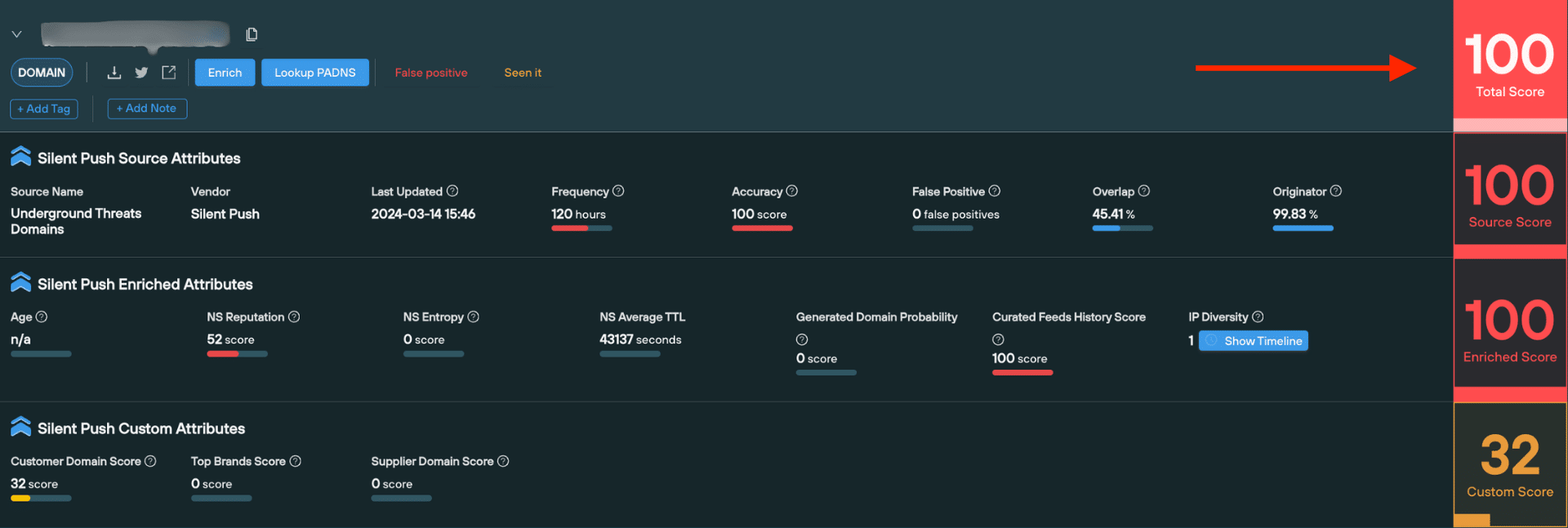
The Total score is a headline number that is always set at the mid-point between the Source score, and the highest value between the Enriched and Custom score.
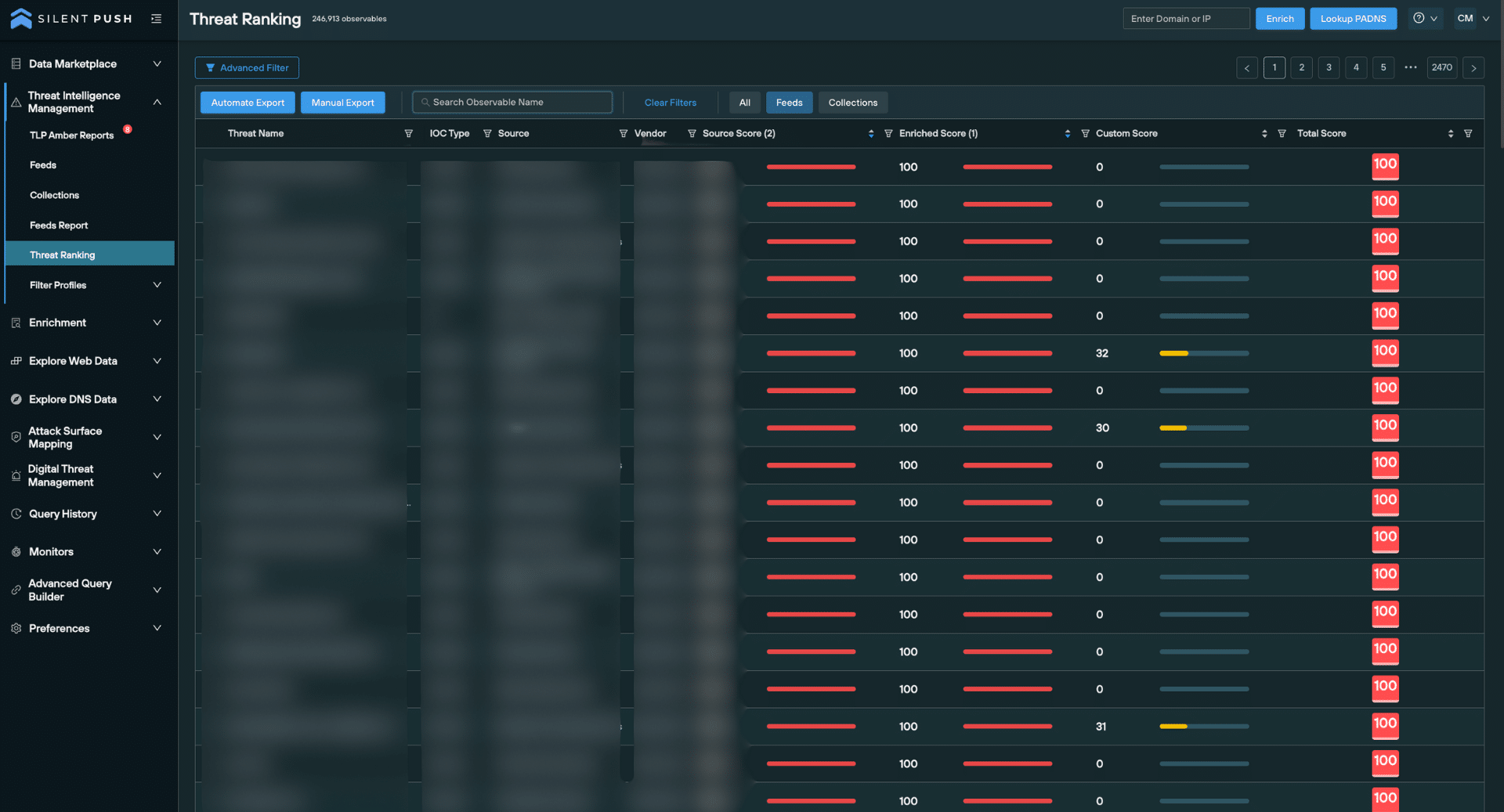
By default, the ThreatRanking page is sorted with the Total score at the top.
Total Score in Threat Ranking Page
When should I use it?
The Total score is useful for obtaining an “at-a-glance” risk level of a domain or IP, without a need to perform additional analysis.
How it is calculated?
The Total score is the middle point between the Source score, and the highest value between the Enriched and Custom score.
For example, if a domain has a Source score of 50, an Enriched score of 90, and a Custom score of 40, it’s Total score would be 70 – the mid-point between 50 (Source score) and 90 (Enriched score)
How to access risk scoring using Silent Push
You can operationalize risk scores using Silent Push in a variety of ways, either using the console or directly into your security stack via the API.
Passive DNS risk scoring (Community and Enterprise users)
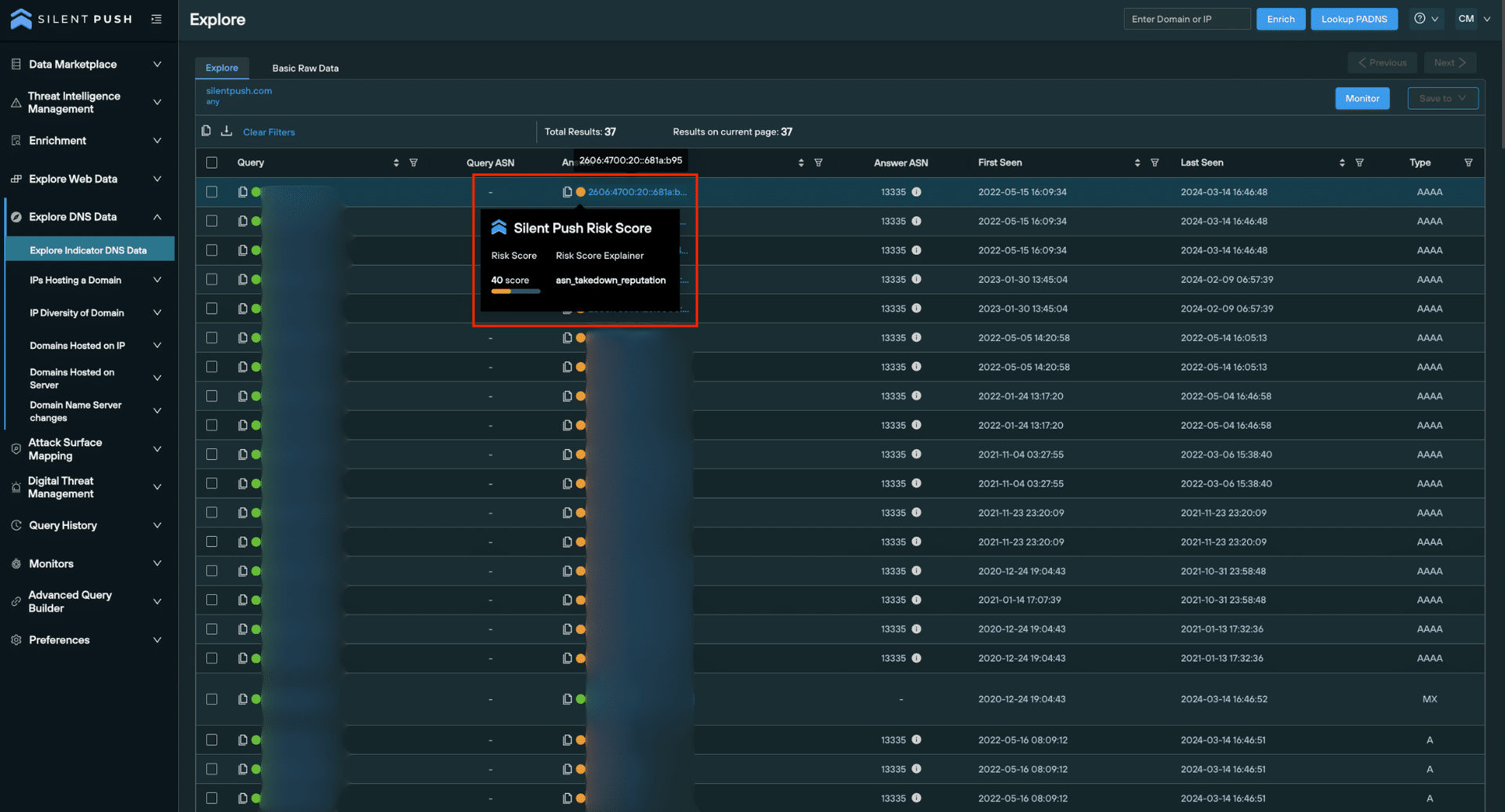
It’s often useful to compare risk scores across a single dataset at a glance. To do this for passive DNS datasets, lookup a domain or IP and take a look at the traffic light system on the Explore screen.
You can hover over the coloured dots next to each observable to get more information. The Silent Push Risk Score is given as the Enriched score, with the primary factor for the score given below the actual score.
In the below example, the Silent Push Risk score is an amber 40, with the observable’s ASN takedown reputation being the deciding factor.
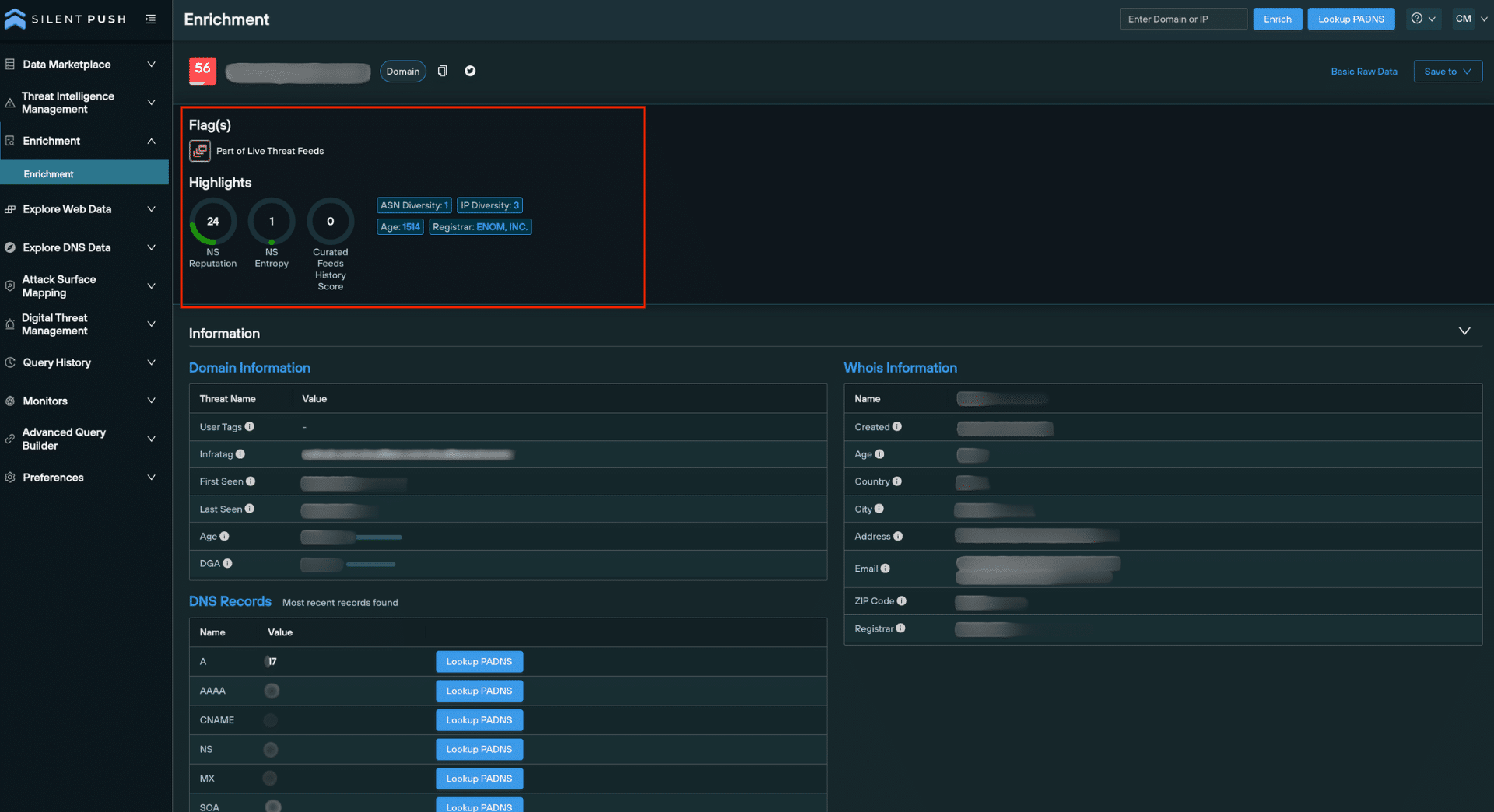
Enrichment highlights (Community and Enterprise users)
Data enrichment is a threat intelligence mechanism that allows security teams to pinpoint the origin, function and risk level of a domain or IP address, by applying multiple layers of categorization to a domain or IP address.
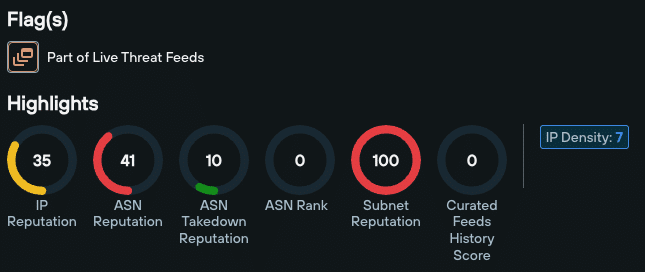
Enrichment results for a domain or IP include a Highlights section that offers an overview of the most important reputation-based metrics.
Highlights are also available for URLs. If the root of a URL is a domain, then domain-based attributes are shown. If the root of the URL is an IP, then IP attributes are shown.
We consolidate malicious domains and IPs into a single indexed and searchable Threat Ranking screen.
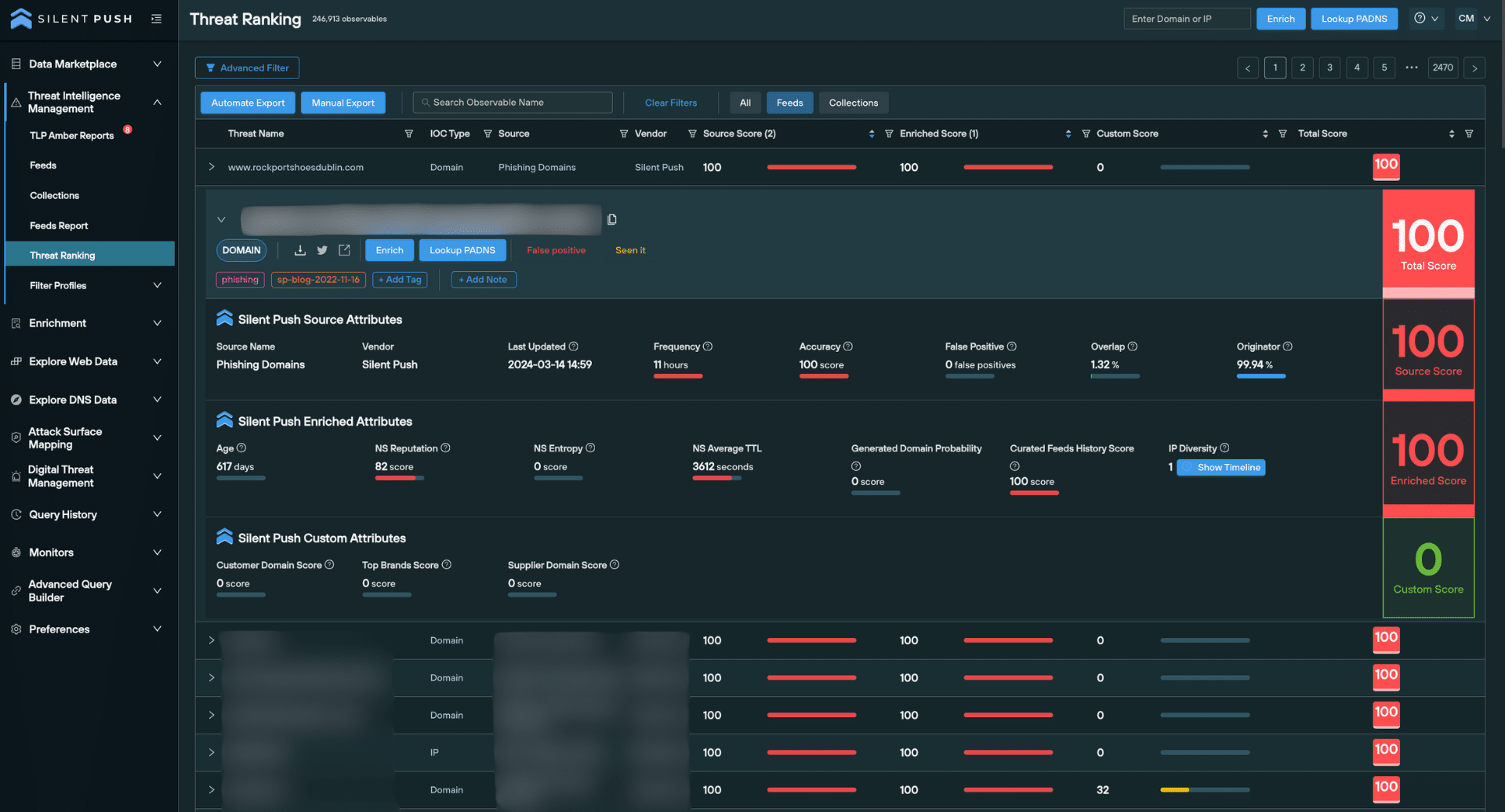
When an observable is expanded from the Threat Ranking screen, over 18 secondary analysis fields are provided, including granular threat data and basic information that provides additional context on a given domain or IP.
Risk scoring is visible on the right side of the screen, along with any factors we’ve used to calculate them.
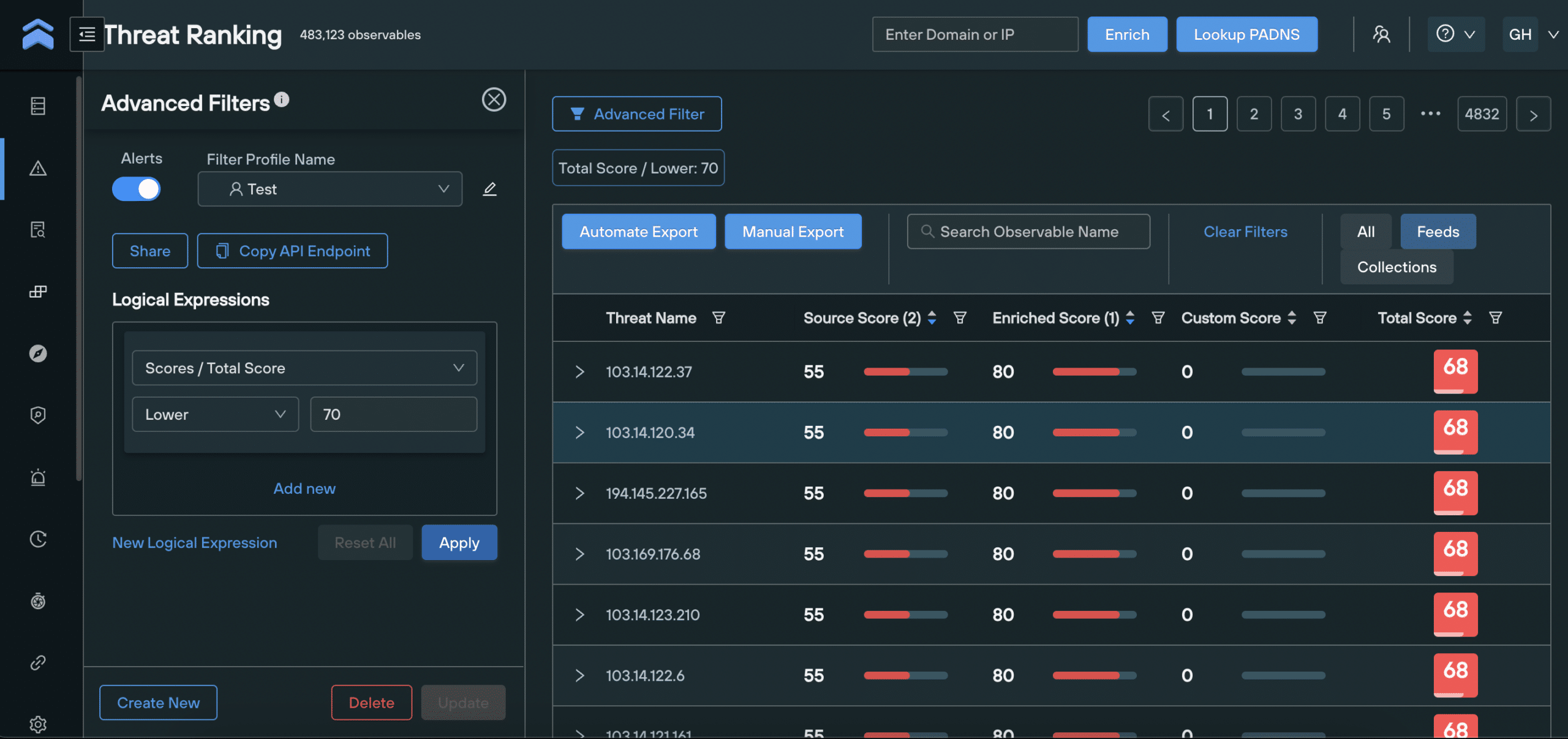
Filtering threat data by score values
Filter Profiles allow you to filter domains and IPs on the Threat Ranking screen by certain criteria, enabling security teams to drill-down into intelligence datasets and create custom workflows at the click of a button.
You can use Filter Profiles to build logical expressions that only show domains and IPs with a certain set of Enriched, Source, Custom and Total scores, along with all the secondary factors that make up each score, and huge range of additional parameters that form a single logical expression.
Here’s an example FilterProfile that displays all IP addresses with a Total score of above 70, and an ASN reputation of below 50.
Register for Silent Push Community Edition
You can access risk scoring using Silent Push Community Edition – a free threat hunting and cyber defense the threat hunting platform that features a range of queries and lookups, the Silent Push Web Scanner, and 90+ data enrichment categories that you can use to track and monitor attacker activity across the global IPv4 space.
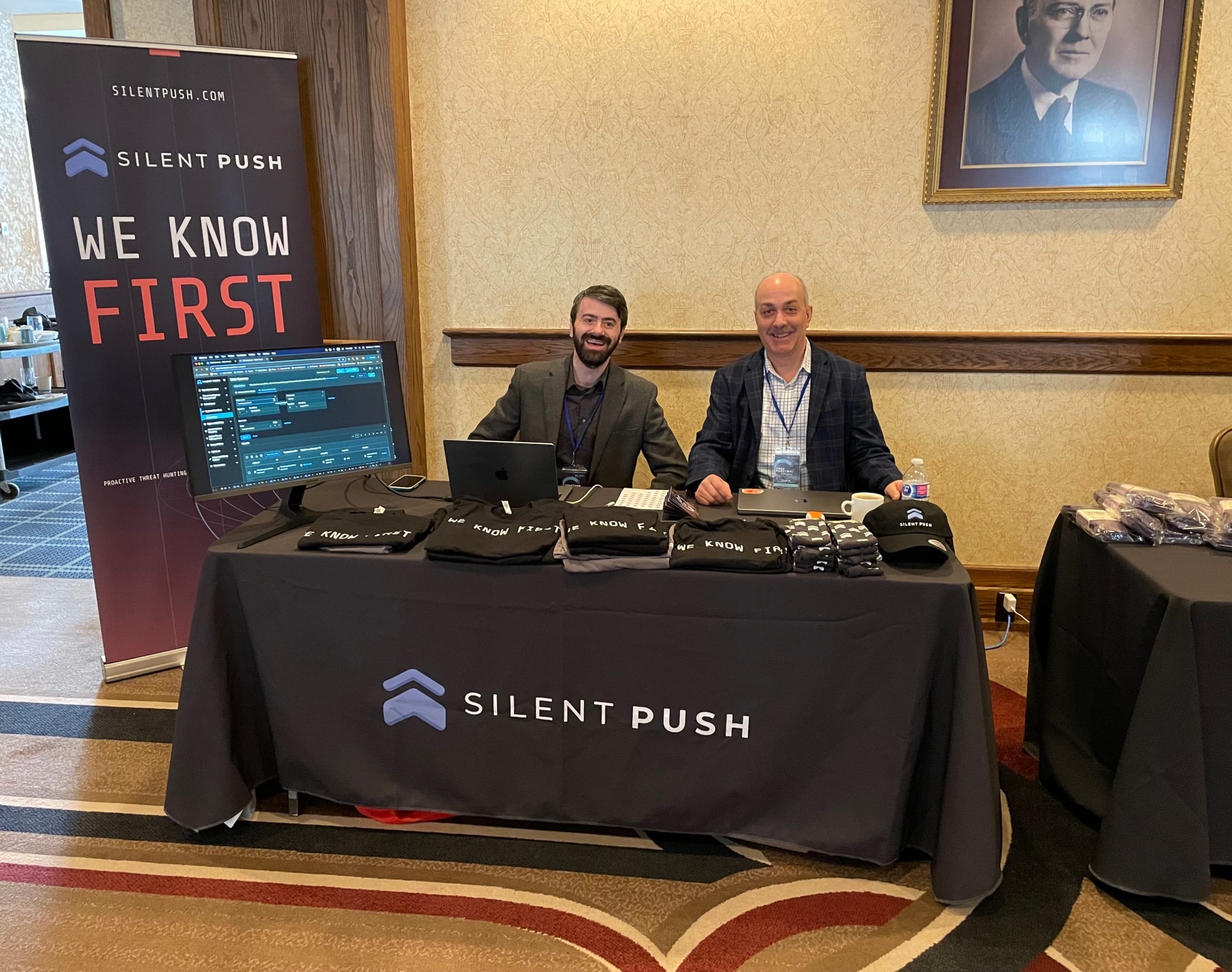
We had a great week in Canada for the 2024 Banff Security Summit, enjoying not just the beautiful scenery but the opportunity to discuss our recent releases and learn from the best cyber security leaders in the world. With recent events such as the ConnectWise ScreenConnect vulnerability and new Scattered Spider activity, the room was buzzing with conversation.
It was great making new connections and catching up with old friends in such a wonderful location.
Product Manager Jonathan Peyster had a few key takeaways from the experience:
Organizations continue to face challenges managing their attack surfaces during mass exploitation events, such as the ongoing one impacting ConnectWise ScreenConnect.
Detecting and countering domain and website impersonation are top of mind for security leaders.
Existing solutions aren’t always delivering a comprehensive picture on impersonation threats. It is clear organization’s need to stay ahead.
Jonathan Peyster and Greg Kardynal at the Banff 2024 Security Summit
In December 2023, we published a blog that exposed active Scattered Spider phishing infrastructure.
Here’s a quick update that takes you through how we used patterns within Scattered Spider’s deployment methods to traverse new infrastructure, by combining the Silent Push Web Scanner with our first-party passive DNS dataset.
For security reasons, certain data categories have been redacted, to prevent threat actors adjusting their TTPs to evade detection.
Silent Push Enterprise users have access to a TLP Amber report that contains specific mitigation actions and links to relevant data fields.
Executing Silent Push Web Scanner queries
We used the Silent Push Web Scanner to cross-reference in-page data with passive DNS data. Analyzing the most recent domain from the resulting dataset – sinchdev[.]com – we can see that it was first detected on 2023-01-31, and uses a certificate issued for another domain – usccplus[.]com.
Pivoting on Scattered Spider WHOIS and passive DNS data
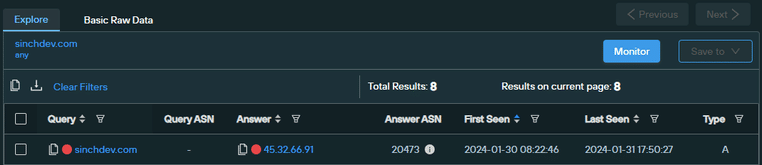
We enriched sinchdev[.]com and executed a passive DNS lookup to locate all DNS records associated with it.
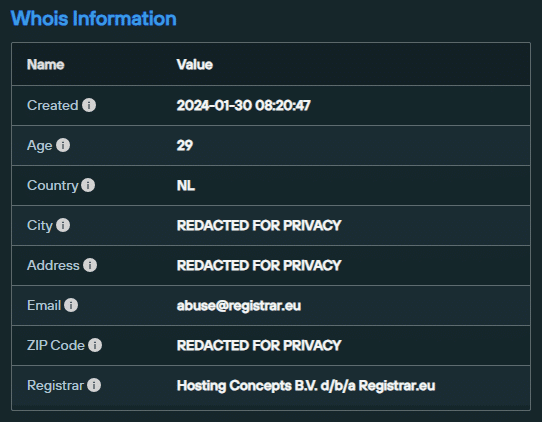
This combined pivot established that sinchdev[.]com was registered on 2023-01-30 via Hosting Concepts, and hosted on 45.32.66[.]91, which is associated with AS20473 (AS-CHOOPA, US).
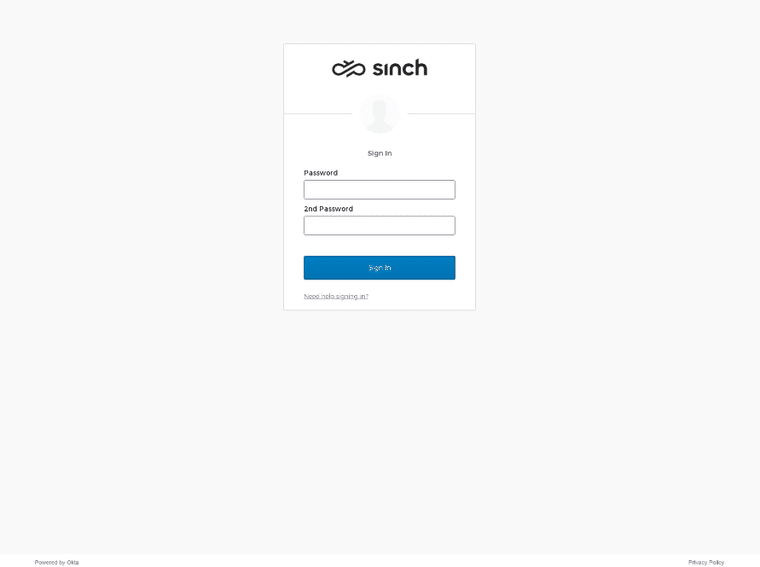
We then used our scan data repository to establish that sinchdev[.]com hosted a phishing pageimmediately after creation. The page was live for approximately 24 hours.
Sinchdev[.]com phishing page
We wanted to locate malicious infrastructure hosted on the same IP – 45.32.66[.]91 – so we performed a reverse A record pivot and uncovered a new domain: on-sinch[.]com
Reverse A record lookup on 45.32.66[.]91
Analyzing on-sinch[.]com
After reviewing WHOIS data and DNS records for on-sinch[.]com, we established that the domain was also registered on 2023-01-30 with Hosting Concepts – the same registration pattern as sinchdev[.]com.
Further scans revealed that it also hosted a phishing page after creation but, which was taken down within 24 hours.
Executing forward A lookups on both domains revealed that all were hosted on low-density IP addresses on AS20473 (AS-CHOOPA, US) – exclusively hosting Scattered Spider infrastructure and others hosting other infrastructure such as Airdrop crypto scams.
Scattered Spider IOFAs
on-sinch[.]com
sinchdev[.]com
45.32.66[.]91
Register for Community Edition
Silent Push Enterprise users benefit from two Early Detection Feeds that allow security teams to track and monitor Scattered Spider infrastructure either using the Silent Push console, or via an API.
All of the Web Scanner queries and DNS lookups we used to detect and traverse Scattered Spider’s phishing infrastructure are available via Silent Push Community Edition – a free threat hunting platform available to security pros, researchers and analysts, including.
Data enrichment is a threat intelligence mechanism that allows security teams to pinpoint the origin, function and risk level of a domain or IP address, by applying multiple categories and sub-categories that provide up to 10x more context than standard DNS lookups and queries are able to provide.
Enrichment is less about volume, and more about creating meaningful relationships between billions of disparate data points. Each enrichment category is designed to help defenders and threat hunters track attacker infrastructure across the IPv4 and IPv6 space.
Stale, unenriched DNS data cannot be truly relied upon as an actionable intelligence source. Security teams who don’t perform data enrichment as part of their threat analysis procedures are working with incomplete datasets, which can lead to flawed decision making and a higher risk of intrusion.
Data enrichment using Silent Push
To map out attacker infrastructure, Silent Push collects information across 100+ domain and IP enrichment categories that contextualize an observable’s presence on the Internet, including risk level, web content (headers, hash values, on-page data), certificates, geographic location, passive DNS data, and the reputation of associated infrastructure.
Data enrichment outputs Indicators of Future Attack (IOFAs) – intelligence data that tells security teams where an attack is coming FROM, rather than where it’s BEEN.
Defenders and threat hunters are able to use enriched data to join the dots across the global IPv4 and IPv6 space, and track the underlying infrastructure behind an attack, rather than relying on publicly available post-breach IOCs that rely on a single point in time.
Summary
In this blog, we’ll show you how to enrich a domain or IP, what each enrichment category means, and how to use enriched data in a live environment.
Data independence
We’re often asked how we are able to provide so much categorization for each piece of observable data. We achieve this by collecting and owning our own first-party data, via a concept we call ‘data independence’.
Controlling our own data allows us to add a near-infinite amount of context, and produce operationalized intelligence that’s adaptable to a range of workflows.
Security teams typically have to use somewhere in the region of three to four vendor platforms to gather intelligence. Data enrichment outputs self-contained searchable spaces relating to specific attack vectors, that require zero third-party intervention to turn into useable intelligence.
How to perform data enrichment using Silent Push
Data enrichment can be done in two ways, and is available for both Community and Enterprise users:
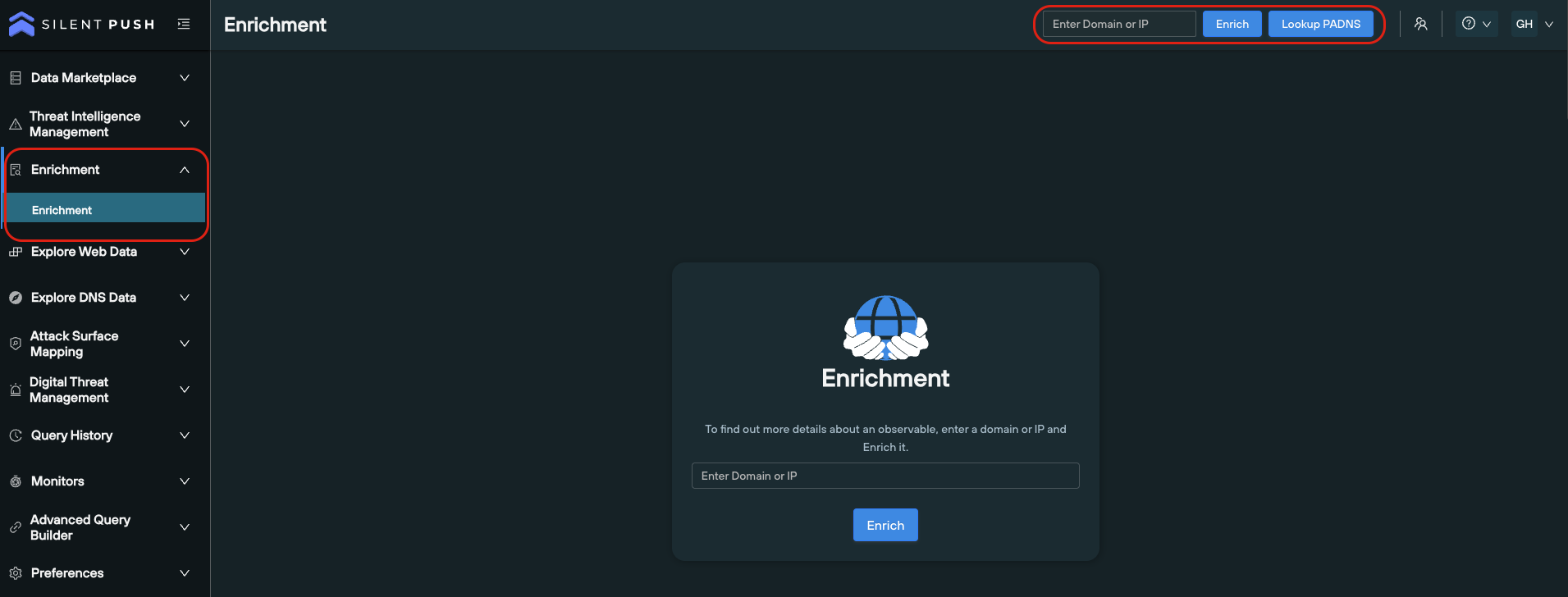
From the search bar on the top right of the platform
Via the Enrichment menu
Here’s a short YouTube video that covers the basics of how to enrich an observable, and how to interpret the data.
Data enrichment categories
We spread out data enrichment across six bitesize categories, each with its own part to play in telling a story about a domain or IP:
‘Enrichment Highlights’
‘Basic Information’
‘Enriched Attributes’
‘Custom Attributes’
‘Live Threat Feeds’
‘Scan Data’
Each category contains both standardized data, and categorization that is unique to Silent Push. Most of our data enrichment categories aren’t available anywhere else, without performing a considerable amount of supplementary analysis
Let’s take a look at each Enrichment category in turn…
1. ‘Enrichment Highlights’
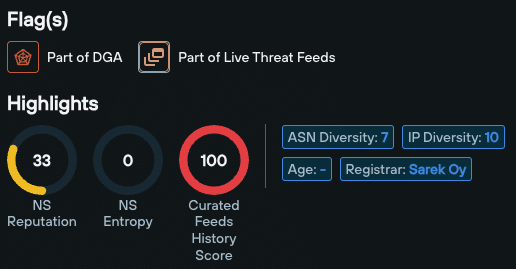
Enrichment Highlights appear at the very top of the Enrichment page. These are a family of scores and numerical values tailored to the enriched data type, that act as reliable indicators of an observable’s risk level.
Data enrichment highlights differ based on the type of observable you’re working with – i.e. a domain or an IPv4/v6 address.
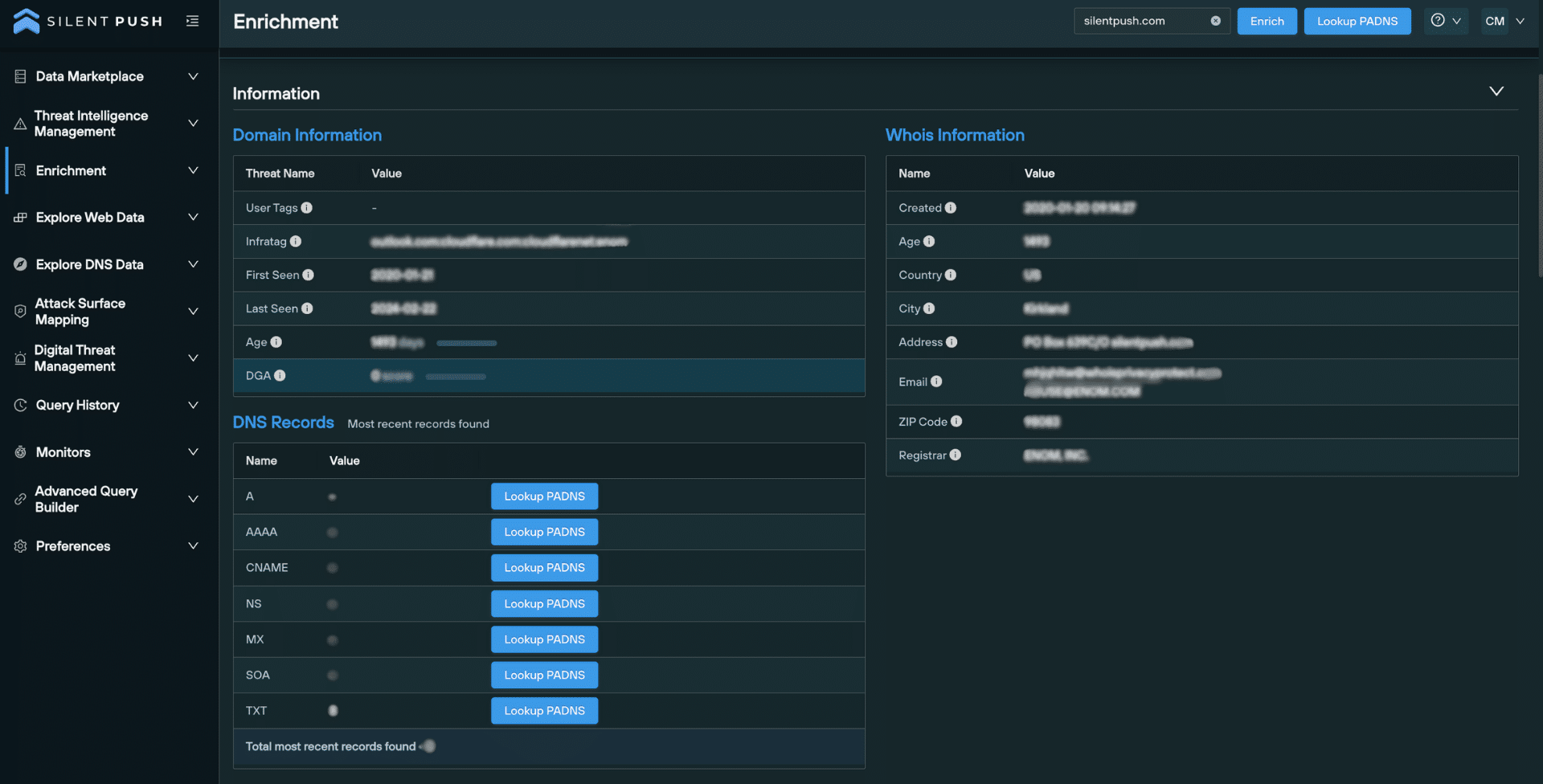
The Domain/IP Information data enrichment sub-category does what it says on the tin – it tells you when a domain or IP was first seen, last seen, its age, and an infratag that summarizes key information.
For domains, WHOIS Information provides standard WHOIS data, related to age, ownership and geographic location.
For IP addresses, the Geo sub-category lists the continent, country, and country code.
The DNS Records category details displays a numerical count of visible DNS records per type, and allows you to perform additional passive DNS lookups with one click.
3. ‘Enriched Attributes’
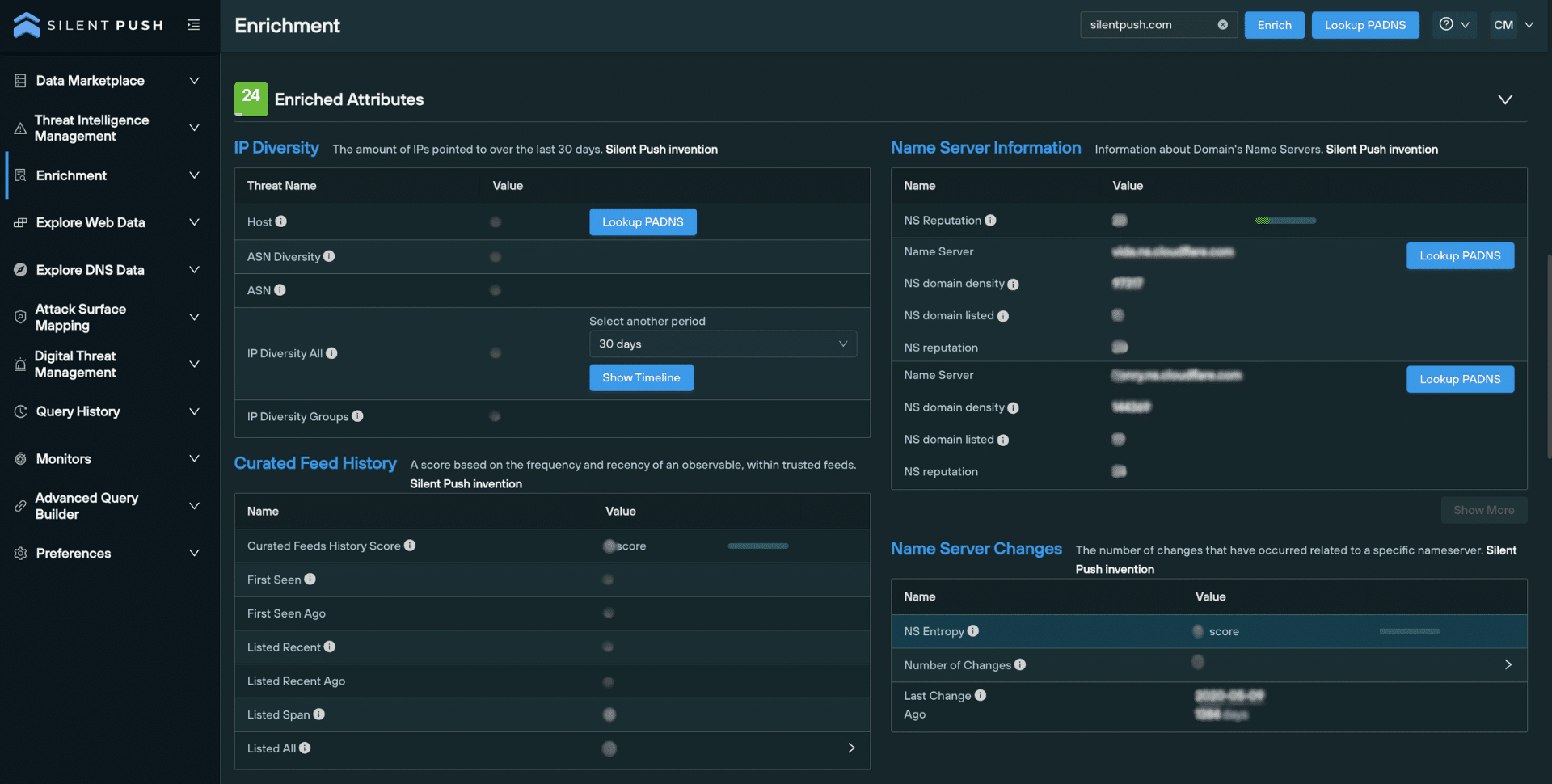
Enriched Attributes outlines a domain or IP’s relationship with the rest of the Internet, including the hosting infrastructure its used over time, its appearance in threat feeds, and how often it’s jumped between nameservers:
IP Diversity lists the number of unique IP addresses associated with a domain, over a period of time.
Nameserver Information provides info specific to each nameserver used by a domain, including reputation and the number of domains it hosts.
The Nameserver Changes section contains data that shows how often a domain has hopped between nameservers.
Curated Feed History allows you to establish the frequency and recency of an observable’s presence within trusted threat feeds.
4. ‘Custom Attributes’
The Custom Attributes section allows you to specify custom scores that reflect an observable’s risk level, relative to your organization or supply chain’s operation and assets.
5. ‘Live Threat Feeds’
This category provides a list of feeds that feature a given domain or IP, including any associated TLP Amber reports. This helps security teams validate the risk level of an observable across the IPv4 and IPv6 space, particularly if it appears within multiple feeds.
6. ‘Scan Data’
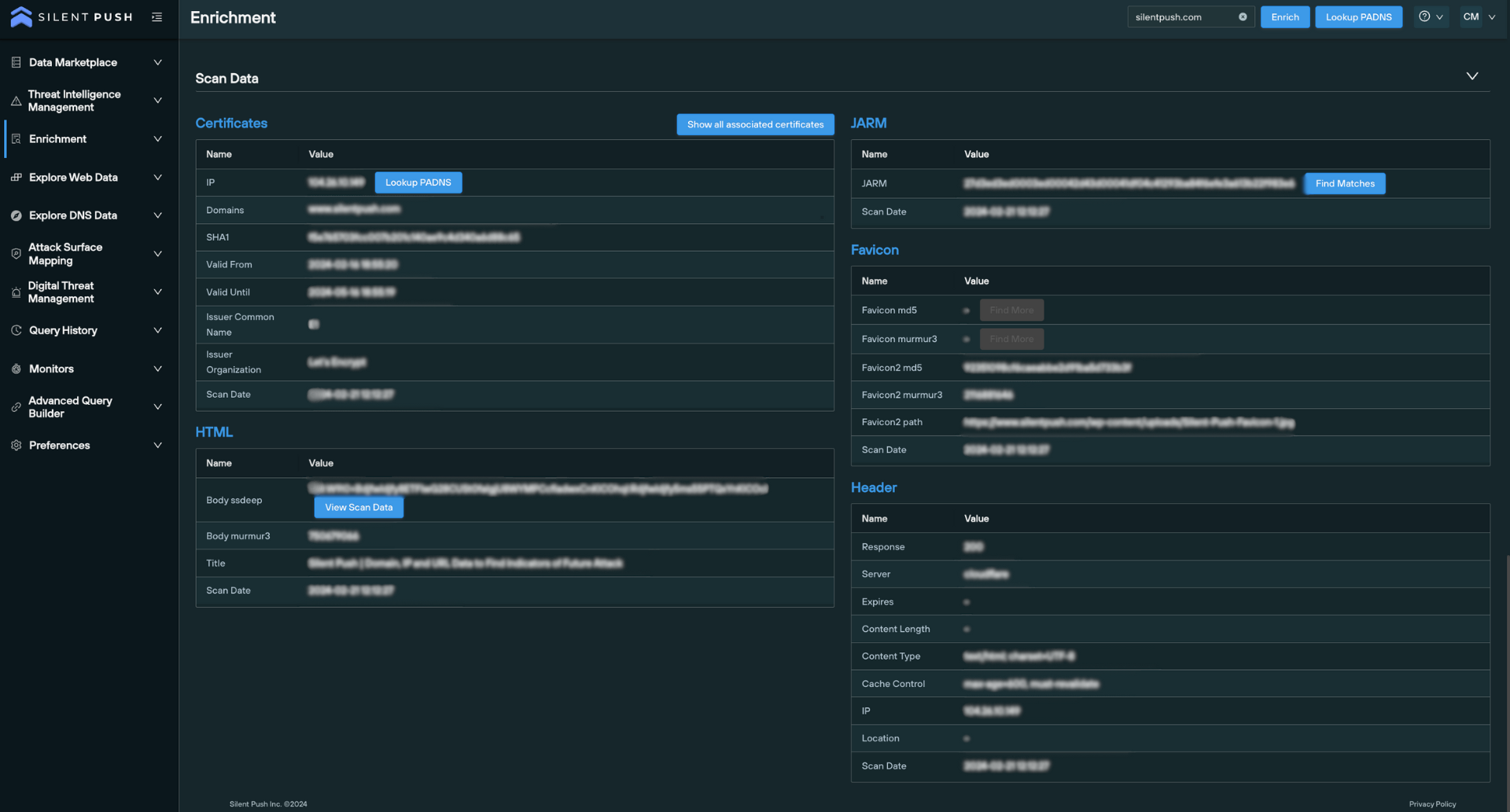
Scan Data enrichment pulls intelligence from Silent Push’s passive web content database, including certificates, HTML body and title data, favicon hash values and header information.
You can use this data to perform additional pivots that instantly detect matching infrastructure, and hunt for domains that are attempting to circumvent global certificate standards.
Scan data is an integral part of not only the Enrichment feature, but our entire first-party dataset. The Silent Push Web Scanner uses scan data to return query results across 100+ field names, including header values, body data and favicon hash values, and SSL data.
Data enrichment as operationalized intelligence
While there’s no doubt that data enrichment provides a number of benefits in and of itself, it’s just as important to ensure the enrichment process fits into your existing workflows.
You can use our API and custom query language to integrate any of the above enriched data types with your existing security stack, providing a near-infinite level of context for billions of observable domains and IPs across the IPv4 and IPv6 range.
Similar to Silent Push passive DNS lookups, you can pivot across, share, save and monitor enriched data, all from a single screen.
Register for Silent Push Community Edition
Data enrichment is available as part of Silent Push Community Edition – a free threat hunting and cyber defense tool used by security teams, threat analysts, and researchers that features 100+ data enrichment categories that you can use to track and monitor attacker activity across the global IPv4 and IPv6 space.
Click the button below to sign-up for a free account.
In October 2022, we published research that detailed how threat actors were using a ScreenConnect exploit to inject malware onto users’ machines.
ScreenConnect is back in the news again, with a widely-publicized authentication vulnerability first confirmed by ConnectWise on February 19th. Prominent security vendors (led by Huntress) subsequently published numerous reports on how simple it was to replicate and weaponize the exploit.
In this blog, we’ll explore how Silent Push analysts captured 60+ IP addresses linked to ScreenConnect threat activity, how we constructed a map of global servers, and a timeline of events starting with the initial discovery.
For a free snapshot of 50+ IPs to plumb into your security stack, scroll to the end of this blog.
ScreenConnect exploit honeypot
To help minimize the global impact of what could well turn into the largest security vulnerability event of the year, Silent Push threat analysts have successfully implemented a honeypot server that’s actively collecting the IP addresses of would-be attackers every hour, and gathering them together into a feed for our Enterprise users.
Note: An IP address is only placed in our ScreenConnect feed if an attacker attempts to trigger the vulnerability.
As of writing, we’ve collected 60+ IPv4 Indicators of Future Attack (IOFA). With threat groups leveraging the exploit to deploy ransomware, cryptocoin miners and infostealers on infected systems (most notably LockBit), we expect this number to increase dramatically over the coming weeks.
Mapping vulnerable ScreenConnect exploit servers
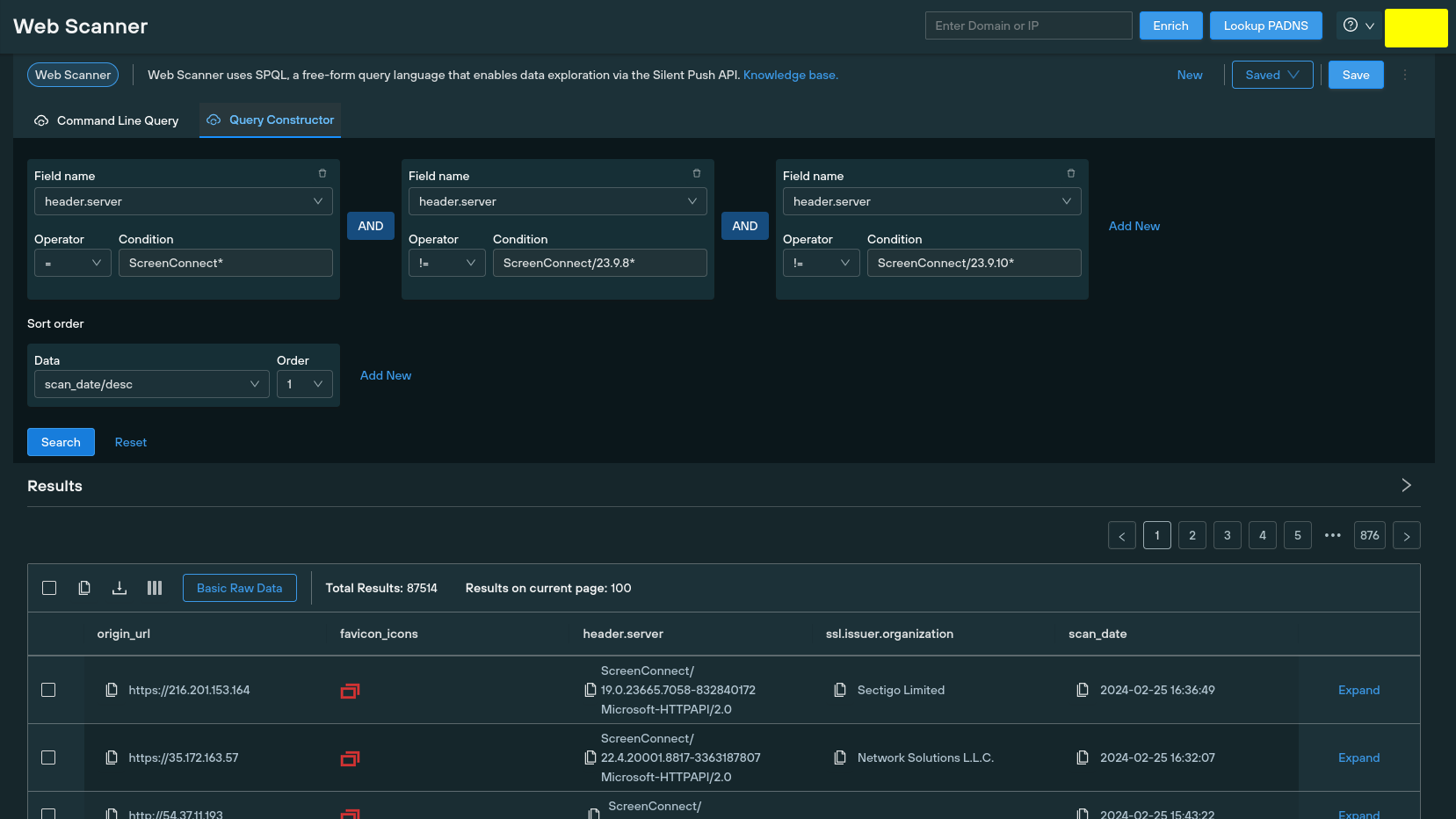
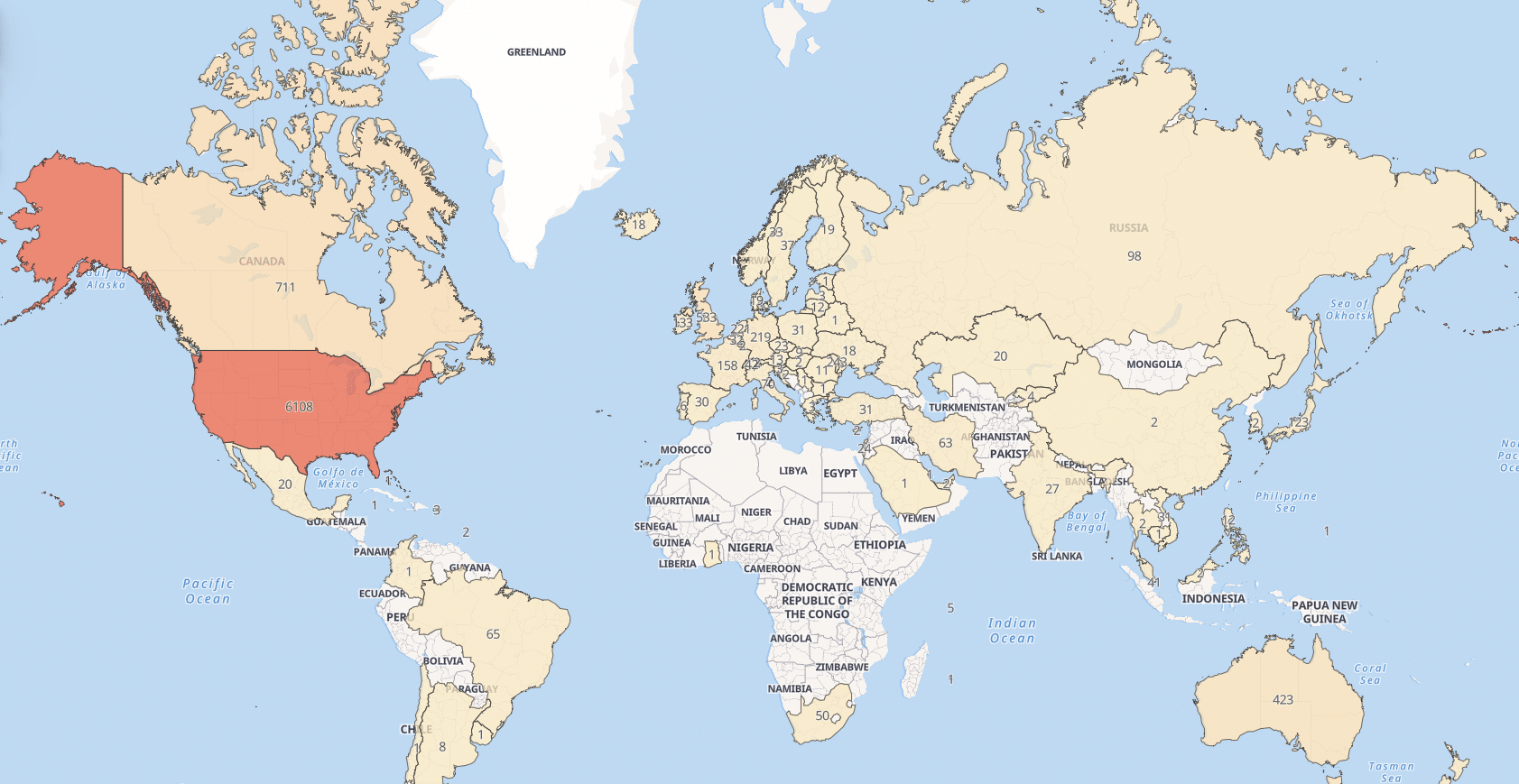
Silent Push Web Scanner allows you to search through a passive database of web content, including on-page data, HTML titles and server headers. ScreenConnect servers return the version number in their header data. Our analysts used a Web Scanner query to conduct a global search of servers running version 23.9.7* or previous, to obtain a global dataset that we mapped to each region:
Query syntax: header.server = "ScreenConnect*" AND header.server != "ScreenConnect/23.9.8*" AND header.server != "ScreenConnect/23.9.10*"
All Web Scanner queries can be executed using a ‘Constructor’ feature, along with the standard command line syntax. Here’s the ScreenConnect query in action:
Using Web Scanner to search for affected servers
Global map of affected ScreenConnect servers
ScreenConnect exploit timeline
February 13
ConnectWise starts to receive reports (via the ConnectWise Trust Center) of an authentication vulnerability related to ScreenConnect, within on-premise servers running version 23.9.7 and prior.
ConnectWise declares that they found no evidence of the vulnerabilities being actively exploited in the wild.
February 13/14
ConnectWise validates the vulnerability, which was reported to them by an independent security researcher.
February 15
ConnectWise applies manual mitigation to cloud-hosted ScreenConnect instances, and urges all on-premise partners to immediately update their servers to version 23.9.8 to apply a patch.
ConnectWise suspends outdated ScreenConnect instances, while organizations apply the patch.
February 19
ConnectWise officially announce the vulnerability in a security bulletin, with a severity of “Critical” and a priority of “1 – High”:, including remedial actions required and two corresponding NIST Common Vulnerabilities and Exposures (CVE) entries:
Improper limitation of a pathname to a restricted directory (“path traversal”)
8.4
ConnectWise provides updated versions of releases 22.4 through 23.9.7 for remediation.
ConnectWise are yet to acknowledge instances of exploitation in the wild.
Huntress publish a blog stating that their researchers have “successfully created and validated a proof-of-concept exploit” for both CWEs, and claim that over 8,800 servers are running vulnerable ScreenConnect instances.
February 20
ConnectWise receive notification of active threat campaigns targeting unpatches instances, and release three IP addresses known to be engaging in malicious activity:
155.133.5[.]15
155.133.5[.]14
118.69.65[.]60
Huntress publish a blog confirming that they have reproduced and weaponized the attack chain for CWE-288 (“Authentication bypass using an alternate path of channel”) with “ease and minimal technical knowledge and resources”. In the blog, Huntress provide a detailed explanation of how to detect the exploit, including XML file contents, event data and disk activity.
February 21
Multiple security vendors begin sharing a proof-of-concept exploit.
Huntress publish a blog that includes forensic examination of the attack chain. The authentication bypass and remote code execution element are demonstrated via a series of Linux shell commands that take all of the 30 seconds to complete.
ScreenConnect 23.9.10.8817 is released.
ConnectWise removes license restrictions, enabling customers no longer covered by a maintenance agreement to upgrade to ScreenConnect 23.9.10.8817 as an “interim step”.
February 22
ConnectWise suspends ScreenConnect instances that are not running version 23.9.8 or later. Affected users are sent alerts on login with instructions on how to upgrade, with the following upgrade path:
Silent Push begins scanning the IPv4 range for server headers that identify affected servers below version 23.9.8*.
Silent Push creates a “honeypot” IP, mimicking a ScreenConnect server header with a fake front page as bait, and begins populating an Early Detection Feed with attacker IPs.
February 23
Multiple sources report on threat actors leveraging the exploit to deploy ransomware, infostealer and cryptocoin miners on infected systems, most notably LockBit.
Here’s a list of IP addresses that have initiated attacks on our honeypot server, as of 26 Feb.
Enterprise customers have access to a realtime list of adversary IPs.
155.133.5[.]14
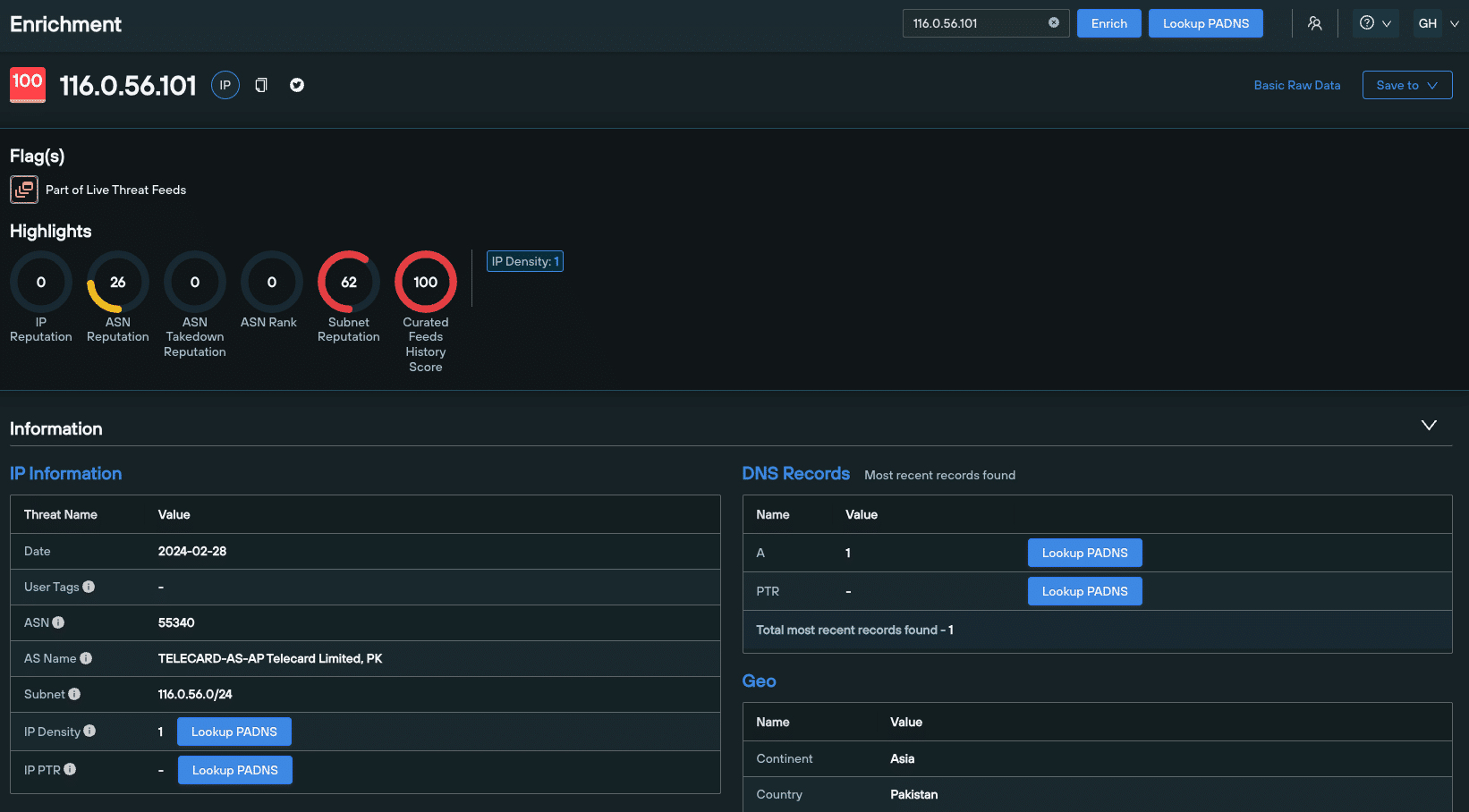
116.0.56[.]101
64.31.63[.]240
118.69.65[.]60
185.220.101[.]109
206.189.150[.]171
36.19.230[.]138
47.243.72[.]174
79.137.204[.]241
185.196.8[.]220
185.174.137[.]26
85.192.41[.]211
38.180.54[.]210
45.9.249[.]238
149.28.197[.]45
207.180.217[.]230
139.227.34[.]124
20.210.105[.]88
191.96.36[.]99
191.101.217[.]122
154.57.3[.]32
135.181.175[.]26
126.108.60[.]57
123.252.45[.]246
185.231.205[.]31
94.131.101[.]37
213.230.93[.]76
24.251.120[.]147
46.249.38[.]211
194.156.98[.]18
193.252.215[.]164
89.39.107[.]191
169.150.202[.]67
194.116.217[.]176
91.92.248[.]164
91.92.247[.]58
173.239.232[.]10
173.239.232[.]3
173.239.232[.]33
91.92.254[.]160
173.239.232[.]30
104.28.222[.]75
176.160.145[.]191
176.130.45[.]168
172.58.109[.]243
46.232.121[.]61
88.209.197[.]8
38.181.70[.]150
103.170.154[.]83
209.127.228[.]186
38.207.173[.]102
223.26.103[.]16
195.26.87[.]209
185.56.83[.]82
103.166.86[.]29
172.56.201[.]183
155.133.5[.]15
ScreenConnect exploit assistance
If you’ve been affected by the recent ScreenConnect exploit, or you’d like to learn more about how Silent Push can help your organization stop attacks before they become a problem, get in touch today.
In this blog, we’ll explore how our analysts took a single piece of page data, and used the Silent Push Web Scanner and the group’s own Telegram account to map out 100+ Indicators of Future Attack (IOFA) in the form of Meduza Stealer MaaS control panels, over a dozen of which are still active.
Background
The Meduza Stealer first appeared for purchase on a Russian-speaking darkweb forum in June 2023. Written in C++ and around 600kb in size, the malware quickly gained popularity in among cybercriminals for its originality, adaptability and competitive pricing model compared to other infostealers.
Named after its creator’s handle – “Meduza” – the malware infects Windows system files and steals sensitive information, including cookies, login credentials, and data from browser extensions such as password managers, 2FA services and cryptocurrency wallets.
Meduza Stealer reads the geolocation of the host machine and terminates if the machine is located in any of the following countries:
Armenia
Belarus
Georgia
Kazakhstan
Kyrgyzstan
Moldova
Russia
Tajikistan
Turkmenistan
Uzbekistan
Once it’s decided to proceed with an attack, the executable establishes a connection with an active C2 server, and proceeds with data exfiltration. Data is packaged and sent to the C2 server, before terminating on the host machine.
Meduza possesses a unique ability to evade standard AV detection protocols. Most popular antivirus suites aren’t able to detect the malware using dynamic or static analysis – either within a sandbox environment, or by interrogating its file structure, code or metadata.
Malware-as-a-Service
Meduza’s operators understand the importance of differentiating their “product” from the competition. The malware contains numerous features that set it apart from other executables available for purchase on the darkweb, under the Malware-as-a-Service (MaaS) model – including binary editing, an enhanced web-based GUI, and frictionless access to exfiltrated data.
In addition to underground forums, Meduza’s administrators also run a Russian language Telegram channel that they use to promote the malware, which reads like standard SaaS marketing material. More on this later on.
Gone are the days of “one and done” malware executables that act in isolation, without the benefit of a dedicated team to develop new iterations. Meduza’s operators have their finger on the pulse of the burgeoning MaaS market – a criminal enterprise model that is only a few years old, but is without a doubt here to stay. They know what their users want, they’re willing to interact with them, and they deliver improvements.
Meduza Stealer web hosting
So…. you’re a cybercriminal. Meduza’s operators have convinced you to part with your not-so-hard-earned cryptocurrency for access to their shiny new infostealer.
What happens now?
Upon subscribing, the “end criminal” can either host a Meduza web control panel using their own infrastructure, or rent a server from the malware’s operators.
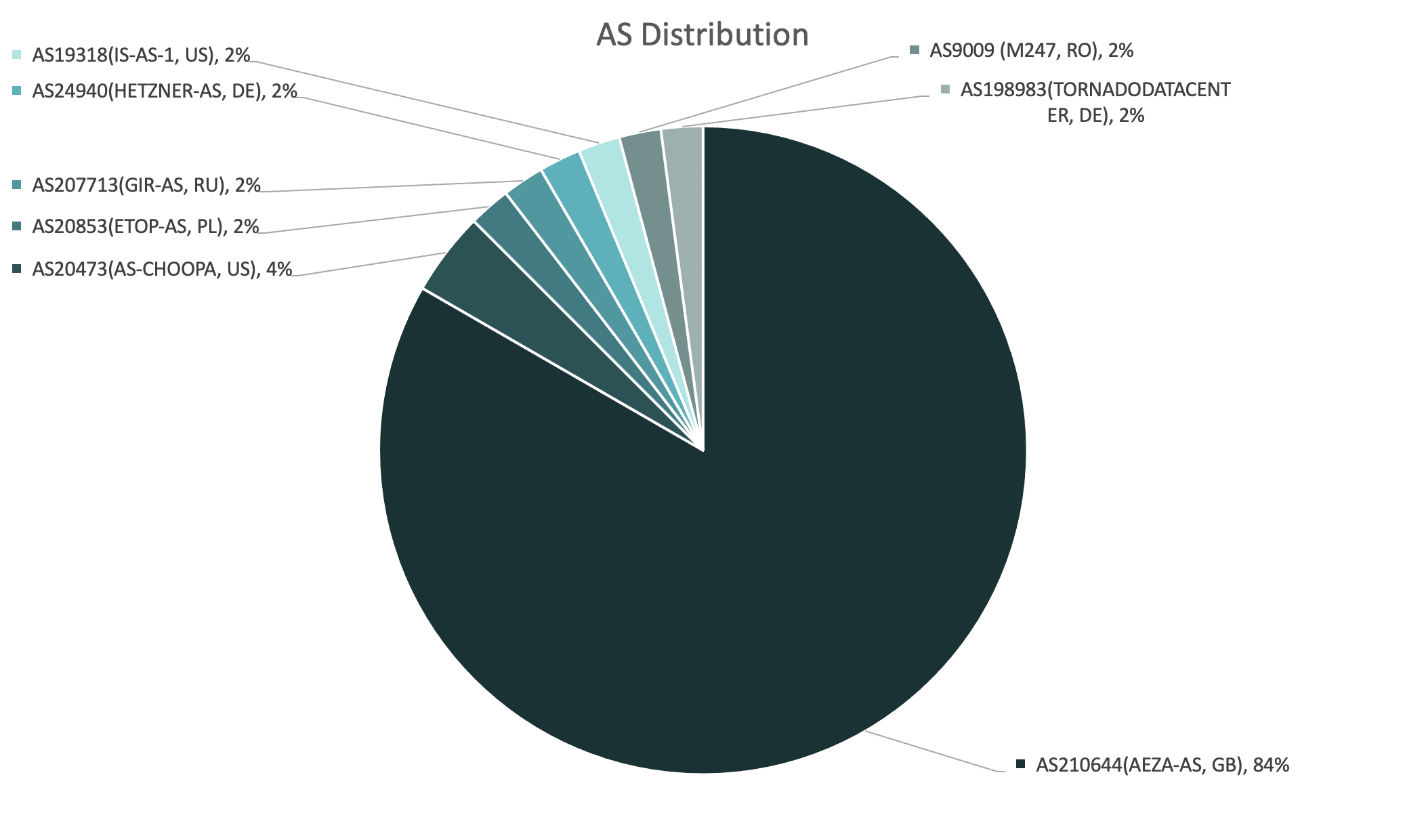
This dual operating model helps us to understand patterns in ASN distribution, when analyzing the geographic spread of Meduza control panels:
Meduza ASN distribution
The majority of web panels are hosted via the Russian hosting provider, Aéza, recently cited by Spamhaus for their involvement with C2 botnets. It’s safe to assume that Aéza is the preferred hosting provider among Meduza’s administrators – either for their own exploits, or as an out-of-the-box option for their MaaS customers.
Here’s a list of other ASN providers that we’ve tagged to Meduza infrastructure:
AS20473 (AS-CHOOPA, US)
AS20853 (ETOP-AS, PL)
AS207713 (GIR-AS, RU)
AS24940 (HETZNER-AS, DE)
AS19318 (IS-AS-1, US)
AS9009 (M247, RO)
AS198983 (TORNADODATACENTER, DE)
Hunting Meduza Stealer web infrastructure
N.B: For security reasons, throughout this report specific query parameters and result sets have been redacted. Silent Push Enterprise users are able to access a TLP Amber report within the platform that contains links to granular queries and the relevant data fields that facilitate discovery of Meduza infrastructure.
During the 2023 Christmas period our scans started to pick up IPv4 addresses and domains linked to Meduza Stealer, through various content elements.
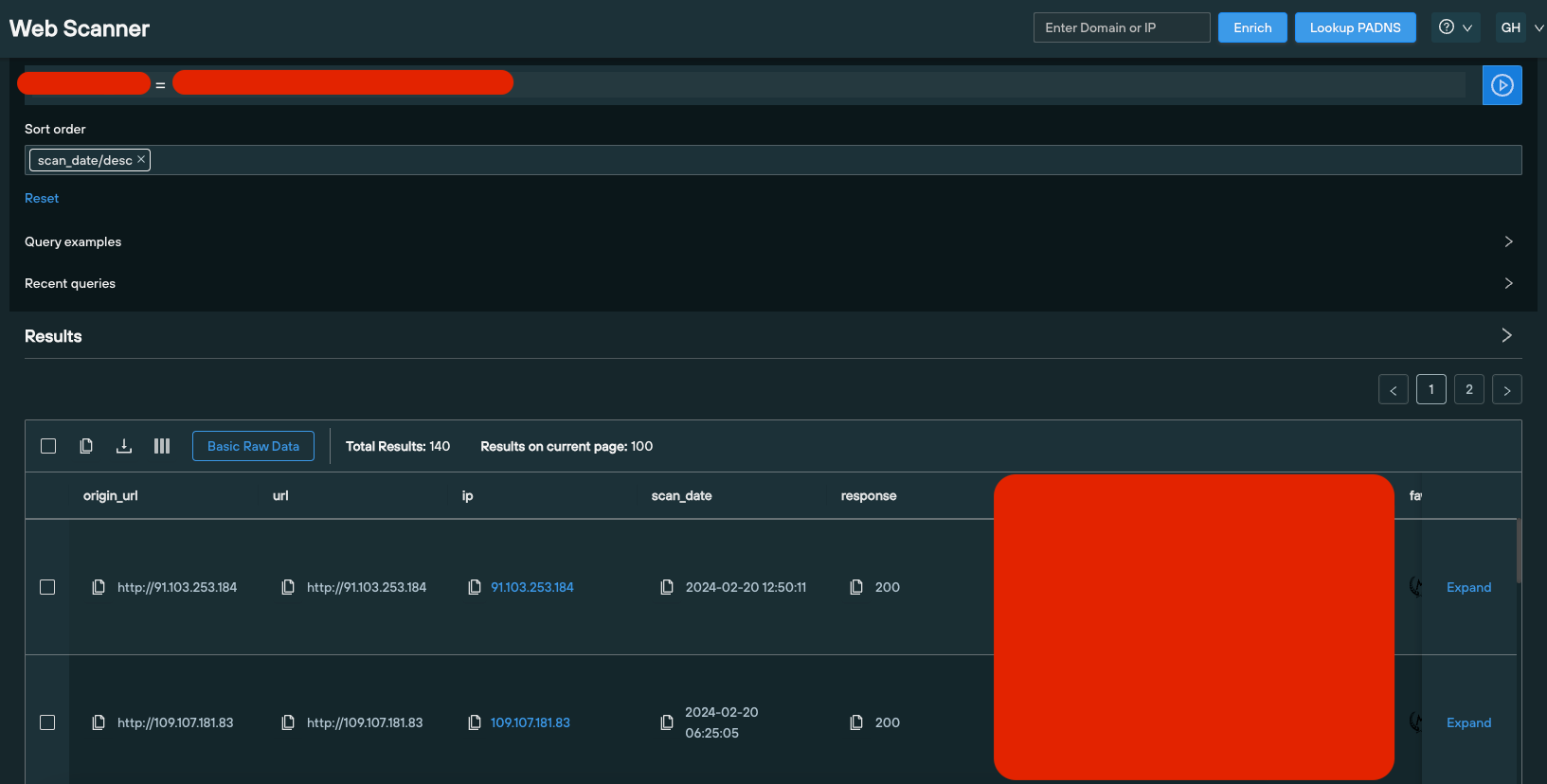
We followed-up by executing a query using the Silent Push Web Scanner that revealed additional domains with matching content.
Domain/IP address
First Seen
Last Seen
5.182.86.32
2023-12-30
2023-12-31
77.105.146.152
2023-12-30
2023-12-31
79.137.194.188
2023-12-28
2023-12-30
ii.nggg.fun
2023-12-25
2023-12-25
Pivoting on web content data
After analyzing the full set of content scanning results, we noticed that all the domains and IPs in the dataset shared a common denominator in the source code of the page.
We executed a content similarity check and uncovered 20 domains and IPs hosting a Meduza control panel, all of them first seen on or after the 23 December 2023:
Web Scanner query results
Corroborating Meduza Stealer datasets
Our analysts also noticed that, from the initial dataset, two IOFAs – 5.182.86[.]32 and ii.nggg[.]fun – both featured matching web content which had changed into a different value.
Further scans on separate elements of the page unearthed 70 domains and IPs hosting Meduza content, scanned since August 8th 2023, with content values that matched the above control panels.
Using Telegram to correlate results
Meduza’s operators use Telegram to communicate malware updates to their user base. This presents an additional layer of intelligence for threat hunters who are able to corroborate announcements with changes in key data types.
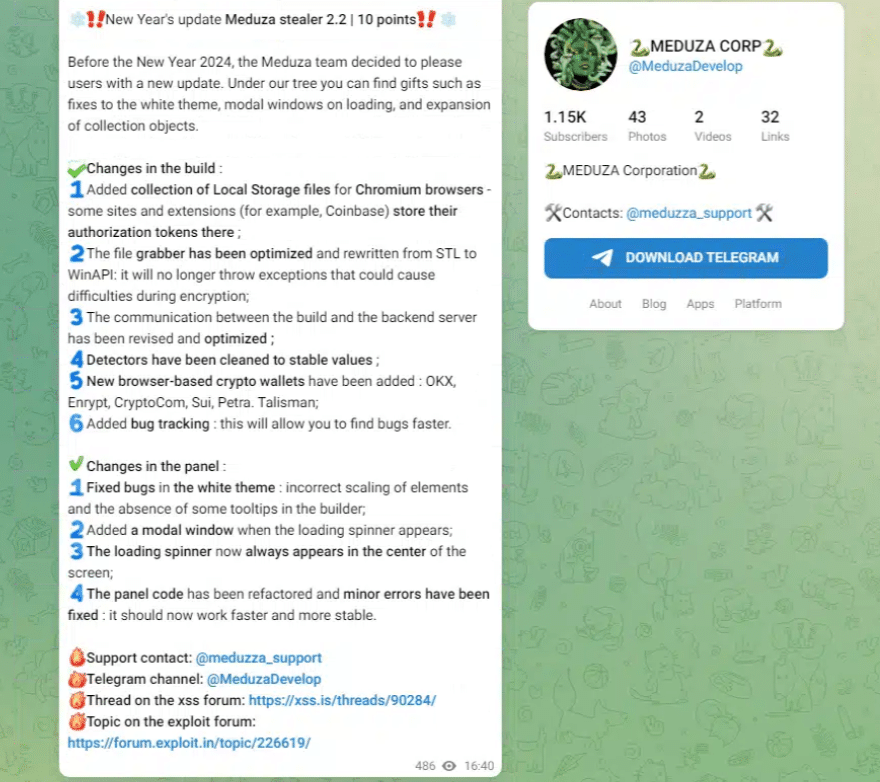
While browsing through Meduza’s Telegram channel, we noticed a message from the operators, sent to the group on Christmas Day 2023, announcing a new version of the stealer with a range of bug fixes and updates to Meduza’s build and control panel, including:
Support for targeting browser-based cryptowallets
Bug tracking
Expanded local storage exfiltration
Meduza Telegram channel
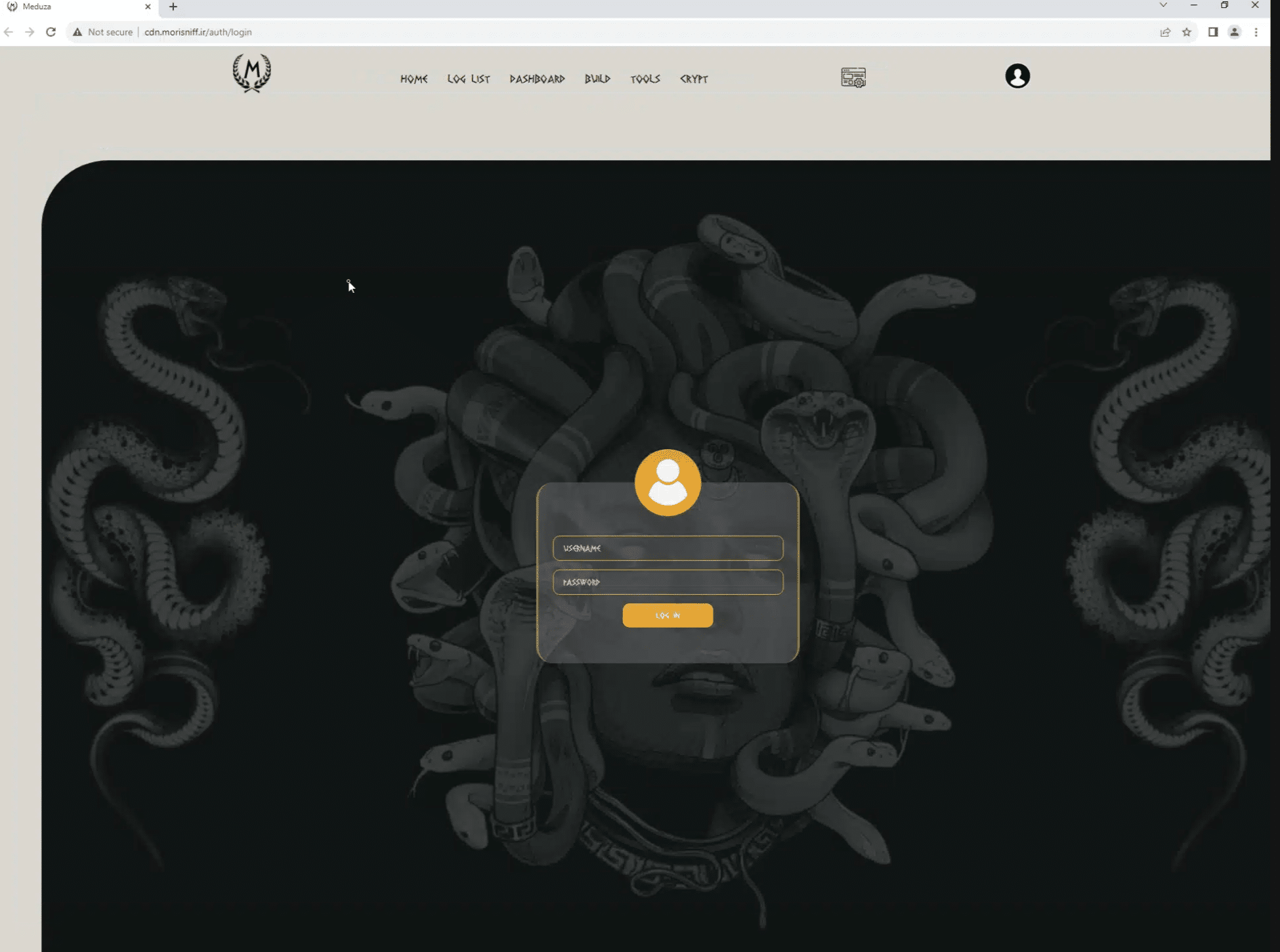
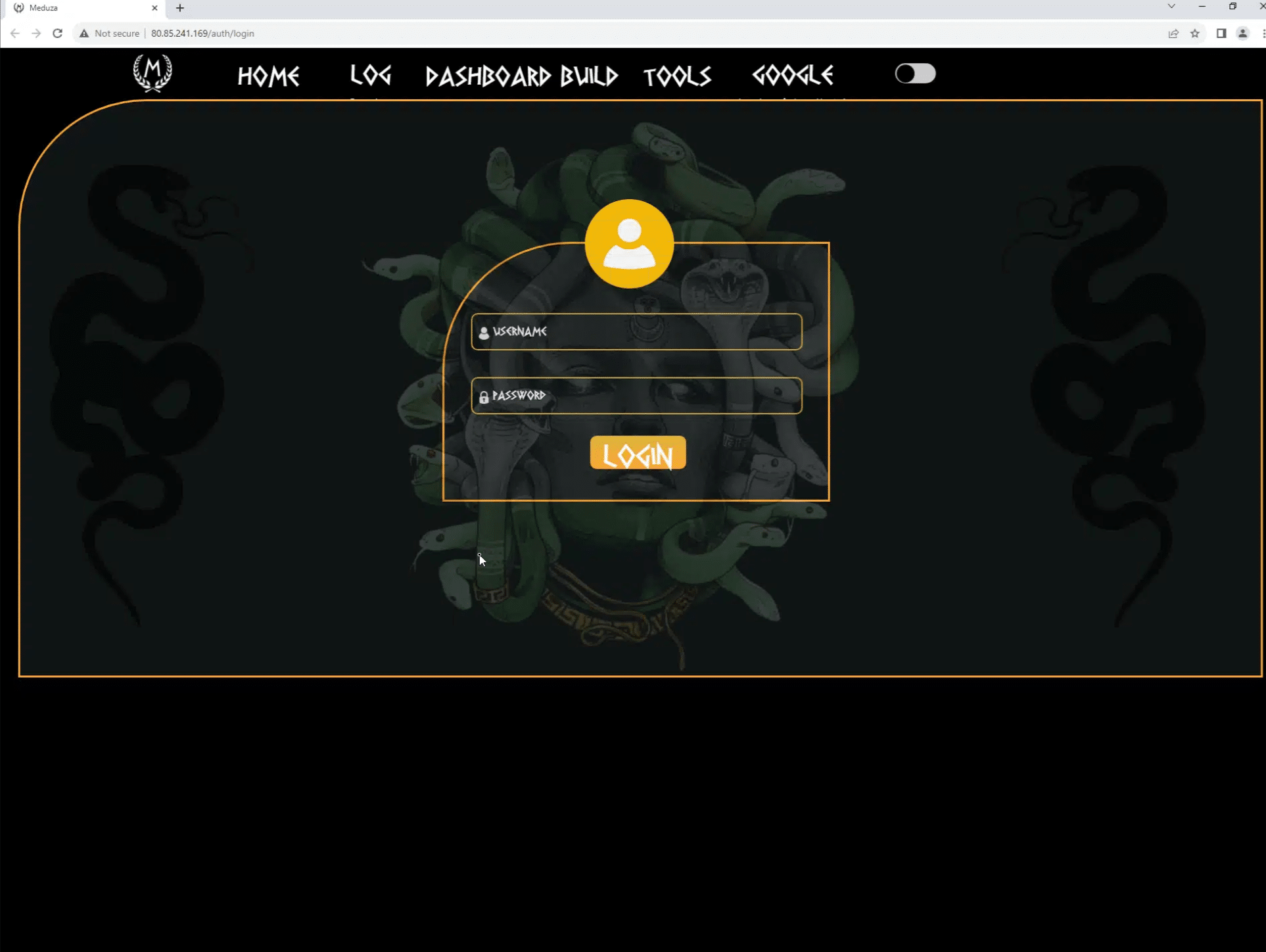
By comparing Silent Push Web Scanner results with Meduza’s release timeline, and analyzing different versions of Meduza’s GUI side-by-side, our analysts quickly established that key content values changed in accordance with updates to the web panel communicated in version 2.x.
Control panel version 2
Control panel version 1
Hunting for active Meduza Stealer infrastructure
Our scans have uncovered over a hundred IP addresses and domains that have hosted a Meduza web panel, dating back to August 2023. Of these, a dozen are still active, suggesting that the group purposefully discard elements of their infrastructure to evade detection.
With this in mind, security teams need to target the group’s TTPs and use of web infrastructure, rather than relying on legacy IOCs that are rendered useless after a short space of time.
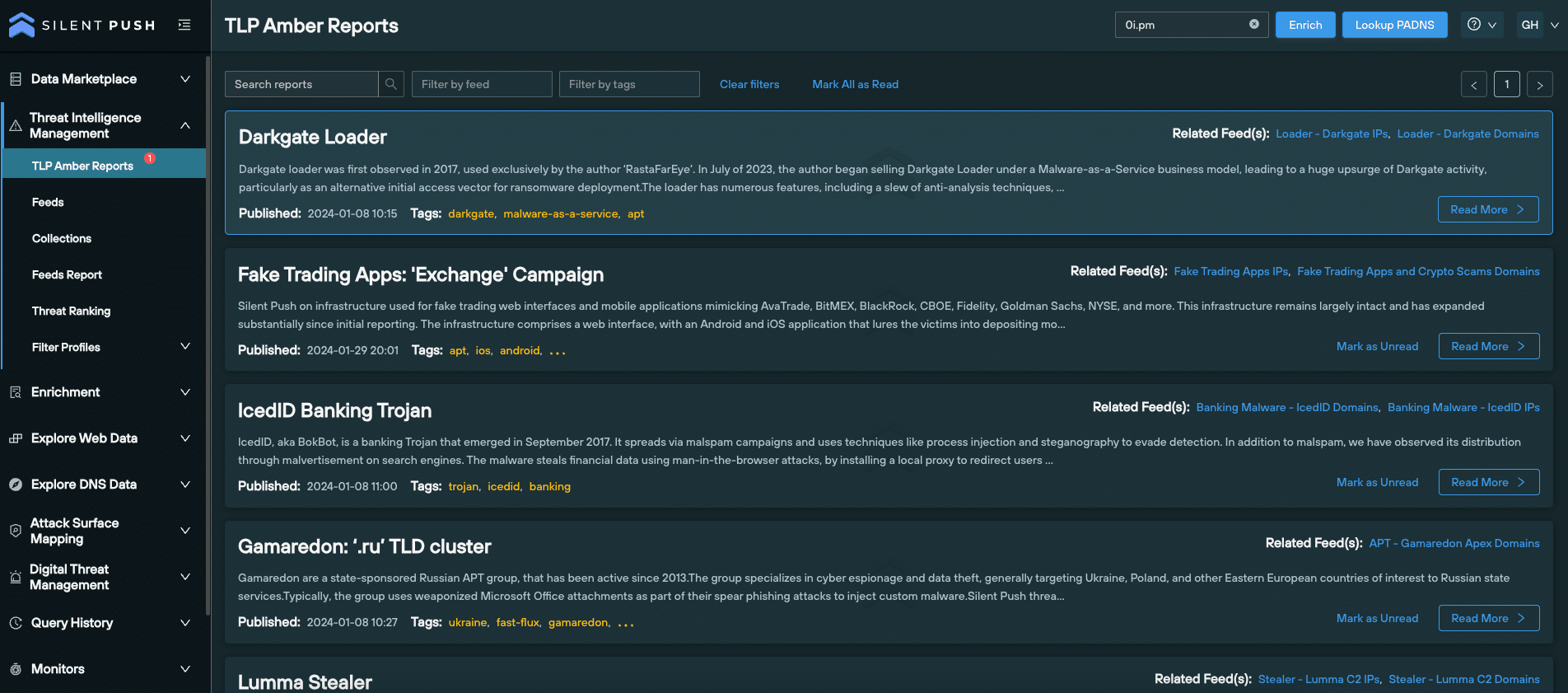
Enterprise users also have access to a TLP Amber report that explains how to uncover Meduza infrastructure, with links to Web Scanner queries, the content data fields we’ve targeted and mitigation actions that instruct security teams on the actions required to counteract Meduza TTPs.
TLP Amber reports
Register for Community Edition
All of the queries and lookups we used to map out Meduza’s C2 infrastructure, including Web Scanner, are available as part of a Silent Push Community Edition – a free threat hunting and cyber defense platform featuring a huge range of advanced offensive and defensive lookups, web content queries, and enriched data types.
A full list of domains, IPs, ASNs and content values are available to Enterprise users in the above Early Detection Feeds and TLP Amber report.
Click the button below to sign-up for a free Community Edition account.
Date: Thursday 22 February 2024, 10:00am PT (1:00pm ET, 6:00pm GMT)
Level: Intermediate
Duration: 30 mins (25 mins + 5 mins Q&A)
In this webinar, Product Manager Jonathan Peyster showcases the Silent Push Web Scanner – a new feature that allows users to execute command line or constructor queries that interrogate the Silent Push web content database, and hunt for websites impersonating their brand or attempting to circumvent certificate transparency standards.
Jonathan starts off by taking you through the UI, before explaining where the data comes from and how we offer unique categorizations. We then demonstrate Web Scanner in a live environment to hunt for spoofing sites using favicon and murmur3 hash data, and show you how to perform DNS defense functions by getting a list of SSL certificates set to expire within 24 hours.
You’ll then learn how to work with outputted data, including domain and IP pivots, expanding on results and adding fields to a query.
Registration
This webinar can be accessed by filling out the form below. Due to the contents of this webinar, we manually approve each individual who requests access. This means you may have to wait up to 24 hours to receive your personal login code. Thank you for your understanding.
Performing a passive DNS lookup (PADNS) allows security teams to collect, analyze and share historical DNS data. Unlike traditional DNS which actively queries servers to translate domain names into IP addresses, passive DNS stores this information over time, creating a searchable historical record of how domains and IP addresses are associated with each other across the global IP space.
A ‘forward’ passive DNS lookup uses a domain or server name as the input parameter and returns an IP address as the ‘answer’, whereas a ‘reverse’ lookup uses an IP address to return a domain or server address.
Passive DNS lookups are the bread and butter of most threat hunting and cyber defense activities. There are, however, several challenges that security teams need to overcome when dealing with DNS records as pieces of digital infrastructure. These range from an over-reliance on incomplete and outdated datasets, to sorting through mountains of DNS records – particularly within enterprise organizations – to produce actionable intelligence.
Silent Push’s passive DNS lookup functionality allows you to perform a deep dive into enriched intelligence datasets, bolstering your cyber defenses, and uncovering emerging threats before they become a problem using a first-party dataset that’s uniquely designed to create searchable spaces related to specific DNS attack vectors.
Summary
In this blog, we’ll delve into different DNS record types, the role they play in the world of cyber threat intelligence, and how to maximise the Silent Push ‘Explore DNS Data’ feature to generate proactive threat intelligence. We’ll then discuss the outcome-focused tools available to you that make the most out of your organization’s passive DNS lookups, including pivoting on datapoints, monitoring results and more advanced query sets.
Understanding DNS record types
Attackers target different DNS record types using a variety of techniques to silently slip past an organization’s security measures. This makes it all the more important for security teams to diversify their defence mechanisms across multiple record types, encompassing their entire attack surface.
Let’s take a look at a selection of common DNS record types, and how attackers seek to exploit them…
A records
A records map a domain name to an IPv4 address. Passive A record lookups help analysts detail any IP addresses associated with a given domain name, detect changes in DNS activity, and associate domains and IPs with a specific threat campaign.
A records play a central role in the cat and mouse game of cyber attack and defense. Adversaries view A records as low hanging fruit, using them to propagate all manner of assaults on a public DNS presence, from domain hijacking, to typosquatting and email spoofing.
CNAME record
A Canonical Name (CNAME) record acts as an alias for another domain name, in lieu of a subdomain. You can’t use a CNAME record to point directly to an IP address – they’re used to map subdomains (such as www.) to apex domains (silentpush.com).
Attackers often use CNAME records when attempting a subdomain takeover – a DNS hijacking technique that can end up with an adversary obtaining access to an organization’s entire public DNS presence.
MX records
Mail Exchanger (MX) records identify which server is responsible for handling emails for a particular domain. Threat actors exploit MX records when propagating DMARC and email spoofing attacks, which involve an attacker making it appear as though an email has originated from a trusted source, when it’s actually been sent by the threat actor themselves.
Nameserver records
Nameserver (NS) records identify the authoritative DNS servers for a domain. NS records are particularly useful when an analyst wants to identify and monitor changes to registrars, hosts, or organizations associated with a particular domain.
Threat actors create searchable patterns by using the same set of nameservers to carry out attacks. By querying NS records via a passive DNS lookup, security teams are able to ascertain the risk level of a domain name, evaluate the reputation score of the NS associated with it, and view how many times a domain has jumped between different NS.
TXT records
TXT records contain any textual information that the domain owner wants to include, such as email addresses, contact information, or security-related information. By manipulating TXT records associated with specific email authentication protocols such as SPF, DKIM, and DMARC, attackers can make fraudulent emails appear legitimate.
SOA records
Start of Authority (SOA) records provide information about the DNS zone in which a particular domain is located, and hold administrative information about the domain. When a change is made to a DNS zone, the SOA serial number is incremented, indicating that an amendment has occurred.
This allows other DNS servers to detect and propagate the change, ensuring that all DNS information is consistent and up-to-date. Subsequently, security teams are able to detect changes to DNS information that may indicate malicious activity, such as the creation of new subdomains or changes to the IP addresses associated with a domain.
Executing a passive DNS lookup
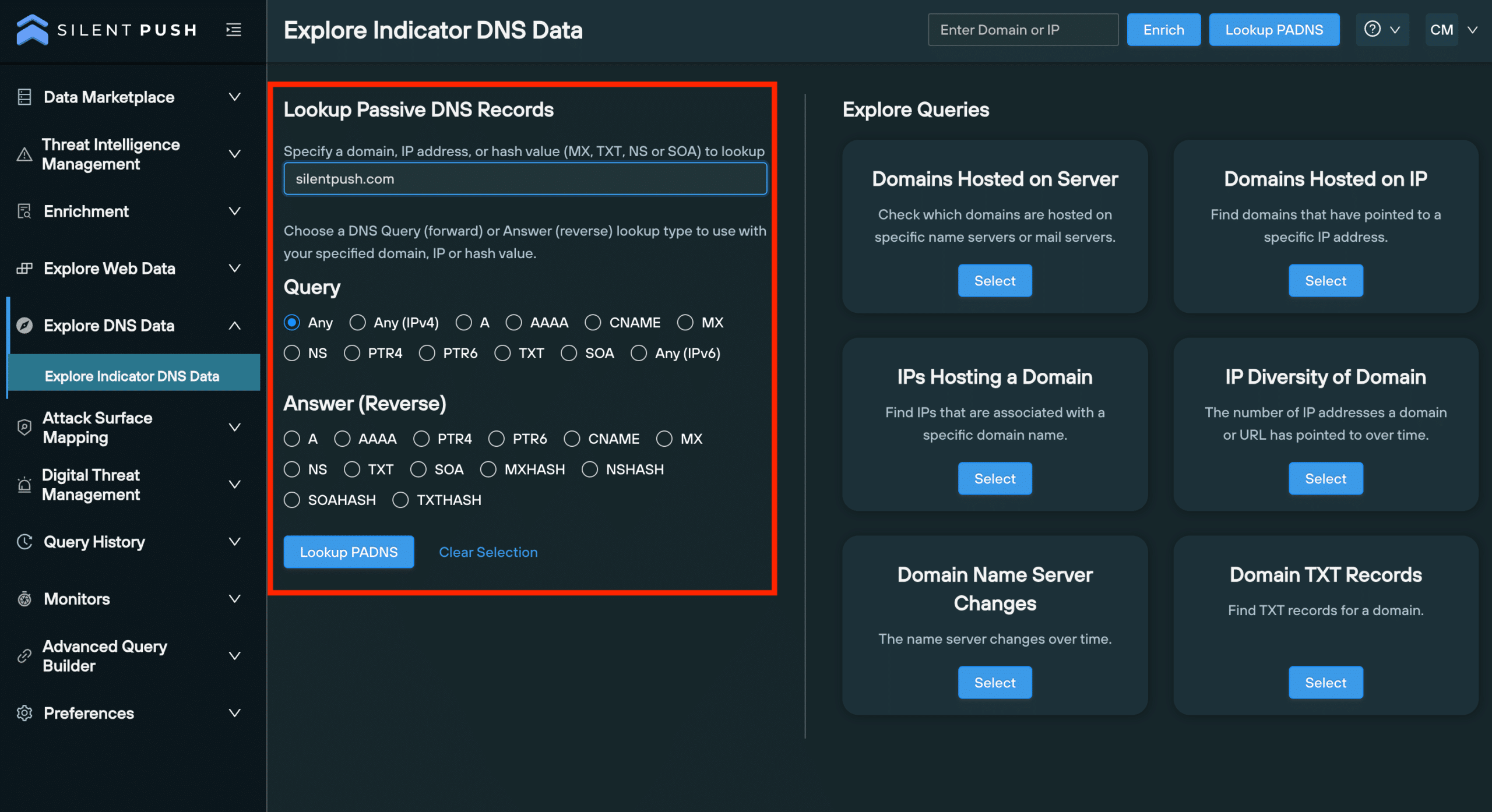
Silent Push allows you to perform powerful passive DNS lookups across a range of record types. Security teams are able to use the console to establish links between disparate records, uncover attacker infrastructure, and obtain granular information on a given domain or IP.
Passive DNS lookup interface
The ‘Explore Indicator DNS Data’ page allows you to perform forward and reverse PADNS lookups, and execute advanced queries, all within a single screen.
Forward and reverse lookups are performed on the ‘Explore Indicator DNS Data’ page, available to both Community and Enterprise users, for the following record types:
A/AAAA
CNAME
MX
NS
PTR4/6
SOA
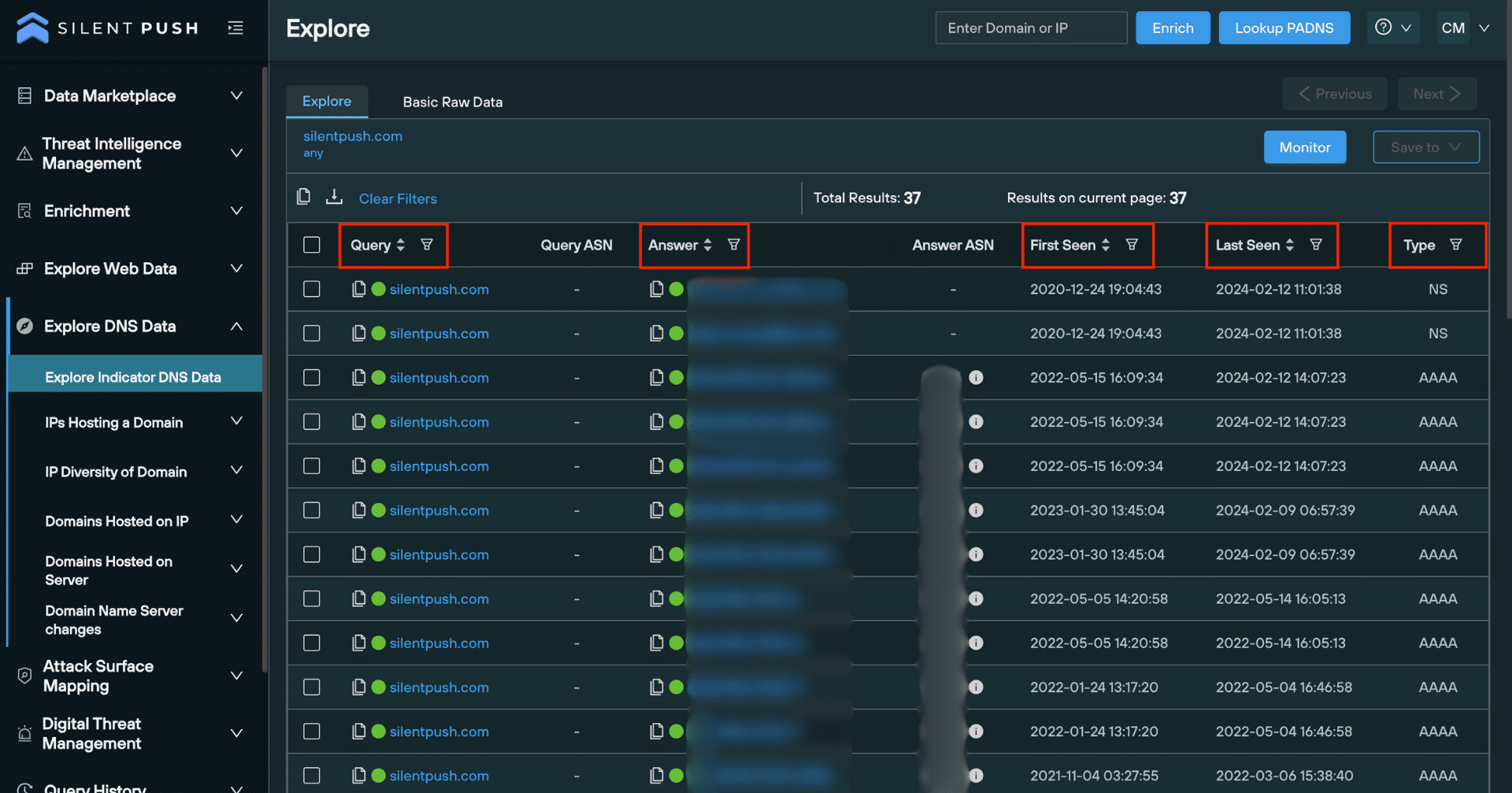
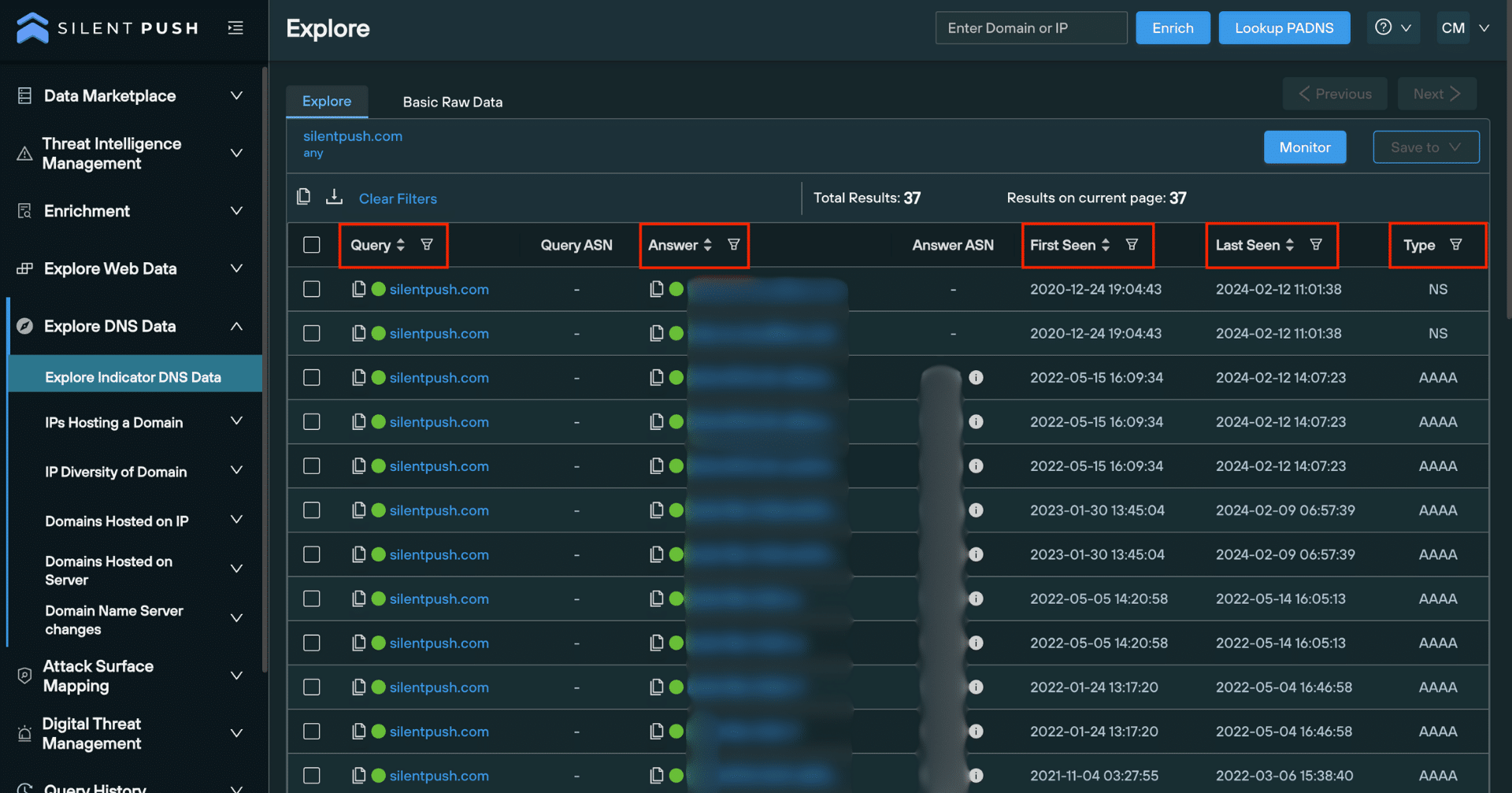
‘Explore’ table
Once you’ve executed a lookup, the Explore table populates results drawn from our first-party database that’s collected, clustered, scored and delivered without third-party intervention.
From here you can monitor and save observables to a feed, perform additional lookups on individual pieces of data, export raw data, obtain risk scores and enrich observables to gather further intelligence across 90+ categories, most of which are unique to Silent Push:
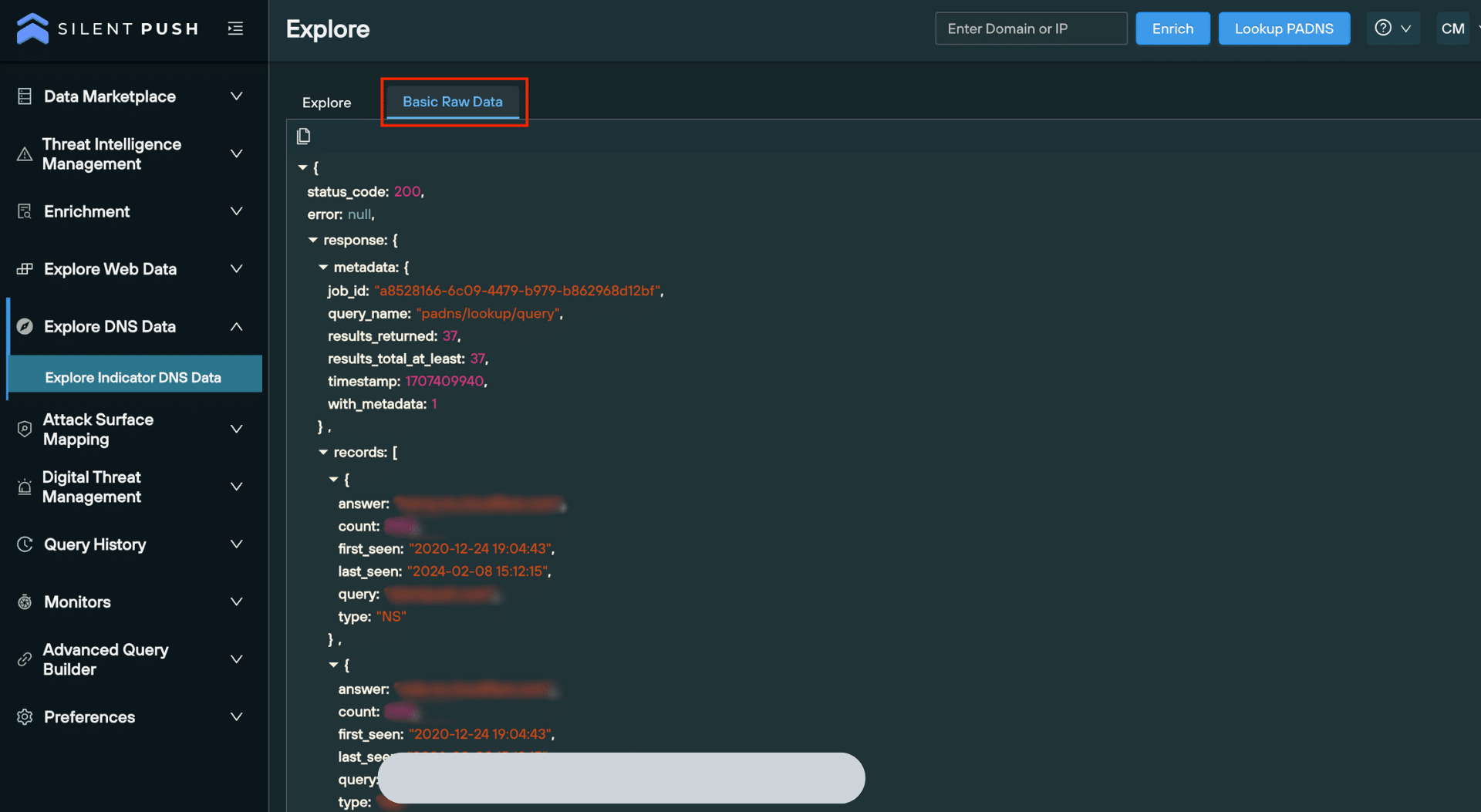
A secondary tab on the Explore screen allows you to view and copy the raw data, either for offline analysis or to facilitate integration with your security stack:
Utilizing results from a passive DNS lookup
Unlike other passive DNS lookup platforms that provide queries in isolation, Silent Push features outcome-focused screens that enable security teams to gather intelligence that can be accessed, saved, and shared in just a few clicks.
Filtering and searching through results
Filters help you sort data using a range of parameters, including:
Domain
IPv4 address
First seen date (When an observable was first seen in the dataset).
Last seen date (when an observable was last seen in the dataset).
DNS record type
Filters can be accessed at the top of the Explore screen. You can also search through individual columns for specific pieces of data:
Pivoting on passive DNS data
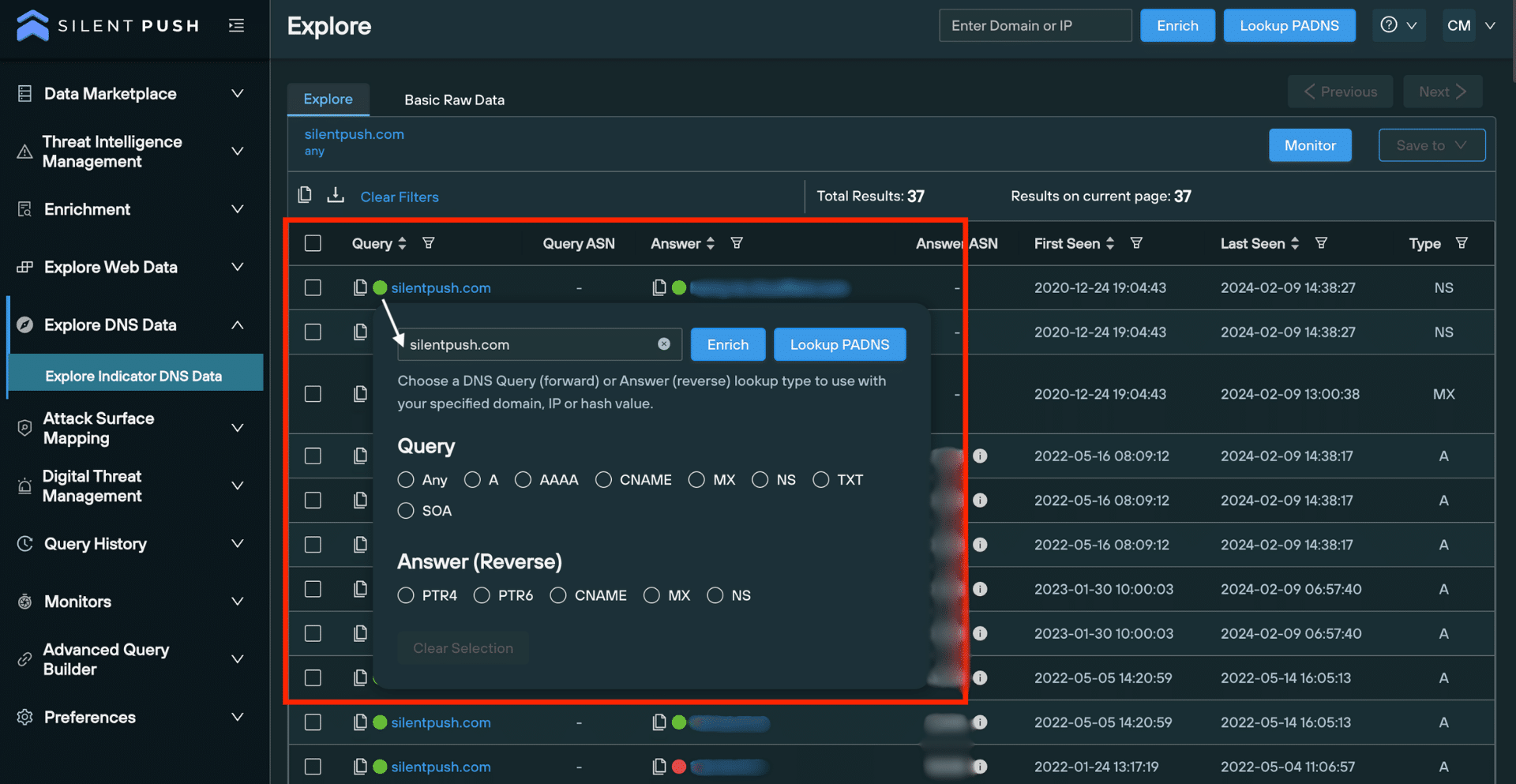
‘Pivoting’ involves performing additional queries on a single piece of data, including forward and reverse lookups, and domain or IP Enrichment queries.
Pivoting allows you to unearth intelligence that reveals the origin, function and risk level of a piece of data across a range of categories and sub-categories.
Clicking on an observable opens a pop-up window, featuring a bank of lookups relevant to the data type:
Monitoring a passive DNS lookup
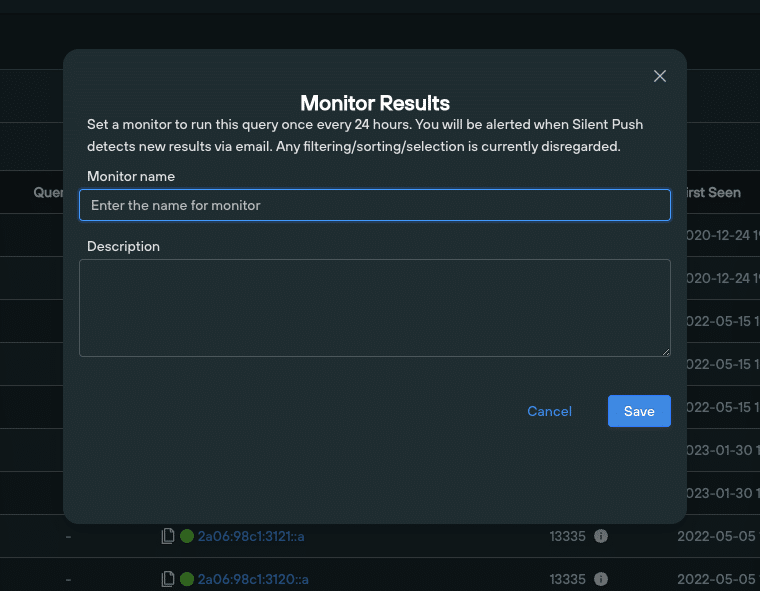
Once you’ve used a lookup to generate a set of results, you can enable ongoing monitoring that alerts you to changes in the dataset every 24 hours. By automating key queries across a range of internal workflows, security teams can save valuable time and resources, and eliminate repetitive tasks to focus on more pressing matters.
Clicking the ‘Monitor’ button on the top right of the Explore screen lets you assign a monitor to a set of results:
Saving and exporting passive DNS data
Critical to any security operation is the ability to share information amongst team members. You can save any piece of data – or even entire datasets – obtained from a passive DNS lookup either to an existing feed, or to a new feed, using a simple drop-down menu.
Feeds can be shared globally throughout your organization:
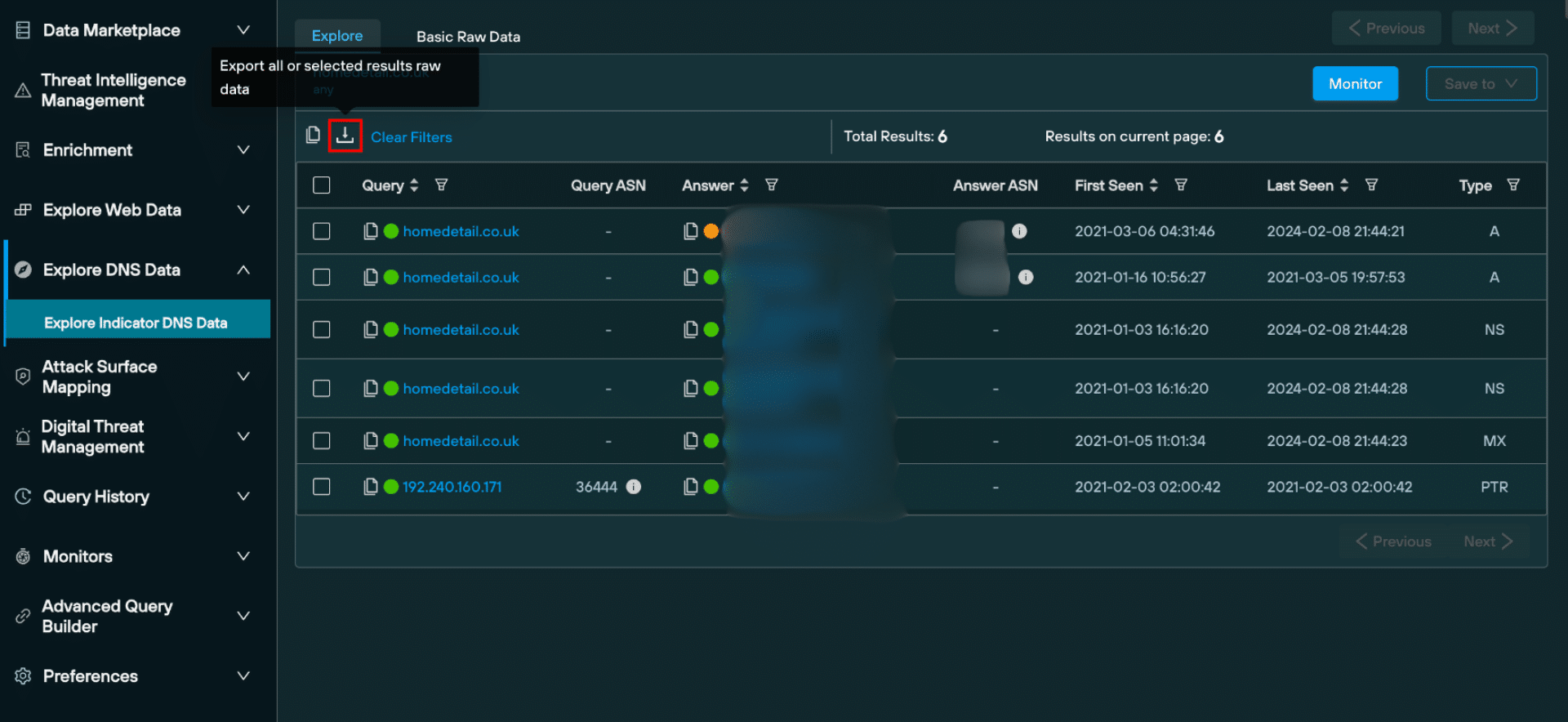
Passive DNS data can also be exported in raw format, as a JSON, or as a CSV:
Advanced queries
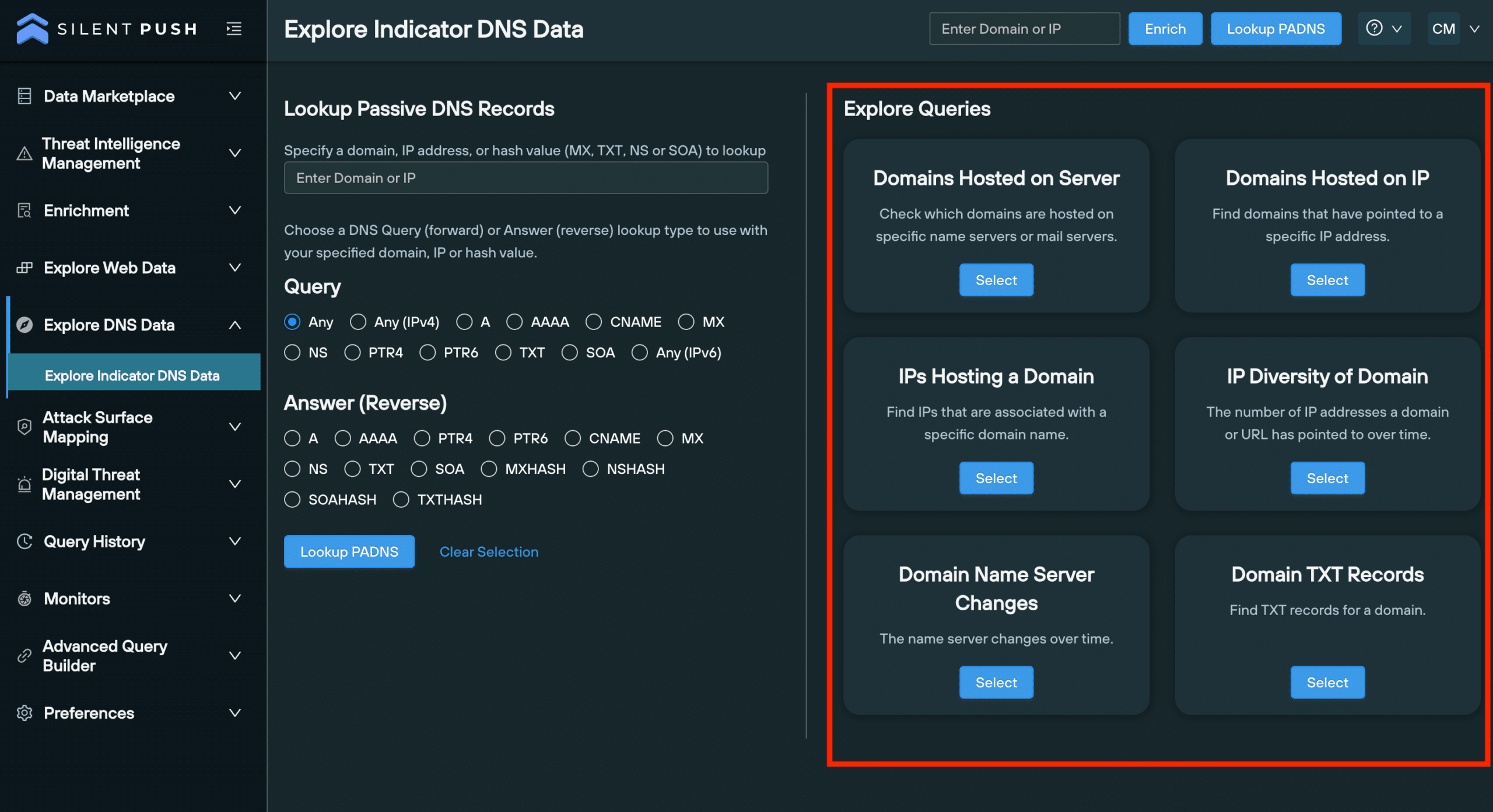
The ’Explore Queries’ menu features a range of advanced DNS queries that allow you to analyze the historical characteristics of a piece of data, including the relationship it has with other data types, and build a behavioural fingerprint of attacker TTPS, including:
All domains hosted on specific server.
All domains hosted on an IP address.
IPs hosting a domain.
The IP ‘diversity’ of domain (the number of unique IP addresses associated with a particular domain).
Any nameserver changes.
All TXT records associated with a domain.
Register for Silent Push Community Edition
Silent Push passive DNS lookups allow you to explore your organization’s and supply chain’s DNS presence in a more timely, accurate and detailed way, and hunt for malicious infrastructure before it’s weaponized.
Silent Push Community Edition is a free threat hunting and cyber defense tool used by security teams, threat analysts, and researchers that features a range of basic and advanced DNS queries which interrogate the Silent Push database, built from our daily scans of the Internet’s global IP range.
Click the button below to sign-up for a free account.